服务器之间时间同步(chrony)
服务器A:192.168.2.203
服务器B:192.168.2.205
让A作为主服务器去外网同步时间,或者直接以A服务器时间为主,让其他服务器去同步
第一步:安装chrony
yum -y install chrony
其对应的文件有:rpm -ql chrony
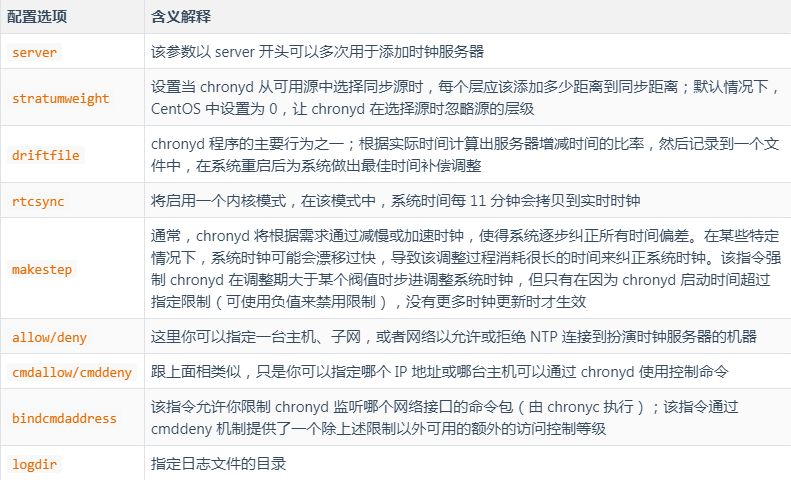
第二步:配置chrony.conf文件
vi /etc/chrony.conf
A服务器配置:
# 配置时间服务器,以server开头,理论上添加多少时间服务器都可以。<br>server ntp.cloud.aliyuncs.com minpoll 4 maxpoll 10 iburst
server ntp.aliyun.com minpoll 4 maxpoll 10 iburst
server ntp1.aliyun.com minpoll 4 maxpoll 10 iburst
server ntp1.cloud.aliyuncs.com minpoll 4 maxpoll 10 iburst
server ntp10.cloud.aliyuncs.com minpoll 4 maxpoll 10 iburst
server ntp11.cloud.aliyuncs.com minpoll 4 maxpoll 10 iburst
server ntp12.cloud.aliyuncs.com minpoll 4 maxpoll 10 iburst
server ntp2.aliyun.com minpoll 4 maxpoll 10 iburst
server 192.168.2.203 iburst

rtcsync #启用内核时间与 <code>RTC</code> <a class="hl hl-1" href="https://so.csdn.net/so/search?q=%E6%97%B6%E9%97%B4%E5%90%8C%E6%AD%A5&spm=1001.2101.3001.7020" target="_blank" data-report-click="{"spm":"1001.2101.3001.7020","dest":"https://so.csdn.net/so/search?q=%E6%97%B6%E9%97%B4%E5%90%8C%E6%AD%A5&spm=1001.2101.3001.7020"}" data-tit="时间同步" data-pretit="时间同步" rel="noopener">时间同步</a> (自动写回硬件)。

makestep 1.0 3 #如果系统时钟的偏移量大于1秒,则允许系统时钟在前三次更新中步进。

allow 192.168.2.0/24  #表示允许这个网段的其他主机链接

local stratum 10 #即使未与时间源同步,也提供服务时间
B服务器配置
server 192.168.2.203 iburst
rtcsync
makestep 1.0 3
allow 192.168.2.0/24
local stratum 10
假如还有C服务器:(这样即使其中一个挂了,另外两台服务器之间时间也会同步)
server 192.168.2.203 iburst
server 192.168.2.205 iburst
rtcsync
makestep 1.0 3
local stratum 10
第三步:启动服务
systemctl start chronyd
systemctl enable chronyd
^* 代表连接成功。
^? 代表未连接成功。可以尝试关闭防火墙,然后重启chrony。
^- 代表通过组合算法计算后排除的源
其他命令
#重启
systemctl restart chronyd

# 查看日期时间、时区及NTP状态
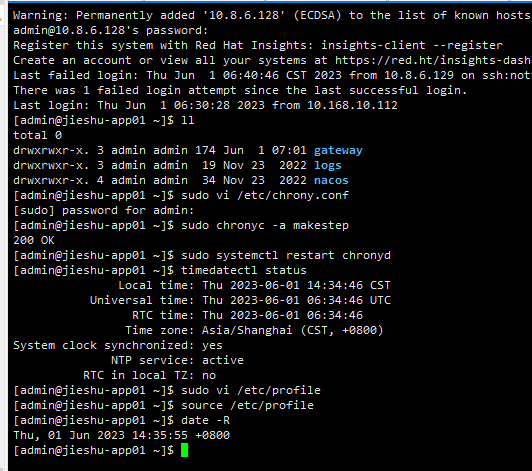
timedatectl

# 查看时区列表
timedatectl list-timezones

# 修改时区
timedatectl set-timezone Asia/Shanghai

# 修改日期时间
timedatectl set-time "2015-01-21 11:50:00"

# 设置完时区后,强制同步下系统时钟
chronyc -a makestep

# 硬件时间默认为UTC
 timedatectl set-local-rtc 1

# 启用或关闭NTP时间自动同步
 timedatectl set-ntp yes|flase
修改时区命令 、
设置服务器时区:
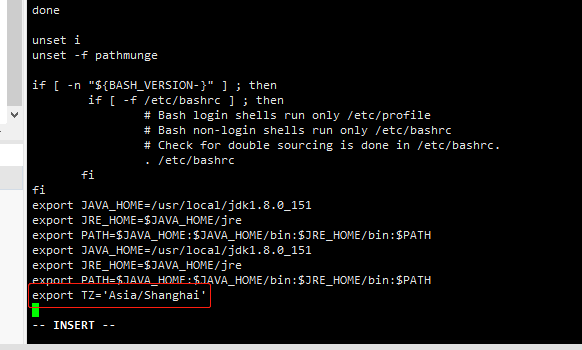
- sudo vi /etc/profile
添加在文档中 export TZ='Asia/Shanghai'
2、使文件生效 source /etc/profile

 浙公网安备 33010602011771号