
【Go-设计模式】命令模式 详解
概念:
命令模式 本质是把 某个对象的方法调用 封装到对象中,方便 传递、存储、调用
在软件设计中,我们经常需要向 某些对象 发送请求,但是并 不知道请求的接收者 是谁,也 不知道被请求的操作 是哪个,只需在程序运行时指定 具体的请求接收者 即可
命令模式使得 请求发送者 与 请求接收者 消除彼此之间的 耦合,让 对象之间的 调用关系 更加 灵活,实现 解耦
在命令模式中,会将 一个请求 封装为 一个对象,以便使用 不同参数 来表示 不同的请求(即命名),同时 命令模式 也支持 可撤销的操作
通俗易懂的理解:将军发布命令,士兵去执行。其中有几个角色:将军(命令发布者)、士兵(命令的具体执行者)、命令(连接将军和士兵)

UML:
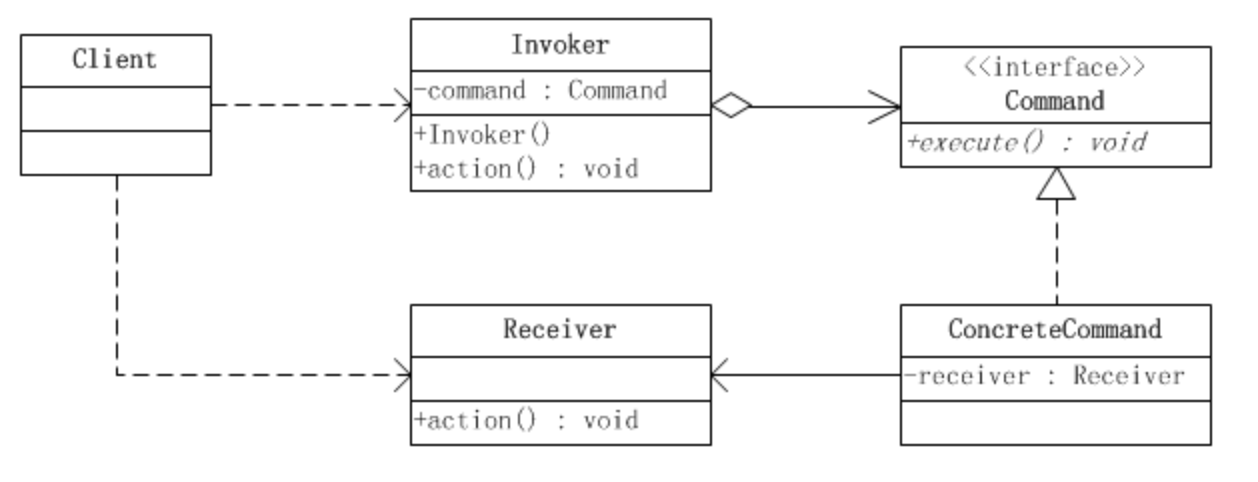
- Invoker:
调用者 角色,客户端通过 Invoker 调用系统功能 - Receiver:
接受者 角色,知道如何实施和执行一个请求相关的操作 - Command:
命令 角色,需要执行的 所有命令 都在这里,可以是接口或抽象类 - ConcreteCommand:
具体的命令,将 一个接受者对象 与 一个动作 绑定,调用、接受者相应的操作,实现 execute
示例:
命令接口:
type Command interface {
	Execute()
	Undo()
}
具体的命令:
兜底 无效命令:
type NoCommand struct {
}

func (this NoCommand) Execute() {
	fmt.Println("==========[NoCommand] Execute nothing!==========")
}

func (this NoCommand) Undo() {
	fmt.Println("==========[NoCommand] Undo nothing!==========")
}
具体命令1:
type ConcreteOnCommand1 struct {
	receive Command1Receiver
}

func (this ConcreteOnCommand1) Execute() {
	fmt.Println("========== ConcreteOnCommand1 on Execute! ==========")
	this.receive.On()
}

func (this ConcreteOnCommand1) Undo() {
	fmt.Println("========== ConcreteOnCommand1 on Undo! ==========")
	this.receive.Off()
}
具体命令2:
type ConcreteOffCommand1 struct {
	receive Command1Receiver
}

func (this ConcreteOffCommand1) Execute() {
	fmt.Println("========== ConcreteOnCommand1 off Execute! ==========")
	this.receive.Off()
}

func (this ConcreteOffCommand1) Undo() {
	fmt.Println("========== ConcreteOnCommand1 off Undo! ==========")
	this.receive.On()
}
具体命令3:
type ConcreteOnCommand2 struct {
	receive Command1Receiver
}

func (this ConcreteOnCommand2) Execute() {
	fmt.Println("========== ConcreteCommand2 Execute! ==========")
	this.receive.On()
}

func (this ConcreteOnCommand2) Undo() {
	fmt.Println("========== ConcreteCommand2 Undo! ==========")
	this.receive.Off()
}
具体命令4:
type ConcreteOffCommand2 struct {
	receive Command1Receiver
}

func (this ConcreteOffCommand2) Execute() {
	fmt.Println("========== ConcreteCommand2 Execute! ==========")
	this.receive.Off()
}

func (this ConcreteOffCommand2) Undo() {
	fmt.Println("========== ConcreteCommand2 Undo! ==========")
	this.receive.On()
}
命令接收者:
命令接收者1:
type Command1Receiver struct {
}

func (this Command1Receiver) On() {
	fmt.Println("Command1Receiver is On now!")
}

func (this Command1Receiver) Off() {
	fmt.Println("Command1Receiver is Off now!")
}
命令接收者2:
type Command2Receiver struct {
}

func (this Command2Receiver) On() {
	fmt.Println("Command2Receiver is On now!")
}

func (this Command2Receiver) Off() {
	fmt.Println("Command2Receiver is Off now!")
}
命令调用者:
type RemoteController struct {
	// 开 按钮的命令数组
	onCommands  map[int64]Command
	offCommands map[int64]Command

	// 执行撤销的命令
	undoCommand Command

	// 模拟 布隆过滤器
	defaultCommand NoCommand
}

func (this *RemoteController) SetCommand(no int64, onCommand, offCommand Command) {
	this.onCommands[no] = onCommand
	this.offCommands[no] = offCommand
}

func (this *RemoteController) TriggerOnButton(no int64) {
	if _, exsit := this.onCommands[no]; !exsit {
		this.defaultCommand.Execute()
		this.undoCommand = this.defaultCommand
	} else {
		this.onCommands[no].Execute()
		this.undoCommand = this.onCommands[no]
	}
}

func (this *RemoteController) TriggerOffButton(no int64) {
	if _, exsit := this.offCommands[no]; !exsit {
		this.defaultCommand.Execute()
		this.undoCommand = this.defaultCommand
	} else {
		this.offCommands[no].Execute()
		this.undoCommand = this.offCommands[no]
	}
}

func (this *RemoteController) TriggerUndoButton() {
	this.undoCommand.Undo()
}

func NewRemoteController() RemoteController {
	return RemoteController{
		onCommands:  map[int64]Command{},
		offCommands: map[int64]Command{},
	}
}
测试:
package main

import "DemoProject/design/base23/command"	// 根据自己的项目路径定制

func main() {
	// command
	controller := command.NewRemoteController()

	onCommand1 := command.ConcreteOnCommand1{}
	offCommand1 := command.ConcreteOffCommand1{}
	controller.SetCommand(1, onCommand1, offCommand1)

	onCommand2 := command.ConcreteOnCommand2{}
	offCommand2 := command.ConcreteOffCommand2{}
	controller.SetCommand(2, onCommand2, offCommand2)

	controller.TriggerOnButton(1)
	controller.TriggerOffButton(2)
	controller.TriggerUndoButton()

	controller.TriggerOnButton(10086)
}
注意事项:
将 发起请求的对象 与 执行请求的对象 解耦
发起请求的对象 是 调用者,调用者 只要 调用命令对象的 execute()方法 就可以让 接收者 工作,而 不必知道具体的接收者对象是谁、是如何实现 的,命令对象 会负责让 接收者 执行请求的动作,
也就是说:”请求发起者” 和 “请求执行者” 之间的 解耦 是通过 命令对象 实现的,命令对象起到了 纽带桥梁 的作用。
可以设计一个 命令队列,只要把 命令对象 放到 队列,就可以 多线程 地 执行命令
可以实现对 请求 的 撤销 和 重做
命令模式 不足:可能导致 某些系统有 过多的具体命令类,增加了系统的复杂度,这点在在使用的时候要注意
空命令 也是一种 设计模式,它为我们 省去了判空的操作
在上面的实例中,如果没有用空命令,我们 每按下一个按键 都要 判空,这给我们编码带来一定的麻烦
经典应用场景:界面的 一个按钮 都是 一条命令,模拟 CMD(DOS 命令)的 撤销/恢复、触发- 反馈 机制

 浙公网安备 33010602011771号