
(登录)Python生成图片验证码
1,生成图片
先安装 pip install Pillow
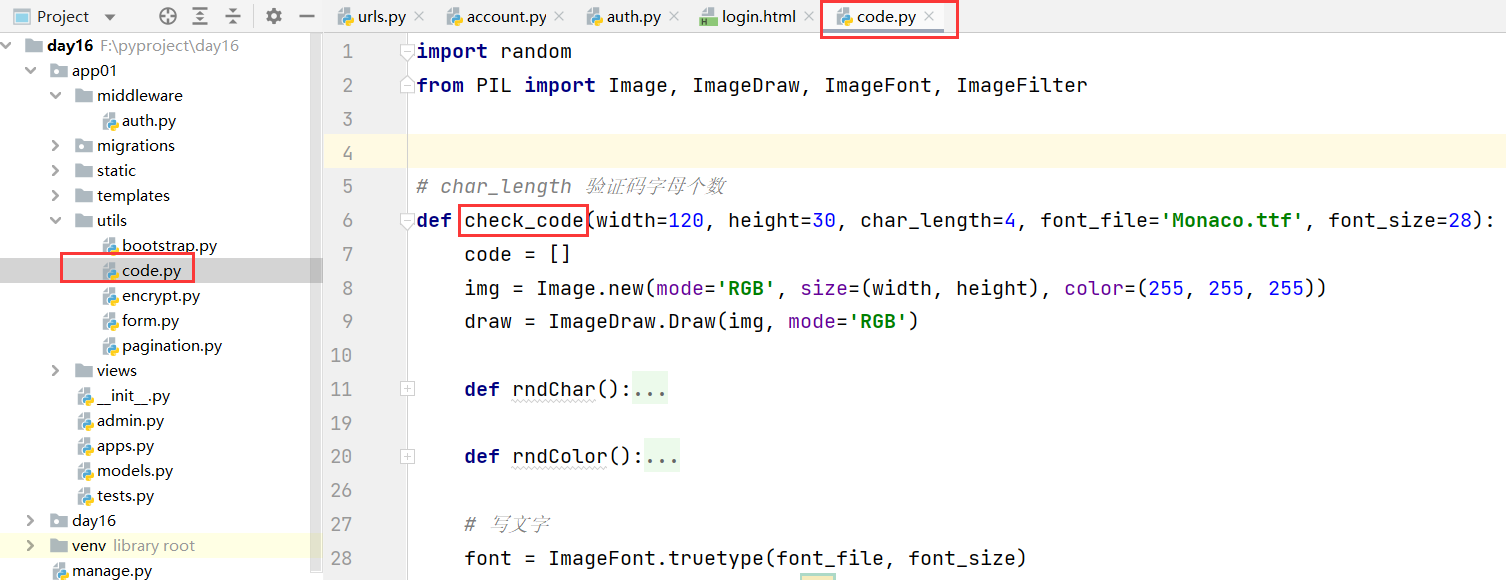
import random
from PIL import Image, ImageDraw, ImageFont, ImageFilter


# char_length 验证码字母个数
def check_code(width=120, height=30, char_length=4, font_file='Monaco.ttf', font_size=28):
    code = []
    img = Image.new(mode='RGB', size=(width, height), color=(255, 255, 255))
    draw = ImageDraw.Draw(img, mode='RGB')

    def rndChar():
        """
        生成随机字母
        :return:
        """
        if random.randint(0, 9)%2==0:
            return str(random.randint(0, 9))  # 加数字

        return chr(random.randint(65, 90))  # 加字母

    def rndColor():
        """
        生成随机颜色
        :return:
        """
        return (random.randint(0, 255), random.randint(10, 255), random.randint(64, 255))

    # 写文字
    font = ImageFont.truetype(font_file, font_size)
    for i in range(char_length):
        char = rndChar()
        code.append(char)
        h = random.randint(0, 4)
        draw.text([i * width / char_length, h], char, font=font, fill=rndColor())

    # 写干扰点
    for i in range(40):
        draw.point([random.randint(0, width), random.randint(0, height)], fill=rndColor())

    # 写干扰圆圈
    for i in range(40):
        draw.point([random.randint(0, width), random.randint(0, height)], fill=rndColor())
        x = random.randint(0, width)
        y = random.randint(0, height)
        draw.arc((x, y, x + 4, y + 4), 0, 90, fill=rndColor())

    # 画干扰线
    for i in range(4):
        x1 = random.randint(0, width)
        y1 = random.randint(0, height)
        x2 = random.randint(0, width)
        y2 = random.randint(0, height)

        draw.line((x1, y1, x2, y2), fill=rndColor())

    img = img.filter(ImageFilter.EDGE_ENHANCE_MORE)
    return img, ''.join(code)


from io import BytesIO
def image_code(request):
    '''生成图片验证码'''
    #调用pillow函数,生成图片
    img,code_string=check_code()

    #把code_string写入session,以便于校验
    request.session['image_code']=code_string
    #给session设置60s超时
    request.session.set_expiry(60)

    #把图片写入内存
    stream=BytesIO()
    img.save(stream,'png')

    return HttpResponse(stream.getvalue())

def login(request):
    '''登录'''
    if request.method=="GET":
        form=LoginForm
        return render(request,'login.html',{"form":form})
    #获取提交的数据
    form=LoginForm(data=request.POST)
    if form.is_valid():
        #验证成功,获取用户名和密码,在数据库中校验
        #验证码校验
        user_input_code=form.cleaned_data.pop('code')
        code=request.session.get("image_code","")
        if code.upper()!=user_input_code.upper():
            form.add_error("code","验证码错误")
            return render(request,'login.html',{'form':form})

        #前提:Admin中的字段名=form.cleaned_data的字段名
        admin_object=models.Admin.objects.filter(**form.cleaned_data).first()
        if not admin_object:
            form.add_error("password","用户名或密码错误")
           # form.add_error("username","用户名或密码错误")
            return render(request, 'login.html', {"form": form})

        #用户名和密码正确
        #网站生成随机字符串;写到用户浏览器的cookie中;写到session中
        request.session['info']={'id':admin_object.id,'name':admin_object.username}
        #session保存7天
        request.session.set_expiry(60*60*24*7)
        return redirect('/admin/list')

    #输入的数据,检验失败
    return render(request, 'login.html', {"form": form})


<div class="form-group">
            <label for="id_code">图片验证码</label>
            <div class="row">
                <div class="col-xs-7">
                    {{ form.code }}
                    <span style="color: red;">{{ form.code.errors.0 }}</span>
                </div>
                <div class="col-xs-5">
                    <img id="image_code" src="/image/code" style="width: 125px;">
                </div>
            </div>
        </div>
PS:点击图片验证码,进行刷新

login.html
{% load static %}
<!DOCTYPE html>
<html lang="en">
<head>
    <meta charset="UTF-8">
    <title>登录</title>
    <link rel="stylesheet" href="{% static 'plugins/bootstrap-3.4.1/css/bootstrap.min.css' %}">
    <style>
        .account {
            width: 400px;
            border: 1px solid #dddddd;
            border-radius: 5px;
            box-shadow: 5px 5px 20px #aaa;

            margin-left: auto;
            margin-right: auto;
            margin-top: 100px;
            padding: 20px 40px;
        }

        .account h2 {
            margin-top: 10px;
            text-align: center;
        }
    </style>
</head>
<body>
<div class="account">
    <h2>用户登录</h2>
    <form method="post" novalidate>
        {% csrf_token %}
        <div class="form-group">
            <label>用户名</label>
            {{ form.username }}
            <span style="color: red;">{{ form.username.errors.0 }}</span>
        </div>
        <div class="form-group">
            <label>密码</label>
            {{ form.password }}
            <span style="color: red;">{{ form.password.errors.0 }}</span>
        </div>
        <div class="form-group">
            <label for="id_code">图片验证码</label>
            <div class="row">
                <div class="col-xs-7">
                    {{ form.code }}
                    <span style="color: red;">{{ form.code.errors.0 }}</span>
                </div>
                <div class="col-xs-5">
                    {#                    点击图片,刷新图片#}
                    <img id="image_code" src="/image/code" style="width: 125px;" onclick="changeCodeImg()">
                </div>
            </div>
        </div>
        <input type="submit" value="登 录" class="btn btn-primary">
    </form>
</div>

<script src="{% static 'js/jquery-3.6.0.min.js' %}"></script>
<script src="{% static 'plugins/bootstrap-3.4.1/js/bootstrap.min.js' %}"></script>
<script type="text/javascript">
    function changeCodeImg() {
         var num = Math.random() ;//生成一个随机数(防止缓存,刷新图片)
        $("#image_code").attr('src', "/image/code?num="+num);
    }
</script>

</body>
</html>

 浙公网安备 33010602011771号