
git推送代码到新的仓库出现fatal拒绝合并无关的历史
git推送代码到新的仓库出现fatal拒绝合并无关的历史,具体过程如下:
进入新的项目,移除原有的git仓库
git remote remove origin
-
设置新的git仓库
git remote add origin ssh://192.168.186.172/wxd/wxd-guess -
添加版本控制
git add . -
提交并推送代码
git commit -m "提交代码"
    git push origin master

 这时出现了如下错误:

    提示更新被拒绝,因为您当前分支的最新提交落后于对应的远程分支,再次推送前,先与远程变更合并
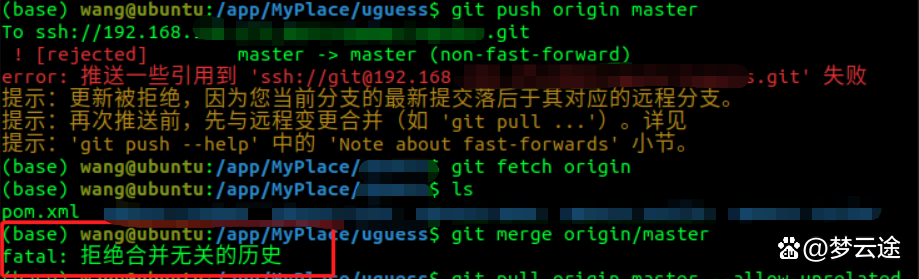
5. 于是执行合并操作

先获得远程代码 git fetch origin
然后执行合并操作
git merge origin/master
结果出现了 “拒绝合并无关历史”的错误
解决方法:

    通过添加 --allow-unrelated-histories 强制将代码合并到新的git库中
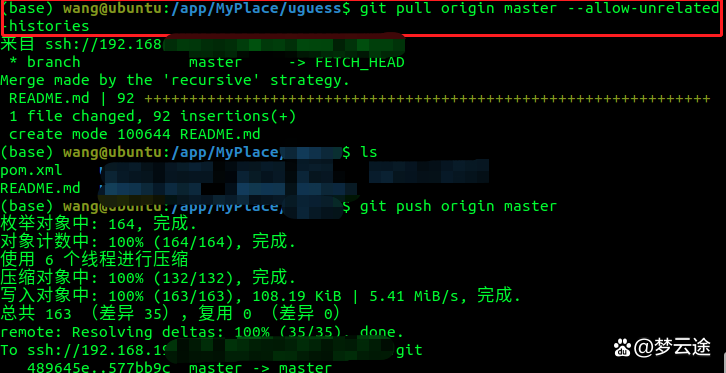
执行命令:

  git pull origin master --allow-unrelated-histories
发现已经可以推送到新的仓库了。
本文来自博客园,作者:晴云孤魂,转载请注明原文链接:https://www.cnblogs.com/cnhack/articles/16728082.html

 浙公网安备 33010602011771号