
jsoup解析html并保存到本地
1.引入依赖
     <dependency>
            <groupId>org.jsoup</groupId>
            <artifactId>jsoup</artifactId>
            <version>1.15.3</version>
        </dependency>

        <dependency>
            <groupId>org.projectlombok</groupId>
            <artifactId>lombok</artifactId>
            <version>1.18.24</version>
        </dependency>

        <dependency>
            <groupId>org.apache.commons</groupId>
            <artifactId>commons-lang3</artifactId>
            <version>3.12.0</version>
        </dependency>
分析网页
https://search.jd.com/Search?keyword=java
可以看到所有的图片标题价格信息都在这个类为J_goodsList的div中,我们可以用jsoup获取到它的这个对象。

然后又可以看到所有的li标签对应了一个元素,继续利用jsop获取这个元素中的所有li标签的元素
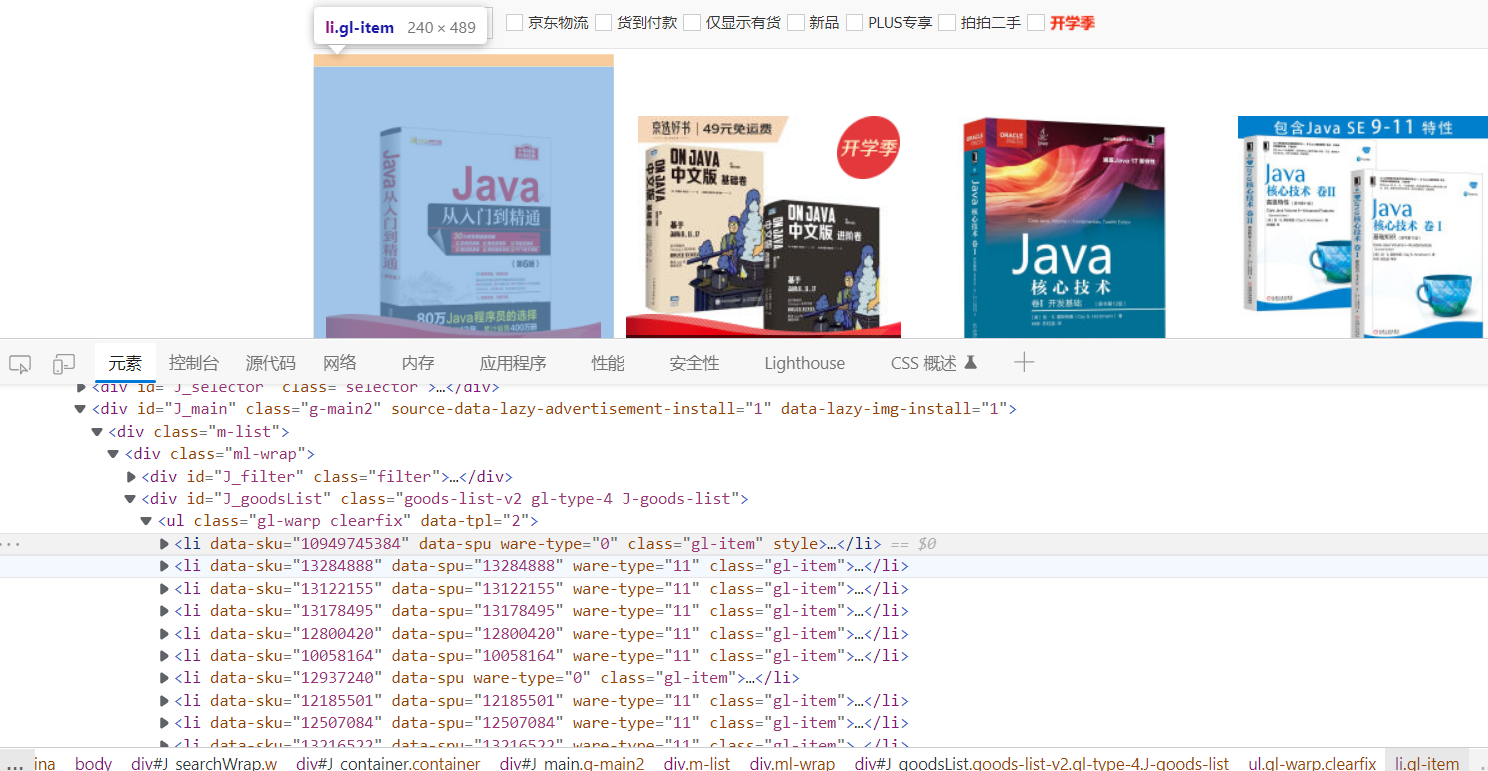
然后可以遍历这个li标签的元素集合,拿到所有的Img标签中的属性也就是图片的地址,和价格所在的类中的内容,和标题所在的类的内容。



并把获取到的图片标题和价格保存到集合中
Content类
@Data
@AllArgsConstructor
@NoArgsConstructor
public class Content {
    private String img;
    private String price;
    private String title;
}
完整代码:
package com.mrs.main;

import com.mrs.entity.Content;
import org.apache.commons.lang3.StringUtils;
import org.jsoup.Jsoup;
import org.jsoup.internal.StringUtil;
import org.jsoup.nodes.Document;
import org.jsoup.nodes.Element;
import org.jsoup.select.Elements;

import java.io.*;
import java.net.HttpURLConnection;
import java.net.URL;
import java.net.URLConnection;
import java.util.ArrayList;
import java.util.List;
import java.util.stream.Collectors;

/**
 * description: HtmlParseUtils
 * date: 2022/9/6 23:55
 * author: MR.孙
 */
public class HtmlParseUtils {
    public static void main(String[] args) throws Exception {

        //获取所有的图片标题和价格信息保存到集合中
        List<Content> contents = parseJD("java");
        //保存图片到本地
        getContent(contents);
    }
    public static  List<Content> parseJD(String keyward) throws Exception{
        //获取https://search.jd.com/Search?keyword=java 网页的内容
        String url = "https://search.jd.com/Search?keyword="+keyward;
        //解析url获取Document对象(也就是浏览器docment对象)
        Document document = Jsoup.parse(new URL(url),30000);
        //所有的js方法,这里都能用
        //该类的div包含了所有的商品信息
        Element element = document.getElementById("J_goodsList");
        // System.out.println(element.html());
        //获取所有的li(也就是每件商品的信息)
        Elements elements = element.getElementsByTag("li");
        List<Content> goodsList = new ArrayList<>();
        for (Element el : elements) {
            String img="";
            if(!StringUtil.isBlank(el.getElementsByTag("img").eq(0).attr("data-lazy-img"))){
                //获取商品图片
                img ="http:"+el.getElementsByTag("img").eq(0).attr("data-lazy-img");
            }
            //获取商品价格
            String price = el.getElementsByClass("p-price").eq(0).text();
            //获取商品标题
            String title = el.getElementsByClass("p-name").eq(0).text();

            Content content = new Content();

            if(!StringUtils.isBlank(img)||!StringUtils.isBlank(price) || !StringUtils.isBlank(title)){
                content.setImg(img);
                content.setPrice(price);
                content.setTitle(title);
                goodsList.add(content);
                System.out.println("图片:"+img);
                System.out.println("价格: "+price);
                System.out.println("标题"+title);
            }


        }

        return goodsList;
    }

    /**
     * @description:  把图片存到本地
     * @return: void
     * @author: MR.孙
     * @date: 2022/9/7 8:23
    */
    public  static void getContent(List<Content> contents){
    contents.stream().map((content)->{
        //遍历content实体类中的图片,保存到本地
        try {
            //获取文件名称
            String fileName = content.getImg().substring(content.getImg().lastIndexOf("/") + 1);

            URL url = new URL(content.getImg());
            URLConnection urlConnection = url.openConnection();
            // HttpURLConnection httpConnection = null;
            //如果你是一个http的url才能属于HttpURLConnection实例
            // if(urlConnection instanceof HttpURLConnection){
            //     httpConnection= (HttpURLConnection) urlConnection;
            // }else{
            //     System.out.println("请获取一个url");
            //     return null;
            // }
            InputStream inputStream = urlConnection.getInputStream();

            FileOutputStream os = new FileOutputStream(new File("d:\\images\\"+fileName));
            byte[] buf = new byte[1024*1024*1024];
            int img=0;
            if((img=inputStream.read(buf))!=-1){
                os.write(buf,0,img);
                System.out.println("图片->" + fileName + "下载完成");
            }
        } catch (Exception e) {
            e.printStackTrace();
        }
        return null;
    }).collect(Collectors.toList());

    }

}
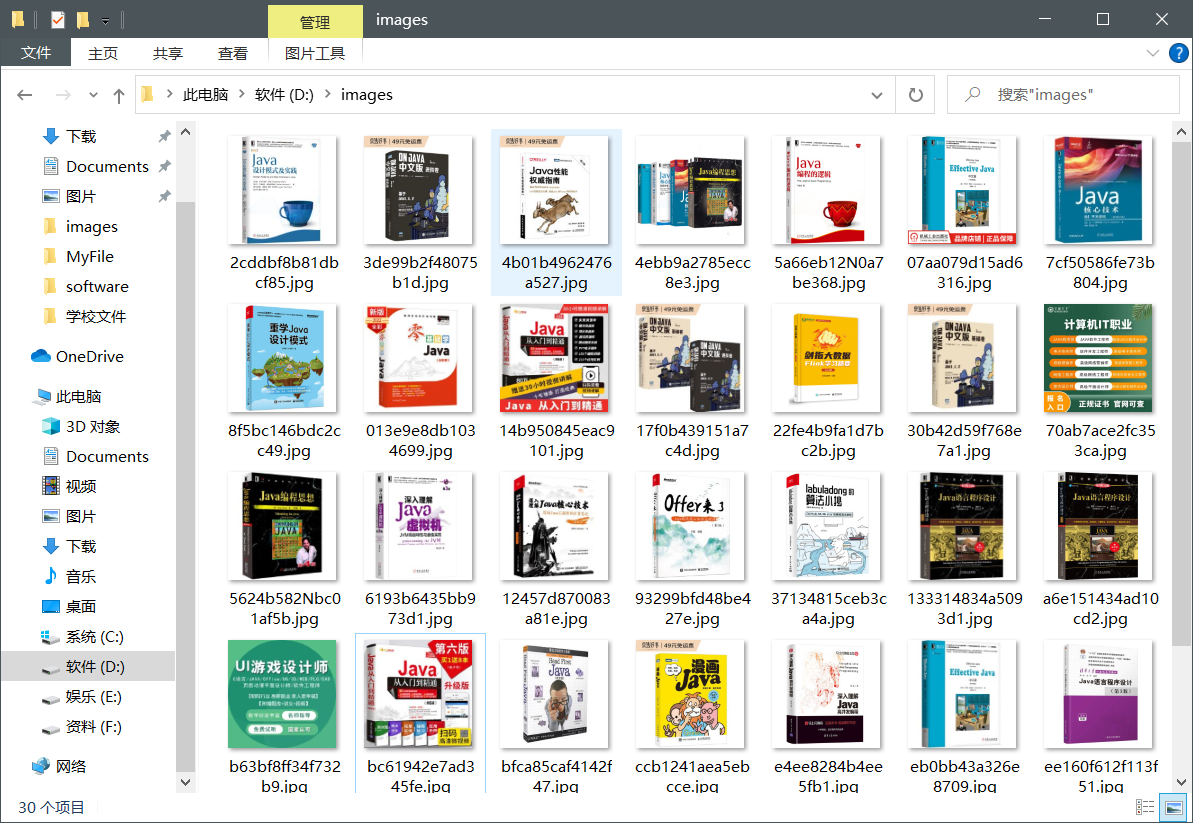
运行效果

 浙公网安备 33010602011771号