
用asp.net mvc与ExtJs关键字Google了一把, 几乎没有看到相关的具体开发文章。由于PoloSoft网站用了asp.net mvc pv3开发,后台管理我采用了asp.net mvc pv3+extjs2.0来实现,在这里我把它提炼出来,供需要的朋友参考!
1、本系列文章为原创,如有转载请注明作者(cmsoft)和出处(博客园);
2、本系列文章不在讲述asp.net mvc与ExtJs相关的基础知识,如要了解基本知识的请参考我以前的文章。
先看效果图 :
:
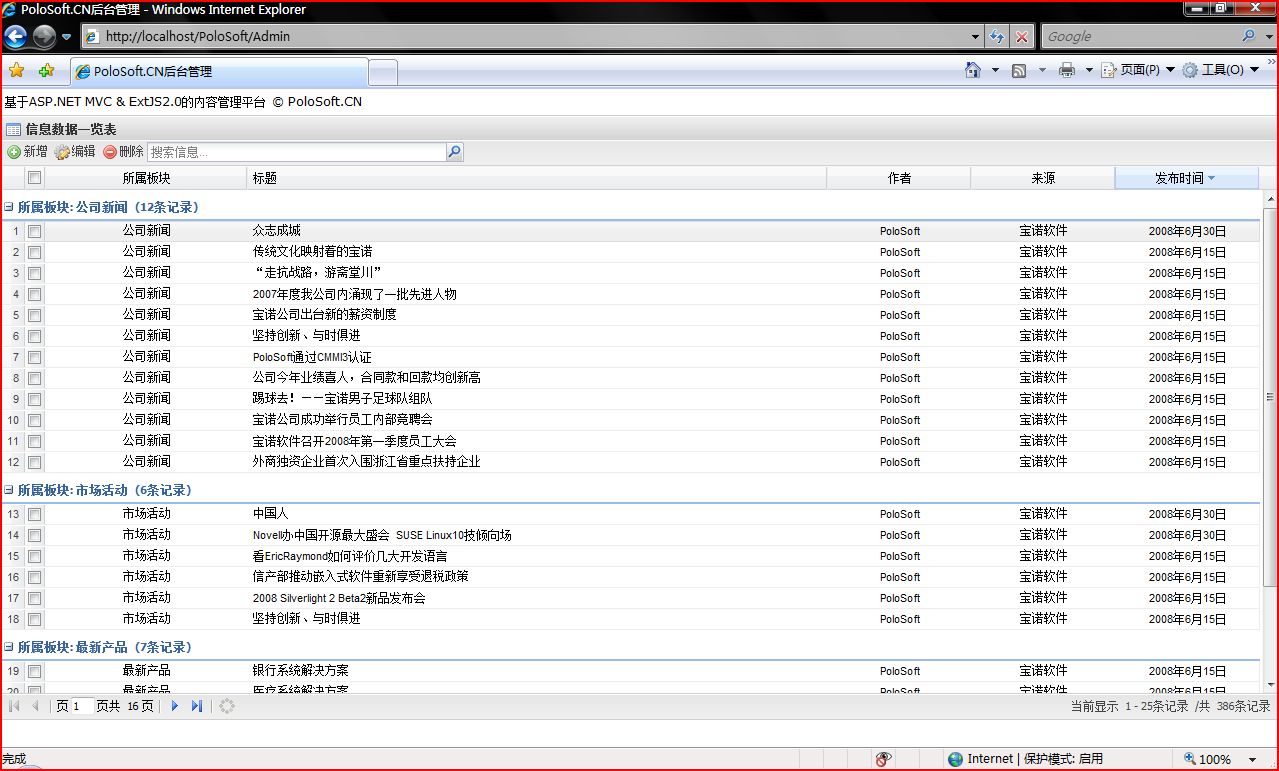
看上去很酷吧,呵呵:)
以上功能主要有以下几个文件组成:
显示、删除功能实现
1.ExtJs的Grid显示(CMS.js)

 CMS.js
1
/**//*2
 * Ext JS Library 2.0
3
* Copyright(c) 2006-2007, Ext JS, LLC.4
* licensing@extjs.com5
* 6
* http://extjs.com/license7
 */
*/8
 Ext.util.CSS.swapStyleSheet("theme","http://localhost/PoloSoft/Resources/css/xtheme-gray.css");
9
Ext.onReady(function() {
{10
Ext.QuickTips.init();11
var myUrl='http://localhost/PoloSoft/';12
// create the Data Store13

 var ds = new Ext.data.GroupingStore({
14
// load using script tags for cross domain, if the data in on the same domain as15
// this page, an HttpProxy would be better16
proxy: new Ext.data.HttpProxy({17
url: myUrl+'Admin/CmsDataSource'18
 }),
}),19
20
// create reader that reads the project records21
reader: new Ext.data.JsonReader(22
{23
totalProperty: "results", // The property which contains the total dataset size (optional)24
root: "rows", // The property which contains an Array of row objects25
id: "id" // The property within each row object that provides an ID for the record (optional)26
},[27
{name:'ID', type:'int'},28
{name:'CATALOG_NAME', type:'string'},29
{name:'TITLE', type:'string'},30
{name:'AUTHOR', type:'string'},31
{name:'CREATE_TIME', type:'string'},32
{name:'NEWS_FROM', type:'string'}33
]),34
groupField:'CATALOG_NAME',35
36
// turn on remote sorting37
remoteSort: false38
});39
ds.setDefaultSort('CREATE_TIME', 'desc');40
41
// formate ms json date formate42
function renderDate(value, p, record){43
var jsondate = record.data.CREATE_TIME;44
// var s = ""; // 声明变量45
jsondate = eval("new " + jsondate.substr(1,jsondate.length-2)); // 创建 Date 对象46
// s += jsondate.getYear()+ "-"; // 获取年份47
// s += (jsondate.getMonth() + 1) + "-"; // 获取月份48
// s += jsondate.getDate() ; // 获取日49
// return(s); 50
return jsondate.toLocaleDateString();51
}52
53
// the column model has information about grid columns54
// dataIndex maps the column to the specific data field in55
// the data store56
var nm = new Ext.grid.RowNumberer();57
var sm = new Ext.grid.CheckboxSelectionModel(); // add checkbox column58
var cm = new Ext.grid.ColumnModel([nm,sm,59
{id:'ID',header:"编号",dataIndex: 'ID', width: 40, align:'center'},60
{header:"所属板块",dataIndex: 'CATALOG_NAME', width: 70,align:'center' },61
{header:"标题",dataIndex: 'TITLE', width:200, align:'left'},62
{header:"作者",dataIndex: 'AUTHOR', width:50, align:'center'},63
{header:"来源", dataIndex: 'NEWS_FROM',width: 50, align:'center'},64
{header:"发布时间", dataIndex: 'CREATE_TIME', renderer: renderDate,width: 50, align:'center'}65
]);66
67
//hide column68
cm.setHidden(2, !cm.isHidden(2)); //隐藏编号列69
70
// by default columns are sortable71
// cm.defaultSortable = true;72
var gdCMS = new Ext.grid.GridPanel({73
el:'cms-grid',74
title:'信息数据一览表',75
iconCls: 'icon-grid',76
layout:'fit',77
bodyStyle:'width:100%',78
height:605,79
monitorWindowResize:true,80
monitorResize:true,81
autoScroll:true,82
store: ds,83
cm: cm,84
sm: sm,85
trackMouseOver:true,86
loadMask: {msg:'正在加载数据,请稍侯……'},87
viewConfig: {88
enableRowBody:true,89
getRowClass : function(record, rowIndex, p, ds){90
return 'x-grid3-row-collapsed';91
}92
},93
view: new Ext.grid.GroupingView({94
forceFit:true,95
groupTextTpl: '{text} ({[values.rs.length]}条记录)'96
}),97
bbar: new Ext.PagingToolbar({98
pageSize: 25,99
store: ds,100
displayInfo: true,101
displayMsg: '当前显示 {0} - {1}条记录 /共 {2}条记录',102
emptyMsg: "无显示数据"103
}),104
tbar:[105
{106
id:'btnAdd',107
text:'新增',108
tooltip:'新增',109
iconCls:'add',110
handler: function(){window.location.href=myUrl+'Admin/Add';}111
},112
{113
id:'btnAdd',114
text:'编辑',115
tooltip:'编辑',116
iconCls:'edit',117
handler: doEdit118
},119
{120
id:'btnDel',121
text:'删除',122
tooltip:'批量删除',123
iconCls:'remove',124
handler:doDel125
},126
new Ext.app.SearchField({127
store: ds,128
width:320,129
emptyText:'搜索信息'130
})131
]132
});133
134
135
gdCMS.render();136
137
// trigger the data store load138
ds.load({params:{start:0, limit:25}});139
140
141
function doEdit()142
{143
var row=gdCMS.getSelections();144
if(row.length==1)145
{146
var id = row[0].get("ID");147
window.location.href=myUrl+'Admin/Edit?id='+id; 148
} 149
else150
{151
Ext.MessageBox.alert("提示","请选1条记录进行编辑!");152
}153
}154
155
function doDel()156
{157
Ext.MessageBox.confirm('提示', '确实要删除所选的记录吗?',showResult);158
} 159
function showResult(btn){160
if(btn=='yes'){161
var row=gdCMS.getSelections();162
var jsonData="";163
for(var i=0,len=row.length;i<len;i++){164
var id = row[i].get("ID");165
if(i==0)166
jsonData =id; //这样处理是为了删除的Lambda语句方便167
else168
jsonData = jsonData + ","+ id; //这样处理是为了删除的Lambda语句方便169
}170
jsonData=","+jsonData+","; //这样处理是为了删除的Lambda语句方便171
var conn = new Ext.data.Connection();172
conn.request({173
url:myUrl+"Admin/Delete",174
params:{idList:jsonData},175
method: 'post',176
scope: this,177
callback:function(options,success, response){ 178
if(success){ 179
Ext.MessageBox.alert("提示","所选记录成功删除!");180
ds.load({params:{start:0, limit:25}}); 181
} 182
else 183
{Ext.MessageBox.alert("提示","所选记录删除失败!");} 184
} 185
})186
}187
};188
});2.Controller实现CmsDataSource
AdminController.cs1
CMSDataContext db = new CMSDataContext();2
public object GetCMSInfo(int? start,int? limit)3
{4
var query = from p in db.CMS_INFOs5
join m in db.CMS_CATALOGs on p.CATALOG_ID equals m.CATALOG_ID6
select new { 7
ID=p.ID, 8
CATALOG_NAME=m.CATALOG_NAME, 9
TITLE=p.TITLE, 10
NEWS_FROM=p.NEWS_FROM, 11
AUTHOR=p.AUTHOR, 12
CREATE_TIME=p.CREATE_TIME 13
};14
ViewData["totalCount"] = query.Count();15
int PageNum = start.Value / limit.Value; //共有页数 16
int PageSize = limit.Value;17
query = query.Skip(PageSize * PageNum).Take(PageSize); //当前页记录18
return query.ToList();19
//return news.OrderByDescending(c => c.CREATE_TIME).ToList();20
}21
22
public ActionResult CmsDataSource(int? start,int? limit)23
{24
ViewData["CMS"] = GetCMSInfo(start.Value,limit.Value);25
return View(ViewData["CMS"]);26
}3.删除方法
AdminController.cs1
public bool Delete(string idList)2
{3
bool result = false;4
try5
{6
var query = from p in db.CMS_INFOs7
where idList.IndexOf(","+p.ID+",") >= 08
select p;9
db.CMS_INFOs.DeleteAllOnSubmit(query);10
db.SubmitChanges();11
result = true;12
}13
catch14
{15
result = false;16
}17
18
return result;19
}4.编辑和新增功能
Code1
public ActionResult Modify(int? id)2
{3
string resultJson;4
try5
{6
CMS_INFO cms = db.CMS_INFOs.First(c=>c.ID==id.Value);7
cms.AUTHOR = Request.Form["author"];8
cms.CATALOG_ID = int.Parse(Request.Form["catalogID"]);9
cms.CREATE_TIME = DateTime.Parse(Request.Form["createDate"]);10
cms.NEWS_CONTENT = Request.Form["content"];11
cms.NEWS_FROM = Request.Form["from"];12
cms.TITLE = Request.Form["title"];13
db.SubmitChanges();14
resultJson = @"{success: true}";15
}16
catch (Exception ex)17
{18
string msg = ex.Message;19
resultJson = @"{success: false,msg:'数据修改失败了!'}";20
}21
ViewData["resultJson"] = resultJson;22
return View("Modify");23
}24
25
public ActionResult Insert()26
{27
string resultJson;28
try29
{30
CMS_INFO cms = new CMS_INFO();31
cms.AUTHOR =Request.Form["author"];32
cms.CATALOG_ID = int.Parse(Request.Form["catalogID"]);33
cms.CREATE_TIME = DateTime.Parse(Request.Form["createDate"]);34
cms.NEWS_CONTENT = Request.Form["content"];35
cms.NEWS_FROM = Request.Form["from"];36
cms.TITLE = Request.Form["title"];37
db.CMS_INFOs.InsertOnSubmit(cms);38
db.SubmitChanges();39
resultJson=@"{success: true}";40
}41
catch(Exception ex)42
{43
string msg = ex.Message;44
resultJson = @"{success: false,msg:'数据保存失败了!'}";45
}46
ViewData["resultJson"] = resultJson;47
return View("Insert");48
}具体的请看Sample,从这里下载(PoloSoft.bak是数据库备份文件,配置的时候请更改你的web.config文件)。
如有不明白的请在评论里提出,我将安排时间回答。

 浙公网安备 33010602011771号