
day_17~19:IO流
IO流
File类
代表文件或目录路径(文件夹)的抽象表示
File只关注文本本身信息,不能操作文本里的内容(要想操作就要IO流的技术)
绝对路径:指定盘符
相对路径:相对于当前项目的路径
主要方法


public class Test01 {

    public static void main(String[] args) {

        //创建出文件的对象
        File file = new File("C:\\Users\\hehanyu\\Desktop\\test.txt");

        System.out.println("获取文件绝对路径:" + file.getAbsolutePath());
        System.out.println("获取文件名:" + file.getName());
        System.out.println("文件内容是否可读:" + file.canRead());
        System.out.println("文件内容是否可写:" + file.canWrite());
        System.out.println("文件内容是否隐藏:" + file.isHidden());
        System.out.println("获取文件长度(字节):" + file.length());

        SimpleDateFormat sdf = new SimpleDateFormat("yyyy年MM月dd日 HH:mm:ss");
        String format = sdf.format(file.lastModified());
        System.out.println("获取文件最后修改时间:" + format);


        System.out.println("判断此文件或文件夹是否存在:" + file.exists());
        System.out.println("获取父路径的字符串表示:" + file.getParent());
        System.out.println("获取父路径的文件对象表示:" + file.getParentFile());

        System.out.println("判断该对象是否是文件:" + file.isFile());
        System.out.println("判断该对象是否是文件夹:" + file.isDirectory());

    }

}
绝对路径、相对路径
public class Test02 {

    public static void main(String[] args) throws IOException {

        //绝对路径:指定盘符
//        File file = new File("C:\\Users\\hehanyu\\Desktop\\hhy.txt");
//        System.out.println("获取路径:" + file.getPath());
//        System.out.println("获取绝对路径:" + file.getAbsolutePath());

        //相对路径:相对于当前项目的路径
        File file = new File("hhy.txt");
        System.out.println("获取路径:" + file.getPath());
        System.out.println("获取绝对路径:" + file.getAbsolutePath());

    }

}
应用
public class Test03 {

    public static void main(String[] args) throws IOException {

        /**
         * 需求2:通过程序,判断指定路径的文件是否存在,如果不存在,则创建该文件
            下面按各种情况来解决该问题
         */
    }

    private static void method03() throws IOException {

        //3)有多个层级的目录不存在的情况
        File file = new File("file1\\file2\\file3\\test.txt");

        //创建文件夹
        File parentFile = file.getParentFile();//获取到父路径的文件对象
        if(!parentFile.exists()){//不存在
            parentFile.mkdirs();//创建多层目录
        }

        //创建文件
        if(!file.exists()){//不存在
            file.createNewFile();//创建文件
        }
    }

    private static void method02() throws IOException {

        //2)有一个层级的目录不存在的情况

        File file = new File("file\\test.txt");

        //创建文件夹
        File parentFile = file.getParentFile();//获取到父路径的文件对象
        if(!parentFile.exists()){//不存在
            parentFile.mkdir();//创建一层目录
        }

        //创建文件
        if(!file.exists()){//不存在
            file.createNewFile();//创建文件
        }
    }

    private static void method01() throws IOException {
        //1)目录已存在的情况
        File file = new File("file\\test.txt");

        if(!file.exists()){//文件不存在
            file.createNewFile();//创建文件
        }
    }

}


public class Test04 {

    @Test
    public void method01(){
        /**
         * 需求3:输出指定目录下的所有文件信息(只考虑当前目录,不考虑子目录)
         */

        File file = new File("C:\\Users\\hehanyu\\Desktop\\资源");

        String[] list = file.list();//把当前目录下的所有文件的名字放入list数组中

        for (String fileName : list) {
            System.out.println(fileName);
        }
    }

    @Test
    public void method02(){
        /**
         * 需求3:输出指定目录下的所有文件信息(只考虑当前目录,不考虑子目录)
         */

        File file = new File("C:\\Users\\hehanyu\\Desktop\\资源");

        File[] listFiles = file.listFiles();//把当前目录下的所有文件对象放入listFiles数组中

        for (File f : listFiles) {
            System.out.println(f.getName() + " : " + f.getAbsolutePath());
        }
    }

    @Test
    public void method03(){
        /**
         * 需求3:输出指定目录下的所有文件信息(只考虑当前目录,不考虑子目录)
         *     1)要求只输出文件后缀名为txt的文件
         */

        File file = new File("C:\\Users\\hehanyu\\Desktop\\资源");

        File[] listFiles = file.listFiles();//把当前目录下的所有文件对象放入listFiles数组中

        for (File f : listFiles) {

            if(f.getName().endsWith(".txt")){
                System.out.println(f.getName() + " : " + f.getAbsolutePath());
            }
        }
    }

    @Test
    public void method04(){
        /**
         * 需求3:输出指定目录下的所有文件信息(只考虑当前目录,不考虑子目录)
         *     1)要求只输出文件后缀名为txt的文件
         *     2)根据API的过滤器来完成该功能
         */

        File file = new File("C:\\Users\\hehanyu\\Desktop\\资源");


        String[] list = file.list(new FilenameFilter() {
            @Override
            public boolean accept(File dir, String name) {//依次遍历文件夹中所有的文件,true-加载到list数组中,false-不加载
                if(name.endsWith(".txt")){
                    return true;
                }else{
                    return false;
                }
            }
        });

        for (String fileName : list) {
            System.out.println(fileName);
        }
    }

    @Test
    public void method05(){
        /**
         * 需求3:输出指定目录下的所有文件信息(只考虑当前目录,不考虑子目录)
         *     1)要求只输出文件后缀名为txt的文件
         *     2)根据API的过滤器来完成该功能
         *  3)需求继续跟进,列出当前目录及子目录中符合该条件的文件信息(递归)
         */

        File file = new File("C:\\Users\\hehanyu\\Desktop\\资源");

        getFile(file,".jpg");
    }

    public static void getFile(File file,String str){

        File[] listFiles = file.listFiles();
        for (File f : listFiles) {
            if(f.isDirectory()){//文件夹
                getFile(f, str);
            }else if(f.isFile()){//文件
                if(f.getName().endsWith(str)){
                    System.out.println(f.getName() + " : " + f.getAbsolutePath());
                }
            }
        }

    }
}
IO流
IO:两个方向(输出流-out-写 输入流-in-读)
分流:
按方向分流:输出流、输入流
按单位分流:字节流、字符流
按功能分流:基础流\节点流、处理流(在基础流的基础上包装了,使得流的功能变强大了)
学习路线:按照IO流的发展历史
ps:注意流与流之间的继承关系
字节流(二进制信息)
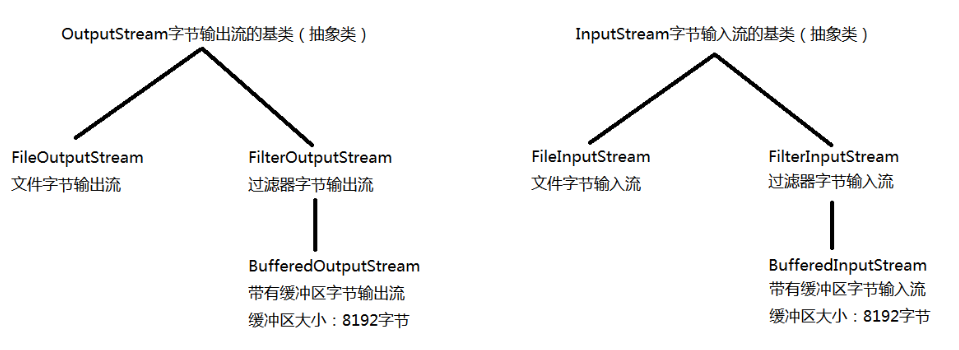
OutputStream -- 字节输出流的基类(抽象类)
InputStream -- 字节输入流的基类(抽象类)
FileOutputStream extends OutputStream -- 文件字节输出流
FileInputStream extends InputStream -- 文件字节输入流
FilterOutputStream extends OutputStream -- 过滤器字节输出流
FilterInputStream extends InputStream -- 过滤器字节输入流
BufferedOutputStream extends FilterOutputStream -- 带有缓冲区的字节输出流
BufferedInputStream extends FilterInputStream -- 带有缓冲区的字节输入流
ps:缓冲区大小为8192字节(8*1024)
FilterOutputStream和FileInputStream实现copy
public class Copy01 {

    public static void main(String[] args) throws Exception {

        //读取源文件,并写入目标文件

        FileInputStream fis = new FileInputStream("test.txt");
        FileOutputStream fos = new FileOutputStream("copy.txt");

        //读取一个字节的数据,写入一个字节的数据
        int read;
        while((read=fis.read()) != -1){
            fos.write(read);
        }

        fis.close();
        fos.close();


    }
}


public class Copy02 {

    public static void main(String[] args) throws Exception {

        //读取源文件,并写入目标文件

        FileInputStream fis = new FileInputStream("上原亚衣.avi");
        FileOutputStream fos = new FileOutputStream("copy.avi");

        //读取1024个字节的数据,写入1024个字节的数据
        byte[] b = new byte[1024];
        int len;
        while((len = fis.read(b)) != -1){
            fos.write(b, 0, len);
        }

        fis.close();
        fos.close();
    }
}
BufferedOutputStream 和BufferedInputStream 实现copy
public class Copy {

    public static void main(String[] args) throws Exception{

        BufferedInputStream bis = new BufferedInputStream(new FileInputStream("上原亚衣.avi"));
        BufferedOutputStream bos = new BufferedOutputStream(new FileOutputStream("copy.avi"));

        byte[] b = new byte[1024];
        int len;
        while((len = bis.read(b)) != -1){
            bos.write(b, 0, len);
        }

        bis.close();
        bos.close();

    }

}
字符流(文本信息)
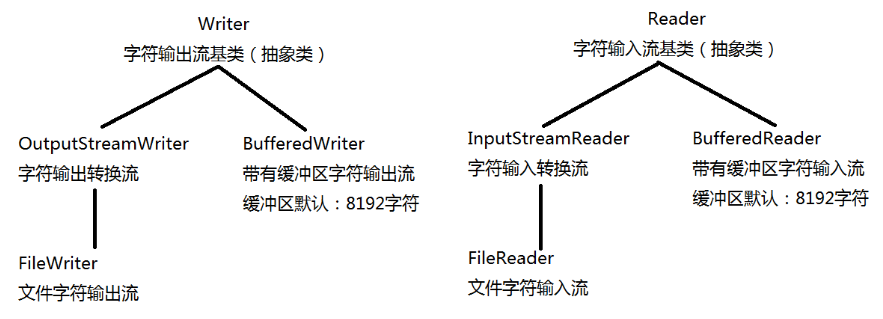
Writer -- 字符输出流的基类(抽象类)
Reader -- 字符输入流的基类(抽象类)
OutputStreamWriter extends Writer -- 字符输出转换流
InputStreamReader extends Reader -- 字符输入转换流
ps:将字节流转换为字符流
应用场景:Java很多类给我们提供的流对象都是字节流,如果需求要操作文本信息,
可以将字节流对象转换为字符流对象,所以要用到转换流
FileWriter extends OutputStreamWriter -- 文件字符输出流
FileReader extends InputStreamReader -- 文件字符输入流
BufferedWriter extends Writer -- 带有缓冲区的字符输出流
BufferedReader extends Reader -- 带有缓冲区的字符输入流
ps:缓冲区大小为8192字符(8*1024)
InputStreamReader和OutputStreamWriter实现copy
public class Copy {

    public static void main(String[] args) throws Exception{

        InputStreamReader isr = new InputStreamReader(new FileInputStream("С˵.txt"), "GBK");
        OutputStreamWriter osw = new OutputStreamWriter(new FileOutputStream("copy.txt"), "GBK");

        char[] cbuf = new char[1024];
        int len;
        while((len = isr.read(cbuf)) != -1){
            osw.write(cbuf, 0, len);
        }

        isr.close();
        osw.close();

    }

}
FileReader和FileWriter实现copy
public class Copy {

    public static void main(String[] args) throws Exception{

        FileReader fr = new FileReader("С˵.txt");
        FileWriter fw = new FileWriter("copy.txt");

        char[] cbuf = new char[1024];
        int len;
        while((len = fr.read(cbuf)) != -1){
            fw.write(cbuf, 0, len);
        }

        fr.close();
        fw.close();


    }

}
BufferedReader和BufferedWriter实现copy ---- 其中copy的方式有两种
public class Copy {

    public static void main(String[] args) throws Exception{

        BufferedReader br = new BufferedReader(new FileReader("小说.txt"));
        BufferedWriter bw = new BufferedWriter(new FileWriter("copy.txt"));

        copy02(br, bw);

        br.close();
        bw.close();
    }

    private static void copy02(BufferedReader br, BufferedWriter bw) throws IOException {
        String str;
        while((str = br.readLine()) != null){//读取一行数据
            bw.write(str);
            bw.newLine();//新的一行(换行)
        }
    }

    private static void copy01(BufferedReader br, BufferedWriter bw) throws IOException {
        char[] cbuf = new char[1024];
        int len;
        while((len = br.read(cbuf)) != -1){
            bw.write(cbuf, 0, len);
        }
    }

}
注意:
1.输出流文件不存在时,会自动创建文件对象
2.输入流文件不存在时,会报错
3.read():逐个读取字节,并返回字节数,读取到文件末尾返回-1
read(byte数据):读取数组长度的数据,并返回读取的到有效字节数的长度,读取到末尾返回-1
各种流
对象流:
ObjectOutputStream -- 对象输出流
ObjectInputStream -- 对象输入流
序列化:程序(对象) --> 文件
反序列化:文件(对象) --> 程序
ps:
1.对象所属的类必须实现Serializable(序列化接口)
2.Serializable序列化接口没有实现任何方法,这种接口叫做标记型接口
3.对象中的属性不想被写入文件,就用transient修饰属性
利用ObjectOutputStream向文件写入对象
public class Test01 {

    public static void main(String[] args) throws Exception{
        /**
         * 利用ObjectOutputStream向文件写入对象
         */
        ObjectOutputStream oos = new ObjectOutputStream(new FileOutputStream("test.txt"));

        oos.writeInt(3);
        oos.writeObject(new String("木头人"));
        oos.writeObject(new String("木头人"));
        oos.writeObject(new String("木头人"));

        oos.close();

    }

    private static void method01(ObjectOutputStream oos) throws IOException {
        oos.writeObject(new String("木头人"));
        oos.writeObject(new String("木头人"));
        oos.writeObject(new String("木头人"));
        oos.writeObject(null);
    }

}
利用ObjectInputStream读取文件中的对象
public class Test02 {

    public static void main(String[] args) throws Exception{
        /**
         * 利用ObjectInputStream读取文件中的对象
         */

        ObjectInputStream ois = new ObjectInputStream(new FileInputStream("test.txt"));

        //取出顺序必须和存入顺序一致
        int num = ois.readInt();
        for (int i = 0; i < num; i++) {
            Object readObject = ois.readObject();
            System.out.println(readObject);
        }

        ois.close();
    }

    //给Test01类里的method01方法对应
    private static void method01(ObjectInputStream ois) throws IOException, ClassNotFoundException {
        Object obj;
        while((obj = ois.readObject()) != null){
            System.out.println(obj);
        }
    }
}
自定义对象
public class User implements Serializable{

    //生成固定的版本号
    private static final long serialVersionUID = 5219224685895297646L;
    //序列化操作的时候系统会把当前类的serialVersionUID写入到序列化文件中,
    //当反序列化时系统会去检测文件中的serialVersionUID,
    //判断它是否与当前类的serialVersionUID一致,
    //如果一致就说明序列化类的版本与当前类版本是一样的,可以反序列化成功,否则失败。

    private String username;
    private transient String password;//不会被存入的文件中
    private static String info;//此属性就不在对象中,自然就不会被存入到文件中
    private char sex;
    private int age;

    public User() {
    }

    public User(String username, String password, String info) {
        this.username = username;
        this.password = password;
        this.info = info;
    }

    public User(String username, String password, String info, char sex) {
        this.username = username;
        this.password = password;
        this.info = info;
        this.sex = sex;
    }

    public User(String username, String password, String info, char sex, int age) {
        super();
        this.username = username;
        this.password = password;
        this.info = info;
        this.sex = sex;
        this.age = age;
    }

    public String getUsername() {
        return username;
    }

    public void setUsername(String username) {
        this.username = username;
    }

    public String getPassword() {
        return password;
    }

    public void setPassword(String password) {
        this.password = password;
    }

    public String getInfo() {
        return info;
    }

    public void setInfo(String info) {
        this.info = info;
    }

    public char getSex() {
        return sex;
    }

    public void setSex(char sex) {
        this.sex = sex;
    }

    public int getAge() {
        return age;
    }

    public void setAge(int age) {
        this.age = age;
    }

    @Override
    public String toString() {
        return "User [username=" + username + ", password=" + password + ", info=" + info + ", sex=" + sex + ", age="
                + age + "]";
    }

}
利用ObjectOutputStream向文件写入自定义类的对象
public class Test03 {

    public static void main(String[] args) throws Exception{

        /**
         * 利用ObjectOutputStream向文件写入自定义类的对象
         */
        ObjectOutputStream oos = new ObjectOutputStream(new FileOutputStream("test.txt"));

        oos.writeObject(new User("hhy", "123123", "我是最帅的...", '男', 18));

        oos.close();
    }

}
利用ObjectInputStream读取文件内容
public class Test04 {

    public static void main(String[] args) throws Exception{

        /**
         * 利用ObjectInputStream读取文件内容
         */

        ObjectInputStream ois = new ObjectInputStream(new FileInputStream("test.txt"));

        User user = (User) ois.readObject();
        System.out.println(user);

        ois.close();
    }

}
打印流:(方向:程序 --> 文件)
PrintStream:将字节流转换为打印流
PrintWriter:将字节流、字符流转换为打印流
应用:
public class Test01 {

    public static void main(String[] args) throws Exception{

        //PrintStream ps = new PrintStream("test.txt");
        PrintStream ps = new PrintStream(new FileOutputStream("test.txt", true));

        ps.println("木头人...");

        ps.close();


    }
}


public class Test02 {

    public static void main(String[] args) throws Exception{

//        PrintWriter pw = new PrintWriter("test.txt");
//        PrintWriter pw = new PrintWriter(new FileOutputStream("test.txt",true));
        PrintWriter pw = new PrintWriter(new FileWriter("test.txt", true));

        pw.println("木头人...");

        pw.close();


    }
}
重定向:重新定义系统标准的输出输入流的方向
系统标准的输入流-System.in:控制台->程序
//重新定义系统标准的输入流:文件->程序
System.setIn(new FileInputStream("test.txt"));
系统标准的输出流-System.out:程序->控制台
//重新定义系统标准的输出流方向:程序->文件
System.setOut(new PrintStream("test.txt"));
重新定义系统标准的输入流:程序 --> 文件
public class Test01 {

    public static void main(String[] args) throws Exception{

        /**
         * 系统标准的输入流:控制台->程序
         * InputStream in = System.in;
         */

        //重新定义系统标准的输入流
        System.setIn(new FileInputStream("test.txt"));

        Scanner scan = new Scanner(System.in);
        String next = scan.next();
        System.out.println(next);
        next = scan.next();
        System.out.println(next);

        scan.close();
    }

}
重新定义系统标准的输出流方向:程序->文件
public class Test02 {

    public static void main(String[] args) throws Exception{

        //重新定义系统标准的输出流方向:程序->文件
        System.setOut(new PrintStream("test.txt"));

        System.out.println("xxxxx");

    }

}
重新定义系统标准的输出流的应用
public class Test03 {

    public static void main(String[] args) throws Exception{

        System.setOut(new PrintStream(new FileOutputStream("log.txt", true)));

        method01();
        method02();
        method03();
        method04();
        method05();
    }

    public static void method01(){
        System.out.println(getDate());
        System.out.println("扫描二维码");
    }

    public static void method02(){
        System.out.println(getDate());
        System.out.println("确认金额");
    }

    public static void method03(){
        System.out.println(getDate());
        System.out.println("输入密码");
    }

    public static void method04(){
        System.out.println(getDate());
        System.out.println("密码验证成功");
    }

    public static void method05(){
        System.out.println(getDate());
        System.out.println("支付成功");
    }

    public static String getDate(){
        SimpleDateFormat sdf = new SimpleDateFormat("yyyy-MM-dd HH:mm:ss");
        return sdf.format(new Date());
    }

}
随机访问流:
RandomAccessFile:此类的实例支持对随机访问文件的读取和写入。随机访问文件的行为类似存储在文件系统中的一个大型 byte 数组。存在指向该隐含数组的光标和索引,称为文件指针;输入操作从文件指针开始读取字节,并随着对字节的读取而前移此文件指针。如果随机访问文件以读取/写入模式创建,则输出操作也可用;输出操作从文件指针开始,并随着对字节的写入而前移此文件指针。写入隐函数组的当前末尾之后的输出操作导致该数组扩展。该文件指针可以通过getFilePointer 方法获取,并通过seek 方法设置。
1.认为文件中的数据为大型的byte数组,有隐含的文件指针
2.读取或写入从文件指针出开始,文件指针默认从0开始
3.r-读的模式 rw-读写的模式
4.断点续传
应用:
public class Test01 {

    // 写入数据
    @Test
    public void method1() throws Exception {
        RandomAccessFile raf = new RandomAccessFile("test.txt", "rw");
        raf.write("123abc木头人".getBytes());
        ;
        raf.close();
    }

    // 读取数据
    @Test
    public void method2() throws Exception {
        RandomAccessFile raf = new RandomAccessFile("test.txt", "r");
        byte[] b = new byte[1024];
        int len;
        while ((len = raf.read(b)) != -1) {
            System.out.println(new String(b, 0, len));
        }
        raf.close();
    }

    // 指定位置读取
    @Test
    public void method3() throws Exception {
        RandomAccessFile rdf = new RandomAccessFile("test.txt", "r");
        rdf.seek(3);
        byte[] b = new byte[1024];
        int len;
        while ((len = rdf.read(b)) != -1) {
            System.out.println(new String(b, 0, len));
        }
        rdf.close();
    }

    // 文件末尾追加
    @Test
    public void method4() throws Exception {
        File file = new File("test.txt");
        RandomAccessFile rdf = new RandomAccessFile(file, "rw");
        rdf.seek(file.length());
        rdf.write("1314赤名莉香mmd".getBytes());
        rdf.close();
    }
}
//用随机访问流copy文件实现断点续传的功能
public class Test02 {
    public static void main(String[] args) throws Exception {

        RandomAccessFile r = new RandomAccessFile("上原亚衣.avi", "r");
        RandomAccessFile w = new RandomAccessFile("copy.avi", "rw");

        long pointer = w.length();
        r.seek(pointer);
        w.seek(pointer);

        byte[] bys = new byte[102];
        int len;
        while((len = r.read(bys)) != -1) {
            w.write(bys, 0, len);
        }

        r.close();
        w.close();
    }
}
内存流:
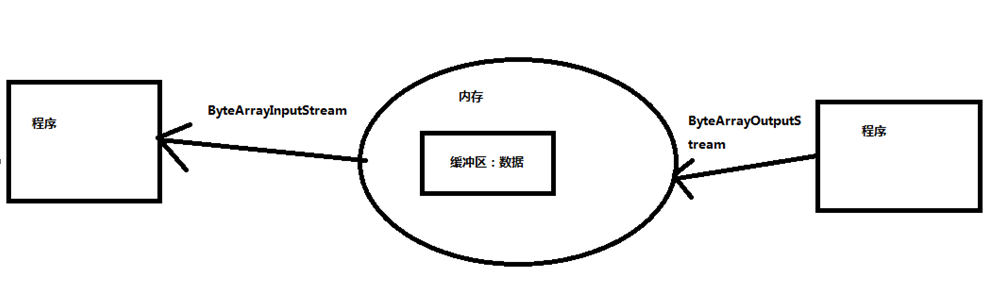
ByteArrayOutputStream
ByteArrayInputStream
应用场景:频繁使用过的数据如果存在文件中,效率不高,因为内存频繁和硬盘交互,效率很低,所以我们可以把一些不重要但又要频繁使用的数据放在内存中。
ps:1.之前的流都是程序<->文件,但是内存流是此程序<->内存
2.内存流不用关闭,你关也关不了
public class Test01 {
    public static void main(String[] args) throws Exception {
        method3();

    }

    //使用读写操作
    private static void method3() throws IOException {
        ByteArrayInputStream bis = new ByteArrayInputStream("天空没有翅膀的痕迹,而我已经飞过。".getBytes());
        ByteArrayOutputStream bos = new ByteArrayOutputStream();

        byte[] bys = new byte[1024];
        int len;
        while((len = bis.read(bys)) != -1) {
            bos.write(bys, 0, len);
        }

//        String string = bos.toString();
//        System.out.println(string);

        byte[] array = bos.toByteArray();
        System.out.println(new String(array));
    }

    //写入数据
    private static void method2() throws IOException {
        ByteArrayOutputStream bos = new ByteArrayOutputStream();
        bos.write("123木头人".getBytes());

        byte[] array = bos.toByteArray();
        System.out.println(new String(array));
//        System.out.println(bos.toString());
    }

    //读取数据
    private static void method1() throws IOException {
        // 创建内存输入流,并输入内容
        ByteArrayInputStream bis = new ByteArrayInputStream("赤名莉香mmd1314".getBytes());

        // 读取数据
        byte[] bys = new byte[1024];
        int len;
        while ((len = bis.read(bys)) != -1) {
            System.out.println(new String(bys, 0, len));
        }
    }
}
NIO - BewIo
由以下几个核心部分组成:
Buffers -- 缓冲区:针对系统的缓冲区
Channels -- 通道:类型于BIO里面的流 主要是FileChannel:文件通道
Selectors -- 选择器
Channels 和Buffer
基本上,所有的IO在NIO中都从一个Channel开始。Channel有点像流,数据可以从Channel读到Buffer中,也可以从Buffer写入到Channel中。
通过BIO的流(fos)获取到NIO里的通道:FileChannel channel = fos.getChannel();
创建缓冲区:ByteBuffer allocate = ByteBuffer.allocate(10);
获得指针:allocate.position()
获得限制:allocate.limit()
获得容量:allocate.capacity()
写入数据:put(byte) or put(byte[])
反转:flip() -------- 指针归零,限制指针到原指针位置,容量不变
remaining()获取到指针与限制之间的元素数量
Ps:反转此缓冲区:将指针初始化,限制为数据的长度
public class Test {

    public static void main(String[] args) {
        //创建缓冲区
        ByteBuffer buffer = ByteBuffer.allocate(10);
        System.out.println("指针:" + buffer.position());//0
        System.out.println("限制:" + buffer.limit());//10
        System.out.println("容量:" + buffer.capacity());//10
        System.out.println("-----------------");

        //写入数据
        buffer.put("abc".getBytes());
        System.out.println("指针:" + buffer.position());//0
        System.out.println("限制:" + buffer.limit());//10
        System.out.println("容量:" + buffer.capacity());//10
        System.out.println("-----------------");

        //翻转指针:指针归零,限制到原来的位置,容量不变
        buffer.flip();
        System.out.println("指针:" + buffer.position());//0
        System.out.println("限制:" + buffer.limit());//3
        System.out.println("容量:" + buffer.capacity());//10
        System.out.println("-----------------");

        System.out.println("获取指针到限制之间的数据个数:" + buffer.remaining());//3

        for(int i=0;i<buffer.remaining();i++) {
            byte b = buffer.get(i);
            System.out.println((char)b);
        }
    }

}
//一次性拷贝
public class copy01 {

    public static void main(String[] args) throws Exception {
        // 获取BIO对象
        File file = new File("上原亚衣.avi");
        long length = file.length();
        FileInputStream fis = new FileInputStream(file);
        FileOutputStream fos = new FileOutputStream("东京爱情故事.avi");

        // 获取Channel通道
        FileChannel rChannel = fis.getChannel();
        FileChannel wChannel = fos.getChannel();

        // 创建Buffer缓冲区
        ByteBuffer buffer = ByteBuffer.allocate((int) length);

        // 拷贝
        rChannel.read(buffer);
        buffer.flip();
        wChannel.write(buffer);

        // 关流

        fis.close();
        fos.close();
    }

}
//1024个字节拷贝
public class copy02 {

    public static void main(String[] args) throws Exception {
        FileInputStream fis = new FileInputStream("上原亚衣.avi");
        FileOutputStream fos = new FileOutputStream("东京爱情故事.avi");

        FileChannel rChannel = fis.getChannel();
        FileChannel wChannel = fos.getChannel();

        ByteBuffer buffer = ByteBuffer.allocate(1024);

        while (rChannel.read(buffer) != -1) {
            buffer.flip();
            wChannel.write(buffer);
            buffer.clear();
        }

        fos.close();
        fis.close();

    }

}
//Map映射拷贝
public class Copy03 {

    public static void main(String[] args) throws Exception {
        // 创建BIO对象
        File file = new File("东京爱情故事.avi");
        long length = file.length();
        RandomAccessFile r = new RandomAccessFile(file, "r");
        RandomAccessFile w = new RandomAccessFile("赤名莉香.avi", "rw");

        // 获取通道
        FileChannel rChannel = r.getChannel();
        FileChannel wChannel = w.getChannel();

        // 创建缓冲区
        MappedByteBuffer rMap = rChannel.map(MapMode.READ_ONLY, 0, length);
        MappedByteBuffer wMap = wChannel.map(MapMode.READ_WRITE, 0, length);

        // 拷贝
        for (int i = 0; i < length; i++) {
            byte b = rMap.get(i);
            rMap.put(b);
        }
        // 关流
        r.close();
        w.close();
    }

}
BIO VS NIO
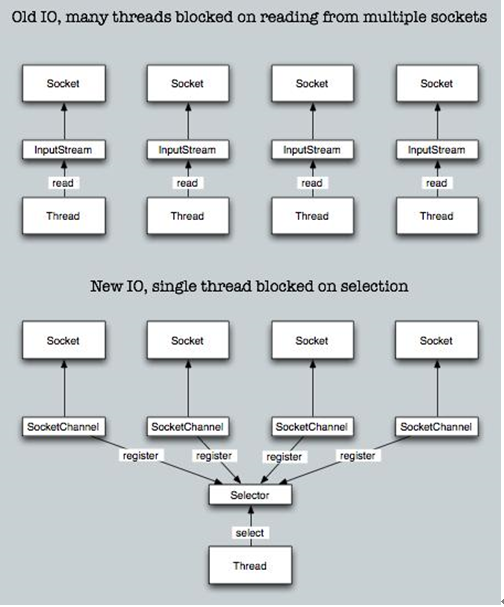
BIO:面向流 阻塞IO 无
NIO:面向缓存 非阻塞IO 选择器
了解
BIO是一个连接一个线程
NIO是一个请求一个线程
AIO是一个有效请求一个线程

 浙公网安备 33010602011771号