
Json
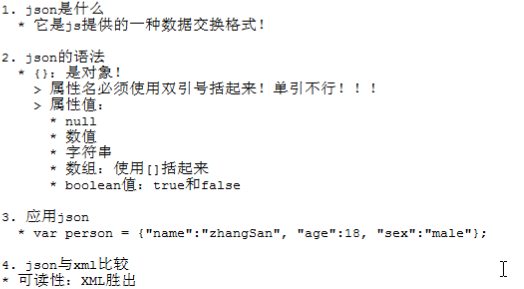

案例:
Json1.jsp
<%@ page language="java" contentType="text/html; charset=UTF-8"
    pageEncoding="UTF-8"%>
<!DOCTYPE html PUBLIC "-//W3C//DTD HTML 4.01 Transitional//EN" "http://www.w3.org/TR/html4/loose.dtd">
<html>
<head>
<meta http-equiv="Content-Type" content="text/html; charset=UTF-8">
<title>json测试</title>
<script type="text/javascript">
    /* var person = {"name":"赤名莉香","age":18,"sex":"male"};
    alert(person.name+","+person.age+","+person.sex); */

/*     var str = "{\"name\":\"赤名莉香\",\"age\":18,\"sex\":\"male\"}";//"\"为转义字符
    var person = eval("(" + str + ")");//eval() 函数可计算某个字符串,并执行其中的的 JavaScript 代码。
    alert(person.name + "," + person.age + "," + person.sex); */

    var str = "1+2";
    var sum = eval("(" + str + ")");
    alert(sum);
</script>
</head>
<body>

</body>
</html>
jsp2.jsp
<%@ page language="java" contentType="text/html; charset=UTF-8"
    pageEncoding="UTF-8"%>
    <%@taglib prefix="c" uri="http://java.sun.com/jsp/jstl/core" %>
<!DOCTYPE html PUBLIC "-//W3C//DTD HTML 4.01 Transitional//EN" "http://www.w3.org/TR/html4/loose.dtd">
<html>
<head>
<meta http-equiv="Content-Type" content="text/html; charset=UTF-8">
<title>Json之hello world</title>
<script type="text/javascript">
//创建异步对象
function createXMLHttpRequest() {
    try {
        return new XMLHttpRequest();//大多数浏览器
    } catch (e) {
        try {
            return ActvieXObject("Msxml2.XMLHTTP");//IE6.0
        } catch (e) {
            try {
                return ActvieObject("Microsoft.XMLHTTP");//IE5.5及更早
            } catch (e) {
                alert("你的浏览器暂不能支持此功能!");
                throw e;
            }
        }
    }
}
window.onload = function(){
    var btn = document.getElementById("btn");
    btn.onclick = function(){
        var xmlHttp = createXMLHttpRequest();
        xmlHttp.open("GET","<c:url value='/JsonServlet'/>",true);
        xmlHttp.send(null);
        xmlHttp.onreadystatechange = function(){
            //双重判断
            if(xmlHttp.readyState == 4 && xmlHttp.status == 200){
                var text = xmlHttp.responseText;//它是一个json串
                //执行json串
                var person = eval("("+text+")");
                var s = person.name+","+person.age+","+person.sex;
                document.getElementById("h3").innerHTML = s;
            }
        };
    };
};
</script>
</head>
<body>
<%--点击按钮之后显示json内容 --%>
<button id="btn">点击按钮</button>
<h1>JSON之HELLO WORLD!</h1>
<h3 id="h3"></h3>
</body>
</html>
JsonServlet.java
package cn.cmlx.web.json;

import java.io.IOException;
import javax.servlet.ServletException;
import javax.servlet.annotation.WebServlet;
import javax.servlet.http.HttpServlet;
import javax.servlet.http.HttpServletRequest;
import javax.servlet.http.HttpServletResponse;

@WebServlet("/JsonServlet")
public class JsonServlet extends HttpServlet {
    protected void doGet(HttpServletRequest request, HttpServletResponse response) throws ServletException, IOException {
        response.setContentType("text/html;charset=utf-8");
        request.setCharacterEncoding("utf-8");

        /*
         * 向客户端发送json字符串
         */
        String str = "{\"name\":\"cmlx\",\"age\":18,\"sex\":\"male\"}";
        response.getWriter().print(str);
        System.out.println(str);
    }

}
json-lib
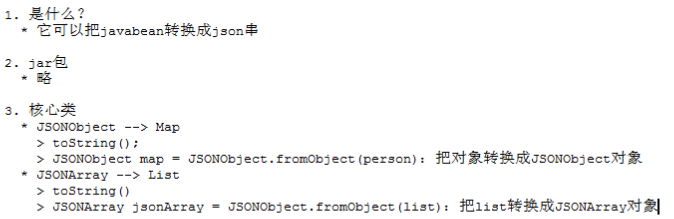
案例:
package cn.cmlx.web.json;

import java.util.ArrayList;
import java.util.List;

import org.junit.Test;

import net.sf.json.JSONArray;
import net.sf.json.JSONObject;

/**
 * 演示JSON-LIB小工具
 *
 * @author 赤名莉香
 *
 */
public class jsonlib1 {
    /*
     * 当map来用
     */
    @Test
    public void fun1() {
        JSONObject map = new JSONObject();
        map.put("name", "赤名莉香");
        map.put("age", 18);
        map.put("sex", "male");

        String s = map.toString();
        System.out.println(s);
    }

    /*
     * 当你已经有一个Person对象时,可以把Person转换成JSONObject对象
     */
    @Test
    public void fun2() {
        Person p = new Person("赤名莉香", 18, "male");
        // 把对象转换成JSONObject类型
        JSONObject map = JSONObject.fromObject(p);
        System.out.println(map.toString());

    }

    /**
     * JSONArray
     */
    @Test
    public void fun3() {
        Person p1 = new Person("赤名莉香", 18, "male");
        Person p2 = new Person("周芷若", 18, "male");
        JSONArray list = new JSONArray();
        list.add(p1);
        list.add(p2);
        System.out.println(list.toString());
    }
    /**
     * 原来就有一个List,我们需要把List转换成JSONArray
     */
    @Test
    public void fun4() {
        Person p1 = new Person("赤名莉香", 18, "male");
        Person p2 = new Person("周芷若", 18, "male");
        List<Person> list = new ArrayList<Person>();
        list.add(p1);
        list.add(p2);
        System.out.println(JSONArray.fromObject(list).toString());
    }
}
自己封装的小工具
ajaxutils.js
//创建异步对象
function createXMLHttpRequest() {
    try {
        return new XMLHttpRequest();// 大多数浏览器
    } catch (e) {
        try {
            return ActvieXObject("Msxml2.XMLHTTP");// IE6.0
        } catch (e) {
            try {
                return ActvieObject("Microsoft.XMLHTTP");// IE5.5及更早
            } catch (e) {
                alert("你的浏览器暂不能支持此功能!");
                throw e;
            }
        }
    }
}
/*
 * option对象有如下属性
 */
/*请求方式*/method,
/*请求的url*/url,
/*是否异步*/asyn,
/*请求体*/params,
/*回调方法*/callback,
/*服务器响应数据转换成什么类型*/type
function ajax(option){
    /*
     * 得到xmlHttp
     */
    var xmlHttp = createXMLHttpRequest();
    /*
     * 打开连接
     */
    if(!option.method){//默认为GET请求
        option.method = "GET";
    }
    if(option.asyn == undefined){//默认为异步处理
        option.asyn == true;
    }
    xmlHttp.open(option.method,option.url,option.asyn);
    /*
     * 判断是否为POST
     */
    if("POST" == option.method){
        xmlHttp.setRequestHeader("Content-Type","application/x-www-form-urlencoded");
    }
    /*
     * 发送请求
     */
    xmlHttp.send(option.params);
    /*
     * 注册监听
     */
    xmlHttp.onreadystatechange = function(){
        if(xmlHttp.readyState == 4 && xmlHttp.status == 200){//双重判断
            var data;
            //获取服务器的响应数据,进行准换
            if(!option.type){//如果type没有给值,name默认为文本
                data = xmlHttp.responseText;
            }
            else if(option.type == "xml"){
                data = xmlHttp.responseXML;
            }else if(option.type == "text"){
                data = xmlHttp.responseText;
            }else if(option.type == "json"){
                var text = xmlHttp.responseText;
                data = eval("(" + text +")");
            }
            //调用回调方法
            option.callback(data);
        }
    };
};
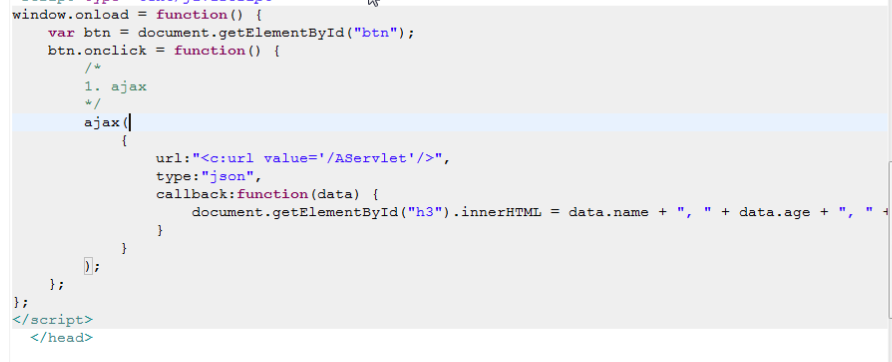
应用:

 浙公网安备 33010602011771号