freemarker
FreemarkerDemo
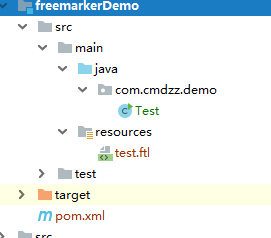
1.目录结构
2.pom.xml
<?xml version="1.0" encoding="UTF-8"?>
<project xmlns="http://maven.apache.org/POM/4.0.0"
         xmlns:xsi="http://www.w3.org/2001/XMLSchema-instance"
         xsi:schemaLocation="http://maven.apache.org/POM/4.0.0 http://maven.apache.org/xsd/maven-4.0.0.xsd">
    <modelVersion>4.0.0</modelVersion>

    <groupId>com.cmdzz.demo</groupId>
    <artifactId>freemarkerDemo</artifactId>
    <version>1.0-SNAPSHOT</version>
    <packaging>jar</packaging>

    <dependencies>
        <dependency>
            <groupId>org.freemarker</groupId>
            <artifactId>freemarker</artifactId>
            <version>2.3.23</version>
        </dependency>
    </dependencies>

</project>
3.test.ftl
<html>
<head>
    <title>demo</title>
    <meta charset="utf-8">
</head>
<body>
    <#--我是一个注释,不会输出  文件后缀名可以随便写 如ftl-->
    <!--html注释-->
${name},你好。${message}

</body>
</html>
4.Test.java
package com.cmdzz.demo;


import freemarker.template.Configuration;
import freemarker.template.Template;

import java.io.File;
import java.io.FileWriter;
import java.io.Writer;
import java.util.HashMap;
import java.util.Map;

/**
 * @author cmdzz
 * @date 2019/7/29 - 23:01
 */
public class Test {
    public static void main(String[] args) throws Exception{

        //1.创建一个配置对象
        Configuration configuration = new Configuration(Configuration.getVersion());
        //2.设置模板所在目录
        configuration.setDirectoryForTemplateLoading(new File("H:\\workspace_idea\\pinyougou\\freemarkerDemo\\src\\main\\resources"));
        //3.设置字符集
        configuration.setDefaultEncoding("utf-8");

        //4.获取模板对象
        Template template = configuration.getTemplate("test.ftl");

        //5.创建数据模型(可以是对象,也可以是map)
        Map map = new HashMap();
        map.put("name","张三");
        map.put("message","欢迎来到freemarker世界");

        //6.创建一个输出流对象
        Writer out = new FileWriter("d:\\test.html");

        //7.输出
        template.process(map,out);

        //8.关闭out
        out.close();


    }
}
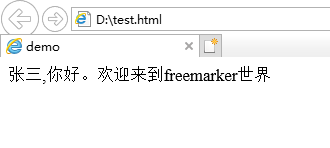
5.输出
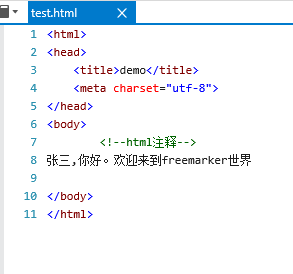
6.查看网页源码
学习记录,网上找的,自己写的都记录下来。如有雷同并且侵犯到您的权益,请联系本人修改。

 浙公网安备 33010602011771号