
rabbitMQ
RabbitMQ队列
远程登录rabbitMQ必须需要验证,所以必须设置一个远程用户。
安装最新版本的rabbitmq(3.3.1),并启用management plugin后,使用默认的账号guest登陆管理控制台,却提示登陆失败。
翻看官方的release文档后,得知由于账号guest具有所有的操作权限,并且又是默认账号,出于安全因素的考虑,guest用户只能通过localhost登陆使用,并建议修改guest用户的密码以及新建其他账号管理使用rabbitmq(该功能是在3.3.0版本引入的)。
虽然可以以比较猥琐的方式:将ebin目录下rabbit.app中loopback_users里的<<"guest">>删除,或者在配置文件rabbitmq.config中对该项进行配置,

并重启rabbitmq,可通过任意IP使用guest账号登陆管理控制台,但始终是违背了设计者的初衷,再加上以前对这一块了解也不多,因此有必要总结一下。
1. 用户管理
用户管理包括增加用户,删除用户,查看用户列表,修改用户密码。
相应的命令
(1) 新增一个用户
rabbitmqctl add_user Username Password
(2) 删除一个用户
rabbitmqctl delete_user Username
(3) 修改用户的密码
rabbitmqctl change_password Username Newpassword
rabbitmqctl是rabbitMQ的一个管理客户端。
(4) 查看当前用户列表
rabbitmqctl list_users
2. 用户角色
按照个人理解,用户角色可分为五类,超级管理员, 监控者, 策略制定者, 普通管理者以及其他。
(1) 超级管理员(administrator)
可登陆管理控制台(启用management plugin的情况下),可查看所有的信息,并且可以对用户,策略(policy)进行操作。
(2) 监控者(monitoring)
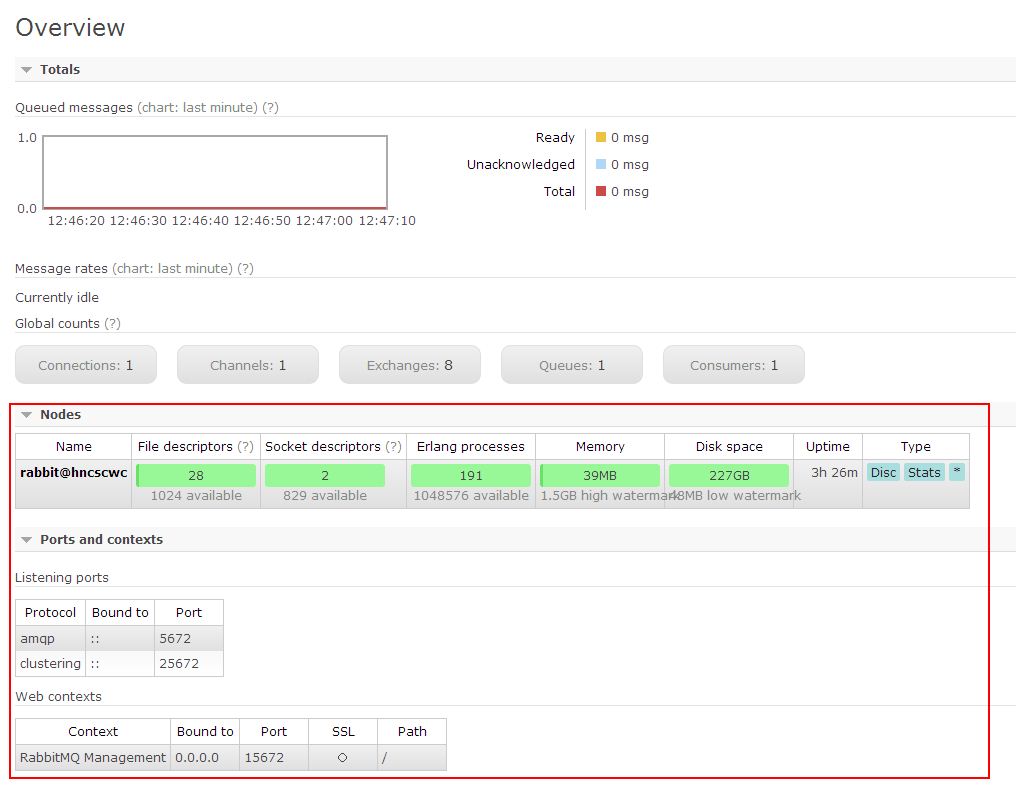
可登陆管理控制台(启用management plugin的情况下),同时可以查看rabbitmq节点的相关信息(进程数,内存使用情况,磁盘使用情况等)
(3) 策略制定者(policymaker)
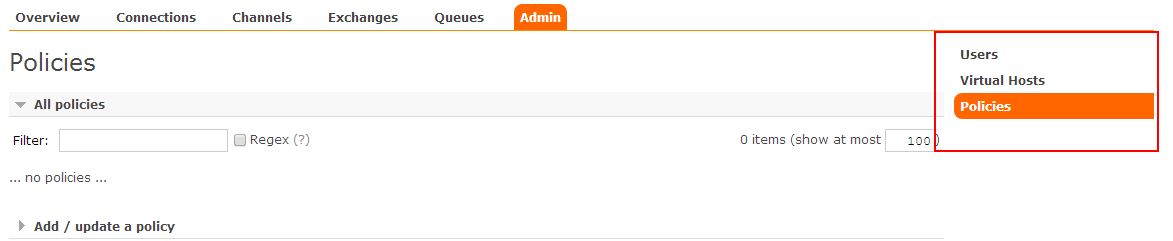
可登陆管理控制台(启用management plugin的情况下), 同时可以对policy进行管理。但无法查看节点的相关信息(上图红框标识的部分)。

与administrator的对比,administrator能看到这些内容
(4) 普通管理者(management)
仅可登陆管理控制台(启用management plugin的情况下),无法看到节点信息,也无法对策略进行管理。
(5) 其他
无法登陆管理控制台,通常就是普通的生产者和消费者。
了解了这些后,就可以根据需要给不同的用户设置不同的角色,以便按需管理。
设置用户角色的命令为:
rabbitmqctl set_user_tags User Tag
User为用户名, Tag为角色名(对应于上面的administrator,monitoring,policymaker,management,或其他自定义名称)。
也可以给同一用户设置多个角色,例如
rabbitmqctl set_user_tags hncscwc monitoring policymaker
3. 用户权限
用户权限指的是用户对exchange,queue的操作权限,包括配置权限,读写权限。配置权限会影响到exchange,queue的声明和删除。读写权限影响到从queue里取消息,向exchange发送消息以及queue和exchange的绑定(bind)操作。
例如: 将queue绑定到某exchange上,需要具有queue的可写权限,以及exchange的可读权限;向exchange发送消息需要具有exchange的可写权限;从queue里取数据需要具有queue的可读权限。详细请参考官方文档中"How permissions work"部分。
相关命令为:
(1) 设置用户权限
rabbitmqctl set_permissions -p VHostPath User ConfP WriteP ReadP
(2) 查看(指定hostpath)所有用户的权限信息
rabbitmqctl list_permissions [-p VHostPath]
(3) 查看指定用户的权限信息
rabbitmqctl list_user_permissions User
(4) 清除用户的权限信息
rabbitmqctl clear_permissions [-p VHostPath] User
===============================
命令详细参考官方文档:rabbitmqctl

-p后面的'/'表示这个用户可以操作所有的队列。后面的三个点表示读、写、配制的权限。中间有空格将三个点分开。
安装 http://www.rabbitmq.com/install-standalone-mac.html
安装python rabbitMQ module
1 pip install pika
2 or
3 easy_install pika
4 or
5 源码
6
7 https://pypi.python.org/pypi/pika
实现最简单的队列通信

send端
 1 import pika
 2
 3 credentials = pika.PlainCredentials('chao','123')
 4
 5 connection = pika.BlockingConnection(pika.ConnectionParameters(
 6     '192.168.14.28',credentials=credentials),)
 7 channel = connection.channel()
 8
 9 # 声明queue
10 channel.queue_declare(queue='hello')
11
12 # n RabbitMQ a message can never be sent directly to the queue, it always needs to go through an exchange.
13 channel.basic_publish(exchange='',
14                       routing_key='hello',
15                       body='Hello World!')
16 print(" [x] Sent 'Hello World!'")
17 connection.close()
receive端
 1 __author__ = 'Alex Li'
 2 import pika
 3
 4 credentials = pika.PlainCredentials('chao','123') #文本格式的验证方式,rabbitmq支持多种验证方式,这只是其中的一种,还有数据库验证等等
 5
 6 connection = pika.BlockingConnection(pika.ConnectionParameters(
 7     '192.168.14.28',credentials=credentials),)
 8 channel = connection.channel()
 9
10 # You may ask why we declare the queue again ‒ we have already declared it in our previous code.
11 # We could avoid that if we were sure that the queue already exists. For example if send.py program
12 # was run before. But we're not yet sure which program to run first. In such cases it's a good
13 # practice to repeat declaring the queue in both programs.
14 channel.queue_declare(queue='hello') #接收端和发送端都要声明,因为如果接收端先于发送端启动,那么就没有队列声明,就会报错,两端都声明了也没有问题,程序会先检测有没有声明,因为如果没有声明就声明一个,声明了就不管了
15
16
17 def callback(ch, method, properties, body):
18     print(" [x] Received %r" % body)
19
20
21 channel.basic_consume(callback,
22                       queue='hello',
23                       no_ack=True)
24 #发送多个信息,开多个receive端,接收消息的原则就是轮训接收,一人一个,默认是按顺序分发的
25 print(' [*] Waiting for messages. To exit press CTRL+C')
26 channel.start_consuming()
Work Queues

在这种模式下,RabbitMQ会默认把p发的消息依次分发给各个消费者(c),跟负载均衡差不多
消息提供者代码
消费者代码
此时,先启动消息生产者,然后再分别启动3个消费者,通过生产者多发送几条消息,你会发现,这几条消息会被依次分配到各个消费者身上
Doing a task can take a few seconds. You may wonder what happens if one of the consumers starts a long task and dies with it only partly done. With our current code once RabbitMQ delivers message to the customer it immediately removes it from memory. In this case, if you kill a worker we will lose the message it was just processing. We'll also lose all the messages that were dispatched to this particular worker but were not yet handled.如果worker荡了,那
这个worker所接到的不论是正在处理的还是没有处理的消息都会丢失。消息有风险。
But we don't want to lose any tasks. If a worker dies, we'd like the task to be delivered to another worker. 如果一个worker荡了,希望另外一个worker能接到消息。
In order to make sure a message is never lost, RabbitMQ supports message acknowledgments. An ack(nowledgement) is sent back from the consumer to tell RabbitMQ that a particular message had been received, processed and that RabbitMQ is free to delete it.
If a consumer dies (its channel is closed, connection is closed, or TCP connection is lost) without sending an ack, RabbitMQ will understand that a message wasn't processed fully and will re-queue it. If there are other consumers online at the same time, it will then quickly redeliver it to another consumer. That way you can be sure that no message is lost, even if the workers occasionally die.消息收到并且处理完成后会返回一个确认信息,并将信息删除,如果没有给send端确认信息ack,那么就代表receive端挂了,rabbitmq会认为这个消息没有被处理完成,那么rabbitmq会将消息重新放回队列中,如果另外一个消费者
在线,会将消息发给另外一个接收者,所以消息不会丢失。
There aren't any message timeouts; RabbitMQ will redeliver the message when the consumer dies. It's fine even if processing a message takes a very, very long time.只要消息没有处理完,没有收到确认信息(ack),那么就不会超时,会一直在队列中。
Message acknowledgments are turned on by default. In previous examples we explicitly turned them off via the no_ack=True flag. It's time to remove this flag and send a proper acknowledgment from the worker, once we're done with a task.确认信息的设置默认是开启的。如果设置no_ack=True,那么消息可能会丢失。
1 def callback(ch, method, properties, body):
2     print " [x] Received %r" % (body,)
3     time.sleep( body.count('.') )
4     print " [x] Done"
5     ch.basic_ack(delivery_tag = method.delivery_tag) #确认信息
6
7 channel.basic_consume(callback,
8                       queue='hello')
Using this code we can be sure that even if you kill a worker using CTRL+C while it was processing a message, nothing will be lost. Soon after the worker dies all unacknowledged messages will be redelivered
消息持久化
We have learned how to make sure that even if the consumer dies, the task isn't lost(by default, if wanna disable use no_ack=True). But our tasks will still be lost if RabbitMQ server stops.
When RabbitMQ quits or crashes it will forget the queues and messages unless you tell it not to. Two things are required to make sure that messages aren't lost: we need to mark both the queue and messages as durable.如果rabbitmq崩了,那么他将会忘记这个队列和所有的消息,除非我们进行持久化设置,需要做两件事
保证数据不丢失。
First, we need to make sure that RabbitMQ will never lose our queue. In order to do so, we need to declare it as durable:
1 channel.queue_declare(queue='hello', durable=True) #这样即便是rabbitmq崩了,这个队列依然存在,但是这个设置不能再已经声明的queue中进行设置,只能在新的queue中设置
Although this command is correct by itself, it won't work in our setup. That's because we've already defined a queue called hello which is not durable. RabbitMQ doesn't allow you to redefine an existing queue with different parameters and will return an error to any program that tries to do that. But there is a quick workaround - let's declare a queue with different name, for exampletask_queue:
1 channel.queue_declare(queue='task_queue', durable=True)
This queue_declare change needs to be applied to both the producer and consumer code.
At that point we're sure that the task_queue queue won't be lost even if RabbitMQ restarts. Now we need to mark our messages as persistent - by supplying a delivery_mode property with a value 2.
1 channel.basic_publish(exchange='',
2                       routing_key="task_queue",
3                       body=message,
4                       properties=pika.BasicProperties(
5                          delivery_mode = 2, # 表示给消息持久化
6                       ))

消息公平分发
如果Rabbit只管按顺序把消息发到各个消费者身上,不考虑消费者负载的话,很可能出现,一个机器配置不高的消费者那里堆积了很多消息处理不完,同时配置高的消费者却一直很轻松。为解决此问题,可以在各个消费者端,配置perfetch=1,意思就是告诉RabbitMQ在我这个消费者当前消息还没处理完的时候就不要再给我发新消息了。

1 channel.basic_qos(prefetch_count=1)
带消息持久化+公平分发的完整代码
生产者端
 1 import pika
 2 import sys
 3
 4 credentials = pika.PlainCredentials('chao','123')
 5
 6 connection = pika.BlockingConnection(pika.ConnectionParameters(
 7     '192.168.14.28',credentials=credentials),)
 8 channel = connection.channel()
 9
10 channel.queue_declare(queue='task_queue', durable=True)
11
12 message = ' '.join(sys.argv[1:]) or "Hello World!"
13 channel.basic_publish(exchange='',
14                       routing_key='task_queue',
15                       body=message,
16                       properties=pika.BasicProperties(
17                          delivery_mode = 2, # make message persistent
18                       ))
19 print(" [x] Sent %r" % message)
20 connection.close()
消费者端
import pika
import time

connection = pika.BlockingConnection(pika.ConnectionParameters(
        host='localhost'))
channel = connection.channel()

channel.queue_declare(queue='task_queue', durable=True)
print(' [*] Waiting for messages. To exit press CTRL+C')

def callback(ch, method, properties, body):
    print(" [x] Received %r" % body)
    time.sleep(body.count(b'.'))
    print(" [x] Done")
    ch.basic_ack(delivery_tag = method.delivery_tag)

channel.basic_qos(prefetch_count=1)#在consume之前加上这个,声明没有处理完消息之前不能再给我发消息了
channel.basic_consume(callback,
                      queue='task_queue')

channel.start_consuming()
Publish\Subscribe(消息发布\订阅)
之前的例子都基本都是1对1的消息发送和接收,即消息只能发送到指定的queue里,但有些时候你想让你的消息被所有的Queue收到,类似广播的效果,这时候就要用到exchange了,
An exchange is a very simple thing. On one side it receives messages from producers and the other side it pushes them to queues. The exchange must know exactly what to do with a message it receives. Should it be appended to a particular queue? Should it be appended to many queues? Or should it get discarded. The rules for that are defined by the exchange type.
Exchange在定义的时候是有类型的,以决定到底是哪些Queue符合条件,可以接收消息
fanout: 所有bind到此exchange的queue都可以接收消息
direct: 通过routingKey和exchange决定的那个唯一的queue可以接收消息
topic:所有符合routingKey(此时可以是一个表达式)的routingKey所bind的queue可以接收消息
表达式符号说明:#代表一个或多个字符,*代表任何字符
例:#.a会匹配a.a,aa.a,aaa.a等
*.a会匹配a.a,b.a,c.a等
注:使用RoutingKey为#,Exchange Type为topic的时候相当于使用fanout
headers: 通过headers 来决定把消息发给哪些queue

fanout
消息publisher
 1 import pika
 2 import time
 3 import sys
 4
 5
 6 credentials = pika.PlainCredentials('chao','123')
 7
 8 connection = pika.BlockingConnection(pika.ConnectionParameters(
 9     '192.168.14.28',credentials=credentials),)
10 channel = connection.channel()
11
12 # 声明queue
13 channel.queue_declare(queue='task_queue',durable=True)
14 #这个durable=True不能再已经声明的queue中进行修改。只能重新声明一个新queue的时候设置,队列持久化
15
16 channel.exchange_declare(exchange='logs',  # exchange='logs'这代表exchange的名字,一个发送端可以连接多个exchange,每个exchange可以关联不同的queue
17                          type='fanout')  # 这就表示该exchange的类型为广播类型了
18
19 # n RabbitMQ a message can never be sent directly to the queue, it always needs to go through an exchange.
20
21 message = ' '.join(sys.argv[1:]) or "Hello World! %s" % time.time() #允许命令行传参数,命令行不传参数那么message就等于"Hello World! %s" % time.time()
22
23 channel.basic_publish(exchange='logs', #消息先发送给exchange,exchange为fanout类型,并且routing_key为空,就发送给所有的queue
24                       routing_key='',#routing_key='',表示不指定发到哪个queue了,全发
25                       body=message,
26                       # properties=pika.BasicProperties(
27                       #     delivery_mode=2,  # 消息持久化
28                       # )
29                       )
30 print(" [x] Sent %r" % message)
31 connection.close()
消息subscriber
 1 __author__ = 'Alex Li'
 2 import pika
 3
 4
 5 credentials = pika.PlainCredentials('chao','123')
 6
 7 connection = pika.BlockingConnection(pika.ConnectionParameters(
 8     '192.168.14.28',credentials=credentials),)
 9 channel = connection.channel()
10
11 channel.exchange_declare(exchange='logs', #防止接收端先启动会报错,所以也需要声明一下
12                          type='fanout')
13
14 result = channel.queue_declare(exclusive=True)  # 不指定queue名字,rabbit会随机分配一个名字,exclusive=True会在使用此queue的消费者断开后,自动将queue删除,相当于unique,唯一的,真正生产中,很多的消费者获取消息之后就不再获取消息了,但是rabbitmq很少重启,这样就会很多queue堆积,所以要设置这个
15 queue_name = result.method.queue #查看queue的name
16
17 #如果发送端发送消息时,接收端还没有启动,也就是还没有queue绑定,所以开启之前的消息收不到,这就是广播
18 channel.queue_bind(exchange='logs',
19                    queue=queue_name) #绑定exchange
20
21 print(' [*] Waiting for logs. To exit press CTRL+C')
22
23
24 def callback(ch, method, properties, body):
25     print(" [x] %r" % body)
26
27
28 channel.basic_consume(callback,
29                       queue=queue_name,
30                       #no_ack=True
31                       )
32
33 channel.start_consuming()
有选择的接收消息(exchange type=direct)
RabbitMQ还支持根据关键字发送,即:队列绑定关键字,发送者将数据根据关键字发送到消息exchange,exchange根据 关键字 判定应该将数据发送至指定队列。

publisher
 1 import pika
 2 import sys
 3
 4 credentials = pika.PlainCredentials('chao','123')
 5
 6 connection = pika.BlockingConnection(pika.ConnectionParameters(
 7     '192.168.14.28',credentials=credentials),)
 8 channel = connection.channel()
 9
10 channel.exchange_declare(exchange='direct_logs',
11                          type='direct')
12
13 severity = sys.argv[1] if len(sys.argv) > 1 else 'info' #严重程度,以此分组,也可认为是日志级别
14 # print(sys.argv[1],'<<<<<<<<<<<>>>>>>>>>>>>>',sys.argv)
15 message = ' '.join(sys.argv[2:]) or 'Hello World!'
16 channel.basic_publish(exchange='direct_logs',
17                       routing_key=severity,#将消息发送到一组制定的队列中
18                       body=message)
19 print(" [x] Sent %r:%r" % (severity, message))
20 connection.close()
subscriber
 1 import pika
 2 import sys
 3
 4 credentials = pika.PlainCredentials('chao','123')
 5
 6 connection = pika.BlockingConnection(pika.ConnectionParameters(
 7     '192.168.14.28',credentials=credentials),)
 8 channel = connection.channel()
 9
10 channel.exchange_declare(exchange='direct_logs',
11                          type='direct')
12
13 result = channel.queue_declare(exclusive=True)
14 queue_name = result.method.queue
15
16 severities = sys.argv[1:] #可以输入过个级别,info,warning,error
17 if not severities:
18     sys.stderr.write("Usage: %s [info] [warning] [error]\n" % sys.argv[0])
19     sys.exit(1)
20
21 for severity in severities: #循环绑定
22     channel.queue_bind(exchange='direct_logs',
23                        queue=queue_name,
24                        routing_key=severity)
25
26 print(' [*] Waiting for logs. To exit press CTRL+C')
27
28
29 def callback(ch, method, properties, body):
30     print(" [x] %r:%r" % (method.routing_key, body))
31
32
33 channel.basic_consume(callback,
34                       queue=queue_name,
35                       #no_ack=True
36                       )
37
38 channel.start_consuming()
sys.argv的设置:

更细致的消息过滤 topic
Although using the direct exchange improved our system, it still has limitations - it can't do routing based on multiple criteria.
In our logging system we might want to subscribe to not only logs based on severity, but also based on the source which emitted the log. You might know this concept from the syslog unix tool, which routes logs based on both severity (info/warn/crit...) and facility (auth/cron/kern...).
That would give us a lot of flexibility - we may want to listen to just critical errors coming from 'cron' but also all logs from 'kern'.

publisher
 1 import pika
 2 import sys
 3
 4 credentials = pika.PlainCredentials('chao','123')
 5
 6 connection = pika.BlockingConnection(pika.ConnectionParameters(
 7     '192.168.14.28',credentials=credentials),)
 8 channel = connection.channel()
 9
10 channel.exchange_declare(exchange='topic_logs',
11                          type='topic')
12
13 routing_key = sys.argv[1] if len(sys.argv) > 1 else 'anonymous.info'
14 message = ' '.join(sys.argv[2:]) or 'Hello World!'
15 channel.basic_publish(exchange='topic_logs',
16                       routing_key=routing_key,
17                       body=message)
18 print(" [x] Sent %r:%r" % (routing_key, message))
19 connection.close()
subscriber
 1 import pika
 2 import sys
 3 credentials = pika.PlainCredentials('chao','123')
 4
 5 connection = pika.BlockingConnection(pika.ConnectionParameters(
 6     '192.168.14.28',credentials=credentials),)
 7 channel = connection.channel()
 8
 9 channel.exchange_declare(exchange='topic_logs',
10                          type='topic')
11
12 result = channel.queue_declare(exclusive=True)
13 queue_name = result.method.queue
14
15 binding_keys = sys.argv[1:]
16 if not binding_keys:
17     sys.stderr.write("Usage: %s [binding_key]...\n" % sys.argv[0])
18     sys.exit(1)
19
20 for binding_key in binding_keys:
21     channel.queue_bind(exchange='topic_logs',
22                        queue=queue_name,
23                        routing_key=binding_key)
24
25 print(' [*] Waiting for logs. To exit press CTRL+C')
26
27
28 def callback(ch, method, properties, body):
29     print(" [x] %r:%r" % (method.routing_key, body))
30
31
32 channel.basic_consume(callback,
33                       queue=queue_name,
34                       #no_ack=True
35                       )
36
37 channel.start_consuming()
To receive all the logs run:
python receive_logs_topic.py "#" 所有的消息都收
To receive all logs from the facility "kern": 内核的
python receive_logs_topic.py "kern.*" 不管什么级别的所有的内核消息都收
Or if you want to hear only about "critical" logs:
python receive_logs_topic.py "*.critical" 级别为critical的所有来源的消息都收
You can create multiple bindings:
python receive_logs_topic.py "kern.*" "*.critical"
And to emit a log with a routing key "kern.critical" type:
python emit_log_topic.py "kern.critical" "A critical kernel error"
Remote procedure call (RPC远程执行调用)消息处理完成之后返回结果(基于socket的短连接)
To illustrate how an RPC service could be used we're going to create a simple client class. It's going to expose a method named call which sends an RPC request and blocks until the answer is received:
1 fibonacci_rpc = FibonacciRpcClient()
2 result = fibonacci_rpc.call(4)
3 print("fib(4) is %r" % result)

RPC server
 1 import pika
 2 import time
 3
 4 credentials = pika.PlainCredentials('chao','123')
 5
 6 connection = pika.BlockingConnection(pika.ConnectionParameters(
 7     '192.168.14.28',credentials=credentials),)
 8 channel = connection.channel()
 9
10 channel.queue_declare(queue='rpc_queue')
11
12
13 def fib(n):
14     if n == 0:
15         return 0
16     elif n == 1:
17         return 1
18     else:
19         return fib(n - 1) + fib(n - 2)
20
21
22 def on_request(ch, method, props, body):
23     n = int(body)
24
25     print(" [.] fib(%s)" % n)
26     response = fib(n)
27
28     ch.basic_publish(exchange='',
29                      routing_key=props.reply_to,
30                      properties=pika.BasicProperties(correlation_id= \
31                                                          props.correlation_id),
32                      body=str(response))
33     ch.basic_ack(delivery_tag=method.delivery_tag) #确认信息
34
35
36 channel.basic_qos(prefetch_count=1)
37 channel.basic_consume(on_request, queue='rpc_queue')
38
39 print(" [x] Awaiting RPC requests")
40 channel.start_consuming()
RPC client
 1 import pika
 2 import uuid
 3 #斐波那契的例子:
 4 class FibonacciRpcClient(object):
 5     def __init__(self):
 6         self.connection = pika.BlockingConnection(pika.ConnectionParameters(
 7             '192.168.14.28', credentials= pika.PlainCredentials('chao','123')))
 8
 9         self.channel = self.connection.channel()
10
11         result = self.channel.queue_declare(exclusive=True)
12         self.callback_queue = result.method.queue #定义了一个随机的rpc_result queue
13
14         self.channel.basic_consume(self.on_response, #就是callback函数
15                                    queue=self.callback_queue)
16
17     def on_response(self, ch, method, props, body):
18         if self.corr_id == props.correlation_id:
19             self.response = body
20
21     def call(self, n):
22         self.response = None #消息接收之后,会把结果返回给self.response
23         self.corr_id = str(uuid.uuid4())
24         self.channel.basic_publish(exchange='',
25                                    routing_key='rpc_queue',
26                                    properties=pika.BasicProperties(
27                                        reply_to=self.callback_queue,#指定返回结果的queue,动态生成,reply_to固定参数
28                                        correlation_id=self.corr_id,#为了保证返回的结果和发出的信息能够对应上,correlation_id也是固定的参数
29                                    ),
30                                    body=str(n))
31         while self.response is None:
32             self.connection.process_data_events() #以非阻塞的方式去检查有没有新消息,有的话就接收
33         return int(self.response)
34
35
36 fibonacci_rpc = FibonacciRpcClient()
37
38 print(" [x] Requesting fib(30)")
39 response = fibonacci_rpc.call(30) #斐波那契数列的第三十位的值
40 print(" [.] Got %r" % response)

远程执行命令的:
server:
 1 import pika
 2 import time
 3 import subprocess
 4
 5
 6 credentials = pika.PlainCredentials('chao','123')
 7
 8 connection = pika.BlockingConnection(pika.ConnectionParameters(
 9     '192.168.14.5',credentials=credentials),)
10 channel = connection.channel()
11
12 channel.queue_declare(queue='rpc_queue')
13
14
15 def CMD(cmd):
16     cmd_obj = subprocess.Popen(cmd,shell=True,stdout=subprocess.PIPE,stderr=subprocess.PIPE)
17     #通过管道的原因是每执行一条命令就是起一个新的进程,要通过python去拿新进程的结果就只能用管道获取,就是将
18     #两个内存打通了
19     cmd_result = cmd_obj.stdout.read() + cmd_obj.stderr.read() #获取两者,因为有可能在有错误的同时还有返回结果
20     return cmd_result
21 def on_request(ch, method, props, body):
22
23
24     print(" [.]recv CMD(%s)" % body)
25     response = CMD(body)
26
27     ch.basic_publish(exchange='',
28                      routing_key=props.reply_to,
29                      properties=pika.BasicProperties(correlation_id= \
30                                                          props.correlation_id),
31                      body=response)
32     ch.basic_ack(delivery_tag=method.delivery_tag) #确认信息
33
34
35 channel.basic_qos(prefetch_count=1)
36 channel.basic_consume(on_request, queue='rpc_queue')
37
38 print(" [x] Awaiting RPC requests")
39 channel.start_consuming()
client:
 1 #!/usr/bin/env python
 2 # -*- coding:utf-8 -*-
 3 #__author: chao
 4 #date: 2017/2/25
 5
 6 import pika
 7 import uuid
 8 #斐波那契的例子:
 9 class FibonacciRpcClient(object):
10     def __init__(self):
11         self.connection = pika.BlockingConnection(pika.ConnectionParameters(
12             '192.168.14.5', credentials= pika.PlainCredentials('chao','123')))
13
14         self.channel = self.connection.channel()
15
16         result = self.channel.queue_declare(exclusive=True)
17         self.callback_queue = result.method.queue #定义了一个随机的rpc_result queue
18
19         self.channel.basic_consume(self.on_response, #就是callback函数
20                                    queue=self.callback_queue)
21
22     def on_response(self, ch, method, props, body):
23         if self.corr_id == props.correlation_id:
24             self.response = body
25
26     def call(self, n):
27         self.response = None #消息接收之后,会把结果返回给self.response
28         self.corr_id = str(uuid.uuid4())
29         self.channel.basic_publish(exchange='',
30                                    routing_key='rpc_queue',
31                                    properties=pika.BasicProperties(
32                                        reply_to=self.callback_queue,#指定返回结果的queue,动态生成,reply_to固定参数
33                                        correlation_id=self.corr_id,#为了保证返回的结果和发出的信息能够对应上,correlation_id也是固定的参数
34                                    ),
35                                    body=str(n))
36         while self.response is None:
37             self.connection.process_data_events() #以非阻塞的方式去检查有没有新消息,有的话就接收
38         return self.response
39
40
41 fibonacci_rpc = FibonacciRpcClient()
42
43 print(" [x] Requesting CMD ifconfig")
44 response = fibonacci_rpc.call('ifconfig') #命令
45 print(" [.] Got",response)

 浙公网安备 33010602011771号