
oracle 03-08 undo
Managing Undo Data
Objectives
After completing this lesson, you should be able to:
• Explain DML and undo data generation
• Monitor and administer undo data
• Describe the difference between undo data and redo data
• Configure undo retention
• Guarantee undo retention
• Enable temporary undo
• Use the Undo Advisor
目标
完成本课程后,您应该能够:
解释DML和撤消数据生成
监视和管理撤消数据
描述撤消数据和就绪数据之间的区别
配置和保留
保证和保留
启用临时撤消
使用撤消顾问
Undo Data: Overview
Undo data is:
• A record of the action of a transaction
• Captured for every transaction that changes data
• Retained at least until the transaction is ended
• Used to support:
– Rollback operations
– Read-consistent queries
– Oracle Flashback Query, Oracle Flashback Transaction, and Oracle Flashback Table
– Recovery from failed transactions
撤消日期:概述
撤消日期为:
交易行为的记录
为每个更改数据的事务捕获
至少在交易结束前保留
用于支持:
回滚操作
读取一致性查询
Oracle Flashback闪回查询、Oracle Flashback事务和Oracle Flashback表
从失败的事务中恢复
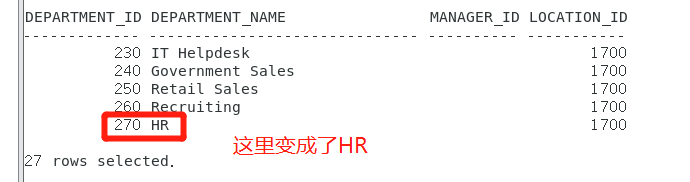
SQL> update departments set DEPARTMENT_NAME='HR' where DEPARTMENT_ID=270;
SQL> select * from departments;

Transactions and Undo Data
• Each transaction is assigned to only one undo segment.
• An undo segment can service more than one transaction at a time.
事务处理和撤消数据
每个事务只分配给一个撤消段。
撤消段一次可以服务多个事务。
DML是以select、insert、update、delete开头的所有SQL语句。
DML发生时,可通过rollback语句回撤
undo与redo
undo:撤销,也就是取消之前的操作。
redo:重做,重新执行一遍之前的操作。
什么是REDO
REDO记录transaction logs,分为online和archived。以恢复为目的。
比如,机器停电,那么在重起之后需要online redo logs去恢复系统到失败点。
比如,磁盘坏了,需要用archived redo logs和online redo logs去恢复数据。
比如,truncate一个表或其他的操作,想恢复到之前的状态,同样也需要。
什么是UNDO
REDO 是为了重新实现你的操作,而UNDO相反,是为了撤销你做的操作,比如你得一个TRANSACTION执行失败了或你自己后悔了,则需要用 ROLLBACK命令回退到操作之前。回滚是在逻辑层面实现而不是物理层面,因为在一个多用户系统中,数据结构,blocks等都在时时变化,比如我们 INSERT一个数据,表的空间不够,扩展了一个新的EXTENT,我们的数据保存在这新的EXTENT里,其它用户随后也在这EXTENT里插入了数据,而此时我想ROLLBACK,那么显然物理上讲这EXTENT撤销是不可能的,因为这么做会影响其他用户的操作。所以,ROLLBACK是逻辑上回滚,比如对INSERT来说,那么ROLLBACK就是DELETE了。
Storing Undo Information
• Undo information is stored in undo segments, which are stored in an undo tablespace.
• Undo tablespaces:
– Are used only for undo segments
– Have special recovery considerations
– May be associated with only a single instance
– Require that only one of them be the current writable undo tablespace for a given instance at any given time
存储撤消信息
撤销信息存储在撤销段中,撤销段存储在撤销表空间中。
撤消表空间:
仅用于撤消段
有特殊的恢复注意事项
可能只与一个实例关联
要求在任何给定时间,只有其中一个是给定实例的当前可写撤消表空间
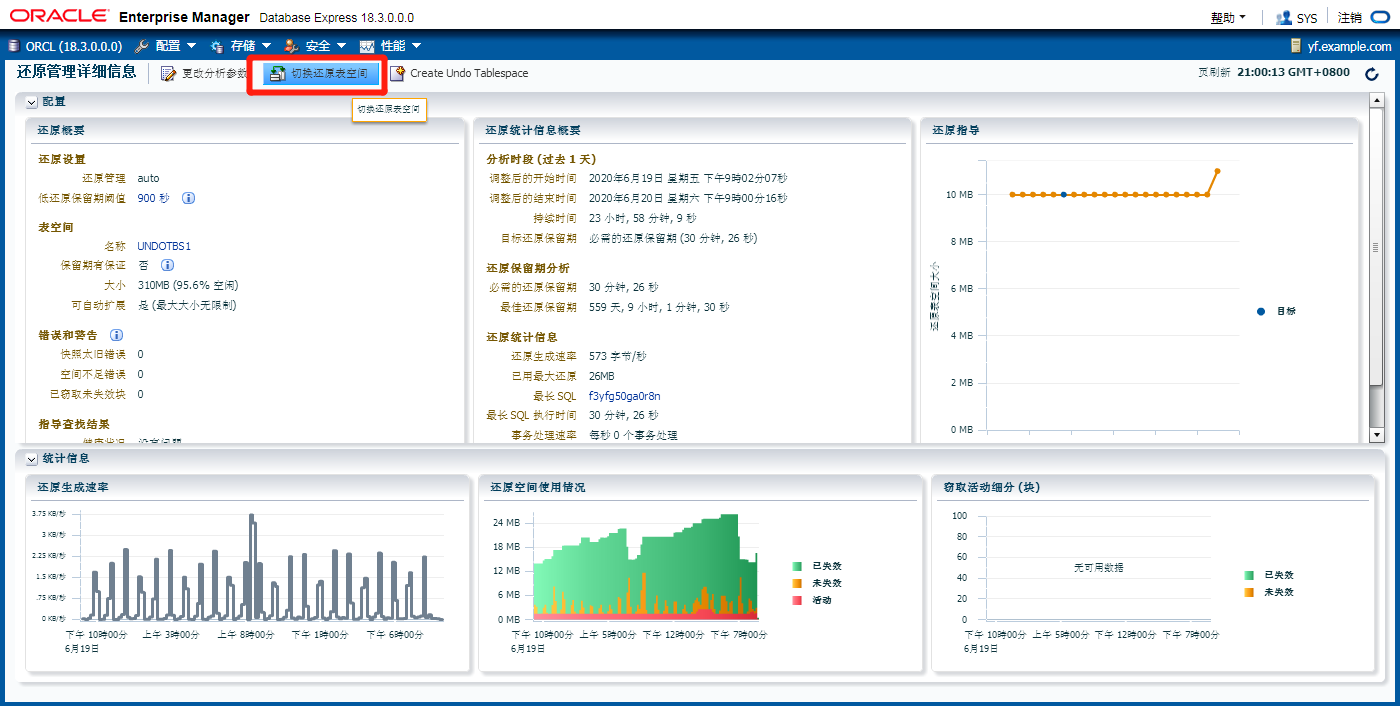
一个数据库仅能对应一个活跃的undo表空间,但可以在不同的undo表空间中进行切换
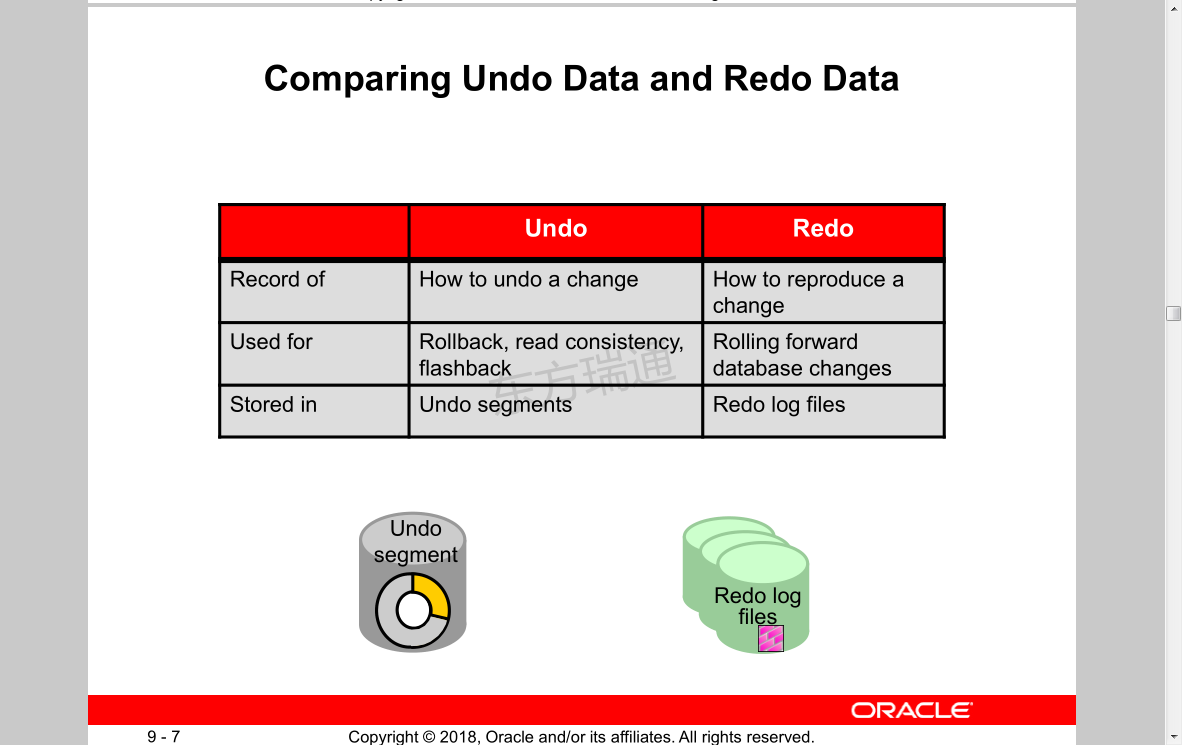
Comparing Undo Data and Redo Data
Redo log
files
Undo
segment
Undo Redo
Record of How to undo a change How to reproduce a
change
Used for Rollback, read consistency,
flashback
Rolling forward
database changes
Stored in Undo segments Redo log files
比较撤消数据和重做数据
就绪日志
文件夹
撤销。
段
撤消就绪
如何撤消更改的记录如何复制
改变
用于回滚、读取一致性,
倒叙
向前滚动
数据库更改
存储在撤消段就绪日志文件中
Managing Undo
Automatic undo management:
• Fully automated management of undo data and space in a dedicated undo tablespace
• For all sessions
• Self-tuning in AUTOEXTEND tablespaces to satisfy long-running queries
• Self-tuning in fixed-size tablespaces for best retention
DBA tasks in support of Flashback operations:
• Configuring undo retention
• Changing undo tablespace to a fixed size
• Avoiding space and “snapshot too old” errors
撤消管理
自动撤消管理:
在专用的撤消表空间中对撤消数据和空间进行全自动管理
对于所有会话
自动扩展表空间中的自调整以满足长时间运行的查询
在固定大小的表空间中进行自我调整以获得最佳保留
支持闪回操作的DBA任务:
配置和保留
将撤消表空间更改为固定大小
避免空间和快照太旧的错误
Configuring Undo Retention
• UNDO_RETENTION specifies (in seconds) how long already committed undo information is to be retained.
• Set this parameter when:
– The undo tablespace has the AUTOEXTEND option enabled
– You want to set undo retention for LOBs
– You want to guarantee retention
撤消保留配置
撤消保留指定(以秒为单位)保留已提交的撤消信息的时间。
在以下情况下设置此参数:
undo表空间启用了AUTOEXTEND选项
要为LOB设置撤消保留
你想保证留下来
SQL> show parameter undo 显示undo参数
NAME TYPE VALUE
------------------------------------ ----------- ------------------------------
temp_undo_enabled boolean FALSE
undo_management string AUTO
undo_retention integer 900
undo_tablespace string UNDOTBS1
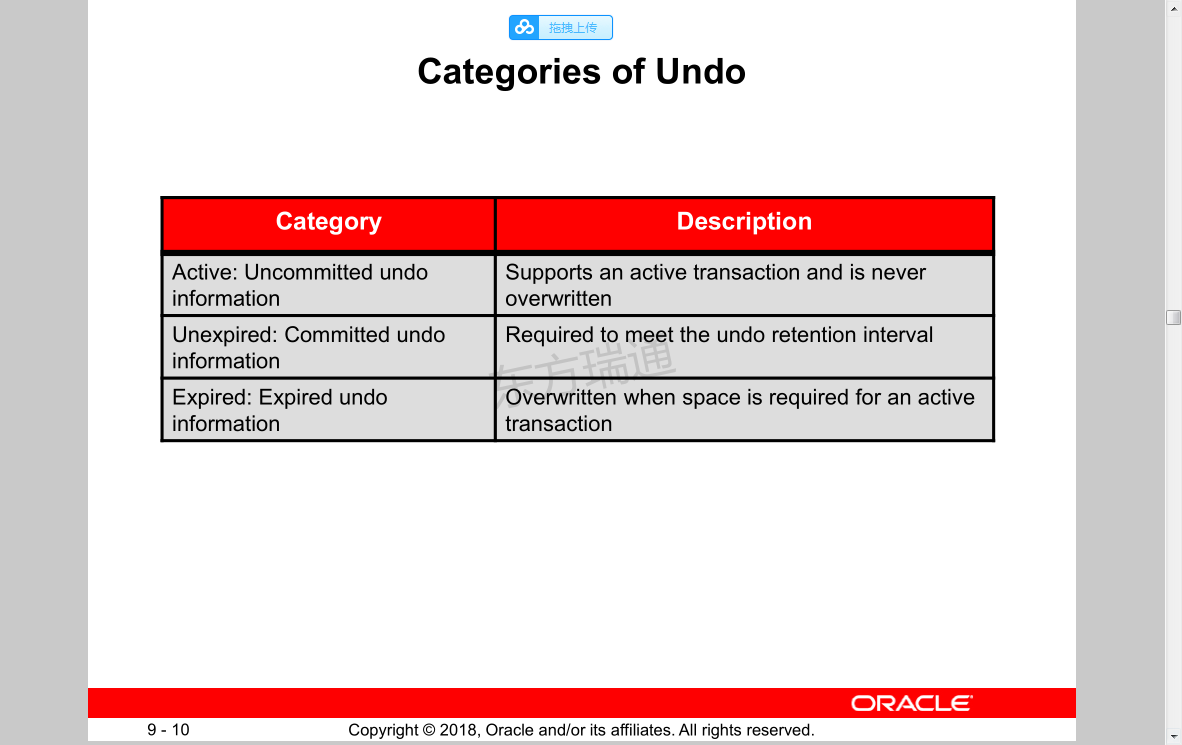
Categories of Undo
Category Description
Active: Uncommitted undo information
Supports an active transaction and is never overwritten
Unexpired: Committed undo information
Required to meet the undo retention interval
Expired: Expired undo information
Overwritten when space is required for an active transaction
撤销的类别
类别
活动:未提交和信息
支持活动事务且从不超过
未到期:承诺和信息
需要满足撤消保留间隔
过期:过期和信息
当活动事务需要空间时覆盖
Changing an Undo Tablespace to a Fixed Size
• Rationale:
– Supporting Flashback operations
– Limiting tablespace growth
• Steps:
1. Run regular workload.
2. Self-tuning mechanism establishes minimum required size.
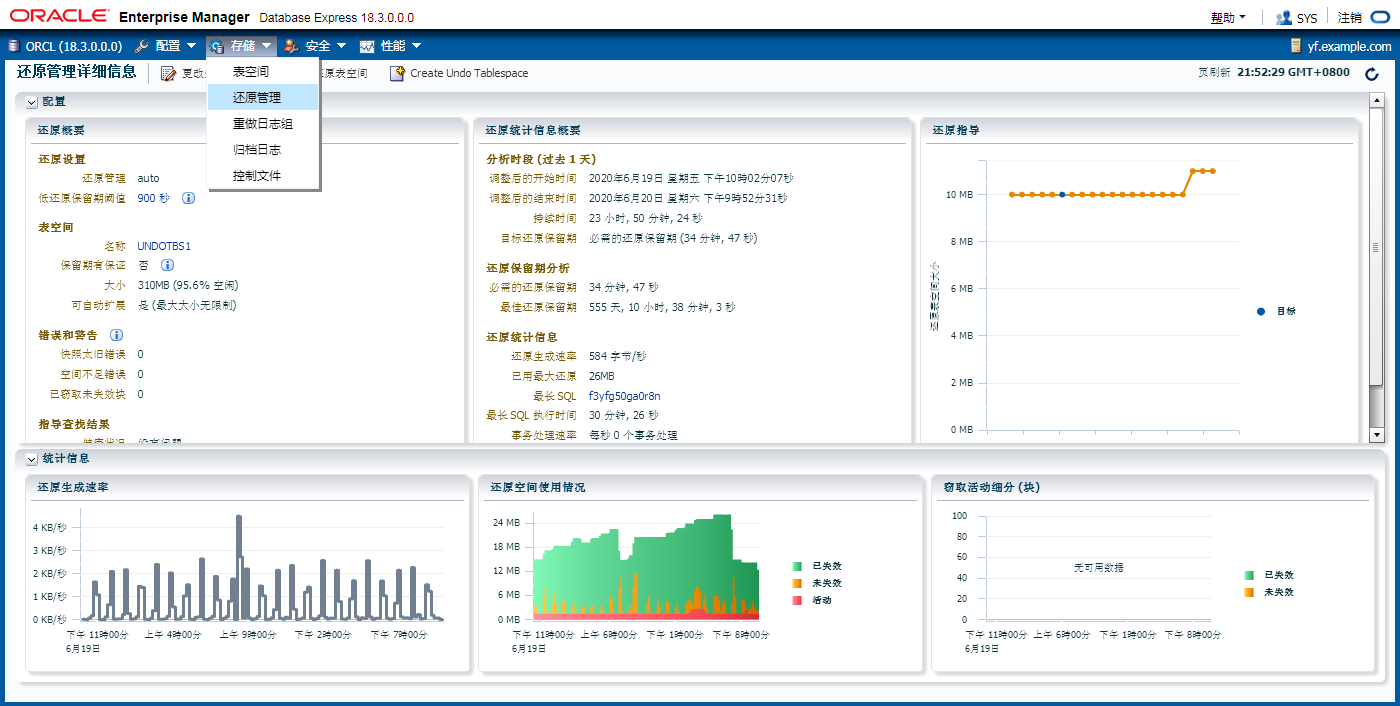
3. (Optional) Use the Enterprise Manager Cloud Control Undo Advisor, which calculates required size for future growth.
4. (Optional) Change undo tablespace to a fixed size.
将撤消表空间更改为固定大小
理性的:
支持闪回操作
限制表空间增长
步骤:
一。运行常规工作负载。
2。自调整机制建立所需的最小大小。
三个。(可选)使用Enterprise Manager云控制撤消顾问,它计算未来增长所需的大小。
四个。(可选)将撤消表空间更改为固定大小
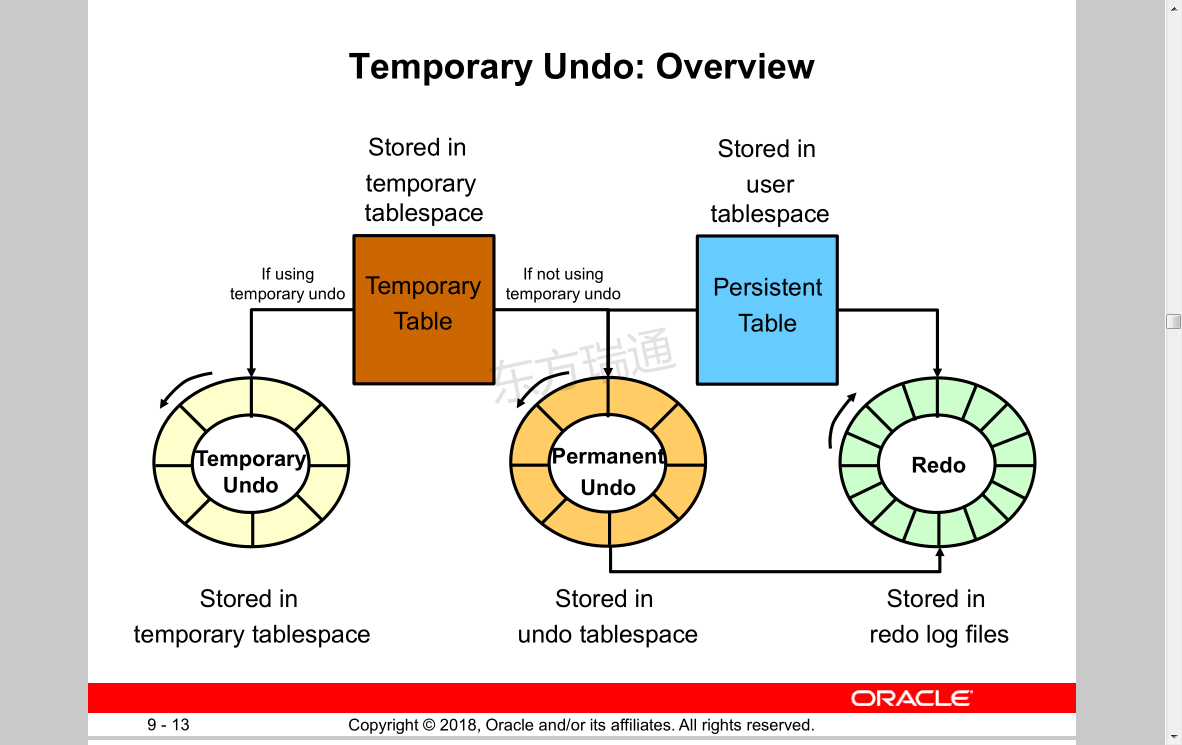
Temporary Undo: Overview
Temporary Undo: Benefits
• Temporary undo reduces the amount of undo stored in the undo tablespaces.
• Temporary undo reduces the size of the redo log.
• Temporary undo enables DML operations on temporary tables in a physical standby database with the Oracle Active Data Guard option.
临时撤消:好处
临时撤消减少了撤消表空间中存储的撤消量。
临时撤消会减小就绪日志的大小。
临时撤消使用Oracle Active Data Guard选项对物理备用数据库中的临时表启用DML操作。
Enabling Temporary Undo
• Enable temporary undo for a session:
SQL> ALTER session SET temp_undo_enabled = true;
• Enable temporary undo for the database instance:
SQL> ALTER system SET temp_undo_enabled = true;
• Temporary undo mode is selected when a session first uses a temporary object.
启用临时撤消
为会话启用临时撤消:
为数据库实例启用临时撤消:
当会话首次使用临时对象时,将选择临时撤消模式。
Monitoring Temporary Undo
SELECT to_char(BEGIN_TIME,'dd/mm/yy hh24:mi:ss'),
TXNCOUNT,MAXCONCURRENCY,UNDOBLKCNT,USCOUNT,NOSPACEERRCNT
FROM V$TEMPUNDOSTAT;
TO_CHAR(BEGIN_TIM TXNCOUNT MAXCONCURRENCY UNDOBLKCNT USCOUNT NOSPACEERRCNT
----------------- -------- -------------- ---------- ------- -------------
…
19/08/12 22:19:44 0 0 0 0 0
19/08/12 22:09:44 0 0 0 0 0
…
19/08/12 13:09:44 0 0 0 0 0
19/08/12 12:59:44 3 1 24 1 0
576 rows selected.
SQL>
查看当前undo的使用情况
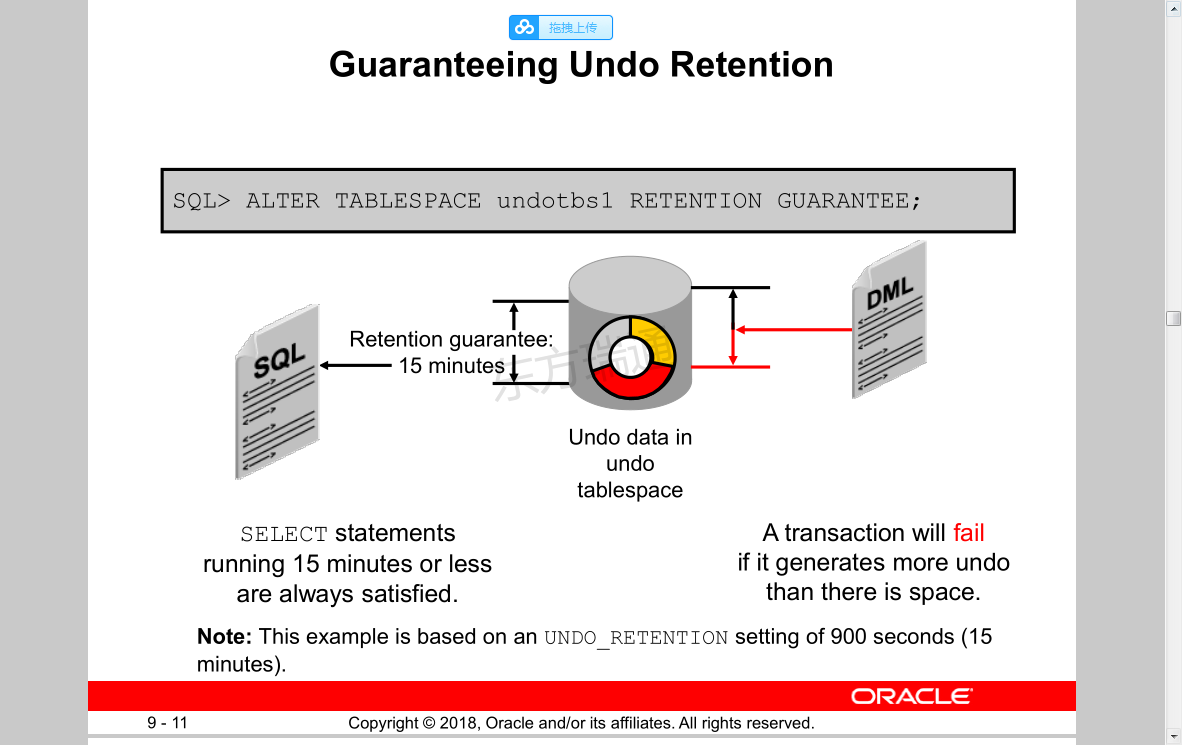
Quiz
All you need to do to guarantee that all queries under 15 minutes will find the undo data needed for read consistency, is set the UNDO_RETENTION parameter to 15 minutes.
测验。
要确保15分钟内的所有查询都能找到读取一致性所需的撤消数据,只需将撤消保留参数设置为15分钟。错误
需要用下面语句确保才行
SQL> ALTER TABLESPACE undotbs1 RETENTION GUARANTEE;
Summary
In this lesson, you should have learned how to:
• Explain DML and undo data generation
• Monitor and administer undo data
• Describe the difference between undo data and redo data
• Configure undo retention
• Guarantee undo retention
• Enable temporary undo
• Use the Undo Advisor
摘要
在本课中,您应该学习如何:
解释DML和撤消数据生成
监视和管理撤消数据
描述撤消数据和就绪数据之间的区别
配置和保留
保证和保留
启用临时撤消
使用撤消顾问

 浙公网安备 33010602011771号