使用 HTML + JavaScript 建立文件树
文章目录
一、文件树
文件树是现代文件管理系统中的核心组件,通过树形结构展示文件和文件夹的层级关系,让用户能够直观地浏览和管理文件。这种界面设计提供了清晰的层次结构,支持文件的展开收起、选中、重命名、删除等操作,极大提升了用户体验和操作效率。本文将介绍如何使用 HTML、CSS 和 JavaScript 实现文件树。
二、效果演示
文件树具有丰富的交互功能。用户可以通过单击选中某个文件或文件夹,被选中的节点会高亮显示。双击文件夹可以展开或收起其子内容,双击文件会触发打开操作。每个节点右侧都有操作按钮,点击重命名按钮可以修改文件名,删除按钮可以移除节点。鼠标悬停在节点上时,会显示操作按钮并改变背景颜色。界面还提供了统计信息,显示当前文件树中项目的总数。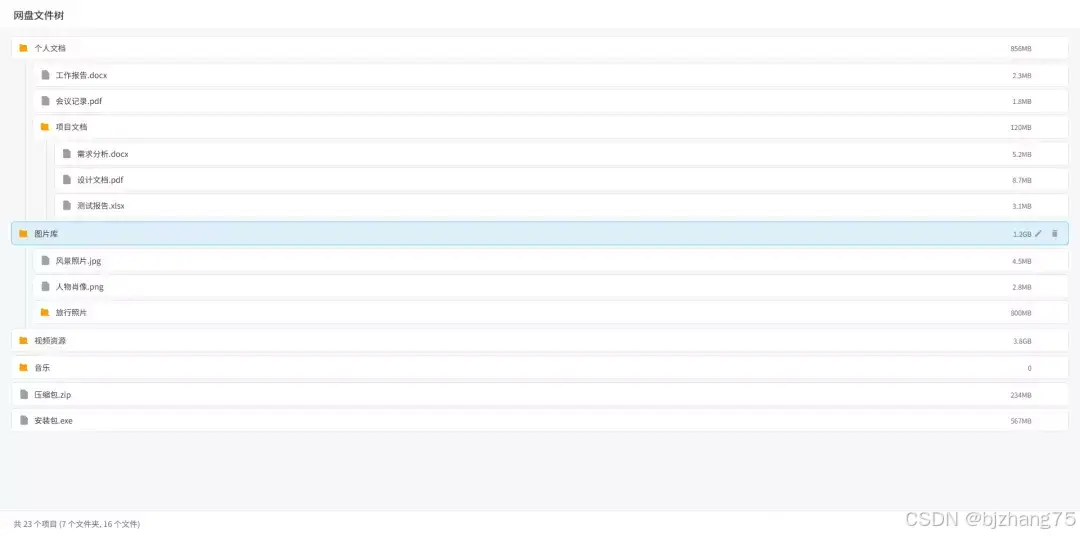
三、系统分析
1、页面结构
页面主要包括以下几个区域:
1.1 文件树区域
展示文件和文件夹的树形结构。
<div class="file-tree" id="fileTree">
<div class="loading">正在加载文件树...</div>
</div>
1.2 统计信息区域
<div class="stats">
<span id="itemCount">共 0 个项目</span>
</div>
2、核心功能实现
2.1 数据结构设计
文件树的数据结构使用嵌套对象表示,每个节点包含名称、类型、大小和子节点等信息。
const mockFileData = [
{ name: "个人文档", type: "folder", size: "856MB", children: [
{ name: "工作报告.docx", type: "file", size: "2.3MB" },
{ name: "会议记录.pdf", type: "file", size: "1.8MB" },
]
},
];
2.2 节点渲染机制
renderNode 方法负责将数据渲染为 DOM 元素,递归处理子节点。根据节点类型显示不同的图标,对文件夹处理展开收起状态。
renderNode(node, level = 0) {
if (!node) return '';
const isExpanded = this.expandedNodes.has(node.id);
const isSelected = this.selectedNodes.has(node.id);
const hasChildren = node.children && node.children.length > 0;
let html = ``; // 生成 HTML 代码,这里省略
if (hasChildren) {
html += `<div class="tree-children ${isExpanded ? 'expanded' : ''}">`;
  node.children.forEach(child => {
  html += this.renderNode(child, level + 1);
  });
html += '</div>';
} else if (node.type === 'folder') {
html += `<div class="tree-children ${isExpanded ? 'expanded' : ''}"><div class="folder-empty">空文件夹</div></div>`
}
html += '</div>';
return html;
}
2.3 交互事件处理
通过 handleNodeClick 和 handleNodeDblClick 方法处理用户的点击和双击事件,实现节点选中和展开收起功能。
handleNodeClick(event, nodeId) {
event.stopPropagation();
this.setSelection(nodeId);
}handleNodeDblClick(event, nodeId) {
event.stopPropagation();
const node = this.nodeIdMap.get(nodeId);
if (node && node.type === 'folder') {
this.toggleNode(nodeId);
} else {
alert(`正在打开文件: ${node.name}`);
}
}2.4 节点操作功能
renameNode 和 deleteNode 方法分别实现重命名和删除功能。重命名时将文本替换为输入框,支持 Enter 确认和 Escape 取消操作。
renameNode(nodeId) {
const node = this.nodeIdMap.get(nodeId);
if (!node) return;
const treeItem = document.querySelector(`[data-id="${nodeId}"]`);
if (!treeItem) return;
const originalName = node.name;
const nameDiv = treeItem.querySelector('.node-name');
const input = document.createElement('input');
input.type = 'text';
input.className = 'rename-input';
input.value = originalName;
nameDiv.innerHTML = '';
nameDiv.appendChild(input);
input.focus();
input.select();
input.addEventListener('mousedown', (e) => e.stopPropagation());
input.addEventListener('click', (e) => e.stopPropagation());
input.addEventListener('dblclick', (e) => e.stopPropagation());
const finishRename = (newName) => {
if (newName && newName !== originalName) {
const parent = this.findParentNode(nodeId);
if (parent && parent.children.some(child => child.name === newName && child.id !== nodeId)) {
alert('同名文件或文件夹已存在!');
input.value = originalName;
nameDiv.textContent = originalName;
return;
}
node.name = newName;
this.nodeIdMap.delete(nodeId);
this.generateNodeIds([node], parent ? parent.id : null);
} else {
nameDiv.textContent = originalName;
}
this.render();
};
input.addEventListener('blur', () => finishRename(input.value));
input.addEventListener('keypress', (e) => {
if (e.key === 'Enter') finishRename(input.value);
else if (e.key === 'Escape') {
nameDiv.textContent = originalName;
this.render();
}
});
}deleteNode(nodeId) {
const node = this.nodeIdMap.get(nodeId);
if (!node) return;
if (!confirm(`确定要删除"${node.name}"吗?`)) return;
const parent = this.findParentNode(nodeId);
if (parent) {
parent.children = parent.children.filter(child => child.id !== nodeId);
} else {
this.data = this.data.filter(item => item.id !== nodeId);
}
this.removeNodeData(nodeId);
this.render();
}四、扩展建议
- 添加拖拽功能实现文件移动
- 增加搜索和过滤功能
- 添加多选操作支持
- 支持键盘快捷键操作
五、完整代码
git地址:https://gitee.com/ironpro/hjdemo/blob/master/file-tree/index.html
<!DOCTYPE html>
<html lang="zh-CN">
<head>
<meta charset="utf-8">
<meta name="viewport" content="width=device-width, initial-scale=1.0">
<title>文件树</title>
<style>
* { margin: 0; padding: 0; box-sizing: border-box; user-select: none; }
html, body { height: 100%; }
body { background: #f6f7f9; min-height: 100vh; color: #333; display: flex; flex-direction: column; }
.container { max-width: 100%; flex: 1; display: flex; flex-direction: column; }
header { height: 52px; background: #fff; border-bottom: 1px solid #e5e5e5; display: flex; align-items: center; padding: 0 24px; position: sticky; top: 0; z-index: 9; flex-shrink: 0; }
header h1 { font-size: 18px; font-weight: 500; margin-right: auto; display: flex; align-items: center; gap: 8px; }
.file-tree { padding: 10px 20px; flex: 1; overflow-y: auto; }
.tree-item { margin: 2px 0; user-select: none; }
.tree-node { display: flex; align-items: center; padding: 8px 12px; border-radius: 6px; cursor: pointer; transition: all 0.3s ease; border: 1px solid #e5e5e5; background: #fff; margin-bottom: 4px; }
.tree-node:hover { background: #f0f7ff; border-color: #06a7ff; }
.tree-node.selected { background: rgba(6, 167, 255, 0.1); }
.node-icon { width: 20px; height: 20px; margin-right: 8px; display: flex; align-items: center; justify-content: center; font-size: 16px; transition: transform 0.3s ease; }
.node-name { flex: 1; font-size: 14px; color: #333; }
.node-size { font-size: 12px; color: #666; margin-left: 8px; }
.node-actions { display: flex; gap: 5px; opacity: 0; transition: opacity 0.3s ease; }
.tree-node:hover .node-actions { opacity: 1; }
.action-btn { width: 24px; height: 24px; border: none; background: transparent; cursor: pointer; border-radius: 4px; display: flex; align-items: center; justify-content: center; font-size: 12px; color: #666; transition: all 0.3s ease; }
.action-btn:hover { background: #dee2e6; color: #333; }
.tree-children { margin-left: 24px; border-left: 2px solid #e9ecef; padding-left: 12px; max-height: 0; overflow: hidden; transition: max-height 0.3s ease; }
.tree-children.expanded { max-height: 2000px; }
.folder-empty { color: #999; font-style: italic; padding: 8px 12px; margin-left: 24px; }
.stats { display: flex; justify-content: space-between; align-items: center; padding: 12px 24px; background: #fff; border-top: 1px solid #e5e5e5; font-size: 14px; color: #666; }
.loading { text-align: center; padding: 20px; color: #666; }
.loading::after { content: ''; display: inline-block; width: 20px; height: 20px; border: 2px solid #f3f3f3; border-top: 2px solid #06a7ff; border-radius: 50%; animation: spin 1s linear infinite; margin-left: 10px; }
@keyframes spin { 0% { transform: rotate(0deg); } 100% { transform: rotate(360deg); } }
.rename-input { width: 100%; padding: 5px; border-radius: 3px;border: 1px solid #06a7ff; font-size: 14px; user-select: auto; }
.rename-input:focus { outline: none; }
</style>
</head>
<body>
<div class="container">
<header><h1>文件树</h1></header>
<div class="file-tree" id="fileTree">
<div class="loading">正在加载文件树...</div>
</div>
<div class="stats">
<span id="itemCount">共 0 个项目</span>
</div>
</div>
<script>
const iconMap = {
folder: '<svg viewBox="0 0 24 24" width="20" height="20"><path fill="#FFA000" d="M10 4H4c-1.11 0-2 .89-2 2v12c0 1.11.89 2 2 2h16c1.11 0 2-.89-2-2V8c0-1.11-.89-2-2-2h-8l-2-2z"/></svg>',
file: '<svg viewBox="0 0 24 24" width="20" height="20"><path fill="#9E9E9E" d="M14 2H6c-1.1 0-2 .9-2 2v16c0 1.1.9 2 2 2h12c1.1 0 2-.9 2-2V8l-6-6z"/></svg>'
};
const mockFileData = [
{ name: "个人文档", type: "folder", size: "856MB", children: [
{ name: "工作报告.docx", type: "file", size: "2.3MB" },
{ name: "会议记录.pdf", type: "file", size: "1.8MB" },
// ...
]
},
// ...
];
class FileTreeManager {
constructor() {
this.data = mockFileData;
this.expandedNodes = new Set();
this.selectedNodes = new Set();
this.nodeIdMap = new Map();
this.init();
}
init() {
this.generateNodeIds(this.data);
this.render();
this.updateStats();
}
generateNodeIds(nodes, parentId = null) {
nodes.forEach(node => {
const id = parentId ? `${parentId}-${node.name}` : node.name;
this.nodeIdMap.set(id, node);
node.id = id;
if (node.children) this.generateNodeIds(node.children, id);
});
}
render() {
const container = document.getElementById('fileTree');
container.innerHTML = '';
let html = '';
this.data.forEach(rootNode => {
html += this.renderNode(rootNode);
});
container.innerHTML = html;
this.updateStats();
}
renderNode(node, level = 0) {
if (!node) return '';
const isExpanded = this.expandedNodes.has(node.id);
const isSelected = this.selectedNodes.has(node.id);
const hasChildren = node.children && node.children.length > 0;
let html = `<div class="tree-item" data-name="${this.escapeHtml(node.name)}" data-type="${node.type}" data-id="${node.id}">
<div class="tree-node ${isSelected ? 'selected' : ''}"
onclick="fileTreeManager.handleNodeClick(event, '${node.id}')"
ondblclick="fileTreeManager.handleNodeDblClick(event, '${node.id}')">
<div class="node-icon ${isExpanded ? 'expanded' : ''}">
${this.getIcon(node.type, node.name)}
</div>
<div class="node-name">${node.name}</div>
<div class="node-size">${node.size || ''}</div>
<div class="node-actions">
<button class="action-btn" title="重命名" onclick="fileTreeManager.renameNode('${node.id}'); event.stopPropagation();">
<svg viewBox="0 0 24 24" width="16" height="16"><path fill="#666" d="M3 17.25V21h3.75L17.81 9.94l-3.75-3.75L3 17.25zM20.71 7.04c.39-.39.39-1.02 0-1.41l-2.34-2.34c-.39-.39-1.02-.39-1.41 0l-1.83 1.83 3.75 3.75 1.83-1.83z"/></svg>
</button>
<button class="action-btn" title="删除" onclick="fileTreeManager.deleteNode('${node.id}'); event.stopPropagation();">
<svg viewBox="0 0 24 24" width="16" height="16"><path fill="#666" d="M6 19c0 1.1.9 2 2 2h8c1.1 0 2-.9 2-2V7H6v12zM19 4h-3.5l-1-1h-5l-1 1H5v2h14V4z"/></svg>
</button>
</div>
</div>`;
if (hasChildren) {
html += `<div class="tree-children ${isExpanded ? 'expanded' : ''}">`;
node.children.forEach(child => {
html += this.renderNode(child, level + 1);
});
html += '</div>';
} else if (node.type === 'folder') {
html += `<div class="tree-children ${isExpanded ? 'expanded' : ''}"><div class="folder-empty">空文件夹</div></div>`
}
html += '</div>';
return html;
}
escapeHtml(text) {
const div = document.createElement('div');
div.textContent = text;
return div.innerHTML;
}
getIcon(type, filename) {
if (type === 'folder') return iconMap.folder;
return iconMap.file;
}
handleNodeClick(event, nodeId) {
event.stopPropagation();
this.setSelection(nodeId);
}
handleNodeDblClick(event, nodeId) {
event.stopPropagation();
const node = this.nodeIdMap.get(nodeId);
if (node && node.type === 'folder') {
this.toggleNode(nodeId);
} else {
alert(`正在打开文件: ${node.name}`);
}
}
toggleNode(nodeId) {
if (this.expandedNodes.has(nodeId)) {
this.expandedNodes.delete(nodeId);
} else {
this.expandedNodes.add(nodeId);
}
this.render();
}
setSelection(nodeId) {
this.selectedNodes.clear();
this.selectedNodes.add(nodeId);
this.render();
}
renameNode(nodeId) {
const node = this.nodeIdMap.get(nodeId);
if (!node) return;
const treeItem = document.querySelector(`[data-id="${nodeId}"]`);
if (!treeItem) return;
const originalName = node.name;
const nameDiv = treeItem.querySelector('.node-name');
const input = document.createElement('input');
input.type = 'text';
input.className = 'rename-input';
input.value = originalName;
nameDiv.innerHTML = '';
nameDiv.appendChild(input);
input.focus();
input.select();
input.addEventListener('mousedown', (e) => e.stopPropagation());
input.addEventListener('click', (e) => e.stopPropagation());
input.addEventListener('dblclick', (e) => e.stopPropagation());
const finishRename = (newName) => {
if (newName && newName !== originalName) {
const parent = this.findParentNode(nodeId);
if (parent && parent.children.some(child => child.name === newName && child.id !== nodeId)) {
alert('同名文件或文件夹已存在!');
input.value = originalName;
nameDiv.textContent = originalName;
return;
}
node.name = newName;
this.nodeIdMap.delete(nodeId);
this.generateNodeIds([node], parent ? parent.id : null);
} else {
nameDiv.textContent = originalName;
}
this.render();
};
input.addEventListener('blur', () => finishRename(input.value));
input.addEventListener('keypress', (e) => {
if (e.key === 'Enter') finishRename(input.value);
else if (e.key === 'Escape') {
nameDiv.textContent = originalName;
this.render();
}
});
}
deleteNode(nodeId) {
const node = this.nodeIdMap.get(nodeId);
if (!node) return;
if (!confirm(`确定要删除"${node.name}"吗?`)) return;
const parent = this.findParentNode(nodeId);
if (parent) {
parent.children = parent.children.filter(child => child.id !== nodeId);
} else {
this.data = this.data.filter(item => item.id !== nodeId);
}
this.removeNodeData(nodeId);
this.render();
}
removeNodeData(nodeId) {
const node = this.nodeIdMap.get(nodeId);
if (node) {
this.nodeIdMap.delete(nodeId);
if (node.children) {
node.children.forEach(child => this.removeNodeData(child.id));
}
}
this.expandedNodes.delete(nodeId);
this.selectedNodes.delete(nodeId);
}
findParentNode(nodeId) {
const findInTree = (nodes, id) => {
for (const node of nodes) {
if (node.children) {
if (node.children.some(child => child.id === id)) return node;
const found = findInTree(node.children, id);
if (found) return found;
}
}
return null;
};
return findInTree(this.data, nodeId);
}
getAllNodeIds(nodes, ids = []) {
nodes.forEach(node => {
ids.push(node.id);
if (node.children) this.getAllNodeIds(node.children, ids);
});
return ids;
}
updateStats() {
const allNodes = this.getAllNodeIds(this.data);
const folderCount = this.getAllFolderIds(this.data).length;
const fileCount = allNodes.length - folderCount;
document.getElementById('itemCount').textContent = `共 ${allNodes.length} 个项目 (${folderCount} 个文件夹, ${fileCount} 个文件)`;
}
getAllFolderIds(nodes, ids = []) {
nodes.forEach(node => {
if (node.type === 'folder') {
ids.push(node.id);
if (node.children) this.getAllFolderIds(node.children, ids);
}
});
return ids;
}
}
const fileTreeManager = new FileTreeManager();
</script>
</body>
</html>
 浙公网安备 33010602011771号