
21天开源鸿蒙训练营|Day2 ReactNative 开发 OpenHarmony 应用环境搭建实录 - 教程
本文正在参与由 GitCode 组织的 21天开源鸿蒙训练营|开源鸿蒙跨平台开发先锋训练营
前言
本文已默认您会通过 AI 辅助安装和配置 NodeJS、DevEcho Studio、React Native 环境等等,如过程中有遇到问题,欢迎随时问 AI 或者联系博主。
今天,我们将尝试使用 React Native 来开发 OpenHarmony 应用。
首先需要和大家介绍一个非常详细的指导仓库: https://gitcode.com/openharmony-sig/ohos_react_native
我们通过 React Native 鸿蒙化版本信息 可以查阅到对于的工具、React Native 版本等信息,如: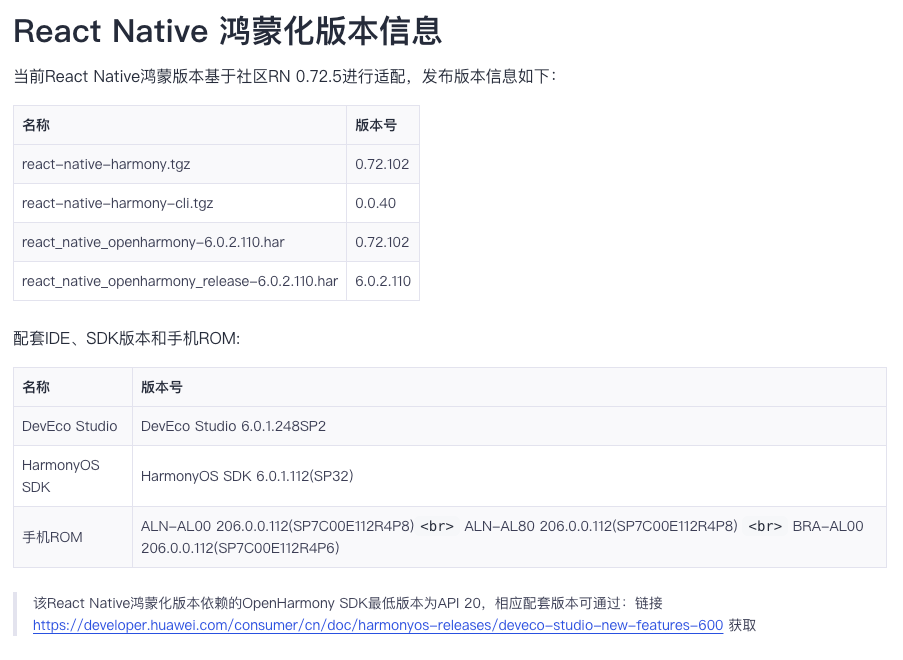
初始化项目
GuidePro 是本次开发的应用名称,我们暂时不需要 iOS 时 使用 --skip-install 跳过下载 iOS 依赖库
npx react-native@0.72.5 init GuidePro --version 0.72.5 --skip-install我们可以看到初始化了一个还没有 OpenHarmony 的目录结构:
接着我们安装鸿蒙依赖包,打开 GuidePro 目录下的 package.json,在 scripts 下新增 OpenHarmony 的运行命令: “harmony”: “react-native bundle-harmony --dev”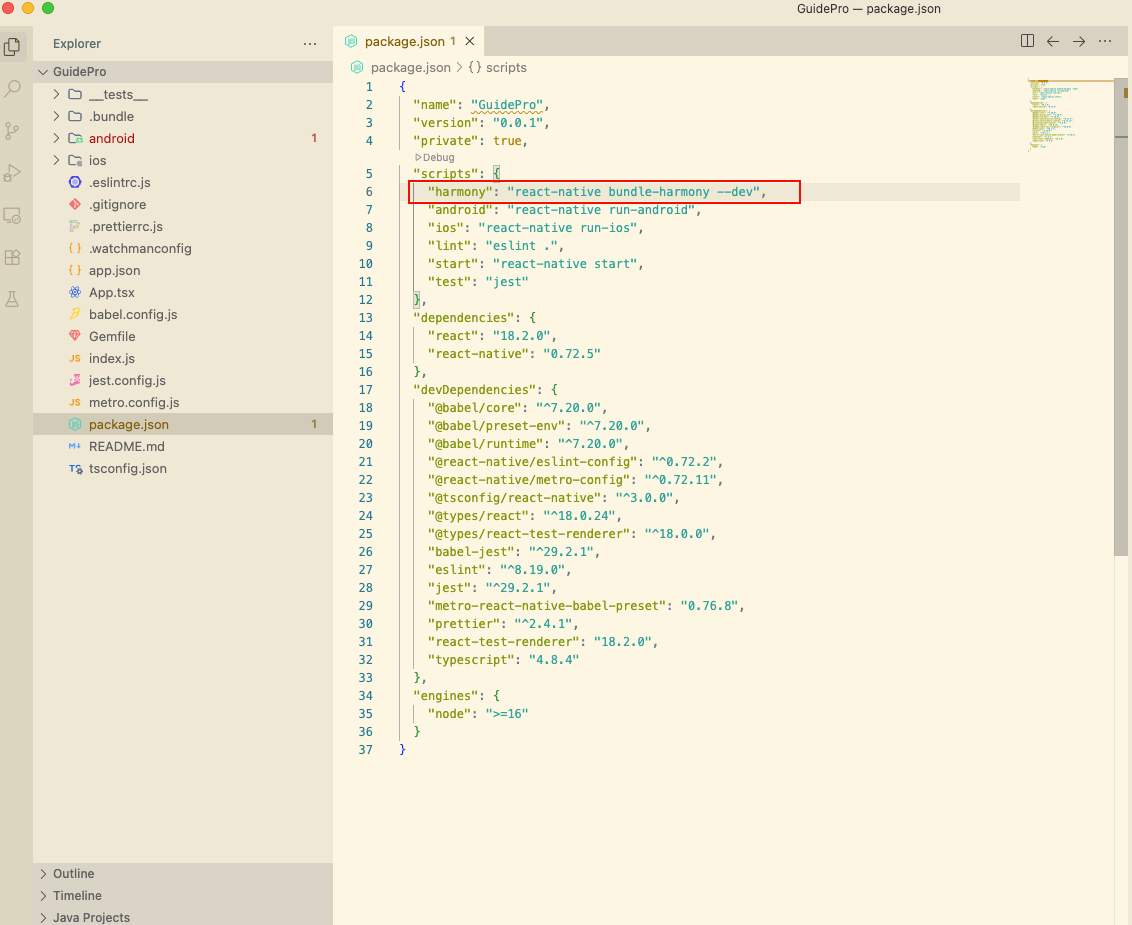
接着安装鸿蒙版本RN依赖包:
npm i @react-native-oh/react-native-harmony@0.72.96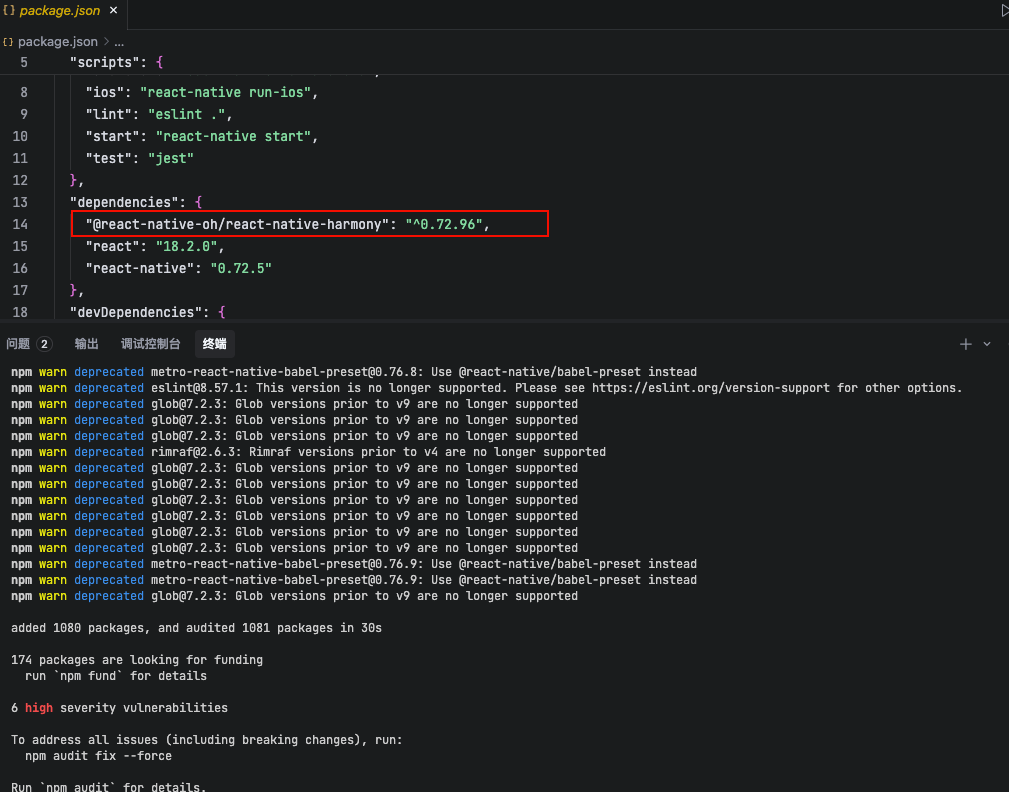
接着打开 GuidePro\metro.config.js,并添加 OpenHarmony 的适配代码:
const {mergeConfig, getDefaultConfig} = require('@react-native/metro-config');
const {createHarmonyMetroConfig} = require('@react-native-oh/react-native-harmony/metro.config');
/*** @type {import("metro-config").ConfigT}*/
const config = {
 transformer: {
   getTransformOptions: async () => ({
     transform: {
       experimentalImportSupport: false,
       inlineRequires: true,
     },
   }),
 },
};
module.exports = mergeConfig(getDefaultConfig(__dirname), createHarmonyMetroConfig({ reactNativeHarmonyPackageName: '@react-native-oh/react-native-harmony', }), config);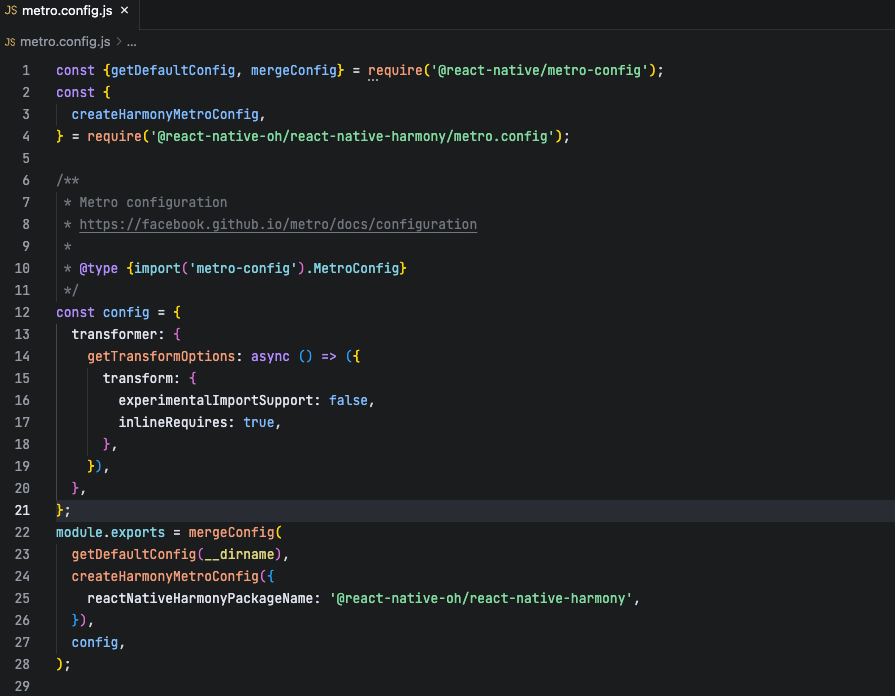
创建RN鸿蒙壳工程
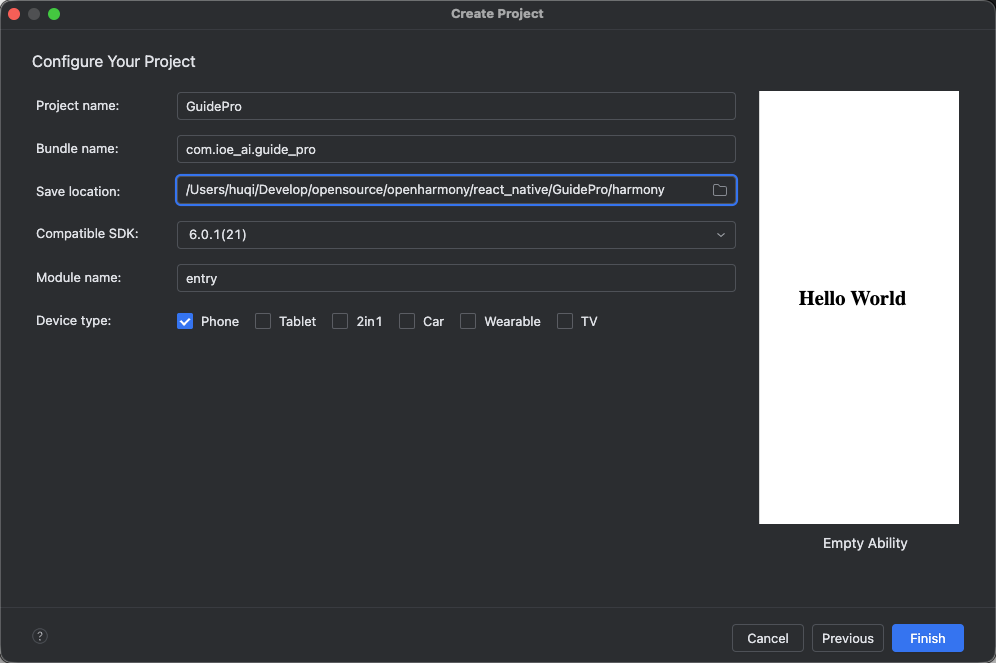
我们在 DevEcho 中点击 File > New > Create Project,选择创建 Empty Ability 工程,点击 Next 按钮创建 harmony 壳工程
接着我们运行 npm run harmony 来生成 bundle 包文件: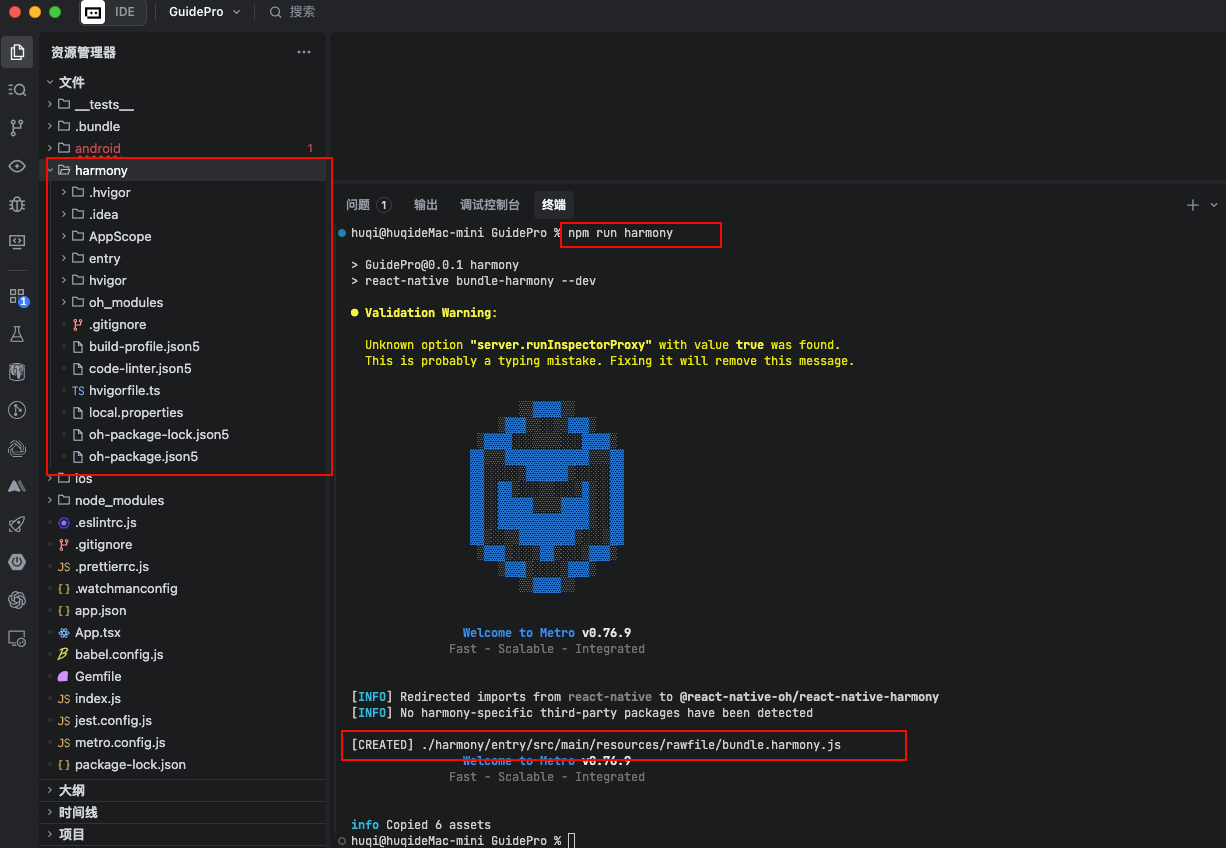
接着为 entry 安装 RNOH 依赖:
cd harmony/entry
npm init -y && npm i @react-native-oh/react-native-harmony@0.72.96 react-native@0.72.5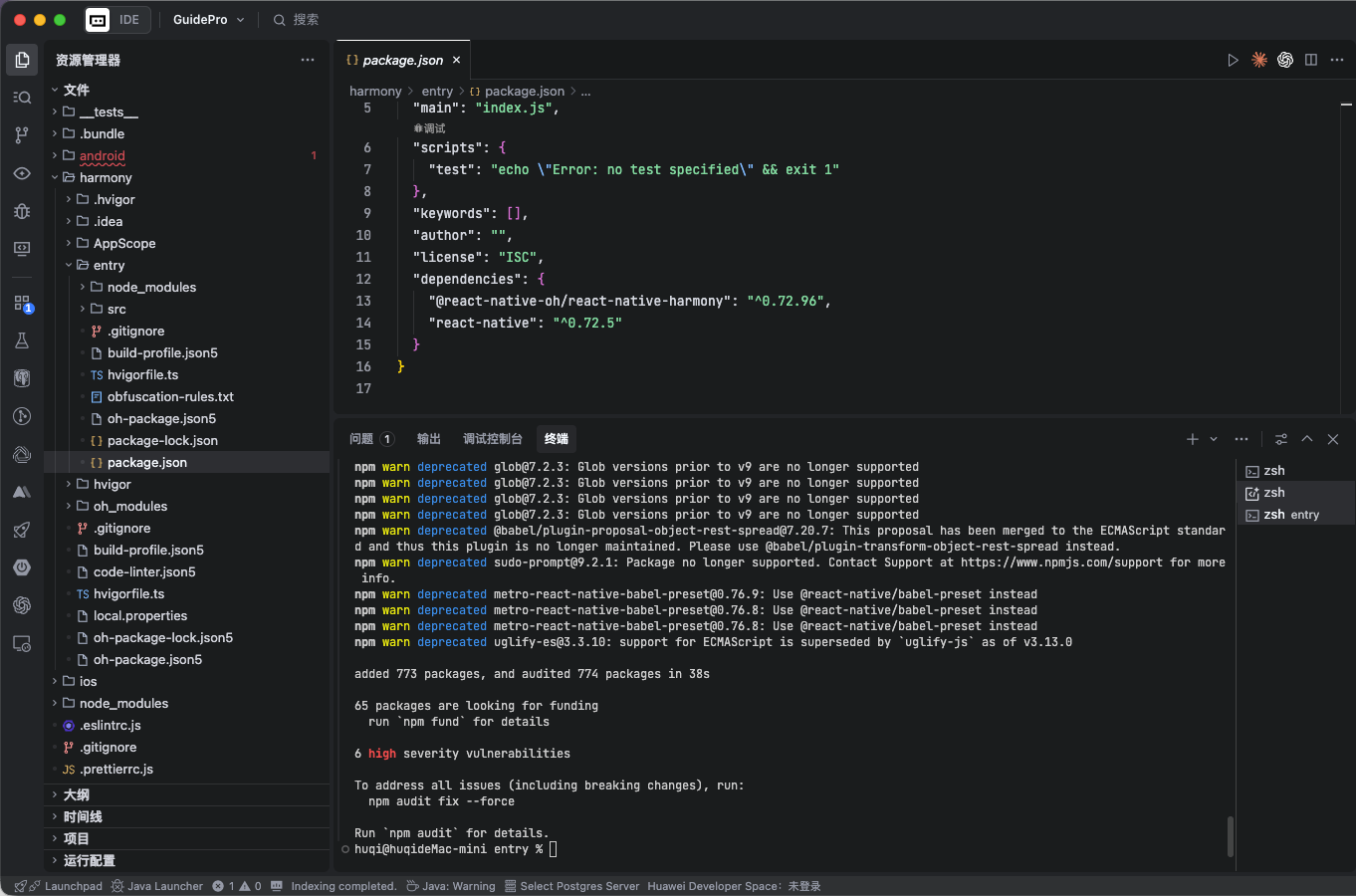
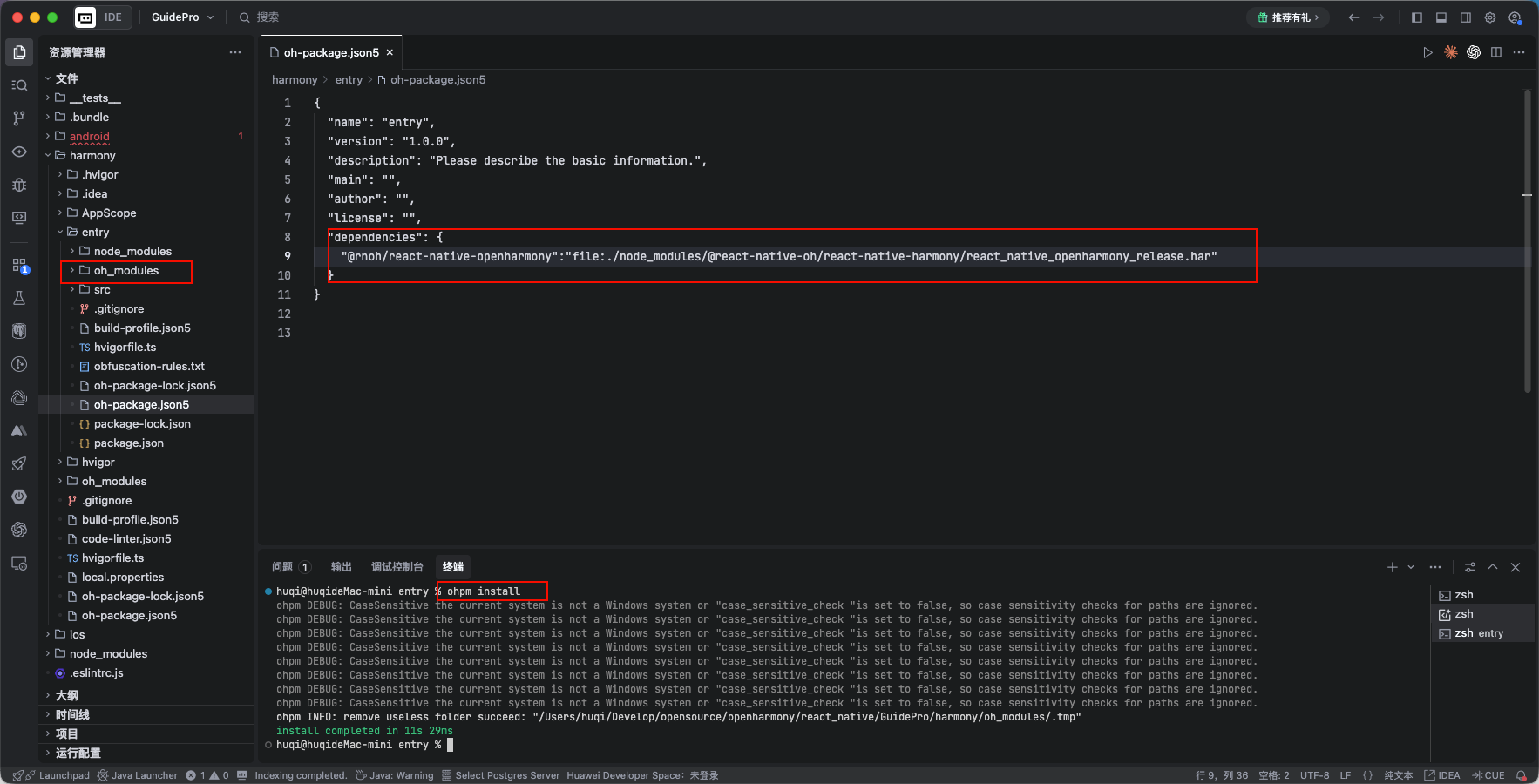
为 entry 引入本地的 harmony/entry/node_modules/@react-native-oh/react-native-harmony/react_native_openharmony_release.har:
dependencies": {
    "@rnoh/react-native-openharmony":"file:./node_modules/@react-native-oh/react-native-harmony/react_native_openharmony_release.har"
  }
## 原生工程集成RNOH
这里主要是补充相关的代码,比如 补充CPP侧代码、补充ArkTS侧的代码。
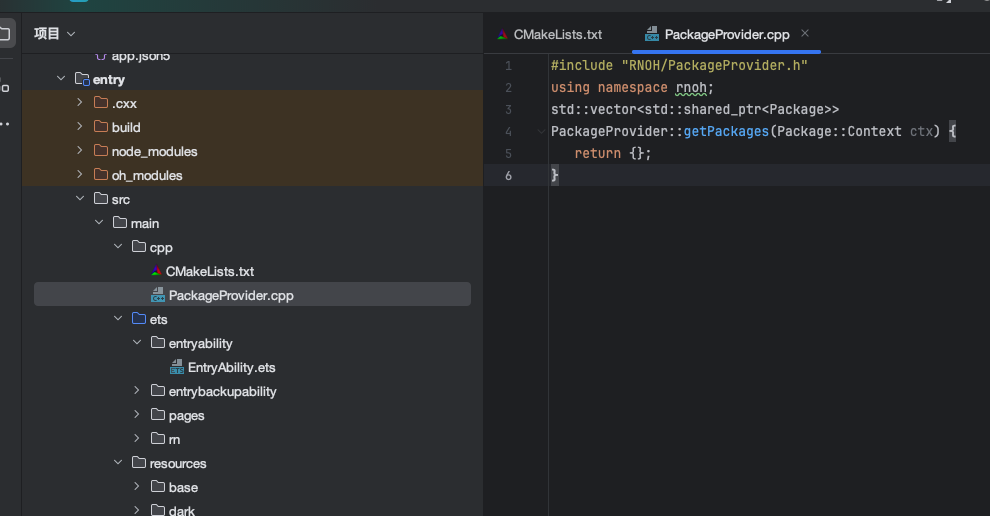
首先补充 cpp 代码,entry/src/main 目录下新建 cpp 文件夹,cpp 目录下新增CMakeLists.txt,并将RNOH的适配层代码添加到CmakeLists.txt编译构建文件中,最终在编译中可以生成librnop_app.so文件.
- CMakeLists.txt
project(rnapp)
cmake_minimum_required(VERSION 3.4.1)
set(CMAKE_SKIP_BUILD_RPATH TRUE)
set(NATIVERENDER_ROOT_PATH "${CMAKE_CURRENT_SOURCE_DIR}")
set(OH_MODULE_DIR "${CMAKE_CURRENT_SOURCE_DIR}/../../../oh_modules")
set(RNOH_CPP_DIR "${OH_MODULE_DIR}/@rnoh/react-native-openharmony/src/main/include")
set(REACT_COMMON_PATCH_DIR "${RNOH_CPP_DIR}/patches/react_native_core")
set(CMAKE_CXX_STANDARD 17)
set(LOG_VERBOSITY_LEVEL 1)
set(CMAKE_ASM_FLAGS "-Wno-error=unused-command-line-argument -Qunused-arguments")
set(RNOH_GENERATED_DIR "${CMAKE_CURRENT_SOURCE_DIR}/generated")
set(CMAKE_CXX_FLAGS "-fstack-protector-strong -Wl,-z,relro,-z,now,-z,noexecstack -s -fPIE -pie -DNDEBUG")
set(WITH_HITRACE_SYSTRACE 1) # for other CMakeLists.txt files to use
add_compile_definitions(WITH_HITRACE_SYSTRACE)
# folly的编译选项
set(folly_compile_options
    -DFOLLY_NO_CONFIG=1
    -DFOLLY_MOBILE=1
    -DFOLLY_USE_LIBCPP=1
    -DFOLLY_HAVE_RECVMMSG=1
    -DFOLLY_HAVE_PTHREAD=1
    -Wno-comma
    -Wno-shorten-64-to-32
    -Wno-documentation
    -faligned-new
)
add_compile_options("-Wno-unused-command-line-argument")
# 添加头文件目录
include_directories(${NATIVERENDER_ROOT_PATH}
                    ${RNOH_CPP_DIR}
                    ${REACT_COMMON_PATCH_DIR}
                    ${RNOH_CPP_DIR}/third-party/folly
                    ${RNOH_CPP_DIR}/third-party/rn/ReactCommon
                    ${RNOH_CPP_DIR}/third-party/rn/ReactCommon/react/nativemodule/core
                    ${RNOH_CPP_DIR}/third-party/rn/ReactCommon/jsi
                    ${RNOH_CPP_DIR}/third-party/rn/ReactCommon/callinvoker
                    ${RNOH_CPP_DIR}/third-party/boost/libs/utility/include
                    ${RNOH_CPP_DIR}/third-party/boost/libs/stacktrace/include
                    ${RNOH_CPP_DIR}/third-party/boost/libs/predef/include
                    ${RNOH_CPP_DIR}/third-party/boost/libs/array/include
                    ${RNOH_CPP_DIR}/third-party/boost/libs/throw_exception/include
                    ${RNOH_CPP_DIR}/third-party/boost/libs/config/include
                    ${RNOH_CPP_DIR}/third-party/boost/libs/core/include
                    ${RNOH_CPP_DIR}/third-party/boost/libs/preprocessor/include
                    ${RNOH_CPP_DIR}/third-party/double-conversion
                    ${RNOH_CPP_DIR}/third-party/rn/ReactCommon/react/renderer/graphics/platform/cxx
                    ${RNOH_CPP_DIR}/third-party/rn/ReactCommon/runtimeexecutor
                    ${RNOH_CPP_DIR}/third-party/glog/src
                    ${RNOH_CPP_DIR}/third-party/boost/libs/mpl/include
                    ${RNOH_CPP_DIR}/third-party/boost/libs/type_traits/include
                    ${RNOH_CPP_DIR}/third-party/rn/ReactCommon/yoga
                    ${RNOH_CPP_DIR}/third-party/boost/libs/intrusive/include
                    ${RNOH_CPP_DIR}/third-party/boost/libs/assert/include
                    ${RNOH_CPP_DIR}/third-party/boost/libs/move/include
                    ${RNOH_CPP_DIR}/third-party/boost/libs/static_assert/include
                    ${RNOH_CPP_DIR}/third-party/boost/libs/container_hash/include
                    ${RNOH_CPP_DIR}/third-party/boost/libs/describe/include
                    ${RNOH_CPP_DIR}/third-party/boost/libs/mp11/include
                    ${RNOH_CPP_DIR}/third-party/boost/libs/iterator/include
                    ${RNOH_CPP_DIR}/third-party/boost/libs/detail/include
                    ${RNOH_CPP_DIR}/patches/react_native_core/react/renderer/textlayoutmanager/platform/harmony
                    )
configure_file(
  ${RNOH_CPP_DIR}/third-party/folly/CMake/folly-config.h.cmake
  ${RNOH_CPP_DIR}/third-party/folly/folly/folly-config.h
)
file(GLOB GENERATED_CPP_FILES "./generated/*.cpp")
# 添加rnoh动态共享包
add_library(rnoh SHARED
    "${RNOH_CPP_DIR}/RNOHOther.cpp"
    "${RNOH_CPP_DIR}/third-party/folly/folly/lang/SafeAssert.cpp"    )
# 链接其他so
target_link_directories(rnoh PUBLIC ${OH_MODULE_DIR}/@rnoh/react-native-openharmony/libs/arm64-v8a)
target_link_libraries(rnoh PUBLIC
    rnoh_semi
    libace_napi.z.so
    libace_ndk.z.so
    librawfile.z.so
    libhilog_ndk.z.so
    libnative_vsync.so
    libnative_drawing.so
    libc++_shared.so
    libhitrace_ndk.z.so
    react_render_scheduler
    rrc_image
    rrc_text
    rrc_textinput
    rrc_scrollview
    react_nativemodule_core
    react_render_animations
    jsinspector
    hermes
    jsi
    logger
    react_config
    react_debug
    react_render_attributedstring
    react_render_componentregistry
    react_render_core
    react_render_debug
    react_render_graphics
    react_render_imagemanager
    react_render_mapbuffer
    react_render_mounting
    react_render_templateprocessor
    react_render_textlayoutmanager
    react_render_telemetry
    react_render_uimanager
    react_utils
    rrc_root
    rrc_view
    react_render_leakchecker
    react_render_runtimescheduler
    runtimeexecutor
    )
if("$ENV{RNOH_C_API_ARCH}" STREQUAL "1")
    message("Experimental C-API architecture enabled")
    target_link_libraries(rnoh PUBLIC libqos.so)
    target_compile_definitions(rnoh PUBLIC C_API_ARCH)
endif()
# RNOH_END: add_package_subdirectories
# 添加rnoh_app共享包
add_library(rnoh_app SHARED
    ${GENERATED_CPP_FILES}
    "./PackageProvider.cpp"
    "${RNOH_CPP_DIR}/RNOHOther.cpp"    "${RNOH_CPP_DIR}/RNOHAppNapiBridge.cpp")
target_link_libraries(rnoh_app PUBLIC rnoh)
target_compile_options(rnoh_app PUBLIC ${folly_compile_options} -DRAW_PROPS_ENABLED -std=c++17)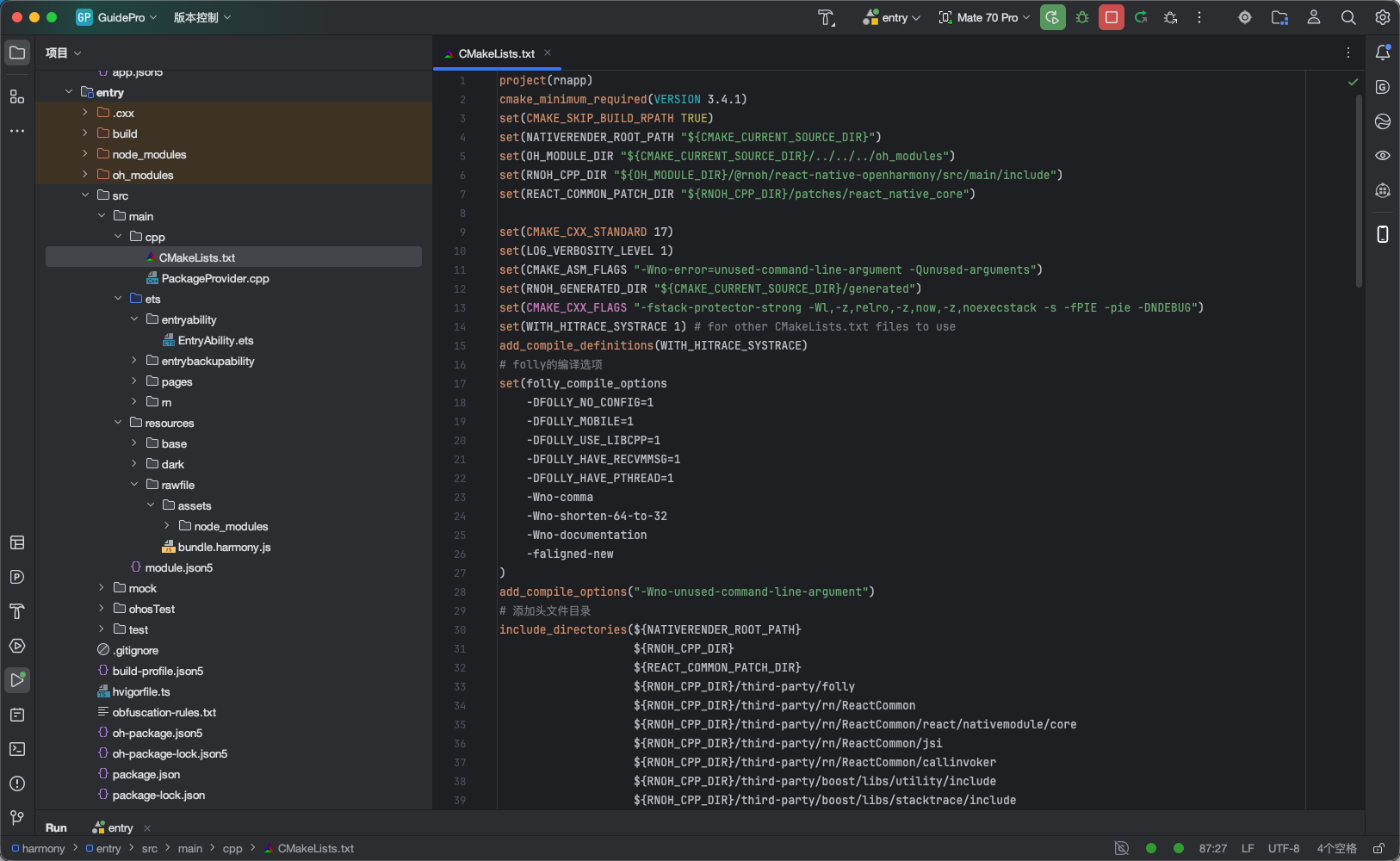
- PackageProvider.cpp
#include "RNOH/PackageProvider.h"  using namespace rnoh;
std::vector>
PackageProvider::getPackages(Package::Context ctx) {
   return {};
} 
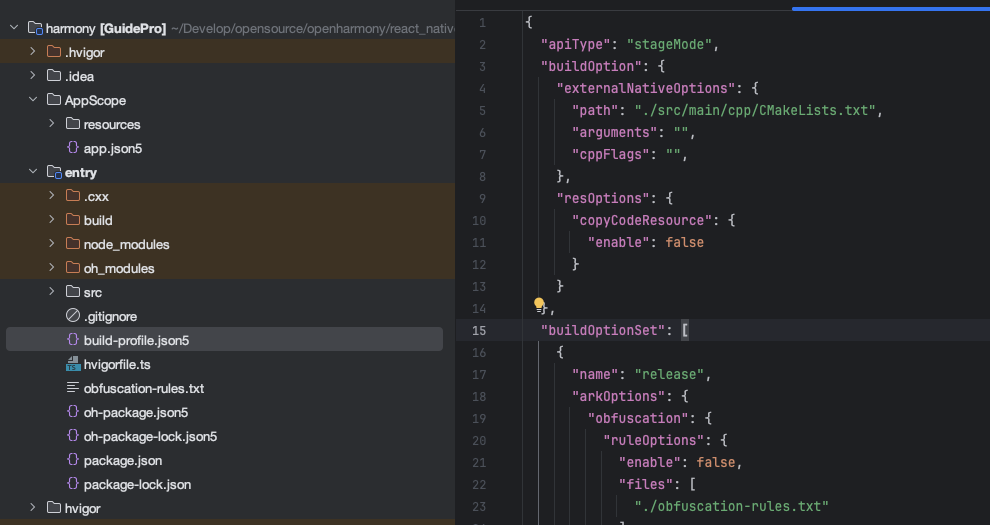
- /harmony/entry/build-profile.json5 新增 CMake 配置,如:
"externalNativeOptions": {
  "path": "./src/main/cpp/CMakeLists.txt",
  "arguments": "",
  "cppFlags": "",
},
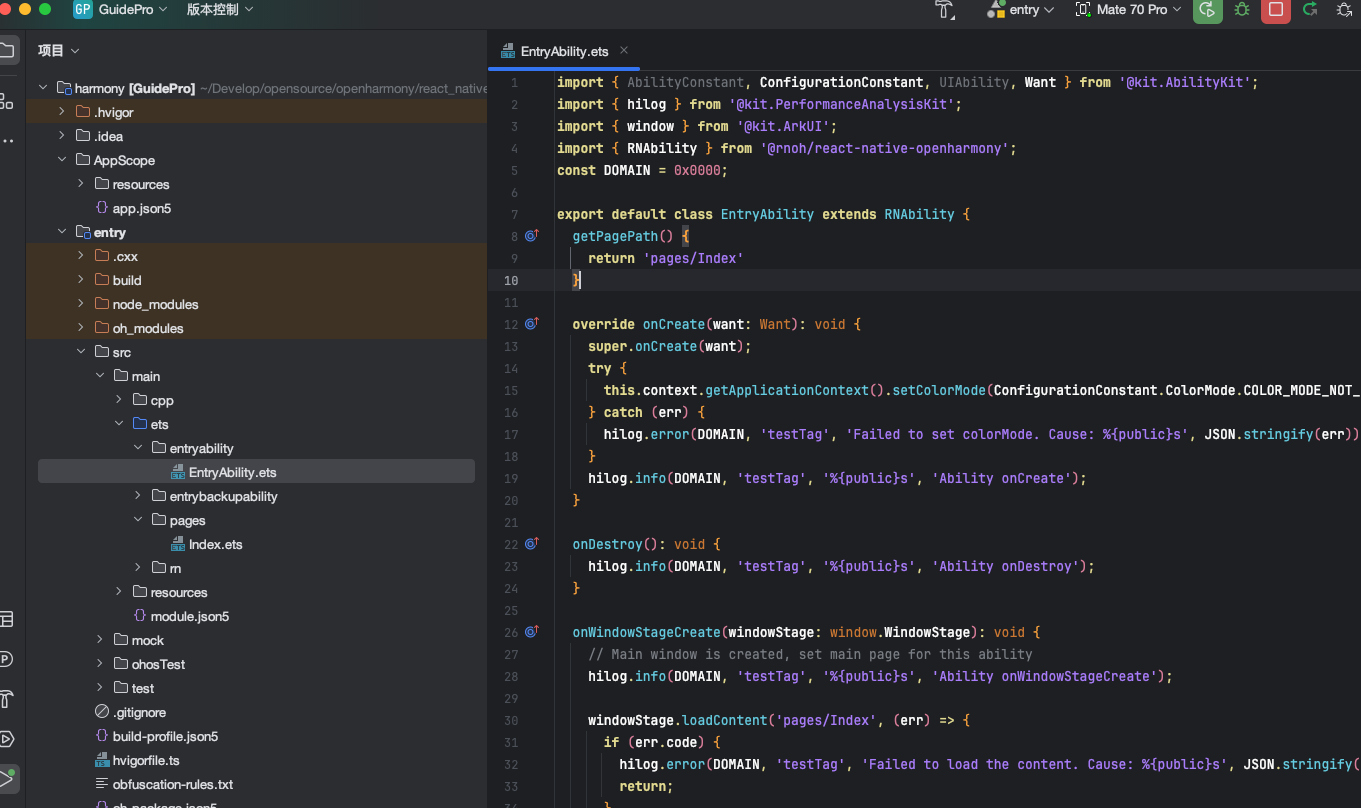
接着新增 ArkTS 端的代码,比如
打开entry\src\main\ets\entryability\EntryAbility.ets引入并使用RNAbility:
import {RNAbility} from '@rnoh/react-native-openharmony'
export default class EntryAbility extends RNAbility {
  override onCreate(want: Want): void {
    super.onCreate(want);
    try {
      this.context.getApplicationContext().setColorMode(ConfigurationConstant.ColorMode.COLOR_MODE_NOT_SET);
    } catch (err) {
      hilog.error(DOMAIN, 'testTag', 'Failed to set colorMode. Cause: %{public}s', JSON.stringify(err));
    }
    hilog.info(DOMAIN, 'testTag', '%{public}s', 'Ability onCreate');
  }
    getPagePath() {
    return 'pages/Index'
  }
}
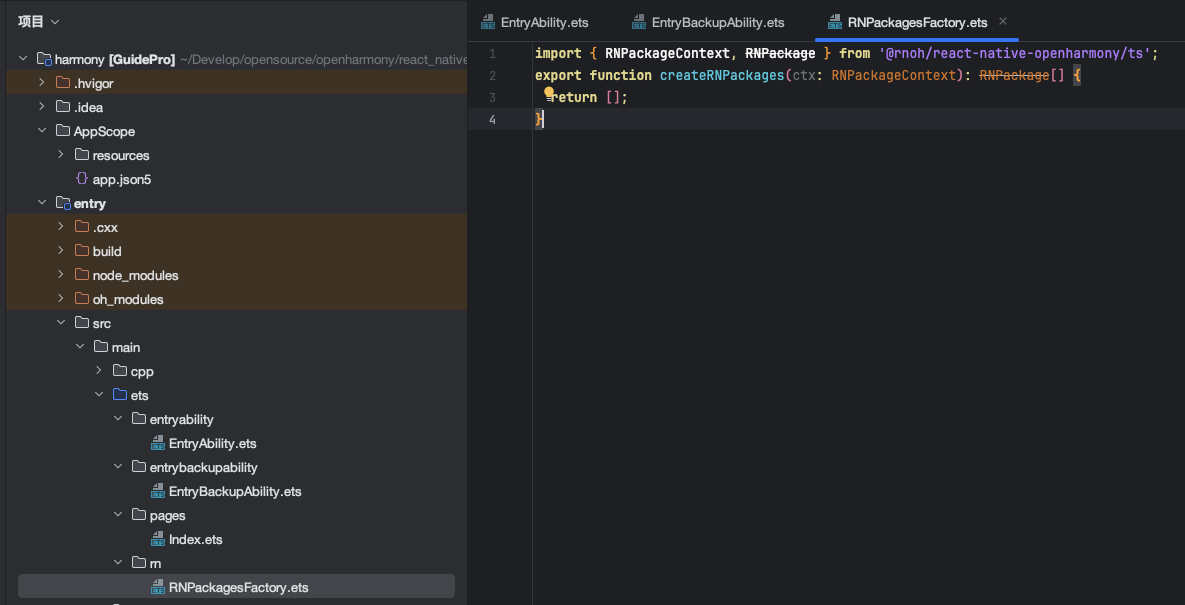
接着在 \entry\src\main\ets目录下新增RNPackagesFactory.ets:
import { RNPackageContext, RNPackage } from '@rnoh/react-native-openharmony/ts';
export function createRNPackages(ctx: RNPackageContext): RNPackage[] {
  return [];
}
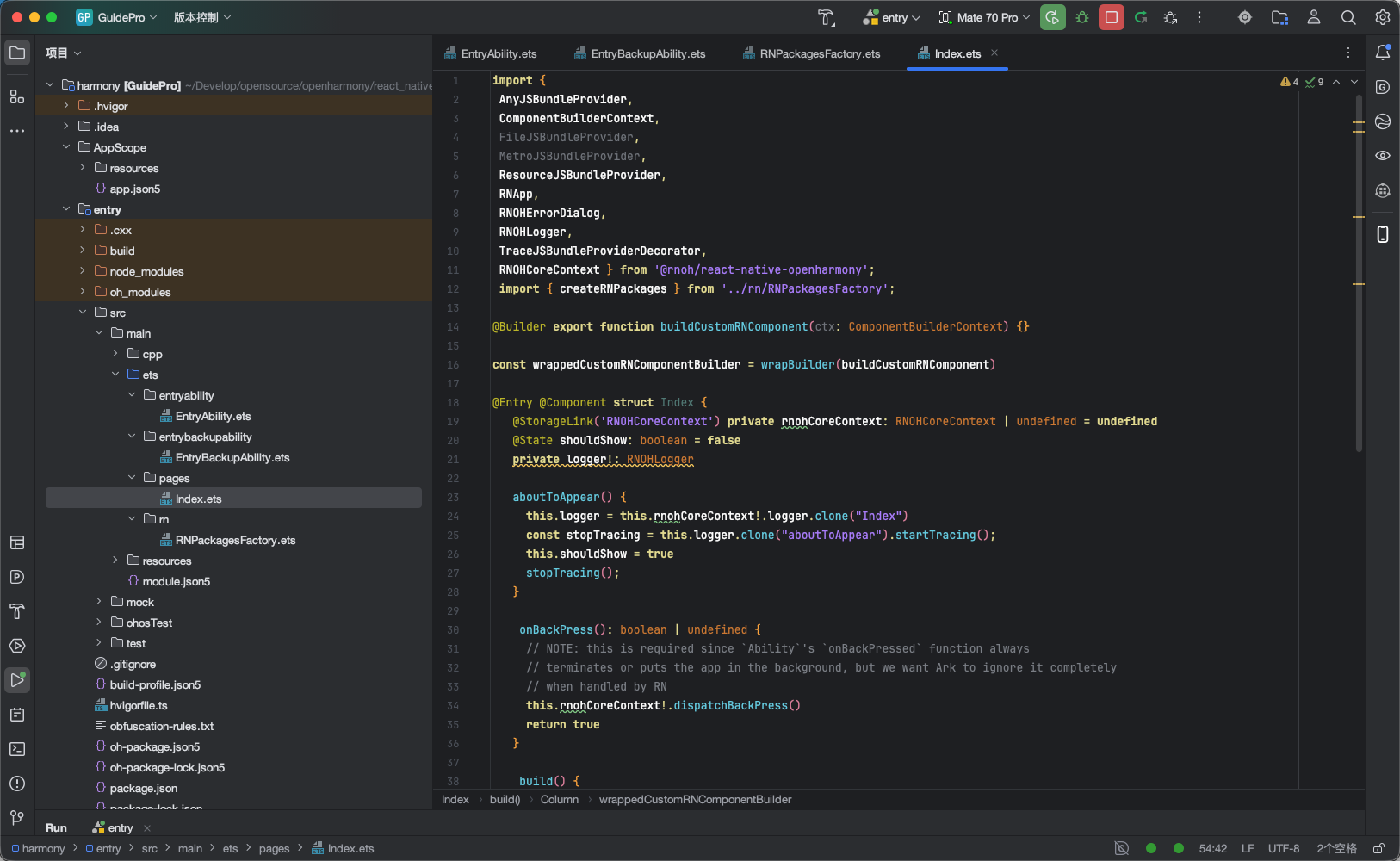
entry\src\main\ets\pages\Index.ets,添加RNOH的使用代码,如:
import {
 AnyJSBundleProvider,
 ComponentBuilderContext,
 FileJSBundleProvider,
 MetroJSBundleProvider,
 ResourceJSBundleProvider,
 RNApp,
 RNOHErrorDialog,
 RNOHLogger,
 TraceJSBundleProviderDecorator,
 RNOHCoreContext } from '@rnoh/react-native-openharmony';
 import { createRNPackages } from '../rn/RNPackagesFactory';
@Builder export function buildCustomRNComponent(ctx: ComponentBuilderContext) {}
const wrappedCustomRNComponentBuilder = wrapBuilder(buildCustomRNComponent)
@Entry @Component struct Index {
   @StorageLink('RNOHCoreContext') private rnohCoreContext: RNOHCoreContext | undefined = undefined
   @State shouldShow: boolean = false
   private logger!: RNOHLogger
   aboutToAppear() {
     this.logger = this.rnohCoreContext!.logger.clone("Index")
     const stopTracing = this.logger.clone("aboutToAppear").startTracing();
     this.shouldShow = true
     stopTracing();
   }
    onBackPress(): boolean | undefined {
     // NOTE: this is required since `Ability`'s `onBackPressed` function always
     // terminates or puts the app in the background, but we want Ark to ignore it completely     // when handled by RN     this.rnohCoreContext!.dispatchBackPress()
     return true
   }
build() {
     Column() {
     if (this.rnohCoreContext && this.shouldShow) {
       if (this.rnohCoreContext?.isDebugModeEnabled) {
         RNOHErrorDialog({ ctx: this.rnohCoreContext })
       }
       RNApp({
         rnInstanceConfig: {
           createRNPackages,
           enableNDKTextMeasuring: true, // 该项必须为true,用于开启NDK文本测算
           enableBackgroundExecutor: false,
           enableCAPIArchitecture: true, // 该项必须为true,用于开启CAPI
           arkTsComponentNames: []
         },
         initialProps: {  } as Record, // 传参
         appKey: "GuidePro",
         wrappedCustomRNComponentBuilder: wrappedCustomRNComponentBuilder,
         onSetUp: (rnInstance) => {
           rnInstance.enableFeatureFlag("ENABLE_RN_INSTANCE_CLEAN_UP")
         },
         jsBundleProvider: new TraceJSBundleProviderDecorator(
           new AnyJSBundleProvider([
             new ResourceJSBundleProvider(this.rnohCoreContext.uiAbilityContext.resourceManager, 'bundle.harmony.js')]),
           this.rnohCoreContext.logger),
       })
     }
   }   .height('100%')
   .width('100%')
 }
} 
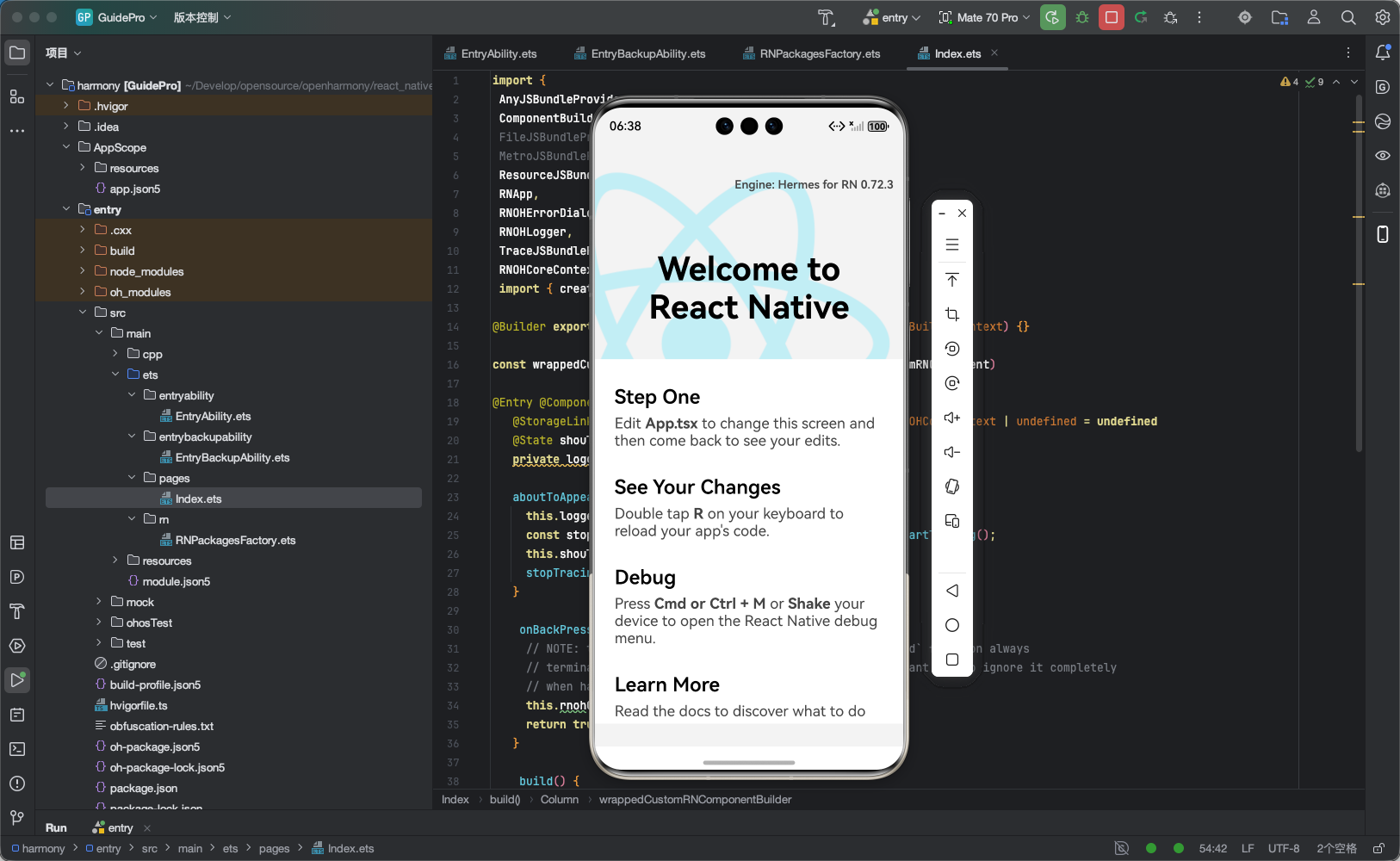
基本上就配置完了,检查下 DevEcho Studio 中没有明显报错就可尝试运行。我这差不多一把过:
注意点:
- 修改文件比较繁杂,其实每一步都有它的道理,我们也可以通过 AI 对话去了解,我个人的理解是做这些操作其实都是按照 RN 的跨平台设计来处理的。一定要有耐心,遇到错误自己解决不了的及时问群友!!!
RNApp的参数appKey需要与RN工程中AppRegistry.registerComponent注册的appName保持一致,否则会导致白屏。- 确保 DevEcho Studio 中没有明显报错再运行。

 浙公网安备 33010602011771号