详细介绍:天机学堂-day2(我的课表)
目录
文章目录
前言
本文章使用的是《天机学堂》开源的资料,并从创建虚拟机开始部署《天机学堂项目》,避免还要下载资料中的20GB虚拟机,只需要下载镜像以及其他基础资料即可,请大家放心食用
注意:若是还不可以启动项目的可以先看上一篇:《天机学堂-自定义部署详细流程(部署篇:初始化项目、启动)》
上一篇:《天机学堂——day1(修改bug)》

一、小TIP
1、启动服务
在启动的时候大家可以不需要在虚拟机中将所有服务启动,只需要启动:
tj-auth:登录时所会用到的服务tj-gateway:这个接口很明显就是网关服务,但是大家可能会有疑惑为什么他不可以在本地启动,我测试过当他在本地启动时,会有一些关于跨域的问题所以建议大家在虚拟机中启动tj-exam:这个接口是播放视频的服务,当然现在还用不到大家也可以不去启动其余的接口暂时都可以在本地启动会方便很多
二、我的课表api接口
| 编号 | 接口简述 | 请求方式 | 请求路径 |
|---|---|---|---|
| 1 | 支付或报名课程后,立刻加入课表 | MQ通知 | |
| 2 | 分页查询我的课表 | GET | /lessons/page |
| 3 | 查询我最近正在学习的课程 | GET | /lessons/now |
| 4 | 根据id查询指定课程的学习状态 | GET | /lessons/{courseId} |
| 5 | 删除课表中的某课程 | DELETE | /lessons/{courseId} |
| 6 | 退款后,立刻移除课表中的课程 | MQ通知 | |
| 7 | 校验指定课程是否是课表中的有效课程(Feign接口) | GET | /lessons/{courseId}/valid |
| 8 | 统计课程学习人数(Feign接口) | GET | /lessons/{courseId}/count |
1、支付或报名课程后,立刻加入课表
①、调用链
此接口是使用MQ所请求接口,这里我们可以先去查看这个接口的调用链是怎么样的?
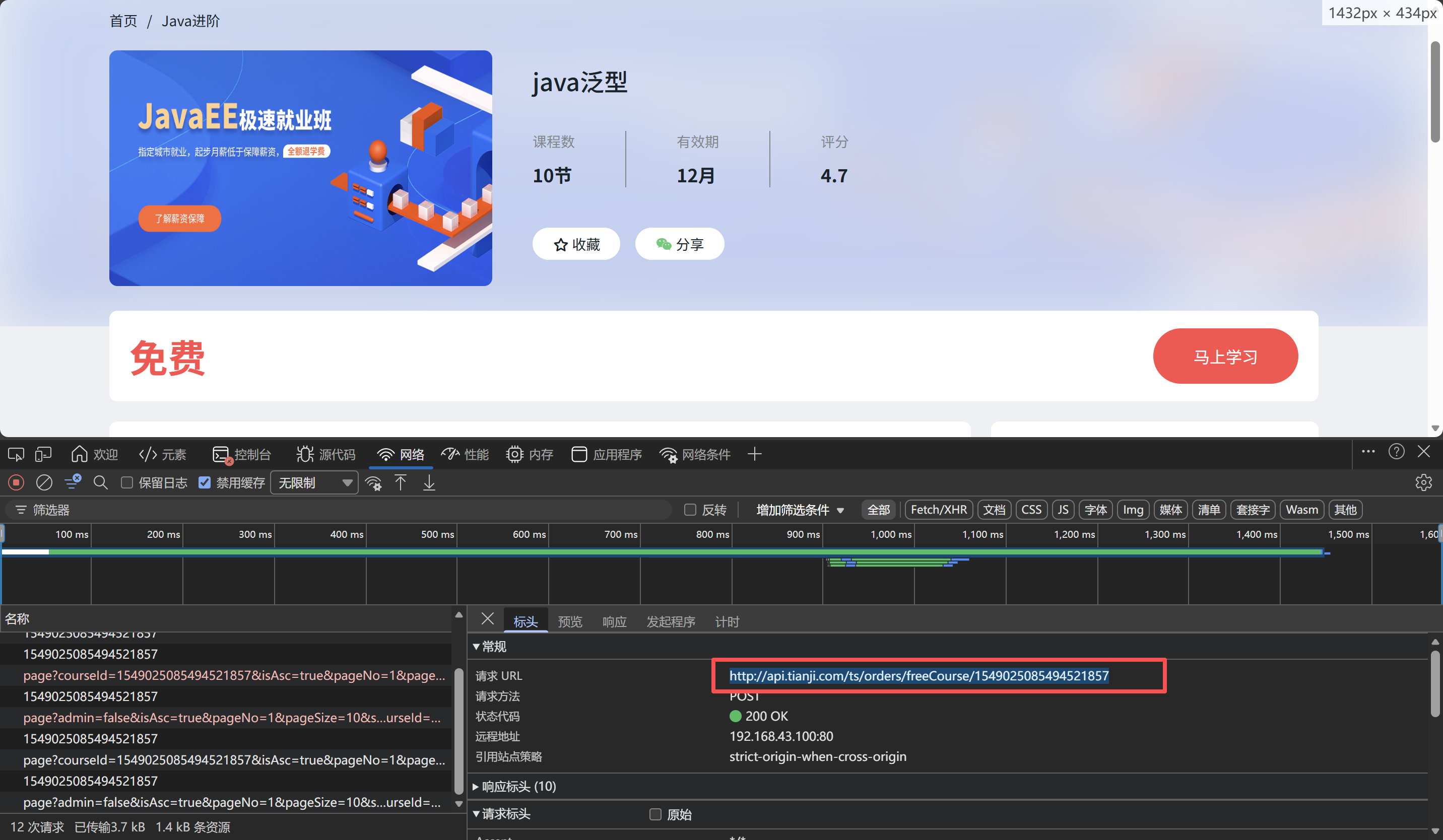
- 首先登录到后台网站中随便点击课程,同时在网络中找到接口
http://api.tianji.com/ts/orders/freeCourse/1549025085494521857- 顺着网址可以找到对应的微服务接口:
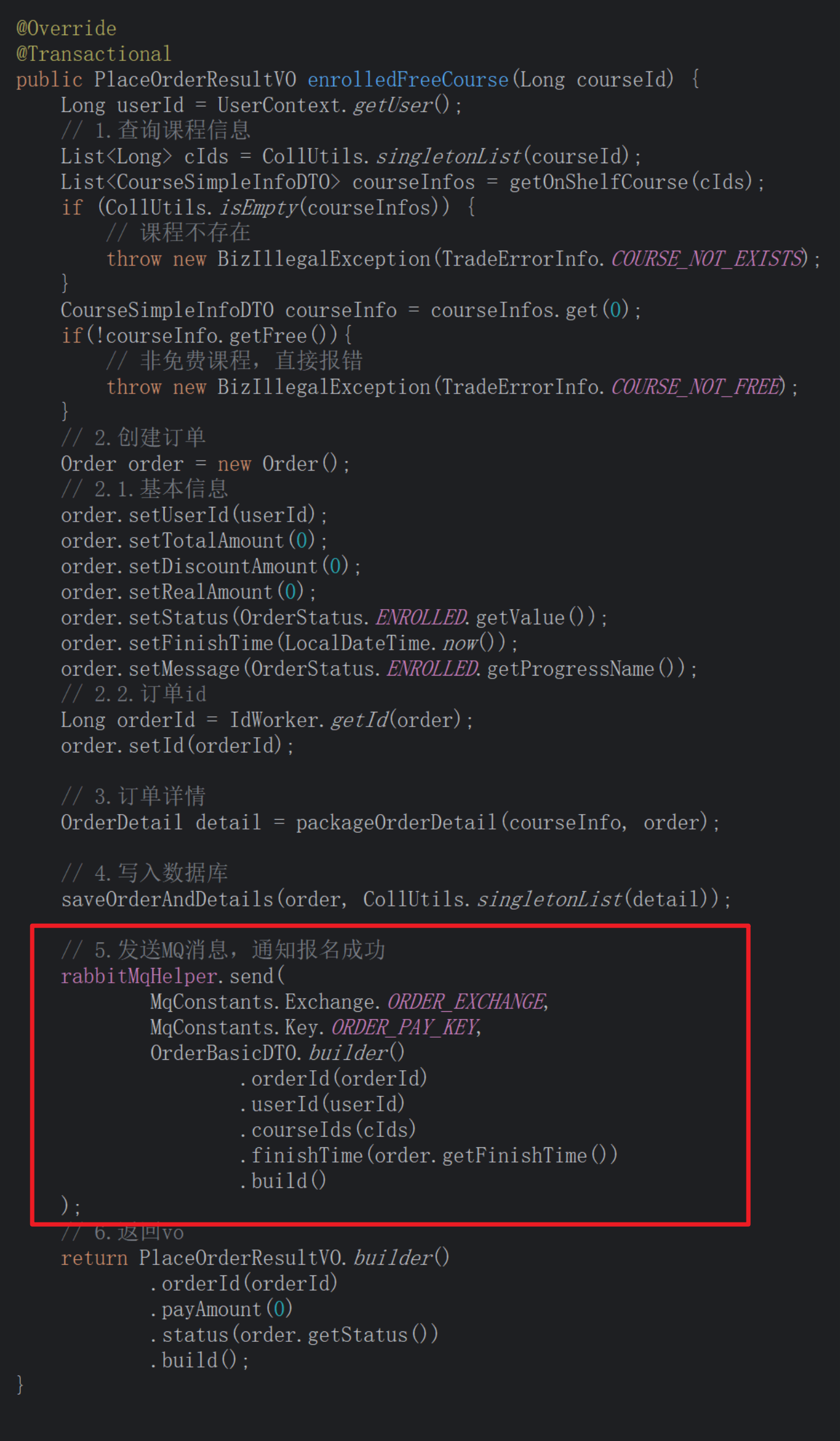
- 找到这个接口的逻辑层部分,并简单预览查找有关发送MQ消息的逻辑代码:

②、编写接口
好了,此时便知道了这个接口的产生,也知道了MQ发送消息时所带来的数据、key、虚拟机
- 找到课表服务,在mq文件中找到文件编写代码:
@Slf4j
@Component
@RequiredArgsConstructor
public class LessonChangeListener {
private final LearningLessonService lessonService;
/**
* 监听订单支付或课程报名的信息
*
* @param order 订单信息
*/
@RabbitListener(bindings = @QueueBinding(
/*绑定队列*/
value = @Queue(value = "learning.lesson.pay.queue", durable = "true"),
/*绑定交换机*/
exchange = @Exchange(name = MqConstants.Exchange.ORDER_EXCHANGE,
type = ExchangeTypes.TOPIC),
/*绑定key*/
key = MqConstants.Key.ORDER_PAY_KEY
))
public void listenLessonPay(OrderBasicDTO order) {
//1、健壮性处理
if (order == null || order.getUserId() == null || CollUtils.isEmpty(order.getCourseIds())) {
//数据误,无需处理
log.error("接收到MQ消息有误,订单数据为空");
return;
}
//2、添加课程
log.debug("监听到用户{}的订单{},需要添加课程{}到课表中", order.getUserId(),
order.getOrderId(), order.getCourseIds());
lessonService.addUserLessons(order.getUserId(), order.getCourseIds());
}
}
- 服务层代码:
/**
* @author chyb
* @description 针对表【learning_lesson(学生课表)】的数据库操作Service实现
* @createDate 2025-11-12 10:59:30
*/
@SuppressWarnings("ALL")
@Service
/**
* 自动生成
* 所有 final 字段和所有带有 @NonNull 注解的非初始化的字段
* public UserService(CourseClient courseClient) {
*         this.CourseClient = courseClient;
* }
* 的构造函数
*/
@RequiredArgsConstructor
@Slf4j
public class LearningLessonServiceImpl extends ServiceImpl<LearningLessonMapper, LearningLesson>
  implements LearningLessonService {
  /*
  Spring进行依赖注入:
  Spring发现构造函数参数 CourseClient
  在容器中查找对应的Feign代理Bean
  注入到UserService中
  */
  private final CourseClient courseClient;
  private final CatalogueClient catalogueClient;
  //    添加课程
  @Override
  /*因为是批量添加,最好加上事务处理*/
  @Transactional
  public void addUserLessons(Long userId, List<Long> courseIds) {
    //1.查询课程有效期
    List<CourseSimpleInfoDTO> simpleInfoList = courseClient.getSimpleInfoList(courseIds);
      if (CollUtils.isEmpty(simpleInfoList)) {
      log.error("课程信息不存在,无法添加到课表");
      return;
      }
      //2.循环便利,处理LearningLesson数据
      ArrayList<LearningLesson> lessons = new ArrayList<>(simpleInfoList.size());
        for (CourseSimpleInfoDTO infoDTO : simpleInfoList) {
        LearningLesson learningLesson = new LearningLesson();
        //2.1获取过期时间
        Integer validDuration = infoDTO.getValidDuration();
        /*因为有效期可能是永久所以避免空指针异常,做一个判断*/
        if (validDuration != null && validDuration > 0) {
        LocalDateTime now = LocalDateTime.now();
        learningLesson.setCreateTime(now);
        learningLesson.setExpireTime(now.plusMonths(validDuration));
        }
        //2.2填充其他字段
        learningLesson.setUserId(userId);
        learningLesson.setCourseId(infoDTO.getId());
        //添加到记录列表
        lessons.add(learningLesson);
        }
        //3.批量处理
        this.saveBatch(lessons);
        }
        }
2、分页查询我的课表
① 调用链
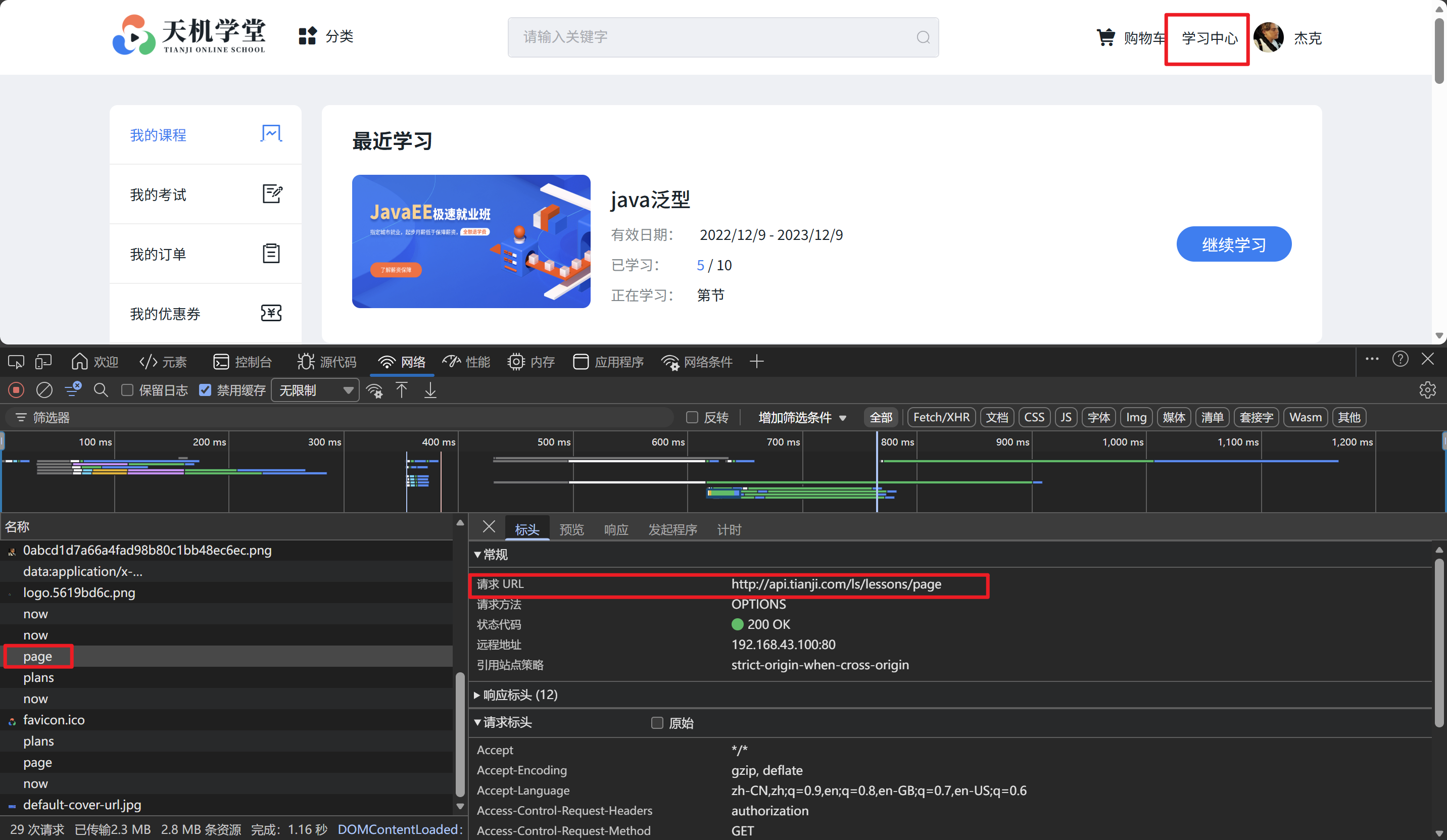
- 点击后台网站的学习中心,并在网络中可以查找到
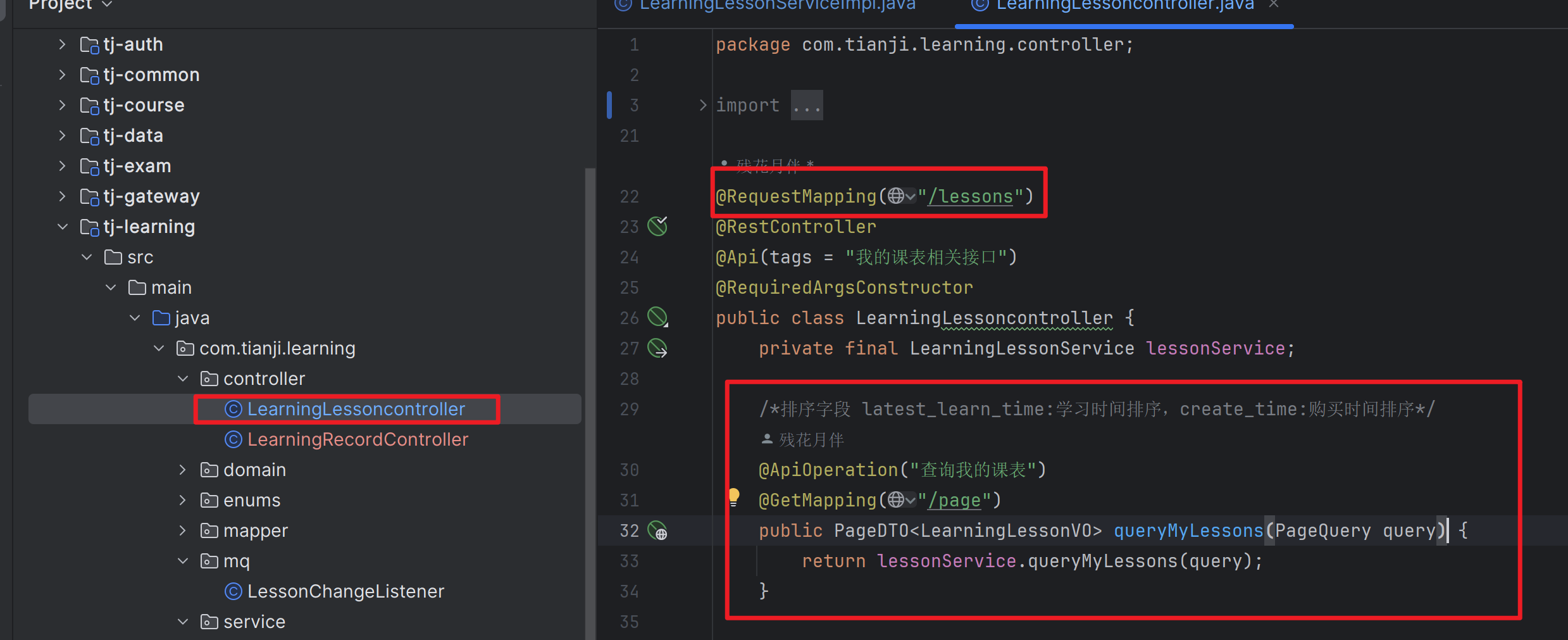
http://api.tianji.com/ls/lessons/page网址- 顺着网址可以知道这个接口需要在
我的课表服务中创建接口
② 接口编写
逻辑层代码:
/**
* 分页
*
* @param query
* @return
*/
@Override
public PageDTO<LearningLessonVO> queryMyLessons(PageQuery query) {
  //获取当前用户
  Long user = UserContext.getUser();
  // 2.分页查询
  /*select * from where user_id = ${userid} order by latest_learn_time limit 0, 5*/
  Page<LearningLesson> page = lambdaQuery().eq(LearningLesson::getUserId, user)
    .page(query.toMpPage("latest_learn_time", false));
    List<LearningLesson> records = page.getRecords();
      /*如果为空直接返回*/
      if (CollUtils.isEmpty(records)) {
      return PageDTO.empty(page);
      }
      // 3.查询课程信息
      Map<Long, CourseSimpleInfoDTO> dtoMap = queryCourseSimpleInfoList(records);
        // 4.封装VO返回
        List<LearningLessonVO> vos = new ArrayList<>(records.size());
          for (LearningLesson record : records) {
          LearningLessonVO vo = BeanUtils.copyBean(record, LearningLessonVO.class);
          CourseSimpleInfoDTO infoDTO = dtoMap.get(record.getCourseId());
          vo.setCourseName(infoDTO.getName());
          vo.setCourseCoverUrl(infoDTO.getCoverUrl());
          vo.setSections(infoDTO.getSectionNum());
          vos.add(vo);
          }
          return PageDTO.of(page, vos);
          }
          /**
          * 查询课程基础信息并转化为Map
          * @param records
          * @return
          */
          private Map<Long, CourseSimpleInfoDTO> queryCourseSimpleInfoList(List<LearningLesson> records) {
            // 3.1.获取课程id
            Set<Long> collect = records.stream().map(c -> c.getCourseId()).collect(Collectors.toSet());
              // 3.2.查询课程信息
              List<CourseSimpleInfoDTO> cInfoList = courseClient.getSimpleInfoList(collect);
                if (CollUtils.isEmpty(cInfoList)) {
                // 课程不存在,无法添加
                throw new BadRequestException("课程信息不存在!");
                }
                // 3.3.把课程集合处理成Map,key是courseId,值是course本身
                Map<Long, CourseSimpleInfoDTO> collect1 =
                  cInfoList
                  .stream()
                  .collect(Collectors.toMap(CourseSimpleInfoDTO::getId, c -> c));
                  return collect1;
                  }
③ 效果展现
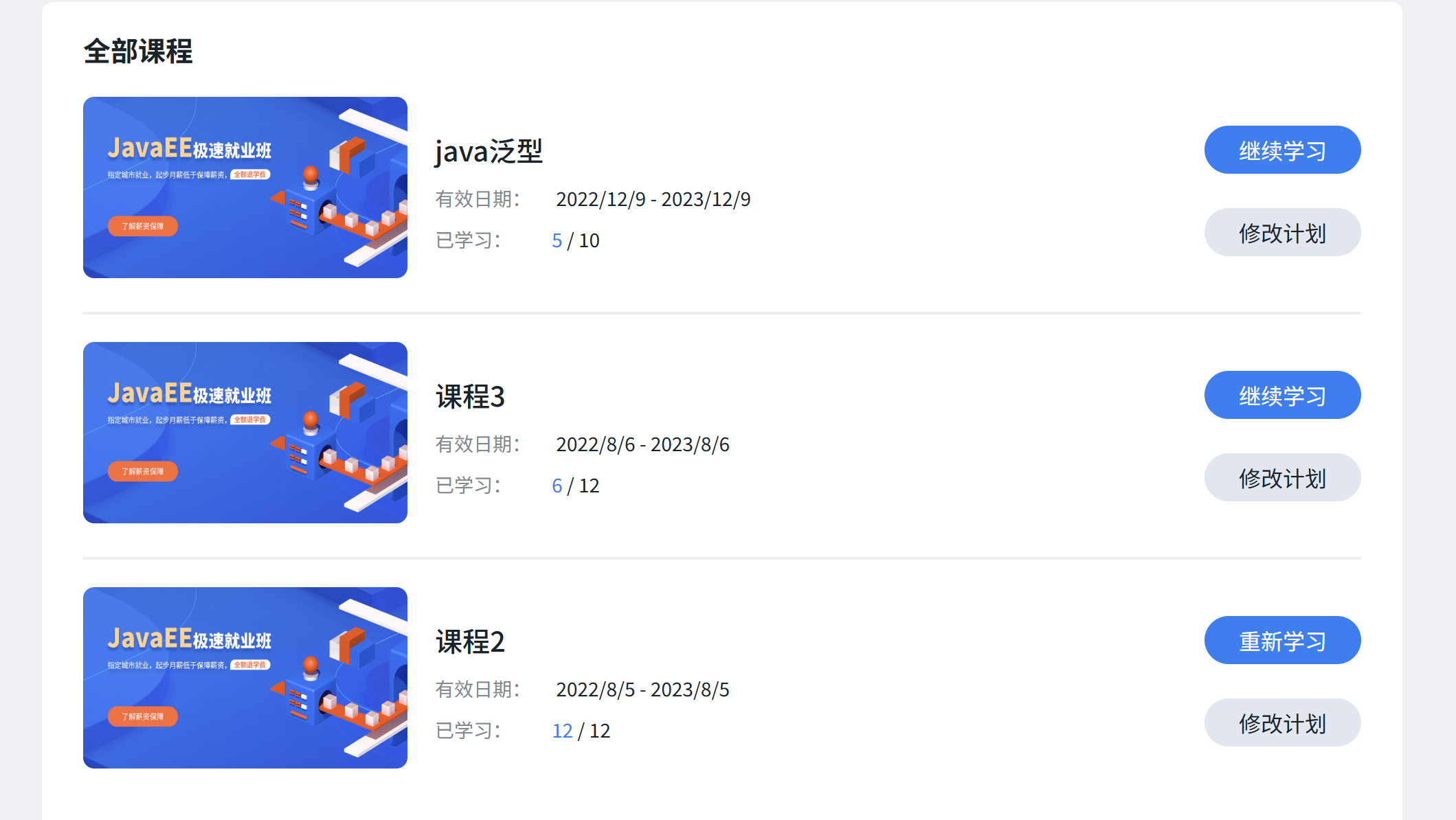
3、查询我最近正在学习的课程
① 调用链
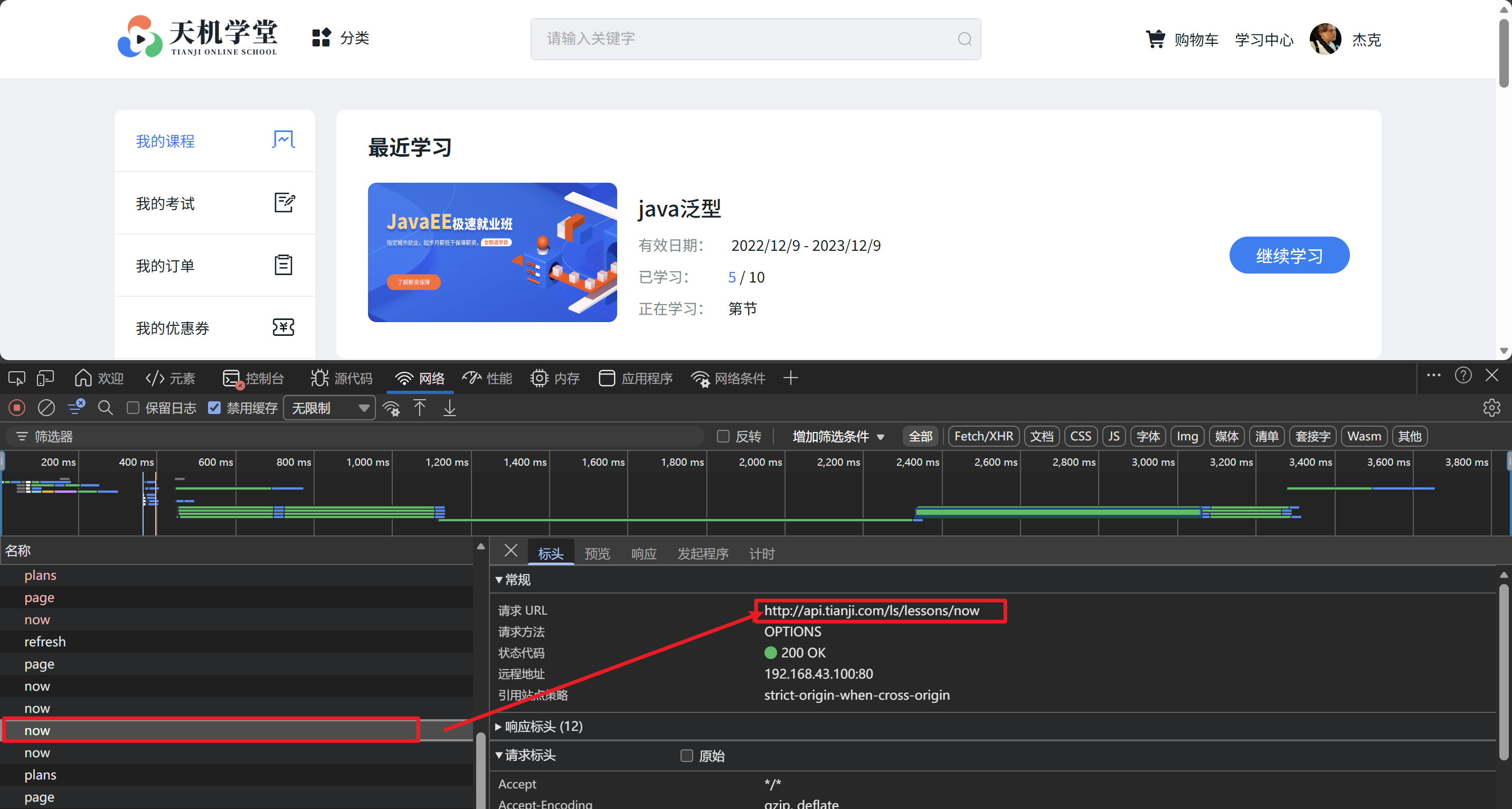
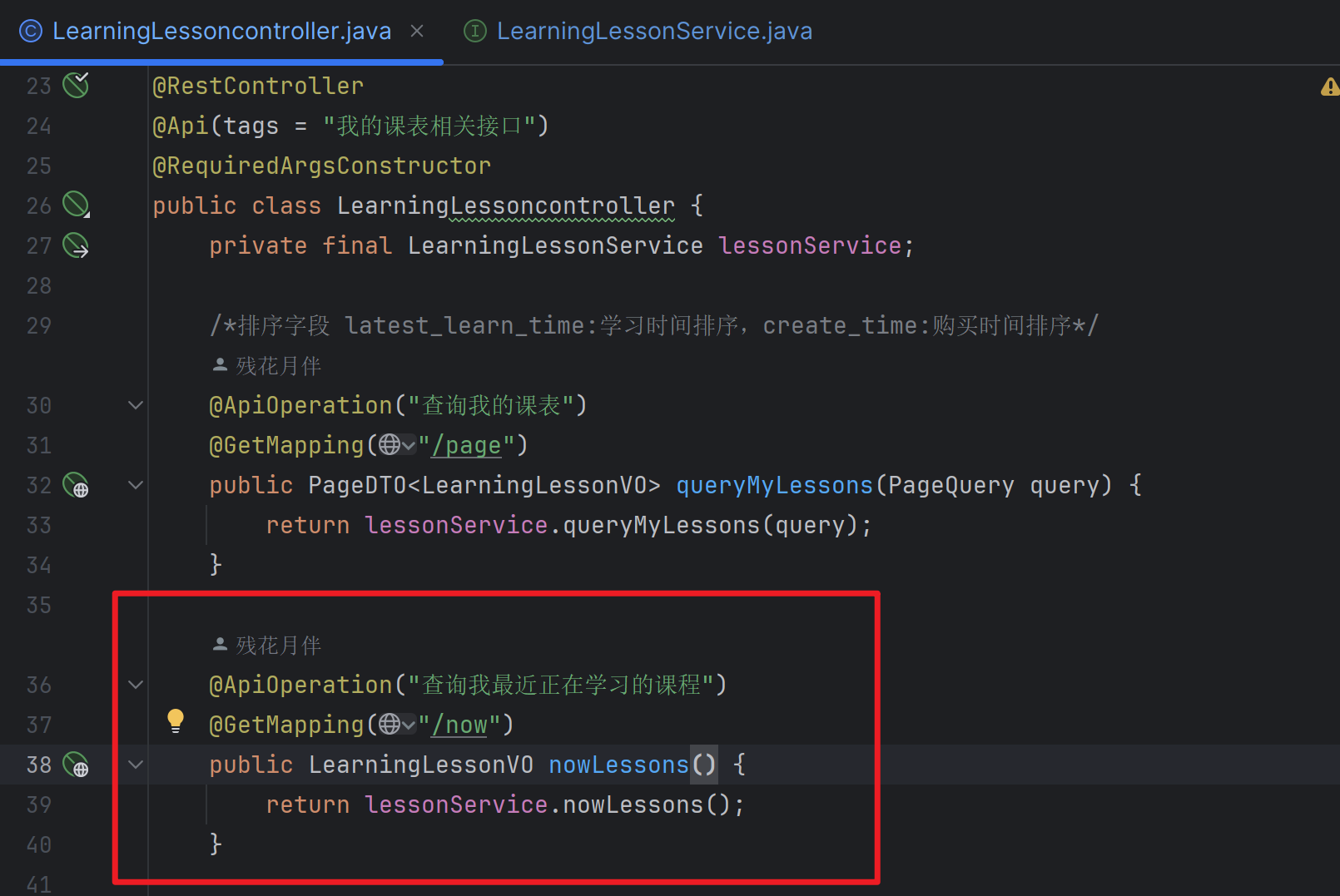
这里就不做过多阐述了,由这个调用接口便知道要在
课表服务中创建接口:
② 接口编写
服务层方法:
/**
* 查询当前用户正在学习的课程
*
* @return
*/
@Override
public LearningLessonVO nowLessons() {
Long user = UserContext.getUser();
/*查询最近学习的课程*/
/*select * from where user_id = {userId} and status = 1 order by LatestLearnTime limit 1*/
LearningLesson lesson = lambdaQuery()
.eq(LearningLesson::getUserId, user)
.eq(LearningLesson::getStatus, LessonStatus.LEARNING.getValue())
.orderByDesc(LearningLesson::getLatestLearnTime)
.last("limit 1")
.one();
/*若是为空直接返回*/
if (lesson == null) {
return null;
}
/*复制基本类型*/
LearningLessonVO lessonVO = BeanUtils.copyBean(lesson, LearningLessonVO.class);
// 4.查询课程信息
CourseFullInfoDTO courseInfoById = courseClient
.getCourseInfoById(lessonVO.getCourseId(), false, false);
if (courseInfoById == null) {
throw new BadRequestException("课程不存在");
}
lessonVO.setCourseName(courseInfoById.getName());
lessonVO.setCourseCoverUrl(courseInfoById.getCoverUrl());
lessonVO.setSections(courseInfoById.getSectionNum());
// 5.统计课表中的课程数量 select count(1) from xxx where user_id = #{userId}
Integer count = lambdaQuery().eq(LearningLesson::getUserId, user)
.count();
lessonVO.setCourseAmount(count);
// 6.查询小节信息
List<CataSimpleInfoDTO> cataSimpleInfoDTOS = catalogueClient
  .batchQueryCatalogue(CollUtils
  .singletonList(lessonVO.getCourseId()));
  if (!cataSimpleInfoDTOS.isEmpty()) {
  CataSimpleInfoDTO cataSimpleInfoDTO = cataSimpleInfoDTOS.get(0);
  lessonVO.setLatestSectionIndex(cataSimpleInfoDTO.getCIndex());
  lessonVO.setLatestSectionName(cataSimpleInfoDTO.getName());
  }
  return lessonVO;
  }
③ 效果展示
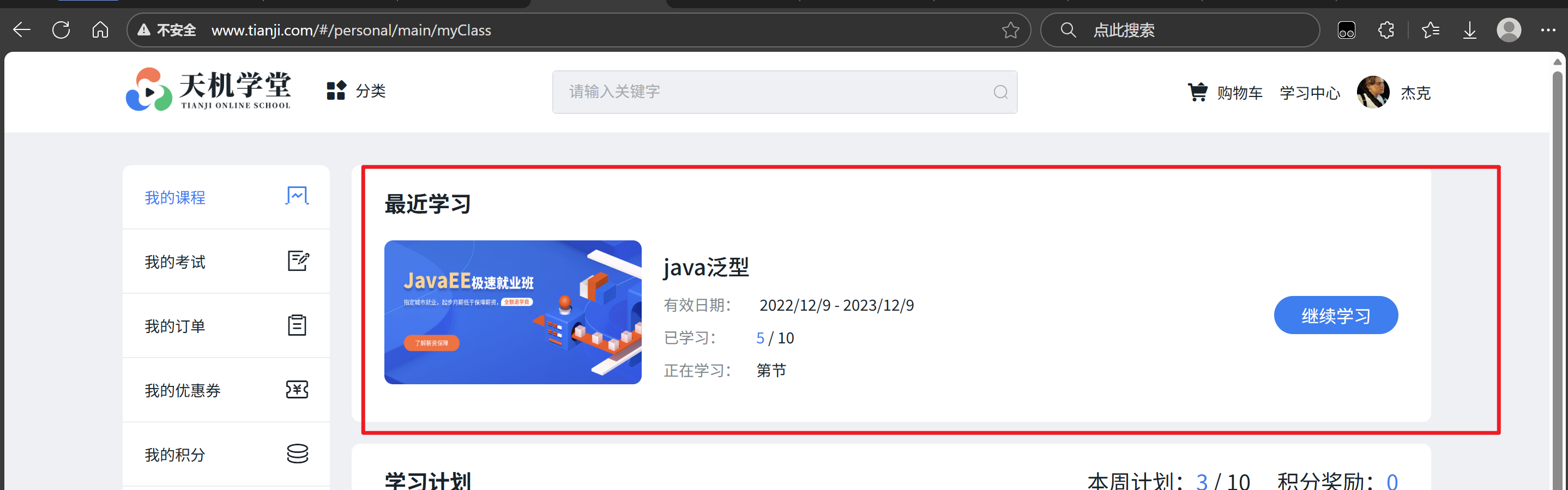
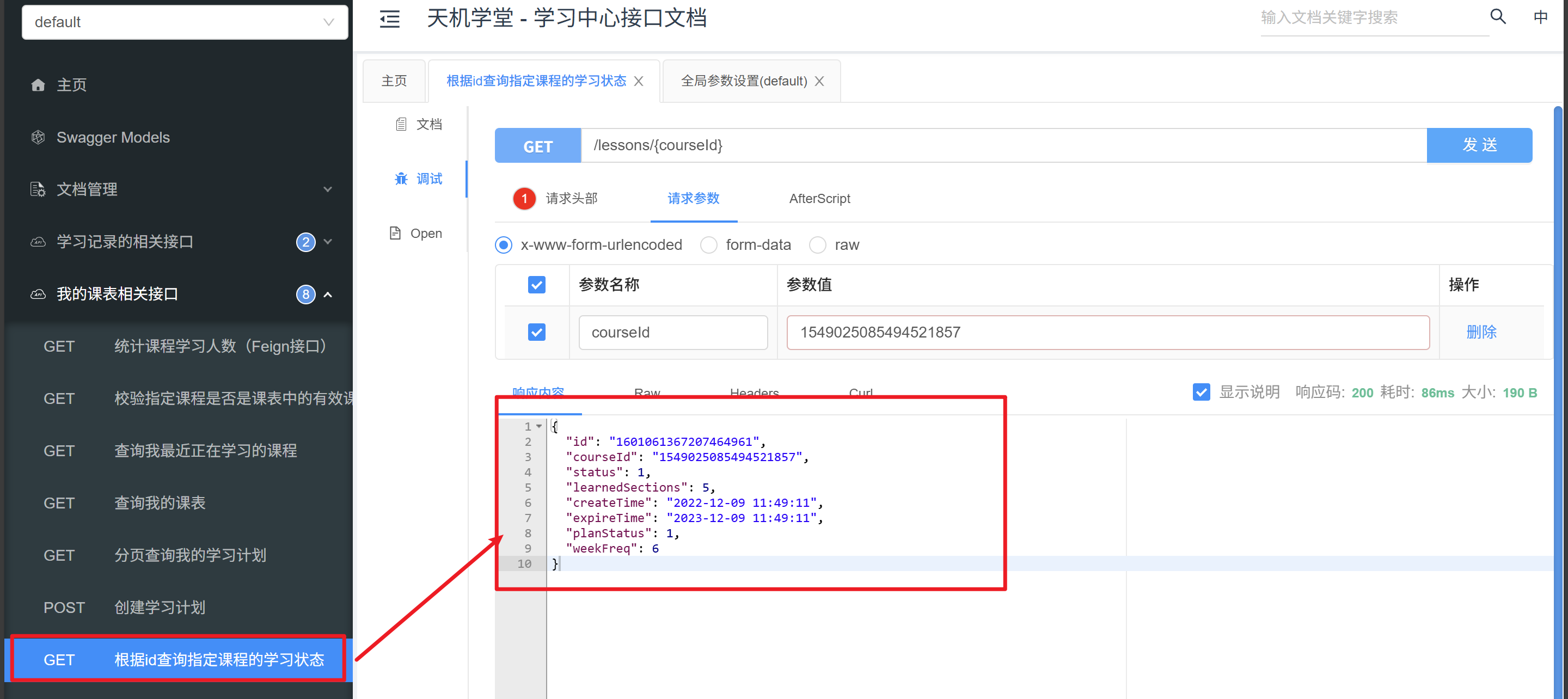
4、根据id查询指定课程的学习状态
① 接口编写
- 创建接口
/lessons/{courseId}
@ApiOperation("根据id查询指定课程的学习状态")
@GetMapping("/{courseId}")
public LearningLessonVO getStatusById(@PathVariable("courseId") Long courseId) {
return lessonService.getStatusById(courseId);
}
- 逻辑层代码:
/**
* 查询课程状态
*
* @param courseId
* @return
*/
@Override
public LearningLessonVO getStatusById(Long courseId) {
Long user = UserContext.getUser();
/*1、判断当前用户是否有购买此课程*/
LearningLesson one = lambdaQuery()
.eq(LearningLesson::getUserId, user)
.eq(LearningLesson::getCourseId, courseId)
.one();
if (one == null) {
log.debug("当前用户${}没有购买${}此课程:", user, courseId);
return null;
}
/*2、若是购买了此课程便查询详细学习进度信息*/
LearningLessonVO vo = BeanUtils.copyBean(one, LearningLessonVO.class);
return vo;
}
② 测试
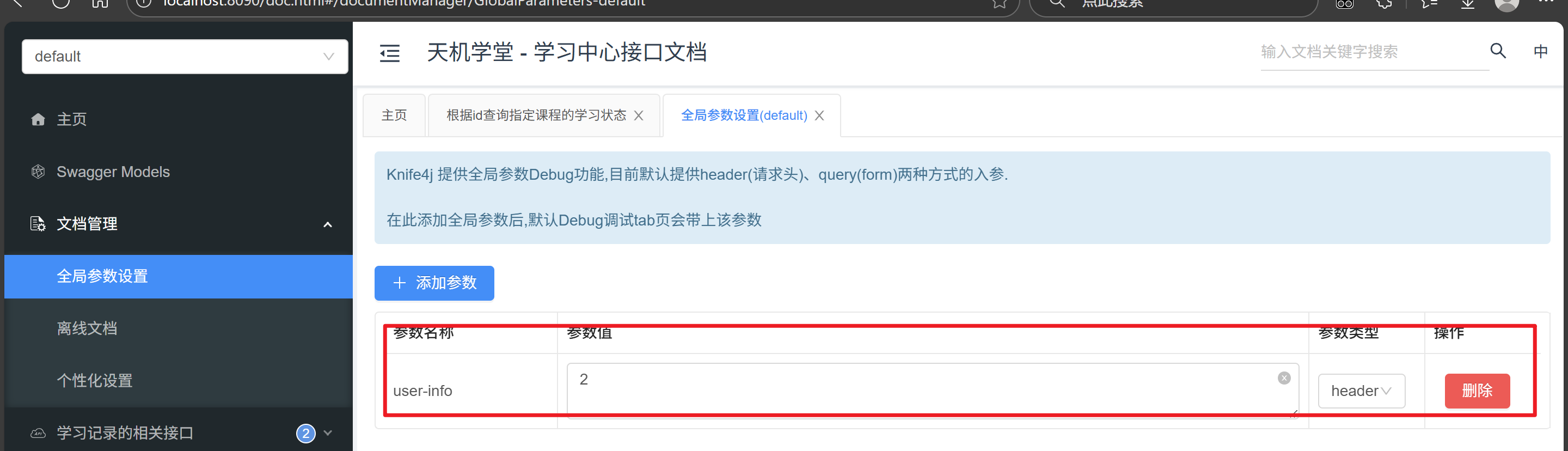
在接口文档中先定义一个
user-info = 2请求头,值为用户id
找到接口进行调试发送:
5、删除课表中的某课程
① 接口编写
定义
/lessons/{courseId}接口:
@ApiOperation("删除课表中的某课程")
@DeleteMapping("/{courseId}")
public void deleteByCourseId(@PathVariable("courseId") Long courseId) {
lessonService.deleteCourse(courseId, UserContext.getUser());
}
逻辑层
/**
* 删除用户课表中的课程
*
* @param courseId
* @param userId
*/
@Override
public void deleteCourse(Long courseId, Long userId) {
//1.判断当前登录用户id是否为null
//调用这个方法有两种情况:
//                      用户直接删除已失效的课程 -> 在controller中调用,没有获取用户id,只传了null值
//                      用户退款后触发课表自动删除 -> 在listener中调用,直接获取了OrderBasicDTO中的用户id
//listenCourseRefund已有健壮性判断,这里目的是在直接删除已失效的课程时,获取用户id
if (userId == null) {
userId = UserContext.getUser();
}
//2、删除
//        remove(lambdaQuery().eq(LearningLesson::getUserId, userId)
//                .eq(LearningLesson::getCourseId, userId));
lambdaUpdate()
.eq(LearningLesson::getUserId, userId)
.eq(LearningLesson::getCourseId, courseId)
.remove();
}
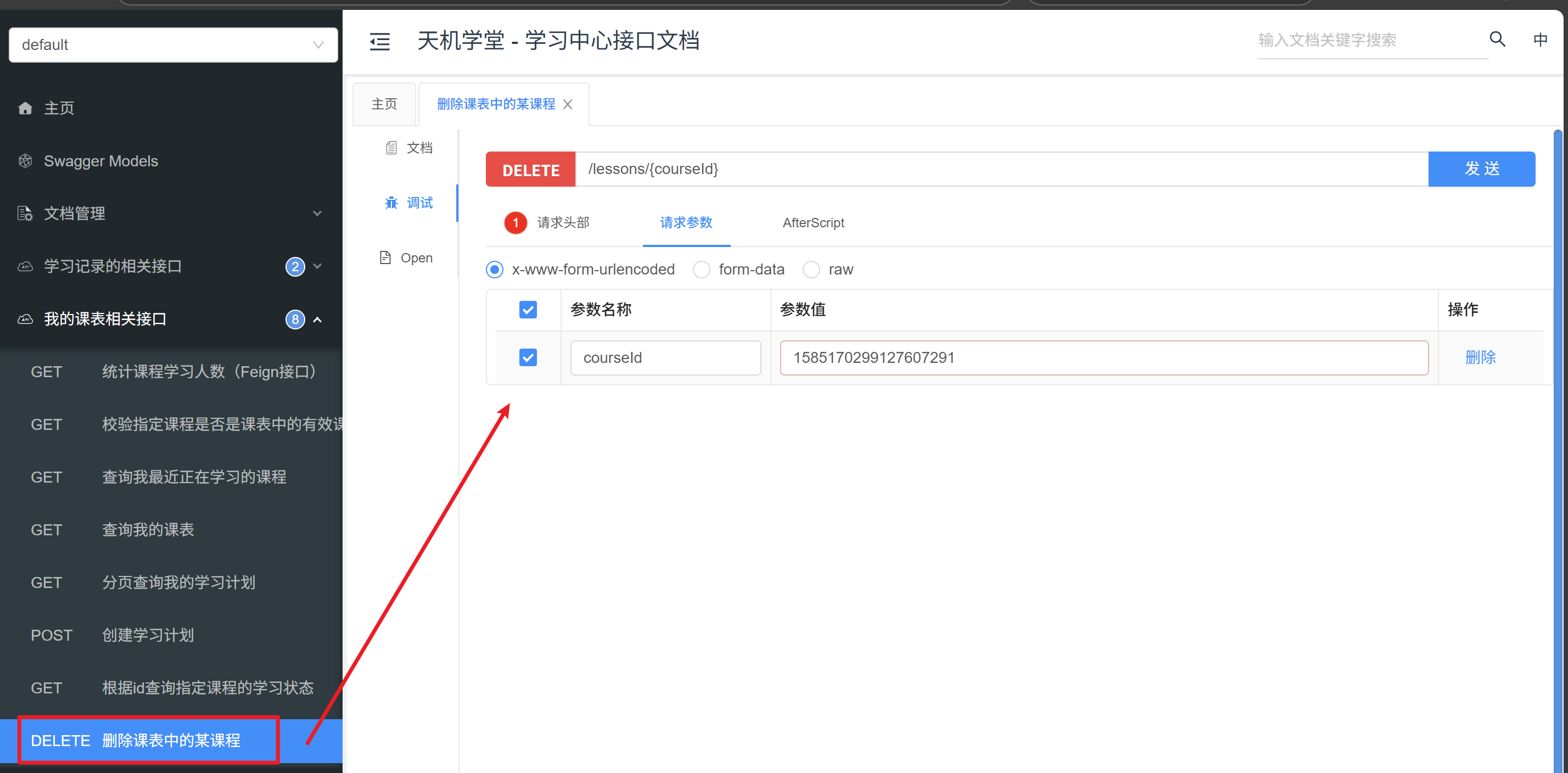
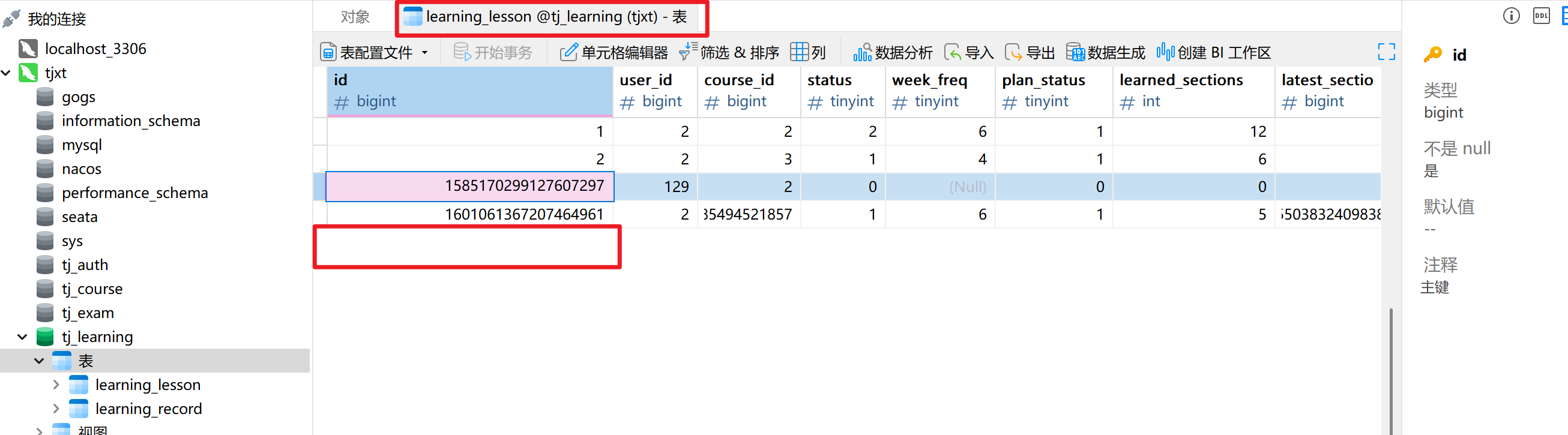
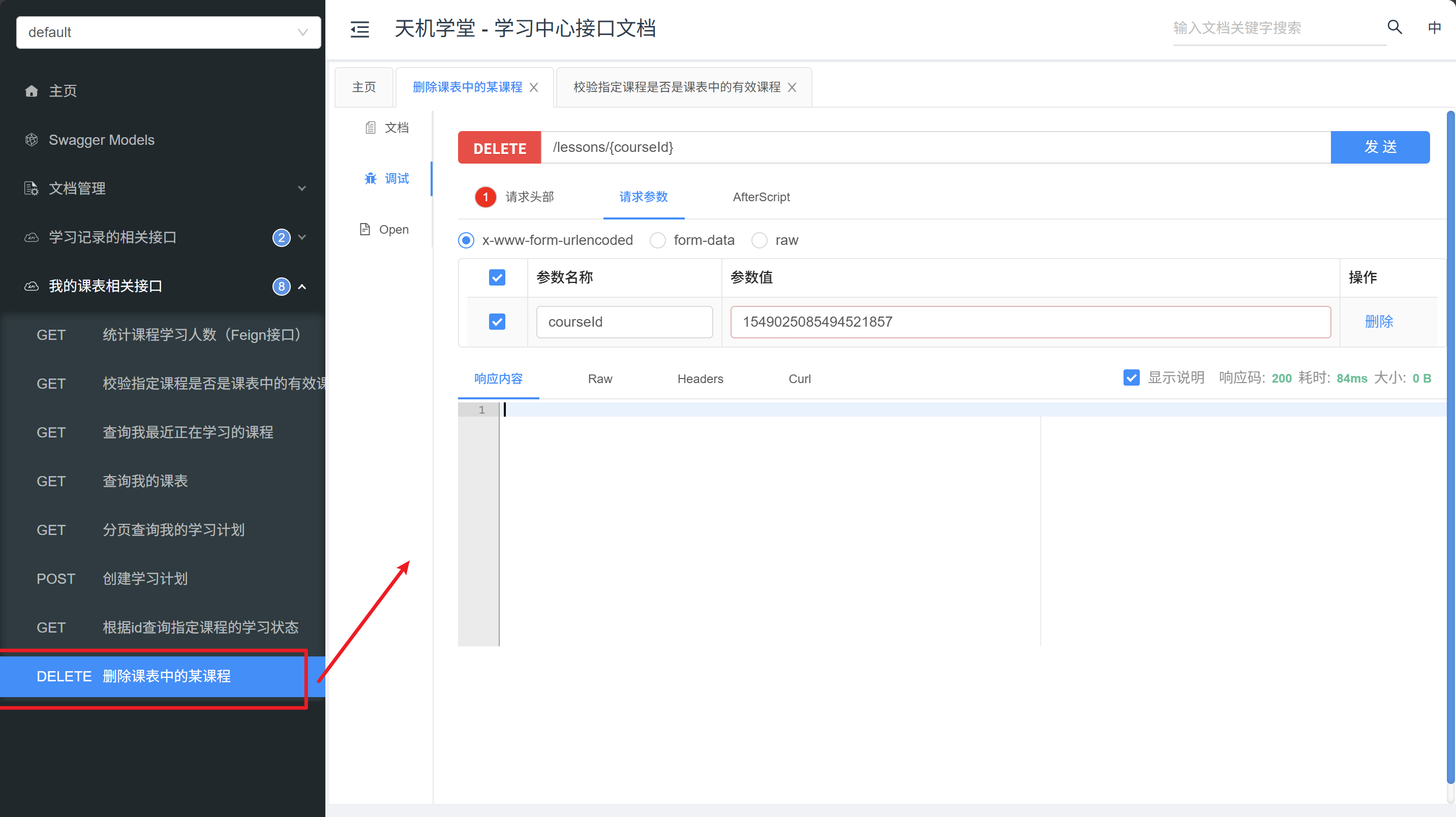
② 测试
这里点击发送后可以去课表数据库中是否有此课表了:
6、退款后,立刻移除课表中的课程
① 接口编写
在mq文件中定义监听消息的方法:
/**
* 监听课程退款或删除课程的消息
*
* @param dto 订单信息
**/
@RabbitListener(bindings = @QueueBinding(
value = @Queue(value = "learning.lesson.refund.queue", durable = "true"),
exchange = @Exchange(name = MqConstants.Exchange.ORDER_EXCHANGE,
type = ExchangeTypes.TOPIC),
key = MqConstants.Key.ORDER_REFUND_KEY
))
public void listenCourseRefund(OrderBasicDTO dto) {
//1、健壮性处理
if (dto == null || dto.getUserId() == null || CollUtils.isEmpty(dto.getCourseIds())) {
//数据误,无需处理
log.error("接收到MQ消息有误,订单数据为空");
return;
}
//2.调用service,删除课程
log.debug("监听到用户{}的订单{}要退款,需要从课表中删除课程{}",
dto.getUserId(), dto.getOrderId(), dto.getCourseIds());
lessonService.deleteCourse(dto.getCourseIds().get(0), dto.getUserId());
}监听到消息后调用上面的删除课表即可
7、校验指定课程是否是课表中的有效课程(Feign接口)
① 接口编写
这里因为时Feign接口直接将接口从
tj-api直接复制过来即可
@ApiOperation("校验指定课程是否是课表中的有效课程")
@GetMapping("/lessons/{courseId}/valid")
public Long isLessonValid(@PathVariable("courseId") Long courseId) {
return lessonService.verifyCourseOfValid(courseId);
}
逻辑层
/**
* 校验指定课程是否是课表中的有效课程
*
* @param courseId
* @return
*/
@Override
public Long verifyCourseOfValid(Long courseId) {
Long user = UserContext.getUser();
/*查询当前用户的课表中的此课程*/
LearningLesson one =
lambdaQuery().eq(LearningLesson::getUserId, user)
.eq(LearningLesson::getCourseId, courseId)
.one();//联合唯一索引,唯一
/*判断是否过期*/
LocalDateTime expireTime = one.getExpireTime();
LocalDateTime now = LocalDateTime.now();
if (now.isBefore(expireTime)) {//“当前时间” 在 “过期时间” 之前便是没有过期
return one.getId(); //返回当前这段课表的id
}
//这里我们可以直接返回空代表已过期
return null;
}
② 测试
返回为空则说明这个课表已过期
8、统计课程学习人数(Feign接口)
① 接口编写
这里因为逻辑比较简单我就直接进行查询了:
@ApiOperation("统计课程学习人数(Feign接口)")
@GetMapping("/lessons/{courseId}/count")
public Integer countLearningLessonByCourse(@PathVariable("courseId") Long courseId) {
return lessonService.lambdaQuery()
.eq(LearningLesson::getCourseId, courseId)
.in(LearningLesson::getStatus,
LessonStatus.LEARNING.getValue(),
LessonStatus.NOT_BEGIN.getValue())
.count();
}
 浙公网安备 33010602011771号