系列文章 Spring AI 通过标准化集成方案大幅降低 AI 应用开发门槛。本文将以国产大模型代表 ** 深度求索(DeepSeek)** 为例,完整演示从环境搭建到核心机制解析的全流程,带您掌握企业级 AI 应用开发的核心能力。
一、传统开发 vs AI 工程化:范式革命与技术挑战 1. 开发模式对比 维度 传统软件开发 AI 工程化开发 核心驱动 业务逻辑与算法实现 数据驱动的模型训练与推理 输出特性 确定性结果(基于固定规则) 概率性结果(基于统计学习) 核心资产 业务代码与数据结构 高质量数据集与训练好的模型 迭代方式 功能模块增量开发 数据标注→模型训练→推理优化的闭环迭代
2. AI 工程化核心挑战 数据治理难题 :需解决数据采集(如爬虫反爬)、清洗(异常值处理)、标注(实体识别)等全链路问题模型工程复杂度 :涉及模型选型(如选择 DeepSeek-R1 还是 Llama 系列)、训练调优(超参数搜索)、量化压缩(模型轻量化)生产级部署要求 :需支持高并发推理(如 Token 级流输出)、多模型管理(A/B 测试)、实时监控(延迟 / 成功率指标) 传统 Spring Boot 的 MVC 架构难以直接应对这些挑战,而Spring AI 通过标准化接口封装与生态整合,将 AI 能力转化为可插拔的工程组件。
二、Spring AI x DeepSeek:国产化 AI 工程解决方案 1. DeepSeek 模型优势 作为国内领先的 AGI 公司,深度求索(DeepSeek)提供:
高性能推理引擎 :支持长上下文(8K/32K tokens 可选)与流式输出企业级安全合规 :数据本地化部署方案(支持私有化云)多模态能力扩展 :后续可无缝集成图像 / 语音处理模块
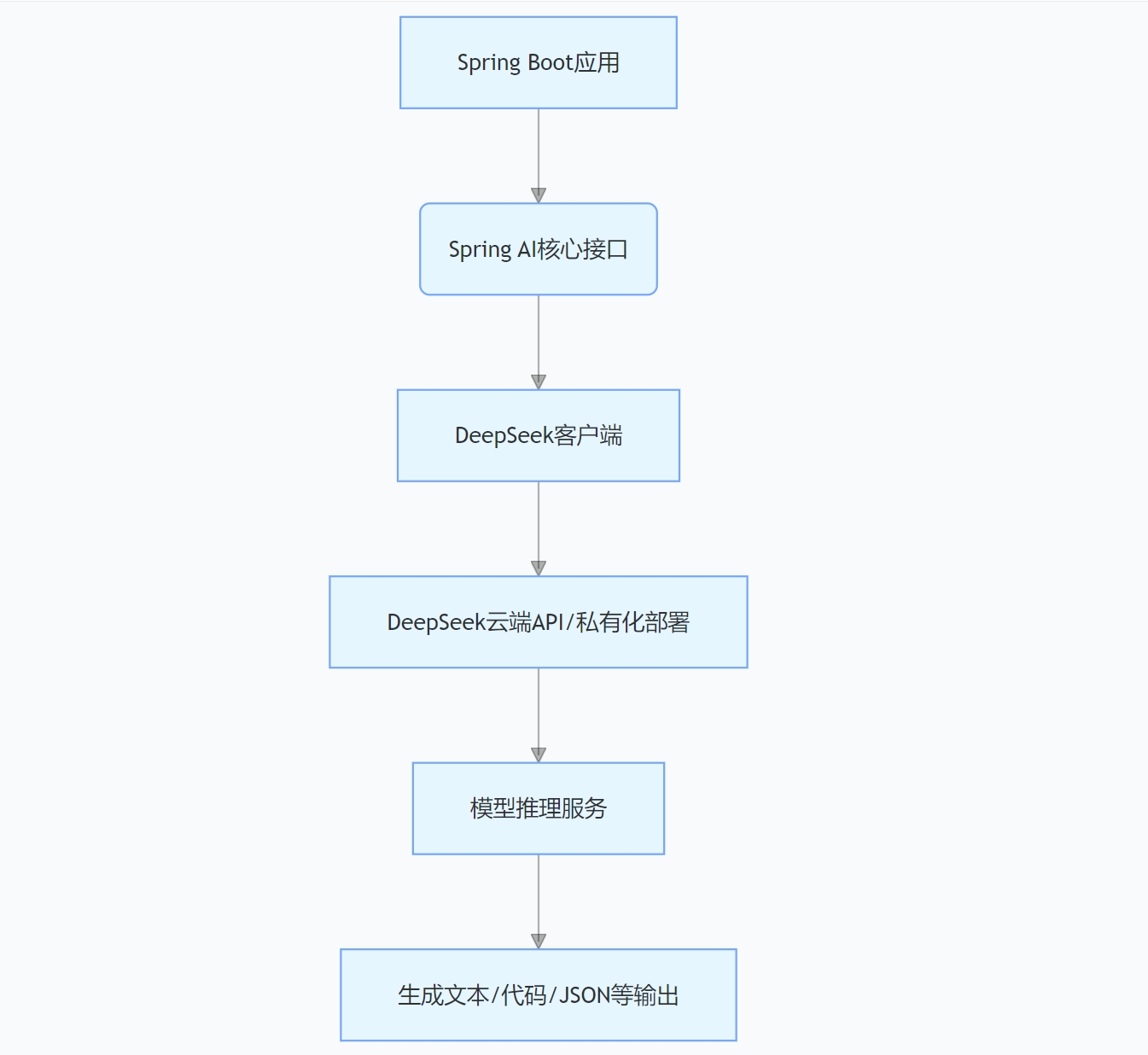
通过spring-ai-deepseek模块,Spring Boot 应用可通过注解驱动方式调用 DeepSeek 模型,底层自动处理 HTTP 连接池管理、请求重试、响应解析等工程化问题。
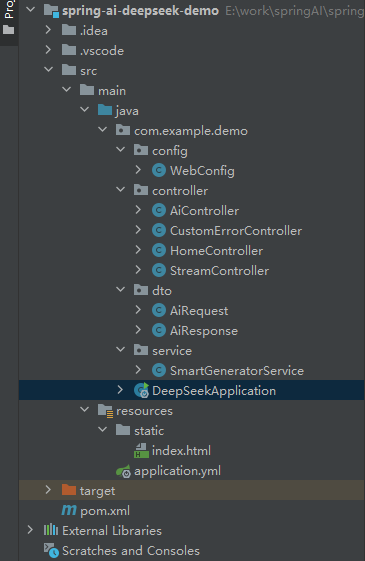
三、实战开发:基于 DeepSeek 的智能文本生成系统 1. 项目搭建 目录结构
通过 Spring Initializr 创建项目时,添加 DeepSeek 专用依赖 :
    org.springframework.boot
    spring-boot-starter-ai-deepseek
或在 pom.xml 中手动添加上述依赖,Maven 会自动解析 DeepSeek 集成所需的全部组件。
2. 配置 DeepSeek 在 application.yml 中配置 DeepSeek 服务信息(含注册指引):
# DeepSeek 服务配置(官方文档:https://docs.spring.io/spring-ai/reference/api/chat/deepseek-chat.html)
spring:
  ai:
    deepseek:
      # 必需:在DeepSeek控制台申请的API密钥(注册地址:https://platform.deepseek.com/register)
      api-key: ${DEEPSEEK_API_KEY:your-deepseek-api-key}
      # API基础地址(私有化部署需修改)
      base-url: https://api.deepseek.com
      # 聊天模型配置
      chat:
        enabled: true
        options:
          model: deepseek-chat  # 使用deepseek-chat模型
          temperature: 0.8  # 生成随机性控制(0.0-1.0,值越高越随机)
          max-tokens: 512  # 单次生成最大Token数
          top-p: 0.9  # Nucleus采样参数(0.0-1.0,控制生成词汇的概率分布)
          frequency-penalty: 0.0  # 频率惩罚(-2.0到2.0)
          presence-penalty: 0.0  # 存在惩罚(-2.0到2.0)
          stop: ["###", "END"]  # 生成停止序列
    # 重试配置
    retry:
      max-attempts: 3  # 最大重试次数
      backoff:
        initial-interval: 2s  # 初始重试间隔
        multiplier: 2  # 重试间隔倍数
        max-interval: 10s  # 最大重试间隔
      on-client-errors: false  # 是否对4xx错误重试
# 应用服务器配置
server:
  port: 8080  # 服务端口
  servlet:
    context-path: /  # 上下文路径
    encoding:
      charset: UTF-8  # 字符编码
      force: true  # 强制编码
# 日志配置
logging:
  level:
    root: INFO
    com.example.demo: DEBUG
    org.springframework.ai: DEBUG
    org.springframework.ai.deepseek: DEBUG
  pattern:
    console: "%d{yyyy-MM-dd HH:mm:ss} [%thread] %-5level %logger{36} - %msg%n"
# 管理端点配置
management:
  endpoints:
    web:
      exposure:
        include: health,info,metrics,env
      base-path: /actuator
  endpoint:
    health:
      show-details: always
  server:
    port: 8080
3. 编写代码 (1)DeepSeek 服务封装(SmartGeneratorService.java)
package com.example.demo.service;
import com.example.demo.dto.AiRequest;
import com.example.demo.dto.AiResponse;
import org.slf4j.Logger;
import org.slf4j.LoggerFactory;
import org.springframework.ai.chat.model.ChatModel;
import org.springframework.ai.chat.prompt.Prompt;
import org.springframework.ai.chat.prompt.PromptTemplate;
import org.springframework.ai.deepseek.DeepSeekChatOptions;
import org.springframework.stereotype.Service;
import reactor.core.publisher.Flux;
import java.util.Map;
/**
 * 智能生成服务
 * 提供营销文案生成、代码生成、智能问答等功能
 *
 * @author Spring AI Demo
 */
@Service
public class SmartGeneratorService {
    private static final Logger logger = LoggerFactory.getLogger(SmartGeneratorService.class);
    private final ChatModel chatModel;
    public SmartGeneratorService(ChatModel chatModel) {
        this.chatModel = chatModel;
    }
    /**
     * 生成营销文案
     *
     * @param request 请求参数
     * @return AI响应
     */
    public AiResponse generateMarketingContent(AiRequest request) {
        logger.info("开始生成营销文案,输入:{}", request.getContent());
        long startTime = System.currentTimeMillis();
        try {
            String systemPrompt = """
                你是一位专业的营销文案专家,擅长创作吸引人的营销内容。
                请根据用户的需求,生成具有以下特点的营销文案:
                1. 吸引眼球的标题
                2. 突出产品/服务的核心价值
                3. 使用情感化的语言
                4. 包含明确的行动号召
                5. 语言简洁有力,易于理解
                请用中文回复,格式清晰,内容富有创意。
                """;
            PromptTemplate promptTemplate = new PromptTemplate(systemPrompt + "\n\n用户需求:{content}");
            Prompt prompt = promptTemplate.create(Map.of("content", request.getContent()));
            // 设置营销文案生成的参数(创意性较高)
            DeepSeekChatOptions options = DeepSeekChatOptions.builder()
                    .temperature(request.getTemperature() != null ? request.getTemperature() : 1.3)
                    .maxTokens(request.getMaxTokens() != null ? request.getMaxTokens() : 800)
                    .build();
            var response = chatModel.call(new Prompt(prompt.getInstructions(), options));
            String content = response.getResult().getOutput().getText();
            long processingTime = System.currentTimeMillis() - startTime;
            logger.info("营销文案生成完成,耗时:{}ms", processingTime);
            AiResponse aiResponse = AiResponse.success(content, "deepseek-chat");
            aiResponse.setProcessingTimeMs(processingTime);
            return aiResponse;
        } catch (Exception e) {
            logger.error("营销文案生成失败", e);
            return AiResponse.error("营销文案生成失败:" + e.getMessage());
        }
    }
    /**
     * 生成代码
     *
     * @param request 请求参数
     * @return AI响应
     */
    public AiResponse generateCode(AiRequest request) {
        logger.info("开始生成代码,需求:{}", request.getContent());
        long startTime = System.currentTimeMillis();
        try {
            String systemPrompt = """
                你是一位资深的软件工程师,精通多种编程语言和技术栈。
                请根据用户的需求,生成高质量的代码,要求:
                1. 代码结构清晰,逻辑合理
                2. 包含必要的注释说明
                3. 遵循最佳实践和编码规范
                4. 考虑错误处理和边界情况
                5. 如果需要,提供使用示例
                请用中文注释,代码要完整可运行。
                """;
            PromptTemplate promptTemplate = new PromptTemplate(systemPrompt + "\n\n编程需求:{content}");
            Prompt prompt = promptTemplate.create(Map.of("content", request.getContent()));
            // 设置代码生成的参数(准确性优先)
            DeepSeekChatOptions options = DeepSeekChatOptions.builder()
                    .temperature(request.getTemperature() != null ? request.getTemperature() : 0.1)
                    .maxTokens(request.getMaxTokens() != null ? request.getMaxTokens() : 1500)
                    .build();
            var response = chatModel.call(new Prompt(prompt.getInstructions(), options));
            String content = response.getResult().getOutput().getText();
            long processingTime = System.currentTimeMillis() - startTime;
            logger.info("代码生成完成,耗时:{}ms", processingTime);
            AiResponse aiResponse = AiResponse.success(content, "deepseek-chat");
            aiResponse.setProcessingTimeMs(processingTime);
            return aiResponse;
        } catch (Exception e) {
            logger.error("代码生成失败", e);
            return AiResponse.error("代码生成失败:" + e.getMessage());
        }
    }
    /**
     * 智能问答
     *
     * @param request 请求参数
     * @return AI响应
     */
    public AiResponse answerQuestion(AiRequest request) {
        logger.info("开始智能问答,问题:{}", request.getContent());
        long startTime = System.currentTimeMillis();
        try {
            String systemPrompt = """
                你是一位知识渊博的AI助手,能够回答各种领域的问题。
                请根据用户的问题,提供准确、详细、有用的回答:
                1. 回答要准确可靠,基于事实
                2. 解释要清晰易懂,层次分明
                3. 如果涉及专业术语,请适当解释
                4. 如果问题复杂,可以分步骤说明
                5. 如果不确定答案,请诚实说明
                请用中文回复,语言友好专业。
                """;
            PromptTemplate promptTemplate = new PromptTemplate(systemPrompt + "\n\n用户问题:{content}");
            Prompt prompt = promptTemplate.create(Map.of("content", request.getContent()));
            // 设置问答的参数(平衡准确性和流畅性)
            DeepSeekChatOptions options = DeepSeekChatOptions.builder()
                    .temperature(request.getTemperature() != null ? request.getTemperature() : 0.7)
                    .maxTokens(request.getMaxTokens() != null ? request.getMaxTokens() : 1000)
                    .build();
            var response = chatModel.call(new Prompt(prompt.getInstructions(), options));
            String content = response.getResult().getOutput().getText();
            long processingTime = System.currentTimeMillis() - startTime;
            logger.info("智能问答完成,耗时:{}ms", processingTime);
            AiResponse aiResponse = AiResponse.success(content, "deepseek-chat");
            aiResponse.setProcessingTimeMs(processingTime);
            return aiResponse;
        } catch (Exception e) {
            logger.error("智能问答失败", e);
            return AiResponse.error("智能问答失败:" + e.getMessage());
        }
    }
    /**
     * 通用聊天
     *
     * @param request 请求参数
     * @return AI响应
     */
    public AiResponse chat(AiRequest request) {
        logger.info("开始聊天对话,消息:{}", request.getContent());
        long startTime = System.currentTimeMillis();
        try {
            String systemPrompt = request.getSystemPrompt() != null ?
                request.getSystemPrompt() :
                """
                你是一位友好、有帮助的AI助手。
                请以自然、亲切的方式与用户对话:
                1. 保持友好和礼貌的语调
                2. 根据上下文提供有用的回复
                3. 如果用户需要帮助,尽力提供支持
                4. 保持对话的连贯性和趣味性
                请用中文回复,语言自然流畅。
                """;
            PromptTemplate promptTemplate = new PromptTemplate(systemPrompt + "\n\n用户:{content}");
            Prompt prompt = promptTemplate.create(Map.of("content", request.getContent()));
            // 设置聊天的参数(自然对话)
            DeepSeekChatOptions options = DeepSeekChatOptions.builder()
                    .temperature(request.getTemperature() != null ? request.getTemperature() : 0.9)
                    .maxTokens(request.getMaxTokens() != null ? request.getMaxTokens() : 800)
                    .build();
            var response = chatModel.call(new Prompt(prompt.getInstructions(), options));
            String content = response.getResult().getOutput().getText();
            long processingTime = System.currentTimeMillis() - startTime;
            logger.info("聊天对话完成,耗时:{}ms", processingTime);
            AiResponse aiResponse = AiResponse.success(content, "deepseek-chat");
            aiResponse.setProcessingTimeMs(processingTime);
            return aiResponse;
        } catch (Exception e) {
            logger.error("聊天对话失败", e);
            return AiResponse.error("聊天对话失败:" + e.getMessage());
        }
    }
    /**
     * 流式聊天
     *
     * @param message 用户消息
     * @return 流式响应
     */
    public Flux streamChat(String message) {
        logger.info("开始流式聊天,消息:{}", message);
        try {
            String systemPrompt = """
                你是一位友好、有帮助的AI助手。
                请以自然、亲切的方式与用户对话,用中文回复。
                """;
            PromptTemplate promptTemplate = new PromptTemplate(systemPrompt + "\n\n用户:{content}");
            Prompt prompt = promptTemplate.create(Map.of("content", message));
            DeepSeekChatOptions options = DeepSeekChatOptions.builder()
                    .temperature(0.9)
                    .maxTokens(800)
                    .build();
            return chatModel.stream(new Prompt(prompt.getInstructions(), options))
                    .map(response -> response.getResult().getOutput().getText())
                    .doOnNext(chunk -> logger.debug("流式响应块:{}", chunk))
                    .doOnComplete(() -> logger.info("流式聊天完成"))
                    .doOnError(error -> logger.error("流式聊天失败", error));
        } catch (Exception e) {
            logger.error("流式聊天启动失败", e);
            return Flux.error(e);
        }
    }
}
(2)Web 控制器实现(AiController.java)
package com.example.demo.controller;
import com.example.demo.dto.AiRequest;
import com.example.demo.dto.AiResponse;
import com.example.demo.service.SmartGeneratorService;
import jakarta.validation.Valid;
import org.slf4j.Logger;
import org.slf4j.LoggerFactory;
import org.springframework.http.ResponseEntity;
import org.springframework.web.bind.annotation.*;
/**
* AI功能控制器
* 提供营销文案生成、代码生成、智能问答、聊天对话等API
*
* @author Spring AI Demo
*/
@RestController
@RequestMapping("/api/ai")
@CrossOrigin(origins = "*")
public class AiController {
private static final Logger logger = LoggerFactory.getLogger(AiController.class);
private final SmartGeneratorService smartGeneratorService;
public AiController(SmartGeneratorService smartGeneratorService) {
this.smartGeneratorService = smartGeneratorService;
}
/**
* 营销文案生成API
*
* @param request 请求参数
* @return 生成的营销文案
*/
@PostMapping("/marketing")
public ResponseEntity generateMarketingContent(@Valid @RequestBody AiRequest request) {
logger.info("收到营销文案生成请求:{}", request.getContent());
try {
AiResponse response = smartGeneratorService.generateMarketingContent(request);
return ResponseEntity.ok(response);
} catch (Exception e) {
logger.error("营销文案生成API调用失败", e);
return ResponseEntity.internalServerError()
.body(AiResponse.error("服务器内部错误:" + e.getMessage()));
}
}
/**
* 代码生成API
*
* @param request 请求参数
* @return 生成的代码
*/
@PostMapping("/code")
public ResponseEntity generateCode(@Valid @RequestBody AiRequest request) {
logger.info("收到代码生成请求:{}", request.getContent());
try {
AiResponse response = smartGeneratorService.generateCode(request);
return ResponseEntity.ok(response);
} catch (Exception e) {
logger.error("代码生成API调用失败", e);
return ResponseEntity.internalServerError()
.body(AiResponse.error("服务器内部错误:" + e.getMessage()));
}
}
/**
* 智能问答API
*
* @param request 请求参数
* @return 问题的答案
*/
@PostMapping("/qa")
public ResponseEntity answerQuestion(@Valid @RequestBody AiRequest request) {
logger.info("收到智能问答请求:{}", request.getContent());
try {
AiResponse response = smartGeneratorService.answerQuestion(request);
return ResponseEntity.ok(response);
} catch (Exception e) {
logger.error("智能问答API调用失败", e);
return ResponseEntity.internalServerError()
.body(AiResponse.error("服务器内部错误:" + e.getMessage()));
}
}
/**
* 聊天对话API
*
* @param request 请求参数
* @return 聊天回复
*/
@PostMapping("/chat")
public ResponseEntity chat(@Valid @RequestBody AiRequest request) {
logger.info("收到聊天对话请求:{}", request.getContent());
try {
AiResponse response = smartGeneratorService.chat(request);
return ResponseEntity.ok(response);
} catch (Exception e) {
logger.error("聊天对话API调用失败", e);
return ResponseEntity.internalServerError()
.body(AiResponse.error("服务器内部错误:" + e.getMessage()));
}
}
/**
* 简单文本生成API(GET方式,用于快速测试)
*
* @param message 用户消息
* @param temperature 温度参数(可选)
* @return 生成的回复
*/
@GetMapping("/simple")
public ResponseEntity simpleChat(
@RequestParam String message,
@RequestParam(required = false) Double temperature) {
logger.info("收到简单聊天请求:{}", message);
try {
AiRequest request = new AiRequest(message, temperature);
AiResponse response = smartGeneratorService.chat(request);
return ResponseEntity.ok(response);
} catch (Exception e) {
logger.error("简单聊天API调用失败", e);
return ResponseEntity.internalServerError()
.body(AiResponse.error("服务器内部错误:" + e.getMessage()));
}
}
/**
* 健康检查API
*
* @return 服务状态
*/
@GetMapping("/health")
public ResponseEntity health() {
return ResponseEntity.ok("AI服务运行正常 ✅");
}
/**
* 获取支持的功能列表
*
* @return 功能列表
*/
@GetMapping("/features")
public ResponseEntity getFeatures() {
var features = new Object() {
public final String[] supportedFeatures = {
"营销文案生成 (POST /api/ai/marketing)",
"代码生成 (POST /api/ai/code)",
"智能问答 (POST /api/ai/qa)",
"聊天对话 (POST /api/ai/chat)",
"简单对话 (GET /api/ai/simple?message=你好)",
"流式聊天 (GET /api/stream/chat?message=你好)"
};
public final String model = "deepseek-chat";
public final String version = "1.0.0";
public final String description = "Spring AI + DeepSeek 智能文本生成服务";
};
return ResponseEntity.ok(features);
}
}
(3)流式响应处理(StreamController.java)
package com.example.demo.controller;
import com.example.demo.service.SmartGeneratorService;
import org.slf4j.Logger;
import org.slf4j.LoggerFactory;
import org.springframework.http.MediaType;
import org.springframework.web.bind.annotation.*;
import reactor.core.publisher.Flux;
import java.time.Duration;
import java.util.HashMap;
import java.util.Map;
/**
* 流式响应控制器
* 提供Server-Sent Events (SSE) 流式聊天功能
*
* @author Spring AI Demo
*/
@RestController
@RequestMapping("/api/stream")
@CrossOrigin(origins = "*")
public class StreamController {
private static final Logger logger = LoggerFactory.getLogger(StreamController.class);
private final SmartGeneratorService smartGeneratorService;
public StreamController(SmartGeneratorService smartGeneratorService) {
this.smartGeneratorService = smartGeneratorService;
}
/**
* 流式聊天API
* 使用Server-Sent Events (SSE) 实现实时流式响应
*
* @param message 用户消息
* @return 流式响应
*/
@GetMapping(value = "/chat", produces = MediaType.TEXT_EVENT_STREAM_VALUE)
public Flux streamChat(@RequestParam String message) {
logger.info("收到流式聊天请求:{}", message);
return smartGeneratorService.streamChat(message)
.filter(chunk -> chunk != null && !chunk.trim().isEmpty()) // 过滤空内容
.doOnNext(chunk -> logger.debug("原始数据块: '{}'", chunk))
.map(chunk -> chunk.trim()) // 只清理空白字符
.filter(chunk -> !chunk.isEmpty()) // 再次过滤空内容
.concatWith(Flux.just("[DONE]"))
.doOnSubscribe(subscription -> logger.info("开始流式响应"))
.doOnComplete(() -> logger.info("流式响应完成"))
.doOnError(error -> logger.error("流式响应出错", error))
.onErrorReturn("[ERROR] 流式响应出现错误");
}
/**
* 流式聊天API(JSON格式)
* 返回JSON格式的流式数据
*
* @param message 用户消息
* @return JSON格式的流式响应
*/
@GetMapping(value = "/chat-json", produces = MediaType.APPLICATION_NDJSON_VALUE)
public Flux> streamChatJson(@RequestParam String message) {
logger.info("收到JSON流式聊天请求:{}", message);
// 创建完成响应
Map doneResponse = new HashMap<>();
doneResponse.put("type", "done");
doneResponse.put("content", "");
doneResponse.put("timestamp", System.currentTimeMillis());
// 创建错误响应
Map errorResponse = new HashMap<>();
errorResponse.put("type", "error");
errorResponse.put("content", "流式响应出现错误");
errorResponse.put("timestamp", System.currentTimeMillis());
return smartGeneratorService.streamChat(message)
.map(chunk -> {
Map response = new HashMap<>();
response.put("type", "chunk");
response.put("content", chunk);
response.put("timestamp", System.currentTimeMillis());
return response;
})
.concatWith(Flux.just(doneResponse))
.doOnSubscribe(subscription -> logger.info("开始JSON流式响应"))
.doOnComplete(() -> logger.info("JSON流式响应完成"))
.doOnError(error -> logger.error("JSON流式响应出错", error))
.onErrorReturn(errorResponse);
}
/**
* 模拟打字机效果的流式响应
*
* @param message 用户消息
* @return 带延迟的流式响应
*/
@GetMapping(value = "/typewriter", produces = MediaType.TEXT_EVENT_STREAM_VALUE)
public Flux typewriterChat(@RequestParam String message) {
logger.info("收到打字机效果聊天请求:{}", message);
return smartGeneratorService.streamChat(message)
.delayElements(Duration.ofMillis(50)) // 添加50ms延迟模拟打字机效果
.map(chunk -> "data: " + chunk + "\n\n")
.concatWith(Flux.just("data: [DONE]\n\n"))
.doOnSubscribe(subscription -> logger.info("开始打字机效果流式响应"))
.doOnComplete(() -> logger.info("打字机效果流式响应完成"))
.doOnError(error -> logger.error("打字机效果流式响应出错", error))
.onErrorReturn("data: [ERROR] 流式响应出现错误\n\n");
}
/**
* 流式响应健康检查
*
* @return 测试流式响应
*/
@GetMapping(value = "/health", produces = MediaType.TEXT_EVENT_STREAM_VALUE)
public Flux streamHealth() {
return Flux.interval(Duration.ofSeconds(1))
.take(5)
.map(i -> "data: 流式服务正常运行 - " + (i + 1) + "/5\n\n")
.concatWith(Flux.just("data: [DONE] 健康检查完成\n\n"))
.doOnSubscribe(subscription -> logger.info("开始流式健康检查"))
.doOnComplete(() -> logger.info("流式健康检查完成"));
}
/**
* 测试用的简单流式聊天(修复版本)
*
* @param message 用户消息
* @return 流式响应
*/
@GetMapping(value = "/chat-fixed", produces = MediaType.TEXT_EVENT_STREAM_VALUE)
public Flux streamChatFixed(@RequestParam String message) {
logger.info("收到修复版流式聊天请求:{}", message);
return smartGeneratorService.streamChat(message)
.filter(chunk -> chunk != null && !chunk.trim().isEmpty())
.doOnNext(chunk -> logger.debug("修复版数据块: '{}'", chunk))
.map(chunk -> chunk.trim())
.filter(chunk -> !chunk.isEmpty())
.concatWith(Flux.just("[DONE]"))
.doOnSubscribe(subscription -> logger.info("开始修复版流式响应"))
.doOnComplete(() -> logger.info("修复版流式响应完成"))
.doOnError(error -> logger.error("修复版流式响应出错", error))
.onErrorReturn("[ERROR] 修复版流式响应出现错误");
}
/**
* 获取流式API使用说明
*
* @return 使用说明
*/
@GetMapping("/info")
public Map getStreamInfo() {
Map info = new HashMap<>();
info.put("description", "Spring AI DeepSeek 流式响应服务");
info.put("endpoints", new String[]{
"GET /api/stream/chat?message=你好 - 基础流式聊天",
"GET /api/stream/chat-fixed?message=你好 - 修复版流式聊天",
"GET /api/stream/chat-json?message=你好 - JSON格式流式聊天",
"GET /api/stream/typewriter?message=你好 - 打字机效果流式聊天",
"GET /api/stream/health - 流式服务健康检查"
});
info.put("usage", "使用curl测试: curl -N 'http://localhost:8080/api/stream/chat-fixed?message=你好'");
info.put("browser", "浏览器访问: http://localhost:8080/api/stream/chat-fixed?message=你好");
info.put("contentType", "text/event-stream");
return info;
}
} (4)主页控制器(HomeController.java)
package com.example.demo.controller;
import org.springframework.stereotype.Controller;
import org.springframework.web.bind.annotation.GetMapping;
/**
* 主页控制器
* 处理根路径访问和页面跳转
*
* @author Spring AI Demo
*/
@Controller
public class HomeController {
/**
* 根路径重定向到主页
*
* @return 重定向到index.html
*/
@GetMapping("/")
public String home() {
return "redirect:/index.html";
}
/**
* 主页访问
*
* @return index页面
*/
@GetMapping("/index")
public String index() {
return "redirect:/index.html";
}
/**
* 演示页面访问
*
* @return index页面
*/
@GetMapping("/demo")
public String demo() {
return "redirect:/index.html";
}
}(5)自定义错误处理控制器(CustomErrorController.java)
package com.example.demo.controller;
import org.springframework.boot.web.servlet.error.ErrorController;
import org.springframework.http.HttpStatus;
import org.springframework.stereotype.Controller;
import org.springframework.web.bind.annotation.RequestMapping;
import org.springframework.web.bind.annotation.ResponseBody;
import jakarta.servlet.http.HttpServletRequest;
import java.util.HashMap;
import java.util.Map;
/**
* 自定义错误处理控制器
* 提供友好的错误页面和API错误响应
*
* @author Spring AI Demo
*/
@Controller
public class CustomErrorController implements ErrorController {
/**
* 处理错误请求
*
* @param request HTTP请求
* @return 错误响应
*/
@RequestMapping("/error")
@ResponseBody
public Map handleError(HttpServletRequest request) {
Map errorResponse = new HashMap<>();
// 获取错误状态码
Integer statusCode = (Integer) request.getAttribute("jakarta.servlet.error.status_code");
String requestUri = (String) request.getAttribute("jakarta.servlet.error.request_uri");
if (statusCode == null) {
statusCode = HttpStatus.INTERNAL_SERVER_ERROR.value();
}
errorResponse.put("status", statusCode);
errorResponse.put("error", getErrorMessage(statusCode));
errorResponse.put("path", requestUri);
errorResponse.put("timestamp", System.currentTimeMillis());
// 根据错误类型提供帮助信息
switch (statusCode) {
case 404:
errorResponse.put("message", "页面未找到");
errorResponse.put("suggestions", new String[]{
"访问主页: http://localhost:8080",
"查看API文档: http://localhost:8080/api/ai/features",
"健康检查: http://localhost:8080/actuator/health"
});
break;
case 500:
errorResponse.put("message", "服务器内部错误");
errorResponse.put("suggestions", new String[]{
"检查应用日志",
"确认API密钥配置正确",
"重启应用服务"
});
break;
default:
errorResponse.put("message", "请求处理失败");
errorResponse.put("suggestions", new String[]{
"检查请求格式",
"查看API文档",
"联系技术支持"
});
}
return errorResponse;
}
/**
* 根据状态码获取错误消息
*
* @param statusCode HTTP状态码
* @return 错误消息
*/
private String getErrorMessage(int statusCode) {
switch (statusCode) {
case 400:
return "Bad Request";
case 401:
return "Unauthorized";
case 403:
return "Forbidden";
case 404:
return "Not Found";
case 500:
return "Internal Server Error";
case 502:
return "Bad Gateway";
case 503:
return "Service Unavailable";
default:
return "Unknown Error";
}
}
} (6)Web配置类(WebConfig.java)
package com.example.demo.config;
import org.springframework.context.annotation.Configuration;
import org.springframework.web.servlet.config.annotation.ResourceHandlerRegistry;
import org.springframework.web.servlet.config.annotation.WebMvcConfigurer;
/**
* Web配置类
* 配置静态资源处理
*
* @author Spring AI Demo
*/
@Configuration
public class WebConfig implements WebMvcConfigurer {
/**
* 配置静态资源处理器
*
* @param registry 资源处理器注册表
*/
@Override
public void addResourceHandlers(ResourceHandlerRegistry registry) {
// 配置静态资源路径
registry.addResourceHandler("/**")
.addResourceLocations("classpath:/static/")
.setCachePeriod(3600); // 缓存1小时
// 确保index.html可以被访问
registry.addResourceHandler("/index.html")
.addResourceLocations("classpath:/static/index.html")
.setCachePeriod(0); // 不缓存主页
}
}(7)AI服务请求DTO(AiRequest.java)
package com.example.demo.dto;
import jakarta.validation.constraints.NotBlank;
import jakarta.validation.constraints.Size;
import jakarta.validation.constraints.DecimalMax;
import jakarta.validation.constraints.DecimalMin;
/**
* AI服务请求DTO
*
* @author Spring AI Demo
*/
public class AiRequest {
/**
* 用户输入内容
*/
@NotBlank(message = "输入内容不能为空")
@Size(max = 2000, message = "输入内容不能超过2000个字符")
private String content;
/**
* 温度参数(可选)
* 控制生成文本的随机性,0.0表示确定性,1.0表示最大随机性
*/
@DecimalMin(value = "0.0", message = "温度参数不能小于0.0")
@DecimalMax(value = "2.0", message = "温度参数不能大于2.0")
private Double temperature;
/**
* 最大生成Token数(可选)
*/
private Integer maxTokens;
/**
* 系统提示词(可选)
*/
private String systemPrompt;
// 构造函数
public AiRequest() {}
public AiRequest(String content) {
this.content = content;
}
public AiRequest(String content, Double temperature) {
this.content = content;
this.temperature = temperature;
}
// Getter和Setter方法
public String getContent() {
return content;
}
public void setContent(String content) {
this.content = content;
}
public Double getTemperature() {
return temperature;
}
public void setTemperature(Double temperature) {
this.temperature = temperature;
}
public Integer getMaxTokens() {
return maxTokens;
}
public void setMaxTokens(Integer maxTokens) {
this.maxTokens = maxTokens;
}
public String getSystemPrompt() {
return systemPrompt;
}
public void setSystemPrompt(String systemPrompt) {
this.systemPrompt = systemPrompt;
}
@Override
public String toString() {
return "AiRequest{" +
"content='" + content + '\'' +
", temperature=" + temperature +
", maxTokens=" + maxTokens +
", systemPrompt='" + systemPrompt + '\'' +
'}';
}
}(8)AI服务响应DTO(AiResponse.java)
package com.example.demo.dto;
import java.time.LocalDateTime;
/**
* AI服务响应DTO
*
* @author Spring AI Demo
*/
public class AiResponse {
/**
* 生成的内容
*/
private String content;
/**
* 请求是否成功
*/
private boolean success;
/**
* 错误信息(如果有)
*/
private String errorMessage;
/**
* 响应时间戳
*/
private LocalDateTime timestamp;
/**
* 使用的模型名称
*/
private String model;
/**
* 消耗的Token数量
*/
private Integer tokensUsed;
/**
* 处理耗时(毫秒)
*/
private Long processingTimeMs;
// 构造函数
public AiResponse() {
this.timestamp = LocalDateTime.now();
}
public AiResponse(String content) {
this();
this.content = content;
this.success = true;
}
public AiResponse(String content, String model) {
this(content);
this.model = model;
}
// 静态工厂方法
public static AiResponse success(String content) {
return new AiResponse(content);
}
public static AiResponse success(String content, String model) {
return new AiResponse(content, model);
}
public static AiResponse error(String errorMessage) {
AiResponse response = new AiResponse();
response.success = false;
response.errorMessage = errorMessage;
return response;
}
// Getter和Setter方法
public String getContent() {
return content;
}
public void setContent(String content) {
this.content = content;
}
public boolean isSuccess() {
return success;
}
public void setSuccess(boolean success) {
this.success = success;
}
public String getErrorMessage() {
return errorMessage;
}
public void setErrorMessage(String errorMessage) {
this.errorMessage = errorMessage;
}
public LocalDateTime getTimestamp() {
return timestamp;
}
public void setTimestamp(LocalDateTime timestamp) {
this.timestamp = timestamp;
}
public String getModel() {
return model;
}
public void setModel(String model) {
this.model = model;
}
public Integer getTokensUsed() {
return tokensUsed;
}
public void setTokensUsed(Integer tokensUsed) {
this.tokensUsed = tokensUsed;
}
public Long getProcessingTimeMs() {
return processingTimeMs;
}
public void setProcessingTimeMs(Long processingTimeMs) {
this.processingTimeMs = processingTimeMs;
}
@Override
public String toString() {
return "AiResponse{" +
"content='" + content + '\'' +
", success=" + success +
", errorMessage='" + errorMessage + '\'' +
", timestamp=" + timestamp +
", model='" + model + '\'' +
", tokensUsed=" + tokensUsed +
", processingTimeMs=" + processingTimeMs +
'}';
}
}(5)Spring Boot与Spring AI集成DeepSeek的主应用类(DeepSeekApplication.java)
package com.example.demo;
import org.springframework.boot.SpringApplication;
import org.springframework.boot.autoconfigure.SpringBootApplication;
import org.springframework.boot.context.event.ApplicationReadyEvent;
import org.springframework.context.event.EventListener;
/**
* Spring Boot与Spring AI集成DeepSeek的主应用类
*
* @author Spring AI Demo
* @version 1.0.0
*/
@SpringBootApplication
public class DeepSeekApplication {
public static void main(String[] args) {
SpringApplication.run(DeepSeekApplication.class, args);
}
/**
* 应用启动完成后的事件处理
*/
@EventListener(ApplicationReadyEvent.class)
public void onApplicationReady() {
System.out.println("\n" +
"=================================================================\n" +
" Spring AI DeepSeek 演示应用启动成功!\n" +
"=================================================================\n" +
" API文档地址:\n" +
" • 测试页面:POST http://localhost:8080\n" +
" • 营销文案生成:POST http://localhost:8080/api/ai/marketing\n" +
" • 代码生成: POST http://localhost:8080/api/ai/code\n" +
" • 智能问答: POST http://localhost:8080/api/ai/qa\n" +
" • 聊天对话: POST http://localhost:8080/api/ai/chat\n" +
" • 流式聊天: GET http://localhost:8080/api/stream/chat?message=你好\n" +
"=================================================================\n" +
" 使用提示:\n" +
" 1. 请确保在application.yml中配置了有效的DeepSeek API密钥\n" +
" 2. 或者设置环境变量:DEEPSEEK_API_KEY=your-api-key\n" +
" 3. 访问 http://localhost:8080/actuator/health 检查应用健康状态\n" +
"=================================================================\n");
}
}(5)前段展示页面(index.html)
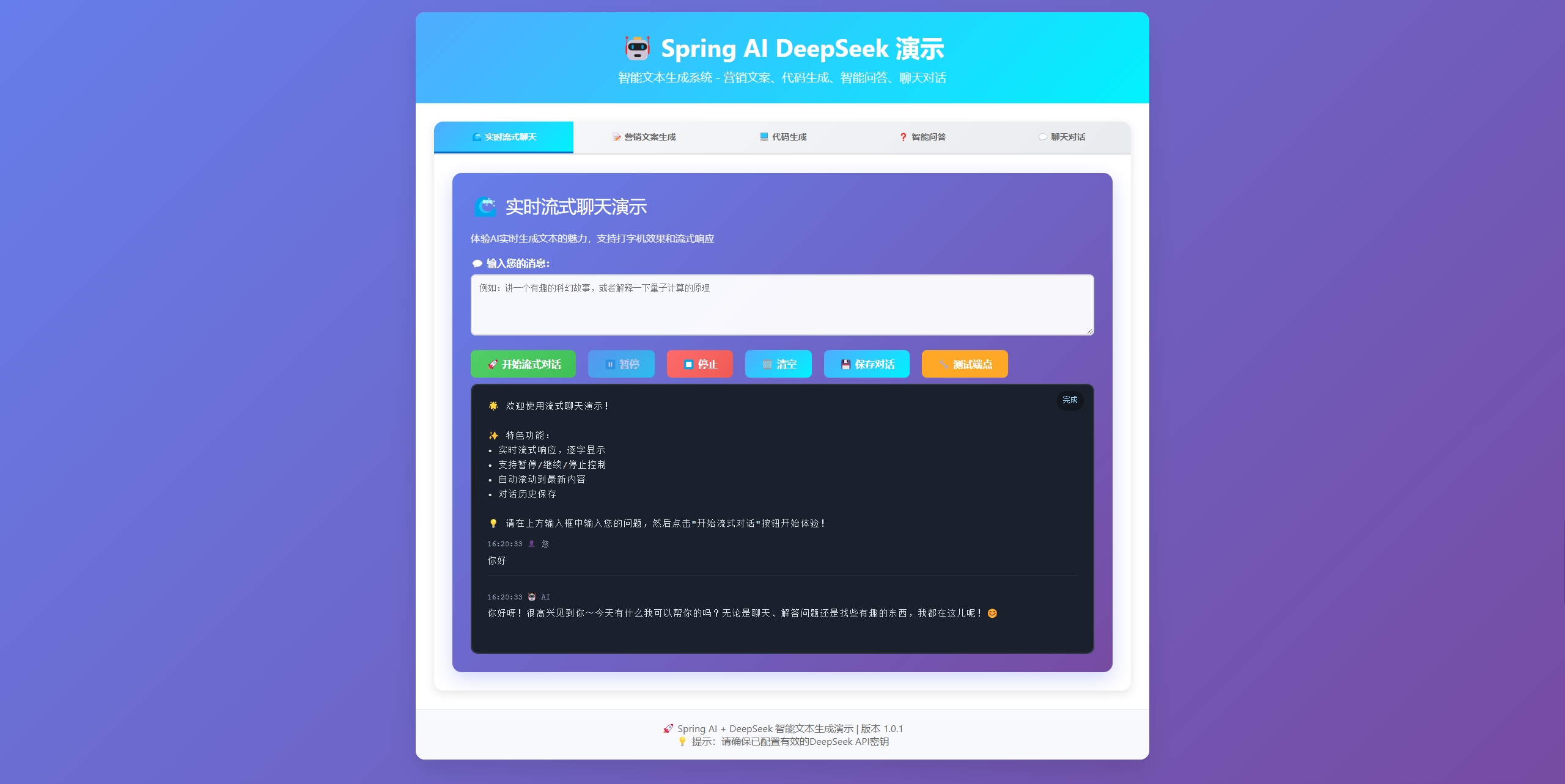
Spring AI DeepSeek 演示
实时流式聊天
营销文案生成
代码生成
❓ 智能问答
聊天对话
实时流式聊天演示
体验AI实时生成文本的魅力,支持打字机效果和流式响应
输入您的消息:
开始流式对话
⏸️ 暂停
⏹️ 停止
️ 清空
保存对话
测试端点
等待开始...
欢迎使用流式聊天演示!
营销文案生成
产品描述或需求:
创意度 (0.0-2.0):
生成营销文案
生成中...
点击按钮开始生成营销文案...
代码生成
编程需求:
精确度 (0.0-1.0):
生成代码
生成中...
点击按钮开始生成代码...
智能问答
您的问题:
获取答案
思考中...
输入问题获取智能回答...
聊天对话
聊天消息:
发送消息
回复中...
开始与AI聊天...
<script>
// 全局变量
let currentEventSource = null;
let isPaused = false;
let streamBuffer = '';
let conversationHistory = [];
// Tab切换功能
function switchTab(tabName) {
// 隐藏所有tab内容
const allTabs = document.querySelectorAll('.tab-content');
allTabs.forEach(tab => tab.classList.remove('active'));
// 移除所有tab按钮的active状态
const allBtns = document.querySelectorAll('.tab-btn');
allBtns.forEach(btn => btn.classList.remove('active'));
// 显示选中的tab内容
document.getElementById(tabName + '-tab').classList.add('active');
// 激活对应的tab按钮
event.target.classList.add('active');
console.log(`切换到 ${tabName} 标签页`);
}
// 通用API调用函数
async function callAPI(endpoint, data, loadingId, responseId) {
const loading = document.getElementById(loadingId);
const response = document.getElementById(responseId);
loading.style.display = 'block';
response.textContent = '处理中...';
try {
const result = await fetch(endpoint, {
method: 'POST',
headers: {
'Content-Type': 'application/json',
},
body: JSON.stringify(data)
});
const jsonResponse = await result.json();
if (jsonResponse.success) {
response.textContent = jsonResponse.content;
} else {
response.textContent = `错误: ${jsonResponse.errorMessage || '请求失败'}`;
}
} catch (error) {
response.textContent = `网络错误: ${error.message}`;
} finally {
loading.style.display = 'none';
}
}
// 营销文案生成
function generateMarketing() {
const content = document.getElementById('marketing-input').value;
const temperature = parseFloat(document.getElementById('marketing-temp').value);
if (!content.trim()) {
alert('请输入产品描述或需求');
return;
}
callAPI('/api/ai/marketing', {
content: content,
temperature: temperature,
maxTokens: 800
}, 'marketing-loading', 'marketing-response');
}
// 代码生成
function generateCode() {
const content = document.getElementById('code-input').value;
const temperature = parseFloat(document.getElementById('code-temp').value);
if (!content.trim()) {
alert('请输入编程需求');
return;
}
callAPI('/api/ai/code', {
content: content,
temperature: temperature,
maxTokens: 1500
}, 'code-loading', 'code-response');
}
// 智能问答
function answerQuestion() {
const content = document.getElementById('qa-input').value;
if (!content.trim()) {
alert('请输入您的问题');
return;
}
callAPI('/api/ai/qa', {
content: content,
temperature: 0.7,
maxTokens: 1000
}, 'qa-loading', 'qa-response');
}
// 聊天对话
function chat() {
const content = document.getElementById('chat-input').value;
if (!content.trim()) {
alert('请输入聊天消息');
return;
}
callAPI('/api/ai/chat', {
content: content,
temperature: 0.9,
maxTokens: 800
}, 'chat-loading', 'chat-response');
}
// 更新流式状态
function updateStreamStatus(status, message) {
const statusElement = document.getElementById('stream-status');
statusElement.className = `stream-status ${status}`;
statusElement.textContent = message;
}
// 添加消息到流式输出
function addStreamMessage(content, isUser = false) {
const streamContent = document.getElementById('stream-content');
const timestamp = new Date().toLocaleTimeString();
const messageDiv = document.createElement('div');
messageDiv.className = 'stream-message';
messageDiv.innerHTML = `
${timestamp} ${isUser ? ' 您' : ' AI'}
${content}
`;
streamContent.appendChild(messageDiv);
// 滚动到底部
const output = document.getElementById('stream-output');
output.scrollTop = output.scrollHeight;
}
// 流式聊天
function startStream() {
const message = document.getElementById('stream-input').value;
if (!message.trim()) {
alert('请输入流式消息');
return;
}
// 停止之前的连接
if (currentEventSource) {
currentEventSource.close();
}
// 添加用户消息
addStreamMessage(message, true);
// 清空输入框
document.getElementById('stream-input').value = '';
// 重置状态
isPaused = false;
streamBuffer = '';
// 更新状态和按钮
updateStreamStatus('connecting', '连接中...');
document.querySelector('button[onclick="startStream()"]').disabled = true;
document.getElementById('pauseBtn').disabled = false;
// 创建新的EventSource连接
const encodedMessage = encodeURIComponent(message);
const streamUrl = `/api/stream/chat-fixed?message=${encodedMessage}`;
console.log('连接流式端点:', streamUrl);
currentEventSource = new EventSource(streamUrl);
// 添加AI响应容器
const aiMessageDiv = document.createElement('div');
aiMessageDiv.className = 'stream-message';
aiMessageDiv.innerHTML = `
${new Date().toLocaleTimeString()} AI
`;
document.getElementById('stream-content').appendChild(aiMessageDiv);
const aiContentDiv = aiMessageDiv.querySelector('.message-content');
currentEventSource.onopen = function() {
console.log('SSE连接已建立');
updateStreamStatus('streaming', '正在接收...');
};
currentEventSource.onmessage = function(event) {
if (isPaused) return;
console.log('收到SSE数据:', event.data);
// 检查是否是完成信号
if (event.data === '[DONE]') {
console.log('流式响应完成');
updateStreamStatus('completed', '完成');
// 移除打字指示器
const typingIndicator = aiContentDiv.querySelector('.typing-indicator');
if (typingIndicator) {
typingIndicator.remove();
}
// 保存到历史记录
conversationHistory.push({
user: message,
ai: streamBuffer,
timestamp: new Date().toISOString()
});
// 清理连接
currentEventSource.close();
currentEventSource = null;
document.querySelector('button[onclick="startStream()"]').disabled = false;
document.getElementById('pauseBtn').disabled = true;
return;
}
// 检查是否是错误信号
if (event.data.startsWith('[ERROR]')) {
console.log('流式响应错误:', event.data);
updateStreamStatus('error', '错误');
const errorMsg = event.data.replace('[ERROR]', '').trim();
aiContentDiv.innerHTML = `❌ ${errorMsg || '流式响应出现错误'}`;
// 清理连接
currentEventSource.close();
currentEventSource = null;
document.querySelector('button[onclick="startStream()"]').disabled = false;
document.getElementById('pauseBtn').disabled = true;
return;
}
// 处理正常的流式数据
if (event.data && event.data.trim() !== '') {
console.log('处理流式数据块:', event.data);
// 累积响应内容
streamBuffer += event.data;
// 移除打字指示器并更新内容
const typingIndicator = aiContentDiv.querySelector('.typing-indicator');
if (typingIndicator) {
typingIndicator.remove();
}
// 转义HTML内容并保持换行
const escapedContent = streamBuffer
.replace(/&/g, '&')
.replace(//g, '>')
.replace(/"/g, '"')
.replace(/'/g, ''')
.replace(/\n/g, '
欢迎使用流式聊天演示!
`;
updateStreamStatus('ready', '等待开始...');
streamBuffer = '';
}
// 保存对话历史
function saveStream() {
if (conversationHistory.length === 0) {
alert('暂无对话历史可保存');
return;
}
const content = conversationHistory.map(item =>
`时间: ${new Date(item.timestamp).toLocaleString()}\n用户: ${item.user}\nAI: ${item.ai}\n${'='.repeat(50)}\n`
).join('\n');
const blob = new Blob([content], { type: 'text/plain;charset=utf-8' });
const url = URL.createObjectURL(blob);
const a = document.createElement('a');
a.href = url;
a.download = `AI对话历史_${new Date().toISOString().slice(0,10)}.txt`;
document.body.appendChild(a);
a.click();
document.body.removeChild(a);
URL.revokeObjectURL(url);
alert('对话历史已保存到文件');
}
// 测试流式端点
async function testStreamEndpoint() {
updateStreamStatus('connecting', '测试中...');
try {
// 测试基础健康检查
console.log('测试基础健康检查...');
const healthResponse = await fetch('/api/ai/health');
const healthText = await healthResponse.text();
console.log('健康检查结果:', healthText);
// 测试流式信息端点
console.log('测试流式信息端点...');
const infoResponse = await fetch('/api/stream/info');
const infoData = await infoResponse.json();
console.log('流式信息:', infoData);
// 测试流式健康检查
console.log('测试流式健康检查...');
const streamHealthResponse = await fetch('/api/stream/health');
const streamHealthText = await streamHealthResponse.text();
console.log('流式健康检查结果:', streamHealthText);
// 显示测试结果
const output = document.getElementById('stream-content');
output.innerHTML = `
端点测试结果:
`;
updateStreamStatus('completed', '测试完成');
} catch (error) {
console.error('端点测试失败:', error);
const output = document.getElementById('stream-content');
output.innerHTML = `
❌ 端点测试失败:
`;
updateStreamStatus('error', '测试失败');
}
}
// 页面加载完成后的初始化
document.addEventListener('DOMContentLoaded', function() {
console.log(' Spring AI DeepSeek 演示页面加载完成');
// 检查服务状态
fetch('/api/ai/health')
.then(response => response.text())
.then(data => {
console.log('✅ 服务状态:', data);
updateStreamStatus('ready', '服务就绪');
})
.catch(error => {
console.warn('⚠️ 服务检查失败:', error);
updateStreamStatus('error', '服务异常');
});
// 添加键盘快捷键
document.getElementById('stream-input').addEventListener('keydown', function(e) {
if (e.ctrlKey && e.key === 'Enter') {
startStream();
}
});
});
</script>
四、核心机制解析:从自动装配到接口设计 1. Spring AI 自动装配原理 当引入spring-boot-starter-ai-deepseek后,Spring Boot 会自动加载以下组件:
DeepSeekProperties 配置类 application.yml中以spring.ai.deepseek开头的配置,转换为可注入的DeepSeekProperties Bean
DeepSeekChatCompletionService 客户端
连接池管理(默认最大连接数 100) 请求签名自动生成(针对 DeepSeek API 认证机制) 响应反序列化(将 JSON 响应转为 Java 对象) 错误处理 Advice DeepSeekApiException,转换为 Spring MVC 可处理的ResponseEntity,包含:
401 Unauthorized(API 密钥错误) 429 Too Many Requests(速率限制处理) 500 Internal Server Error(模型服务异常) 五、总结 通过本文实践,您已掌握:
Spring AI 与 DeepSeek 的工程化集成方法 文本生成的同步 / 流式两种实现方式 自动装配机制与核心接口设计原理 后续可探索的方向:
多模型管理 :通过@Primary注解实现模型切换,支持 A/B 测试上下文管理 :维护对话历史(List<ChatMessage>),实现多轮对话插件扩展 :自定义请求拦截器(添加业务参数)或响应处理器(数据清洗) Spring AI 与 DeepSeek 的组合,为企业级 AI 应用开发提供了稳定高效的工程化解决方案。随着更多国产化模型的接入,这一生态将持续释放 AI 与传统业务融合的巨大潜力。立即尝试在您的项目中引入这套方案,开启智能开发新征程!
六、源码 百度云盘地址: 百度网盘 请输入提取码 提取码: yyb8

 浙公网安备 33010602011771号