
深入解析:sphinx(1)基础使用
Sphinx(1)基础介绍
Author:Once Day Date:2025年11月17日
漫漫长路,才刚刚开始…
参考文档:
- Sphinx — Sphinx 文档 - Sphinx 文档生成器
- Sphinx + Read the Docs 从懵逼到入门 - 知乎
- 使用 Sphinx 高效生成项目文档:从入门到实战-CSDN博客
- 1. sphinx介绍 — sphinx 文档
- Sphinx Themes Gallery
- 入门 — Sphinx 文档 - Sphinx 文档生成器
- Sphinx 文档目录 — Sphinx 使用手册
文章目录
1. 介绍
Sphinx是一个强大的文档生成工具,它诞生于技术文档需求日益增长的背景下,为开发者提供了一种优雅而高效的方式来创建、管理和发布各类文档。
Sphinx的故事始于2008年,当时Python社区面临着一个挑战:需要一个更好的系统来编写Python官方文档。Georg Brandl正是在这样的背景下创建了Sphinx,最初就是为了满足Python语言本身的文档需求。这个工具的名字灵感来源于埃及的狮身人面像(Sphinx),象征着智慧与力量的结合。
随着时间推移,Sphinx逐渐从Python社区的一个内部工具,发展成为一个广泛使用的通用文档解决方案。它的成功不仅体现在Python生态系统中,还扩展到了许多其他编程语言和技术领域。如今,无论是开源项目还是企业级应用,Sphinx都成为了技术文档的首选工具之一。
Sphinx的魅力在于它将简单的使用体验与强大的功能完美结合。它的核心价值包括:
- 丰富的输出格式:Sphinx可以将同一份源文档转换成多种格式,包括HTML、PDF、ePub等,满足不同场景下的阅读需求。
- 结构化文档:它支持文档的层次结构组织,自动生成目录、索引和交叉引用,使得复杂的文档也能保持清晰的结构。
- 代码文档自动化:Sphinx可以从代码注释中自动提取文档,为API文档的维护提供了极大便利。
- 强大的扩展系统:通过丰富的扩展,Sphinx可以实现语法高亮、数学公式渲染、图表生成等高级功能。
- 国际化支持:它内建了对多语言文档的支持,便于项目文档的国际化。
文档生成工具的领域中,Sphinx并非独行者。各种工具各有所长,适合不同的场景和偏好:
- Doxygen:最初为C++设计,现在支持多种编程语言,侧重于从源代码生成API文档。与Sphinx相比,Doxygen在处理代码文档方面有其独特优势,但在一般文档的结构化和美观度上略逊一筹。
- MkDocs:一个专注于使用Markdown创建项目文档的工具。MkDocs的学习曲线较Sphinx更平缓,但功能也相对简单。它特别适合那些已经熟悉Markdown并希望快速上手的开发者。
- GitBook:结合了版本控制和文档发布的平台,提供了友好的编辑界面。GitBook在协作编辑方面表现出色,但在高度定制化文档结构上不如Sphinx灵活。
- Read the Docs:不仅是一个工具,还是一个托管平台,专门用于托管使用Sphinx生成的文档。它与Sphinx紧密集成,提供了版本控制、搜索和自动构建等功能。
每个工具都有自己的生态系统和社区支持,选择时应根据项目需求、团队技能和文档复杂度来考量。
2. 安装与简单使用
在ubuntu24-04系统上使用下面命令进行安装:
sudo apt install python3-sphinx接着,在项目目录中初始化Sphinx:
onceday->sphinx:$ mkdir docs
onceday->sphinx:$ cd docs
onceday->sphinx:$ sphinx-quickstart
Welcome to the Sphinx 7.2.6 quickstart utility.
Please enter values for the following settings (just press Enter to
accept a default value, if one is given in brackets).
Selected root path: .
You have two options for placing the build directory for Sphinx output.
Either, you use a directory "_build" within the root path, or you separate
"source" and "build" directories within the root path.
> Separate source and build directories (y/n) [n]: y
The project name will occur in several places in the built documentation.
> Project name: ease
> Author name(s): onceday
> Project release []: 1.0.0
If the documents are to be written in a language other than English,
you can select a language here by its language code. Sphinx will then
translate text that it generates into that language.
For a list of supported codes, see
https://www.sphinx-doc.org/en/master/usage/configuration.html#confval-language.
> Project language [en]: zh_CN
Creating file /home/onceday/ease/sphinx/docs/source/conf.py.
Creating file /home/onceday/ease/sphinx/docs/source/index.rst.
Creating file /home/onceday/ease/sphinx/docs/Makefile.
Creating file /home/onceday/ease/sphinx/docs/make.bat.
Finished: An initial directory structure has been created.
You should now populate your master file /home/onceday/ease/sphinx/docs/source/index.rst and create other documentation
source files. Use the Makefile to build the docs, like so:
make builder
where "builder" is one of the supported builders, e.g. html, latex or linkcheck.
在交互式设置中,我们可以配置项目名称、作者、版本等信息。完成后,Sphinx会生成基本的文档结构。
onceday->docs:$ ls -al
total 24
drwxrwxr-x 4 onceday onceday 4096 Nov 17 12:39 .
drwxrwxr-x 3 onceday onceday 4096 Nov 17 12:37 ..
drwxrwxr-x 4 onceday onceday 4096 Nov 17 12:50 build
-rw-rw-r-- 1 onceday onceday  804 Nov 17 12:39 make.bat
-rw-rw-r-- 1 onceday onceday  638 Nov 17 12:39 Makefile
drwxrwxr-x 4 onceday onceday 4096 Nov 17 12:49 source
onceday->docs:$ ls -al source/
total 28
drwxrwxr-x 4 onceday onceday 4096 Nov 17 12:49 .
drwxrwxr-x 4 onceday onceday 4096 Nov 17 12:39 ..
-rw-rw-r-- 1 onceday onceday  934 Nov 17 12:39 conf.py
-rw-rw-r-- 1 onceday onceday  514 Nov 17 12:47 index.rst
drwxrwxr-x 2 onceday onceday 4096 Nov 17 12:39 _static
drwxrwxr-x 2 onceday onceday 4096 Nov 17 12:39 _templates
Sphinx 目录和文件结构说明:
build/- 存放生成的文档输出文件,包括HTML、PDF等格式的文档make.bat- Windows系统下用于构建文档的批处理脚本Makefile- Linux/Mac系统下用于构建文档的脚本,包含各种文档生成命令source/- 存放文档源文件的主目录source/conf.py- Sphinx的主配置文件,包含项目信息、主题设置、扩展配置等source/index.rst- 文档的主入口文件,定义文档的首页内容和整体结构source/_static/- 存放静态文件的目录,如CSS、图片、JavaScript等资源source/_templates/- 存放自定义HTML模板的目录,用于定制文档外观
现在,编辑index.rst文件,添加项目的概述:
rst
欢迎来到EASE项目文档
=========================
EASE是一个简单而强大的C/C++库,提供一系列基础能力组件用于开发高级业务APP。
.. toctree::
   :maxdepth: 2
   :caption: 目录:
   installation
   usage
api创建相应的文档文件,例如installation.rst:
安装指南
========
使用apt安装
-----------
.. code-block:: bash
apt install ease
从源码安装
---------
.. code-block:: bash
   git clone https://github.com/example/ease.git
   cd ease
   make build && sudo make install
最后,生成HTML文档:
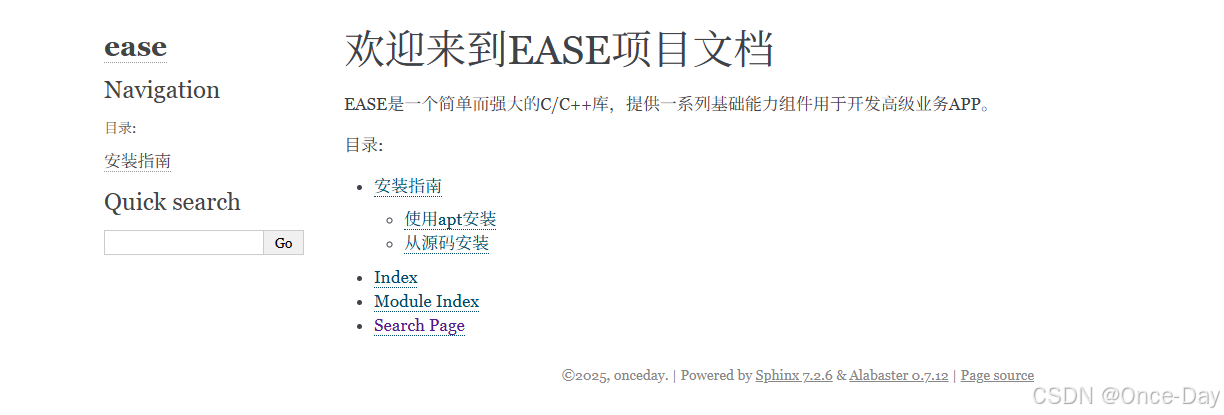
make html打开_build/html/index.html,会看到一个精美的文档网站,包含目录、导航和搜索功能。
3. 本地预览(sphinx-autobuild)
在ubuntu24-04系统上使用下面命令进行安装:
sudo apt install python3-sphinx-autobuildsphinx-autobuild source build/html 是一个非常实用的 Sphinx 开发工具命令,它能显著提升文档编写的效率和体验。
- 启动一个本地开发服务器,默认在 http://127.0.0.1:8000 上运行。
- 监控
source/目录下的源文件变化。 - 当检测到任何文件修改时,自动重新构建文档。
- 将生成的 HTML 输出保存到
build/html目录。 - 通过 WebSocket 自动刷新浏览器,实时显示更新后的内容。
使用 sphinx-autobuild 的主要优势在于它创建了一个"所见即所得"的文档编辑环境,让你无需手动执行 make html 命令并刷新浏览器。这大大提高了文档编写的流畅性,特别适合以下场景:
- 进行大量文档内容编写。
- 调整文档样式和布局。
- 调试自定义 Sphinx 扩展。
- 在团队协作中快速预览文档效果。
4. Sphinx插件系统
Sphinx 的强大之处在于其可扩展的插件系统,通过这些插件(称为"扩展"),可以大幅增强文档的功能和外观。
Sphinx 本身支持多语言,对于中文文档,需要在 conf.py 中进行设置而非安装额外插件:
# 设置语言为中文
language = 'zh_CN'
# 配合中文搜索
html_search_language = 'zh'
html_search_options = {'type': 'jieba'}
常用功能扩展插件:
sphinx-intl:用于文档国际化和本地化,支持创建多语言文档
sphinx-rtd-theme:ReadTheDocs 主题,提供现代、响应式的文档界面
# 在conf.py中设置
html_theme = 'sphinx_rtd_theme'- sphinx-copybutton:为代码块添加复制按钮
# 在conf.py中启用
extensions = ['sphinx_copybutton']- sphinxcontrib-mermaid:支持 Mermaid 图表渲染(流程图、时序图等)
# 在conf.py中启用
extensions = ['sphinxcontrib.mermaid']- sphinx-markdown-tables:改进对 Markdown 表格的支持
# 在conf.py中启用
extensions = ['sphinx_markdown_tables']
API文档自动生成插件:
- sphinx.ext.autodoc:自动从 Python 模块提取文档
# 内置扩展,在conf.py中启用
extensions = ['sphinx.ext.autodoc']- sphinx-autoapi:高级 API 文档生成,支持多种编程语言
# 在conf.py中启用
extensions = ['autoapi.extension']
Markdown支持插件:
- recommonmark:使 Sphinx 支持 Markdown 文件
# 在conf.py中启用
extensions = ['recommonmark']- MyST-Parser:更强大的 Markdown 解析器
# 在conf.py中启用
extensions = ['myst_parser']
增强交互性插件:
- sphinx-tabs:在文档中添加选项卡界面
# 在conf.py中启用
extensions = ['sphinx_tabs.tabs']- sphinx-togglebutton:添加可折叠内容区域
# 在conf.py中启用
extensions = ['sphinx_togglebutton']
5. Sphinx支持markdown文档
MyST-Parser 是目前最推荐的 Markdown 解析器,它提供了比 recommonmark 更完整的 Markdown 支持:
pip install myst-parser编辑 conf.py 文件,添加 MyST-Parser 的支持:
source_suffix = {
'.rst': 'restructuredtext',
'.md': 'markdown',
}
# 启用所有 MyST 语法扩展
myst_enable_extensions = [
'amsmath',
'colon_fence',
'deflist',
'dollarmath',
'fieldlist',
'html_admonition',
'html_image',
'linkify',
'replacements',
'smartquotes',
'strikethrough',
'substitution',
'tasklist',
]
# 可选:设置渲染围栏代码块的方式
myst_fence_as_directive = True
添加一些有用的插件增强 Markdown 体验:
# 代码块复制按钮
pip install sphinx-copybutton
# 表格支持增强
pip install sphinx-markdown-tables
# 选项卡支持
pip install sphinx-tabs
# 代码高亮增强
pip install pygments
更新 conf.py 添加这些插件:
extensions = [
'myst_parser',
'sphinx_copybutton',
'sphinx_markdown_tables',
'sphinx_tabs.tabs',
# 其他已有扩展...
]
6. Sphinx项目实战
6.1 安装所有需要软件包
sudo apt install python3-sphinx # shpinx主包
sudo apt install python3-sphinx-autobuild # 本地预览
sudo apt install python3-myst-parser # markdown支持
sudo apt install python3-sphinx-copybutton # 代码块复制按钮
sudo apt install python3-sphinx-markdown-tables # 表格支持增强
sudo apt install python3-sphinx-tabs # 选项卡支持
sudo apt install python3-pygments # 代码高亮增强
# 文档主题
sudo apt install python3-sphinx-rtd-theme # 安装 Read the Docs 主题
sudo apt install python3-sphinx-book-theme # 安装 Book 主题
注意:这里直接安装到全局目录里面,有一些第三方工作包不在系统软件包里面,因此对于复杂的sphinx配置场景,还是需要使用python venv环境进行安装。
# 安装venv包
sudo apt install python3.12-venv
# 创建虚拟环境
python3 -m venv sphinx-env
source sphinx-env/bin/activate
# 设置镜像源(下载如果出错, 可以多换几个)
pip config set global.index-url http://mirrors.aliyun.com/pypi/simple
pip config set install.trusted-host mirrors.aliyun.com
然后按照 sphinx 相关包:
pip install sphinx # shpinx主包
pip install sphinx-autobuild # 本地预览
pip install myst-parser # markdown支持
pip install sphinx-copybutton # 代码块复制按钮
pip install sphinx-markdown-tables # 表格支持增强
pip install sphinx-tabs # 选项卡支持
pip install pygments # 代码高亮增强
pip install linkify-it-py # 工具库
# 文档主题
pip install sphinx-rtd-theme # 安装 Read the Docs 主题
pip install sphinx-book-theme # 安装 Book 主题
pip install furo # 安装 Furo 主题
pip install shibuya # 安装 Shibuya 主题
Read the Docs 主题:最流行的技术文档主题,清晰简洁,广泛兼容,良好的移动端支持,嵌套导航,适用于技术参考文档,API 文档。
Furo 主题:现代、简约的设计,专注于阅读体验,优雅的排版,明暗模式,高度可定制。文字内容为主的文档,书籍风格的项目
Shibuya 主题:受日本设计影响的现代主题,强调视觉层次,精美的视觉设计,完善的响应式布局,丰富的组件,注重设计的文档,产品文档。
Book 主题:类似教科书的布局,侧重于学习体验,完善的导航结构,章节组织,交互式功能,适用于教程,指南,学习资料。
6.2 配置文件
# Configuration file for the Sphinx documentation builder.
#
# For the full list of built-in configuration values, see the documentation:
# https://www.sphinx-doc.org/en/master/usage/configuration.html
# -- Project information -----------------------------------------------------
# https://www.sphinx-doc.org/en/master/usage/configuration.html#project-information
project = "ease"
copyright = "2025, onceday"
author = "onceday"
release = "1.0.0"
# -- General configuration ---------------------------------------------------
# https://www.sphinx-doc.org/en/master/usage/configuration.html#general-configuration
extensions = [
"myst_parser",
"sphinx_copybutton",
"sphinx_markdown_tables",
"sphinx_tabs.tabs",
]
# 将 .md 文件映射到 MyST 解析器
source_suffix = {
".rst": "restructuredtext",
".md": "markdown",
}
# 启用所有 MyST 语法扩展
myst_enable_extensions = [
"amsmath",
"colon_fence",
"deflist",
"dollarmath",
"fieldlist",
"html_admonition",
"html_image",
"linkify",
"replacements",
"smartquotes",
"strikethrough",
"substitution",
"tasklist",
]
# 可选:设置渲染围栏代码块的方式
myst_fence_as_directive = [
"mermaid",  # 例如将 ```mermaid 作为 directive 处理
"math",
]
templates_path = ["_templates"]
exclude_patterns = []
language = "zh_CN"
html_search_language = "zh"
# -- Options for HTML output -------------------------------------------------
# https://www.sphinx-doc.org/en/master/usage/configuration.html#options-for-html-output
html_theme = "furo"
html_theme_options = {
"sidebar_hide_name": False,
"navigation_with_keys": True,
# "announcement": "这是一个使用 Furo 主题的示例文档",
# "light_css_variables": {
#     "color-brand-primary": "#7C4DFF",
#     "color-brand-content": "#7C4DFF",
# },
}
html_static_path = ["_static"]
6.3 新增文档
新增markdown文档:
(sphinx-env) onceday->docs:$ cat source/API参考.md
# API参考
(sphinx-env) onceday->docs:$ cat source/使用介绍.md
# 使用介绍
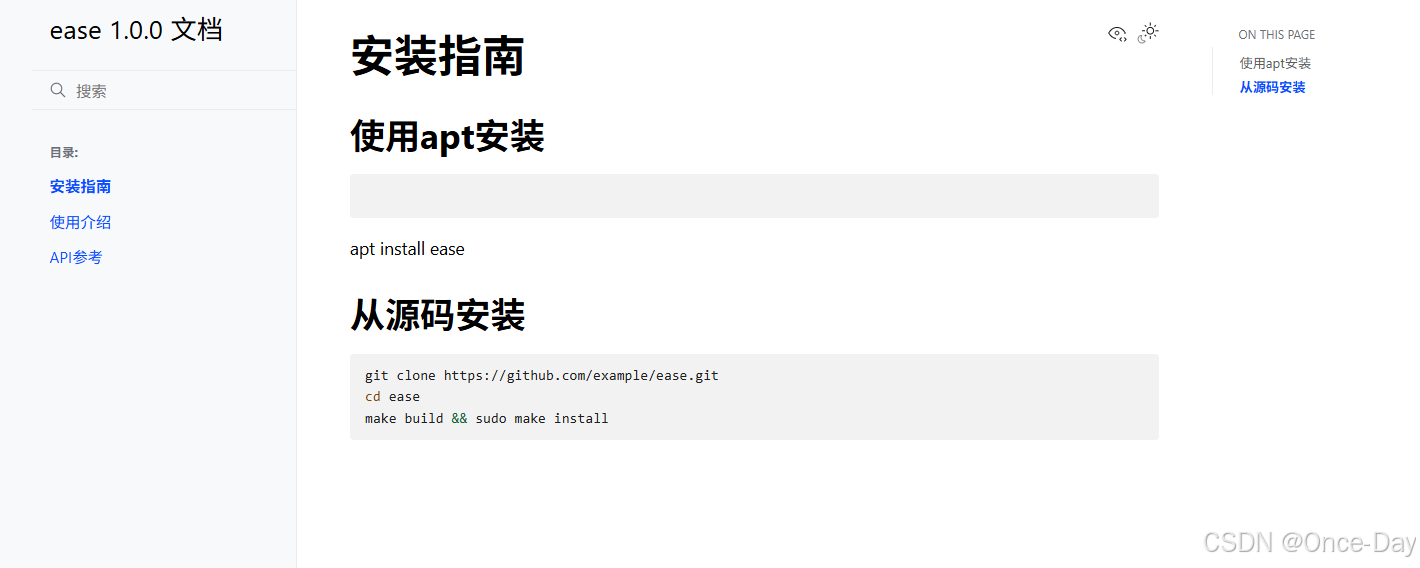
然后本地预览:

 浙公网安备 33010602011771号