
详细介绍:【Rust】 基于Rust 从零构建一个本地 RSS 阅读器
文章目录
项目简介
RSS(Really Simple Syndication)是一种用于发布经常更新内容的标准格式。本项目实现了一个功能完整的本地 RSS 阅读器,支持订阅管理、自动更新、系统通知等功能。
核心功能:
- 订阅源管理(添加、删除、列表)
- 定时自动拉取更新(使用
tokio::time::interval) - 本地数据库存储(sled 嵌入式数据库)
- 新文章系统通知
- 终端交互式阅读
- 浏览器打开链接
适用场景:
- 关注少数优质内容源,避免信息过载
- 学习定时任务、XML 解析和系统通知集成
- 理解 Rust 异步编程和数据持久化
技术栈
| 技术 | 版本 | 用途 |
|---|---|---|
| Rust | 2021 edition | 核心语言 |
| tokio | 1.41 | 异步运行时和定时任务 |
| quick-xml | 0.31 | XML/RSS 解析 |
| sled | 0.34 | 嵌入式 KV 数据库 |
| reqwest | 0.11 | HTTP 客户端 |
| notify-rust | 4.11 | 系统通知 |
| clap | 4.5 | 命令行参数解析 |
| serde | 1.0 | 序列化/反序列化 |
| chrono | 0.4 | 时间处理 |
| anyhow | 1.0 | 错误处理 |
项目实现
1. 项目结构
rss-reader/
├── src/
│   ├── main.rs         # 主程序入口和 CLI
│   ├── models.rs       # 数据模型
│   ├── storage.rs      # 数据存储层
│   ├── parser.rs       # RSS 解析器
│   └── fetcher.rs      # RSS 获取和定时任务
├── Cargo.toml          # 项目配置
└── rss_data/           # 数据库目录(运行时生成)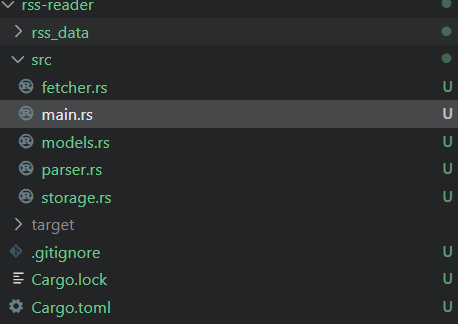
2. 依赖配置 (Cargo.toml)
[package]
name = "rss-reader"
version = "0.1.0"
edition = "2021"
[dependencies]
tokio = { version = "1.41", features = ["full"] }
quick-xml = "0.31"
sled = "0.34"
reqwest = { version = "0.11", features = ["blocking"] }
serde = { version = "1.0", features = ["derive"] }
serde_json = "1.0"
notify-rust = "4.11"
chrono = { version = "0.4", features = ["serde"] }
anyhow = "1.0"
clap = { version = "4.5", features = ["derive"] }
注意事项:
tokio使用fullfeature 获取完整功能chrono必须启用serdefeature 才能序列化DateTimereqwest启用blockingfeature 用于同步 HTTP 请求
3. 数据模型 (src/models.rs)
use serde::{Deserialize, Serialize};
use chrono::{DateTime, Utc};
  #[derive(Debug, Clone, Serialize, Deserialize)]
pub struct Feed {
pub url: String,
pub title: String,
pub last_check: Option<DateTime<Utc>>,
  }
    #[derive(Debug, Clone, Serialize, Deserialize)]
  pub struct Article {
  pub id: String,
  pub feed_url: String,
  pub title: String,
  pub link: String,
  pub description: Option<String>,
    pub pub_date: Option<DateTime<Utc>>,
      pub is_read: bool,
      pub created_at: DateTime<Utc>,
        }
        impl Article {
        pub fn new(feed_url: String, title: String, link: String) -> Self {
        let id = format!("{}-{}", feed_url, link);
        Self {
        id,
        feed_url,
        title,
        link,
        description: None,
        pub_date: None,
        is_read: false,
        created_at: Utc::now(),
        }
        }
        }
设计要点:
- 使用
serde实现序列化,方便存储到数据库 Article.id由feed_url和link组合生成,保证唯一性last_check记录最后检查时间,避免重复拉取
4. RSS 解析器 (src/parser.rs)
use quick_xml::events::Event;
use quick_xml::Reader;
use anyhow::{Result, anyhow};
use crate::models::Article;
pub fn parse_rss(xml_content: &str, feed_url: &str) -> Result<Vec<Article>> {
  let mut reader = Reader::from_str(xml_content);
  reader.trim_text(true);
  let mut articles = Vec::new();
  let mut buf = Vec::new();
  let mut in_item = false;
  let mut current_title = String::new();
  let mut current_link = String::new();
  let mut current_description = String::new();
  let mut current_pub_date = String::new();
  let mut current_tag = String::new();
  loop {
  match reader.read_event_into(&mut buf) {
  Ok(Event::Start(e)) => {
  let tag_name = String::from_utf8_lossy(e.name().as_ref()).to_string();
  current_tag = tag_name.clone();
  if tag_name == "item" || tag_name == "entry" {
  in_item = true;
  current_title.clear();
  current_link.clear();
  current_description.clear();
  current_pub_date.clear();
  }
  }
  Ok(Event::Text(e)) => {
  if in_item {
  let text = e.unescape().unwrap_or_default().to_string();
  match current_tag.as_str() {
  "title" => current_title = text,
  "link" => current_link = text,
  "description" | "summary" => current_description = text,
  "pubDate" | "published" | "updated" => current_pub_date = text,
  _ => {}
  }
  }
  }
  Ok(Event::End(e)) => {
  let tag_name = String::from_utf8_lossy(e.name().as_ref()).to_string();
  if (tag_name == "item" || tag_name == "entry") && in_item {
  if !current_title.is_empty() && !current_link.is_empty() {
  let mut article = Article::new(
  feed_url.to_string(),
  current_title.clone(),
  current_link.clone(),
  );
  article.description = if current_description.is_empty() {
  None
  } else {
  Some(current_description.clone())
  };
  articles.push(article);
  }
  in_item = false;
  }
  current_tag.clear();
  }
  Ok(Event::Eof) => break,
  Err(e) => return Err(anyhow!("XML 解析错误: {}", e)),
  _ => {}
  }
  buf.clear();
  }
  Ok(articles)
  }
设计要点:
- 使用
quick-xml的事件驱动模式解析 XML - 同时支持 RSS 2.0 (
item) 和 Atom (entry) 格式 - 状态机模式追踪当前解析位置
- 内存高效:通过复用 buffer 减少分配
5. 数据存储层 (src/storage.rs)
use anyhow::Result;
use sled::Db;
use crate::models::{Article, Feed};
pub struct Storage {
db: Db,
}
impl Storage {
pub fn new(path: &str) -> Result<Self> {
  let db = sled::open(path)?;
  Ok(Self { db })
  }
  // 订阅源管理
  pub fn add_feed(&self, feed: &Feed) -> Result<()> {
    let feeds_tree = self.db.open_tree("feeds")?;
    let value = serde_json::to_vec(feed)?;
    feeds_tree.insert(feed.url.as_bytes(), value)?;
    Ok(())
    }
    pub fn get_feeds(&self) -> Result<Vec<Feed>> {
      let feeds_tree = self.db.open_tree("feeds")?;
      let mut feeds = Vec::new();
      for item in feeds_tree.iter() {
      let (_, value) = item?;
      let feed: Feed = serde_json::from_slice(&value)?;
      feeds.push(feed);
      }
      Ok(feeds)
      }
      pub fn update_feed(&self, feed: &Feed) -> Result<()> {
        self.add_feed(feed)
        }
        pub fn remove_feed(&self, url: &str) -> Result<()> {
          let feeds_tree = self.db.open_tree("feeds")?;
          feeds_tree.remove(url.as_bytes())?;
          Ok(())
          }
          // 文章管理
          pub fn add_article(&self, article: &Article) -> Result<bool> {
            let articles_tree = self.db.open_tree("articles")?;
            // 检查是否已存在
            if articles_tree.contains_key(article.id.as_bytes())? {
            return Ok(false);
            }
            let value = serde_json::to_vec(article)?;
            articles_tree.insert(article.id.as_bytes(), value)?;
            Ok(true)
            }
            pub fn get_unread_articles(&self) -> Result<Vec<Article>> {
              let articles_tree = self.db.open_tree("articles")?;
              let mut articles = Vec::new();
              for item in articles_tree.iter() {
              let (_, value) = item?;
              let article: Article = serde_json::from_slice(&value)?;
              if !article.is_read {
              articles.push(article);
              }
              }
              // 按创建时间降序排列
              articles.sort_by(|a, b| b.created_at.cmp(&a.created_at));
              Ok(articles)
              }
              pub fn mark_as_read(&self, article_id: &str) -> Result<()> {
                let articles_tree = self.db.open_tree("articles")?;
                if let Some(value) = articles_tree.get(article_id.as_bytes())? {
                let mut article: Article = serde_json::from_slice(&value)?;
                article.is_read = true;
                let updated_value = serde_json::to_vec(&article)?;
                articles_tree.insert(article_id.as_bytes(), updated_value)?;
                }
                Ok(())
                }
                pub fn get_article_count(&self) -> Result<(usize, usize)> {
                  let articles_tree = self.db.open_tree("articles")?;
                  let mut total = 0;
                  let mut unread = 0;
                  for item in articles_tree.iter() {
                  let (_, value) = item?;
                  let article: Article = serde_json::from_slice(&value)?;
                  total += 1;
                  if !article.is_read {
                  unread += 1;
                  }
                  }
                  Ok((total, unread))
                  }
                  }
设计要点:
- 使用
sled的 Tree 功能分离订阅源和文章数据 add_article返回bool表示是否为新文章- 自动去重:通过检查文章 ID 避免重复存储
6. RSS 获取和定时任务 (src/fetcher.rs)
use anyhow::Result;
use tokio::time::{interval, Duration};
use crate::models::Feed;
use crate::parser::parse_rss;
use crate::storage::Storage;
use chrono::Utc;
pub struct Fetcher {
storage: Storage,
client: reqwest::blocking::Client,
}
impl Fetcher {
pub fn new(storage: Storage) -> Self {
let client = reqwest::blocking::Client::builder()
.timeout(Duration::from_secs(30))
.build()
.unwrap();
Self { storage, client }
}
pub fn fetch_feed(&self, feed: &Feed) -> Result<Vec<crate::models::Article>> {
  println!(" 正在获取: {}", feed.title);
  let response = self.client.get(&feed.url).send()?;
  let xml_content = response.text()?;
  let articles = parse_rss(&xml_content, &feed.url)?;
  Ok(articles)
  }
  pub fn update_all_feeds(&self) -> Result<usize> {
    let feeds = self.storage.get_feeds()?;
    let mut new_articles_count = 0;
    for mut feed in feeds {
    match self.fetch_feed(&feed) {
    Ok(articles) => {
    for article in articles {
    if self.storage.add_article(&article)? {
    new_articles_count += 1;
    }
    }
    // 更新最后检查时间
    feed.last_check = Some(Utc::now());
    self.storage.update_feed(&feed)?;
    }
    Err(e) => {
    eprintln!(" 获取失败 {}: {}", feed.title, e);
    }
    }
    }
    Ok(new_articles_count)
    }
    pub async fn start_auto_fetch(storage: Storage, interval_minutes: u64) {
    let fetcher = Fetcher::new(storage);
    let mut interval = interval(Duration::from_secs(interval_minutes * 60));
    println!(" 自动更新已启动,间隔: {} 分钟", interval_minutes);
    loop {
    interval.tick().await;
    println!("\n 开始定时更新...");
    match fetcher.update_all_feeds() {
    Ok(count) => {
    if count > 0 {
    println!(" 发现 {} 篇新文章", count);
    // 发送系统通知
      #[cfg(not(target_os = "linux"))]
    {
    if let Err(e) = notify_rust::Notification::new()
    .summary("RSS 阅读器")
    .body(&format!("发现 {} 篇新文章", count))
    .show()
    {
    eprintln!("通知发送失败: {}", e);
    }
    }
      #[cfg(target_os = "linux")]
    {
    if let Err(e) = notify_rust::Notification::new()
    .summary("RSS 阅读器")
    .body(&format!("发现 {} 篇新文章", count))
    .timeout(5000)
    .show()
    {
    eprintln!("通知发送失败: {}", e);
    }
    }
    } else {
    println!(" 没有新文章");
    }
    }
    Err(e) => {
    eprintln!(" 更新失败: {}", e);
    }
    }
    }
    }
    }
设计要点:
- 使用
tokio::time::interval实现定时任务 - 异步函数
start_auto_fetch永久运行 - 跨平台系统通知支持(Windows/macOS/Linux)
- 错误处理:单个订阅源失败不影响其他源
7. 主程序和 CLI (src/main.rs)
mod models;
mod storage;
mod parser;
mod fetcher;
use anyhow::Result;
use clap::{Parser, Subcommand};
use storage::Storage;
use models::Feed;
use fetcher::Fetcher;
use std::io::{self, Write};
  #[derive(Parser)]
  #[command(name = "rss")]
  #[command(about = "简易 RSS 阅读器", long_about = None)]
struct Cli {
  #[command(subcommand)]
command: Commands,
}
  #[derive(Subcommand)]
enum Commands {
/// 添加订阅源
Add {
/// RSS 源的 URL
url: String,
/// 订阅源名称
  #[arg(short, long)]
title: Option<String>,
  },
  /// 列出所有订阅源
  List,
  /// 删除订阅源
  Remove {
  /// RSS 源的 URL
  url: String,
  },
  /// 手动更新所有订阅
  Update,
  /// 阅读未读文章
  Read,
  /// 启动自动更新守护进程
  Daemon {
  /// 更新间隔(分钟)
    #[arg(short, long, default_value = "30")]
  interval: u64,
  },
  /// 显示统计信息
  Stats,
  }
    #[tokio::main]
  async fn main() -> Result<()> {
    let cli = Cli::parse();
    let storage = Storage::new("rss_data")?;
    match cli.command {
    Commands::Add { url, title } => {
    let feed_title = if let Some(t) = title {
    t
    } else {
    // 尝试从 URL 获取标题
    url.clone()
    };
    let feed = Feed {
    url: url.clone(),
    title: feed_title,
    last_check: None,
    };
    storage.add_feed(&feed)?;
    println!(" 已添加订阅源: {}", url);
    }
    Commands::List => {
    let feeds = storage.get_feeds()?;
    if feeds.is_empty() {
    println!("暂无订阅源");
    } else {
    println!("\n 订阅源列表:\n");
    for (i, feed) in feeds.iter().enumerate() {
    let last_check = if let Some(time) = feed.last_check {
    format!("最后检查: {}", time.format("%Y-%m-%d %H:%M"))
    } else {
    "从未检查".to_string()
    };
    println!("{}. {} ({})", i + 1, feed.title, last_check);
    println!("   {}", feed.url);
    println!();
    }
    }
    }
    Commands::Remove { url } => {
    storage.remove_feed(&url)?;
    println!(" 已删除订阅源: {}", url);
    }
    Commands::Update => {
    println!(" 开始更新所有订阅源...\n");
    let fetcher = Fetcher::new(storage);
    let count = fetcher.update_all_feeds()?;
    println!("\n 更新完成! 新增 {} 篇文章", count);
    }
    Commands::Read => {
    let articles = storage.get_unread_articles()?;
    if articles.is_empty() {
    println!(" 没有未读文章");
    return Ok(());
    }
    println!("\n 未读文章列表 (共 {} 篇):\n", articles.len());
    for (i, article) in articles.iter().enumerate() {
    println!("{}. {}", i + 1, article.title);
    println!("   来源: {}", article.feed_url);
    if let Some(desc) = &article.description {
    let short_desc = if desc.len() > 100 {
    format!("{}...", &desc[..100])
    } else {
    desc.clone()
    };
    // 移除 HTML 标签
    let clean_desc = short_desc
    .replace("<p>", "")
  .replace("</p>", "")
  .replace("<br>", " ")
    .replace("<br/>", " ");
    println!("   {}", clean_desc);
    }
    println!("   时间: {}", article.created_at.format("%Y-%m-%d %H:%M"));
    println!();
    }
    print!("\n请输入要阅读的文章编号 (1-{}), 输入 'q' 退出: ", articles.len());
    io::stdout().flush()?;
    let mut input = String::new();
    io::stdin().read_line(&mut input)?;
    let input = input.trim();
    if input.eq_ignore_ascii_case("q") {
    return Ok(());
    }
    if let Ok(index) = input.parse::<usize>() {
      if index > 0 && index <= articles.len() {
      let article = &articles[index - 1];
      // 标记为已读
      storage.mark_as_read(&article.id)?;
      // 在浏览器中打开
      println!("\n 正在打开: {}", article.link);
        #[cfg(target_os = "windows")]
      {
      std::process::Command::new("cmd")
      .args(["/C", "start", &article.link])
      .spawn()?;
      }
        #[cfg(target_os = "macos")]
      {
      std::process::Command::new("open")
      .arg(&article.link)
      .spawn()?;
      }
        #[cfg(target_os = "linux")]
      {
      std::process::Command::new("xdg-open")
      .arg(&article.link)
      .spawn()?;
      }
      println!(" 已标记为已读");
      } else {
      println!(" 无效的编号");
      }
      } else {
      println!(" 无效的输入");
      }
      }
      Commands::Daemon { interval } => {
      println!(" RSS 阅读器守护进程启动");
      println!(" 更新间隔: {} 分钟", interval);
      println!("按 Ctrl+C 退出\n");
      // 先执行一次更新
      let fetcher = Fetcher::new(Storage::new("rss_data")?);
      match fetcher.update_all_feeds() {
      Ok(count) => println!(" 初始更新完成! 新增 {} 篇文章\n", count),
      Err(e) => eprintln!(" 初始更新失败: {}\n", e),
      }
      // 启动定时任务
      Fetcher::start_auto_fetch(storage, interval).await;
      }
      Commands::Stats => {
      let (total, unread) = storage.get_article_count()?;
      let feeds = storage.get_feeds()?;
      println!("\n 统计信息:\n");
      println!("订阅源数量: {}", feeds.len());
      println!("文章总数: {}", total);
      println!("未读文章: {}", unread);
      println!("已读文章: {}", total - unread);
      println!();
      }
      }
      Ok(())
      }
设计要点:
- 使用
clap的 derive 宏简化 CLI 定义 #[tokio::main]宏提供异步运行时- 跨平台打开浏览器(Windows/macOS/Linux)
- 友好的终端交互和 Emoji 图标
项目运行
1. 创建项目
cargo new rss-reader
cd rss-reader
2. 编译项目
cargo build --release3. 使用示例
添加订阅源
# 添加 Rust 官方博客
cargo run --release -- add "https://blog.rust-lang.org/feed.xml" -t "Rust Blog"
# 添加 GitHub 博客
cargo run --release -- add "https://github.blog/feed/" -t "GitHub Blog"
查看订阅列表
cargo run --release -- list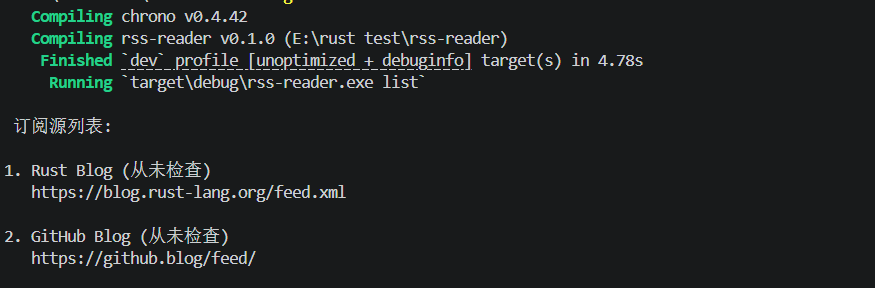
 订阅源列表:
1. Rust Blog (从未检查)
   https://blog.rust-lang.org/feed.xml
2. GitHub Blog (从未检查)
   https://github.blog/feed/
手动更新
cargo run --release -- update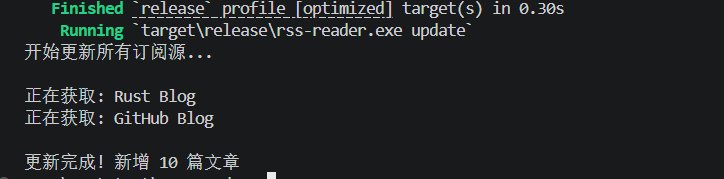
 开始更新所有订阅源...
 正在获取: Rust Blog
 正在获取: GitHub Blog
更新完成! 新增 10 篇文章
查看统计
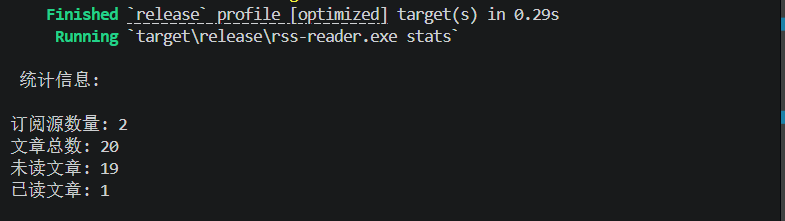
cargo run --release -- stats因为我已经读过了一次,所以显示1,原来已经增加过一次。
阅读文章
cargo run --release -- read重要提示:
- 该命令需要交互式输入,**不能使用 **
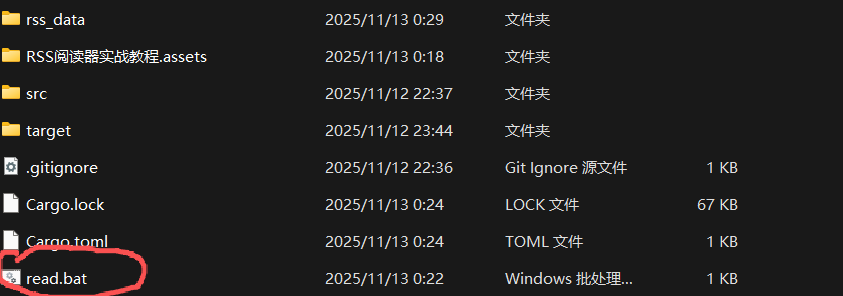
cargo run -- read - 推荐方法:双击
read.bat文件(最可靠) - 或者直接运行:
.\.target\release\rss-reader.exe read - 不要使用管道或重定向(如
echo 1 | cargo run -- read)
为什么不能用 cargo run?
cargo run会创建额外的进程层,导致标准输入流无法正常传递- 在 Windows PowerShell 中尤其明显
- 解决方案:直接运行编译好的可执行文件或使用提供的 bat 脚本
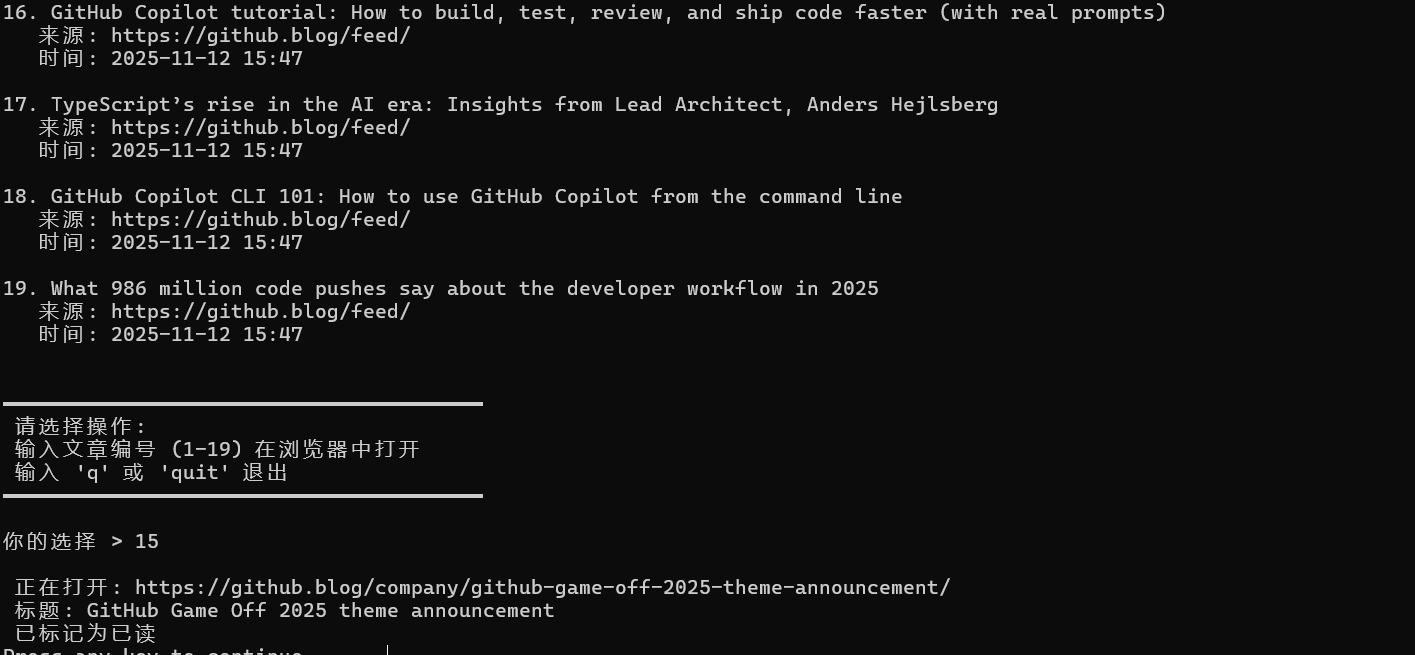
交互流程:
- 显示所有未读文章列表
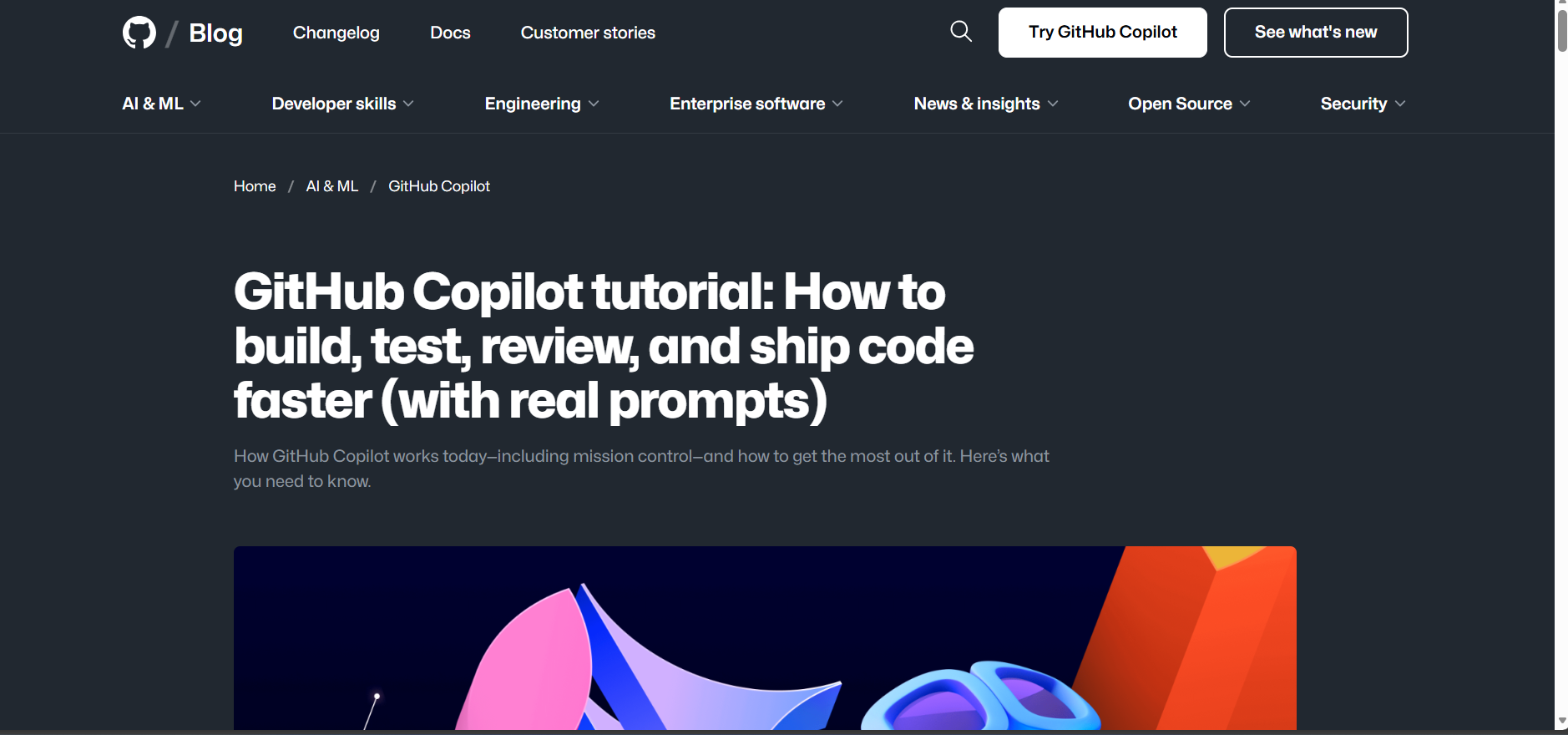
- 输入文章编号(如
1、5)在浏览器中打开 - 输入
q或quit退出 - 文章会自动标记为已读
启动守护进程
方法 1:使用 daemon.bat
# 双击 daemon.bat 文件
# 会自动关闭旧进程并启动守护进程
daemon.bat
方法 2:手动启动
# 首先确保没有其他 rss-reader 进程在运行
Stop-Process -Name rss-reader -Force -ErrorAction SilentlyContinue
Start-Sleep -Seconds 3
# 然后启动守护进程(默认每 30 分钟更新)
.\target\release\rss-reader.exe daemon --interval 30
# 或自定义间隔(例如每 15 分钟)
.\target\release\rss-reader.exe daemon --interval 15:- 守护进程运行时,不能同时使用 read、update 等命令
- 如果需要使用其他功能,先按
Ctrl+C停止守护进程 - 守护进程会持续运行到手动中断
守护进程功能:
- 定时拉取所有订阅源
- 发现新文章时发送系统通知
- 后台持续运行,无需手动更新
删除订阅源
cargo run --release -- remove "https://blog.rust-lang.org/feed.xml"
4. 查看帮助
cargo run --release -- --help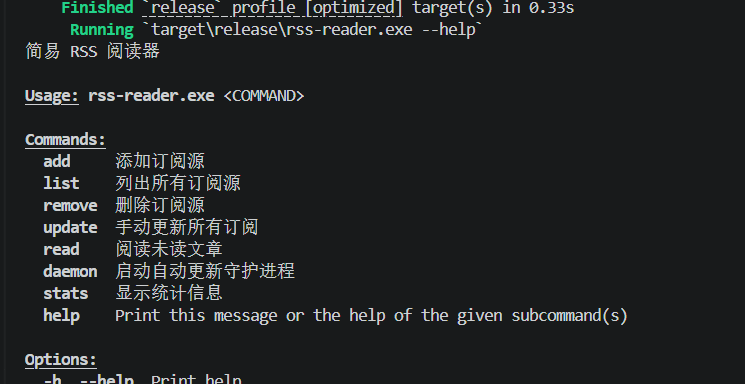
项目总结
本项目展示了如何使用 Rust 构建一个实用的命令行工具,涵盖了异步编程、XML 解析、数据持久化、系统集成等多个方面。通过这个项目,可以学习到 Rust 生态系统中优秀 crate 的使用,以及如何设计一个模块化、易扩展的应用程序。
想了解更多关于Rust语言的知识及应用,可前往华为开放原子旋武开源社区(https://xuanwu.openatom.cn/),了解更多资讯~

 浙公网安备 33010602011771号