
详细介绍:Maven:详细学习笔记
第1章:引言
1.1 什么是Maven?
Apache Maven是一个强大的项目管理和构建自动化工具,主要服务于基于Java平台的项目构建、依赖管理和项目信息管理。它使用一个中央信息片段(POM文件)来管理项目的构建、报告和文档。
1.2 Maven的核心价值
依赖管理:自动下载和管理项目依赖
标准化构建:统一的构建流程和目录结构
插件架构:丰富的插件生态系统
项目信息管理:集中管理项目信息
多模块支持:支持大型项目的模块化管理
1.3 Maven的历史与发展
2001年:Maven 1.0发布,基于Ant
2004年:Maven 2.0发布,重写架构
2009年:Maven 3.0发布,性能大幅提升
2010年至今:持续更新和维护
1.4 Maven的优势
约定优于配置:提供标准的项目结构
依赖自动解析:自动下载和管理依赖
统一的项目信息:POM文件集中管理
丰富的插件:覆盖各种构建需求
跨平台支持:支持多种操作系统
1.5 Maven与Gradle对比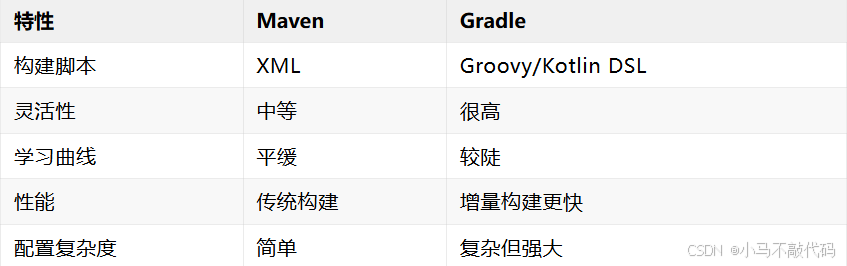
第2章:Maven基础概念
2.1 核心组件
POM(Project Object Model)
POM是Maven项目的核心,XML格式的配置文件,定义了项目的:
坐标信息(groupId、artifactId、version)
依赖关系
构建配置
项目信息
坐标系统
Maven使用坐标来唯一标识一个项目:
groupId:组织或项目的唯一标识符
artifactId:项目或模块的名称
version:项目的版本号
packaging:打包方式(jar、war、pom等)
仓库系统
Maven有三种类型的仓库:
本地仓库:存储在本地机器上
中央仓库:Maven官方仓库
远程仓库:第三方仓库(如阿里云镜像)
2.2 构建生命周期
Maven的构建生命周期分为三个主要阶段:
Clean Lifecycle(清理生命周期)
pre-clean
clean:删除target目录
post-clean
Default Lifecycle(默认生命周期)
validate:验证项目结构
compile:编译源代码
test:运行测试
package:打包
verify:验证包
install:安装到本地仓库
deploy:部署到远程仓库
Site Lifecycle(站点生命周期)
pre-site
site:生成项目站点
post-site
site-deploy
2.3 依赖范围
Maven定义了六种依赖范围:
compile:编译、测试、运行时都需要
test:仅测试时需要
provided:编译和测试时需要,运行时由容器提供
runtime:运行时需要,编译时不需要
system:系统范围,需要指定系统路径
import:仅用于依赖管理
2.4 插件系统
Maven的插件分为两类:
Build plugins:在构建过程中执行
Reporting plugins:生成报告
第3章:安装与配置
3.1 系统要求
JDK 1.7或更高版本
支持的操作系统:Windows、macOS、Linux
3.2 下载安装
Windows安装
下载apache-maven-x.x.x-bin.zip
解压到指定目录(如C:\apache-maven-x.x.x)
配置环境变量:
MAVEN_HOME = C:\apache-maven-x.x.x
PATH 添加 %MAVEN_HOME%\bin
验证安装:mvn -v
Linux安装
# 下载
wget https://downloads.apache.org/maven/maven-3/3.8.6/binaries/apache-maven-3.8.6-bin.tar.gz
# 解压
tar -xzf apache-maven-3.8.6-bin.tar.gz
sudo mv apache-maven-3.8.6 /opt/
# 配置环境变量
export MAVEN_HOME=/opt/apache-maven-3.8.6
export PATH=$PATH:$MAVEN_HOME/bin
# 验证安装
mvn -v
macOS安装
# 使用Homebrew
brew install maven
# 或手动安装
curl -O https://downloads.apache.org/maven/maven-3/3.8.6/binaries/apache-maven-3.8.6-bin.tar.gz
tar -xzf apache-maven-3.8.6-bin.tar.gz
sudo mv apache-maven-3.8.6 /usr/local/
# 配置环境变量
export MAVEN_HOME=/usr/local/apache-maven-3.8.6
export PATH=$PATH:$MAVEN_HOME/bin
3.3 配置设置
settings.xml位置
全局配置:${MAVEN_HOME}/conf/settings.xml
用户配置:${USER_HOME}/.m2/settings.xml
基本配置
<?xml version="1.0" encoding="UTF-8"?>
  <settings xmlns="http://maven.apache.org/SETTINGS/1.0.0"
  xmlns:xsi="http://www.w3.org/2001/XMLSchema-instance"
  xsi:schemaLocation="http://maven.apache.org/SETTINGS/1.0.0 http://maven.apache.org/xsd/settings-1.0.0.xsd">
  <localRepository>${user.home}/.m2/repository</localRepository>
    <mirrors>
      <mirror>
        <id>aliyun</id>
          <mirrorOf>*</mirrorOf>
            <url>https://maven.aliyun.com/repository/public</url>
              </mirror>
                </mirrors>
                  <profiles>
                    <profile>
                      <id>jdk-11</id>
                        <activation>
                          <activeByDefault>true</activeByDefault>
                            <jdk>11</jdk>
                              </activation>
                                <properties>
                                  <maven.compiler.source>11</maven.compiler.source>
                                    <maven.compiler.target>11</maven.compiler.target>
                                      </properties>
                                        </profile>
                                          </profiles>
                                            </settings>
3.4 IDE集成
IntelliJ IDEA
默认支持Maven项目
自动导入Maven项目
提供Maven工具窗口
Eclipse
内置Maven支持
Maven项目向导
依赖可视化
VS Code
需要安装Maven扩展
支持Maven命令执行
提供项目视图
第4章:项目结构
4.1 标准目录结构
project/
├── pom.xml                    # 项目描述文件
├── src/
│   ├── main/                  # 主代码目录
│   │   ├── java/              # Java源代码
│   │   ├── resources/         # 资源文件
│   │   ├── filters/           # 资源过滤文件
│   │   └── webapp/            # Web应用文件
│   └── test/                  # 测试代码目录
│       ├── java/              # 测试源代码
│       └── resources/         # 测试资源文件
├── target/                    # 构建输出目录
├── .mvn/                      # Maven包装器
└── mvnw/mvnw.cmd             # Maven包装器脚本
4.2 自定义目录结构
<build>
  <sourceDirectory>src/main/java</sourceDirectory>
    <testSourceDirectory>src/test/java</testSourceDirectory>
      <resources>
        <resource>
          <directory>src/main/resources</directory>
            </resource>
              </resources>
                <testResources>
                  <testResource>
                    <directory>src/test/resources</directory>
                      </testResource>
                        </testResources>
                          <directory>target</directory>
                            <outputDirectory>target/classes</outputDirectory>
                              <testOutputDirectory>target/test-classes</testOutputDirectory>
                                </build>
4.3 Maven Wrapper
Maven Wrapper提供:
自动下载指定版本的Maven
确保团队使用一致的Maven版本
无需手动安装Maven
# 生成Wrapper
mvn wrapper:wrapper
# 使用Wrapper
./mvnw clean compile  # Linux/macOS
mvnw.cmd clean compile  # Windows
4.4 构建产物目录
target/
├── classes/               # 编译后的class文件
├── test-classes/          # 测试编译文件
├── maven-archiver/        # Maven归档器文件
├── surefire-reports/      # 测试报告
├── site/                  # 生成的站点
├── dependency/            # 依赖信息
├── generated-sources/     # 生成的源代码
└── project-name-version.jar  # 构建产物
第5章:POM文件详解
5.1 POM文件结构
<?xml version="1.0" encoding="UTF-8"?>
  <project xmlns="http://maven.apache.org/POM/4.0.0"
  xmlns:xsi="http://www.w3.org/2001/XMLSchema-instance"
  xsi:schemaLocation="http://maven.apache.org/POM/4.0.0
  http://maven.apache.org/xsd/maven-4.0.0.xsd">
  <modelVersion>4.0.0</modelVersion>
    <!-- 基本信息 -->
      <groupId>com.example</groupId>
        <artifactId>my-app</artifactId>
          <version>1.0.0</version>
            <packaging>jar</packaging>
              <!-- 项目信息 -->
                <name>My Application</name>
                  <description>A sample Maven project</description>
                    <url>https://example.com</url>
                      <!-- 属性 -->
                        <properties>
                          <maven.compiler.source>11</maven.compiler.source>
                            <maven.compiler.target>11</maven.compiler.target>
                              <project.build.sourceEncoding>UTF-8</project.build.sourceEncoding>
                                </properties>
                                  <!-- 依赖管理 -->
                                    <dependencies>
                                      <!-- 具体依赖 -->
                                        </dependencies>
                                          <!-- 构建配置 -->
                                            <build>
                                              <!-- 插件管理 -->
                                                </build>
                                                  </project>
5.2 坐标信息
groupId
组织或项目的唯一标识符
通常使用反向域名命名
例如:com.example、org.apache
artifactId
项目或模块的名称
在groupId下必须唯一
应该使用小写字母和连字符
version
项目版本号
遵循语义化版本规范
SNAPSHOT表示开发版本
packaging
jar:Java应用程序
war:Web应用程序
pom:父项目或聚合项目
ear:企业应用程序
5.3 依赖管理
基本依赖声明
<dependencies>
  <dependency>
    <groupId>org.springframework</groupId>
      <artifactId>spring-core</artifactId>
        <version>5.3.20</version>
          <scope>compile</scope>
            </dependency>
              </dependencies>
依赖排除
<dependency>
  <groupId>com.example</groupId>
    <artifactId>problematic-lib</artifactId>
      <version>1.0.0</version>
        <exclusions>
          <exclusion>
            <groupId>old.lib</groupId>
              <artifactId>old-artifact</artifactId>
                </exclusion>
                  </exclusions>
                    </dependency>
可选依赖
<dependency>
  <groupId>com.example</groupId>
    <artifactId>optional-lib</artifactId>
      <version>1.0.0</version>
        <optional>true</optional>
          </dependency>
5.4 属性定义
<properties>
  <!-- 版本属性 -->
    <spring.version>5.3.20</spring.version>
      <junit.version>5.9.0</junit.version>
        <!-- 编译属性 -->
          <maven.compiler.source>11</maven.compiler.source>
            <maven.compiler.target>11</maven.compiler.target>
              <project.build.sourceEncoding>UTF-8</project.build.sourceEncoding>
                <!-- 自定义属性 -->
                  <main.class>com.example.Main</main.class>
                    </properties>
5.5 构建配置
<build>
  <finalName>${project.artifactId}-${project.version}</finalName>
    <resources>
      <resource>
        <directory>src/main/resources</directory>
          <filtering>true</filtering>
            </resource>
              </resources>
                <plugins>
                  <plugin>
                    <groupId>org.apache.maven.plugins</groupId>
                      <artifactId>maven-compiler-plugin</artifactId>
                        <version>3.10.1</version>
                          <configuration>
                            <source>11</source>
                              <target>11</target>
                                <encoding>UTF-8</encoding>
                                  </configuration>
                                    </plugin>
                                      </plugins>
                                        </build>
5.6 继承关系
父POM
<project>
  <modelVersion>4.0.0</modelVersion>
    <groupId>com.example</groupId>
      <artifactId>parent</artifactId>
        <version>1.0.0</version>
          <packaging>pom</packaging>
            <properties>
              <spring.version>5.3.20</spring.version>
                </properties>
                  <dependencyManagement>
                    <dependencies>
                      <dependency>
                        <groupId>org.springframework</groupId>
                          <artifactId>spring-core</artifactId>
                            <version>${spring.version}</version>
                              </dependency>
                                </dependencies>
                                  </dependencyManagement>
                                    </project>
子POM
<project>
  <modelVersion>4.0.0</modelVersion>
    <parent>
      <groupId>com.example</groupId>
        <artifactId>parent</artifactId>
          <version>1.0.0</version>
            </parent>
              <artifactId>child-module</artifactId>
                <packaging>jar</packaging>
                  </project>
第6章:依赖管理
6.1 仓库配置
中央仓库
Maven默认使用中央仓库,无需特殊配置。
镜像仓库
<!-- settings.xml -->
  <mirrors>
    <mirror>
      <id>aliyun</id>
        <mirrorOf>*</mirrorOf>
          <url>https://maven.aliyun.com/repository/public</url>
            </mirror>
              <mirror>
                <id>huawei</id>
                  <mirrorOf>*</mirrorOf>
                    <url>https://repo.huaweicloud.com/repository/maven/</url>
                      </mirror>
                        </mirrors>
私有仓库
<repositories>
  <repository>
    <id>company-repo</id>
      <url>https://repo.company.com/maven2</url>
        <releases>
          <enabled>true</enabled>
            </releases>
              <snapshots>
                <enabled>true</enabled>
                  </snapshots>
                    </repository>
                      </repositories>
6.2 依赖范围详解
compile范围
<dependency>
  <groupId>org.springframework</groupId>
    <artifactId>spring-core</artifactId>
      <version>5.3.20</version>
        <scope>compile</scope>  <!-- 默认范围 -->
          </dependency>
test范围
<dependency>
  <groupId>org.junit.jupiter</groupId>
    <artifactId>junit-jupiter</artifactId>
      <version>5.9.0</version>
        <scope>test</scope>
          </dependency>
provided范围
<dependency>
  <groupId>javax.servlet</groupId>
    <artifactId>javax.servlet-api</artifactId>
      <version>4.0.1</version>
        <scope>provided</scope>
          </dependency>
runtime范围
<dependency>
  <groupId>mysql</groupId>
    <artifactId>mysql-connector-java</artifactId>
      <version>8.0.30</version>
        <scope>runtime</scope>
          </dependency>
6.3 传递依赖
Maven自动解析传递依赖:
A依赖B,B依赖C,则A间接依赖C
使用排除不需要的传递依赖
使用标记可选依赖
排除传递依赖
<dependency>
  <groupId>com.example</groupId>
    <artifactId>some-lib</artifactId>
      <version>1.0.0</version>
        <exclusions>
          <exclusion>
            <groupId>commons-logging</groupId>
              <artifactId>commons-logging</artifactId>
                </exclusion>
                  </exclusions>
                    </dependency>
6.4 依赖冲突解决
最近优先原则
Maven使用"最近定义优先"原则解决依赖冲突。
版本管理
<dependencyManagement>
  <dependencies>
    <dependency>
      <groupId>org.springframework</groupId>
        <artifactId>spring-core</artifactId>
          <version>5.3.20</version>
            </dependency>
              </dependencies>
                </dependencyManagement>
强制指定版本
<dependencies>
  <dependency>
    <groupId>org.springframework</groupId>
      <artifactId>spring-core</artifactId>
        <version>5.3.20</version>
          </dependency>
            </dependencies>
6.5 本地依赖
<dependency>
  <groupId>com.example</groupId>
    <artifactId>local-lib</artifactId>
      <version>1.0.0</version>
        <scope>system</scope>
          <systemPath>${project.basedir}/lib/local-lib.jar</systemPath>
            </dependency>
第7章:插件系统
7.1 插件基础
Maven插件分为两类:
Build plugins:参与构建过程
Reporting plugins:生成报告
插件声明
<build>
  <plugins>
    <plugin>
      <groupId>org.apache.maven.plugins</groupId>
        <artifactId>maven-compiler-plugin</artifactId>
          <version>3.10.1</version>
            <configuration>
              <source>11</source>
                <target>11</target>
                  </configuration>
                    </plugin>
                      </plugins>
                        </build>
7.2 常用构建插件
maven-compiler-plugin
<plugin>
  <groupId>org.apache.maven.plugins</groupId>
    <artifactId>maven-compiler-plugin</artifactId>
      <version>3.10.1</version>
        <configuration>
          <source>11</source>
            <target>11</target>
              <encoding>UTF-8</encoding>
                </configuration>
                  </plugin>
maven-surefire-plugin
<plugin>
  <groupId>org.apache.maven.plugins</groupId>
    <artifactId>maven-surefire-plugin</artifactId>
      <version>3.0.0-M9</version>
        <configuration>
          <includes>
          <include>**/*Test.java</include>
          </includes>
        </configuration>
      </plugin>
maven-failsafe-plugin
<plugin>
  <groupId>org.apache.maven.plugins</groupId>
    <artifactId>maven-failsafe-plugin</artifactId>
      <version>3.0.0-M9</version>
        <configuration>
          <includes>
          <include>**/*IT.java</include>
          </includes>
        </configuration>
      </plugin>
maven-jar-plugin
<plugin>
  <groupId>org.apache.maven.plugins</groupId>
    <artifactId>maven-jar-plugin</artifactId>
      <version>3.2.2</version>
        <configuration>
          <archive>
            <manifest>
              <mainClass>com.example.Main</mainClass>
                </manifest>
                  </archive>
                    </configuration>
                      </plugin>
7.3 报告插件
maven-site-plugin
<reporting>
  <plugins>
    <plugin>
      <groupId>org.apache.maven.plugins</groupId>
        <artifactId>maven-site-plugin</artifactId>
          <version>3.12.1</version>
            </plugin>
              </plugins>
                </reporting>
maven-project-info-reports-plugin
<reporting>
  <plugins>
    <plugin>
      <groupId>org.apache.maven.plugins</groupId>
        <artifactId>maven-project-info-reports-plugin</artifactId>
          <version>3.4.1</version>
            </plugin>
              </plugins>
                </reporting>
7.4 插件管理
插件版本管理
<build>
  <pluginManagement>
    <plugins>
      <plugin>
        <groupId>org.apache.maven.plugins</groupId>
          <artifactId>maven-compiler-plugin</artifactId>
            <version>3.10.1</version>
              <configuration>
                <source>11</source>
                  <target>11</target>
                    </configuration>
                      </plugin>
                        </plugins>
                          </pluginManagement>
                            </build>
7.5 自定义插件
创建自定义Maven插件需要:
创建Maven项目
继承org.apache.maven.plugin.AbstractMojo
实现execute()方法
配置插件描述符
@Mojo(name = "hello")
public class HelloMojo extends AbstractMojo {
@Parameter(property = "hello.message", defaultValue = "Hello World")
private String message;
public void execute() throws MojoExecutionException {
getLog().info(message);
}
}
第8章:构建生命周期
8.1 生命周期阶段
Clean生命周期
mvn pre-clean # 预清理
mvn clean # 清理
mvn post-clean # 后清理
Default生命周期
mvn validate # 验证项目结构
mvn compile # 编译主代码
mvn test # 运行测试
mvn package # 打包
mvn verify # 验证包
mvn install # 安装到本地仓库
mvn deploy # 部署到远程仓库
Site生命周期
mvn pre-site # 预站点
mvn site # 生成站点
mvn post-site # 后站点
mvn site-deploy # 部署站点
8.2 插件绑定
Maven插件默认绑定到特定的生命周期阶段:
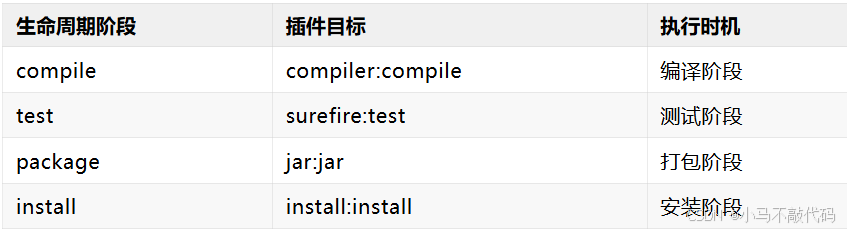
自定义插件绑定
<plugin>
  <groupId>org.apache.maven.plugins</groupId>
    <artifactId>maven-antrun-plugin</artifactId>
      <version>3.1.0</version>
        <executions>
          <execution>
            <id>custom-task</id>
              <phase>compile</phase>
                <goals>
                  <goal>run</goal>
                    </goals>
                      <configuration>
                        <target>
                          <echo message="Custom task executed"/>
                            </target>
                              </configuration>
                                </execution>
                                  </executions>
                                    </plugin>
8.3 构建Profile
Profile基础
<profiles>
  <profile>
    <id>development</id>
      <activation>
        <activeByDefault>true</activeByDefault>
          </activation>
            <properties>
              <db.url>jdbc:h2:mem:test</db.url>
                </properties>
                  </profile>
                    <profile>
                      <id>production</id>
                        <properties>
                          <db.url>jdbc:mysql://prod-db:3306/app</db.url>
                            </properties>
                              </profile>
                                </profiles>
Profile激活
# 激活指定profile
mvn clean install -P production
# 激活多个profile
mvn clean install -P development,test
# 根据属性激活
mvn clean install -Ddb.type=mysql
8.4 自定义生命周期
通过插件可以定义自定义的构建阶段和目标。
第9章:多模块项目
9.1 聚合项目结构
parent/
├── pom.xml
├── module1/
│   └── pom.xml
├── module2/
│   └── pom.xml
└── module3/
└── pom.xml
9.2 父POM配置
<project>
  <modelVersion>4.0.0</modelVersion>
    <groupId>com.example</groupId>
      <artifactId>parent</artifactId>
        <version>1.0.0</version>
          <packaging>pom</packaging>
            <modules>
              <module>module1</module>
                <module>module2</module>
                  <module>module3</module>
                    </modules>
                      <properties>
                        <spring.version>5.3.20</spring.version>
                          <junit.version>5.9.0</junit.version>
                            </properties>
                              <dependencyManagement>
                                <dependencies>
                                  <dependency>
                                    <groupId>org.springframework</groupId>
                                      <artifactId>spring-core</artifactId>
                                        <version>${spring.version}</version>
                                          </dependency>
                                            <dependency>
                                              <groupId>org.junit.jupiter</groupId>
                                                <artifactId>junit-jupiter</artifactId>
                                                  <version>${junit.version}</version>
                                                    <scope>test</scope>
                                                      </dependency>
                                                        </dependencies>
                                                          </dependencyManagement>
                                                            <build>
                                                              <pluginManagement>
                                                                <plugins>
                                                                  <plugin>
                                                                    <groupId>org.apache.maven.plugins</groupId>
                                                                      <artifactId>maven-compiler-plugin</artifactId>
                                                                        <version>3.10.1</version>
                                                                          <configuration>
                                                                            <source>11</source>
                                                                              <target>11</target>
                                                                                </configuration>
                                                                                  </plugin>
                                                                                    </plugins>
                                                                                      </pluginManagement>
                                                                                        </build>
                                                                                          </project>
9.3 子模块配置
<project>
  <modelVersion>4.0.0</modelVersion>
    <parent>
      <groupId>com.example</groupId>
        <artifactId>parent</artifactId>
          <version>1.0.0</version>
            </parent>
              <artifactId>module1</artifactId>
                <packaging>jar</packaging>
                  <dependencies>
                    <dependency>
                      <groupId>org.springframework</groupId>
                        <artifactId>spring-core</artifactId>
                          </dependency>
                            <dependency>
                              <groupId>com.example</groupId>
                                <artifactId>module2</artifactId>
                                  <version>1.0.0</version>
                                    </dependency>
                                      </dependencies>
                                        </project>
9.4 模块间依赖
<!-- module1依赖module2 -->
  <dependency>
    <groupId>com.example</groupId>
      <artifactId>module2</artifactId>
        <version>${project.version}</version>
          </dependency>
            <!-- 使用${project.version}引用父项目的版本 -->
9.5 构建多模块项目
# 构建所有模块
mvn clean install
# 构建特定模块
mvn clean install -pl module1
# 构建模块及其依赖
mvn clean install -pl module1 -am
# 跳过测试构建
mvn clean install -DskipTests
# 并行构建
mvn clean install -T 4
第10章:测试与发布
10.1 测试配置
JUnit 5配置
<properties>
  <junit.version>5.9.0</junit.version>
    <maven.surefire.version>3.0.0-M9</maven.surefire.version>
      </properties>
        <dependencies>
          <dependency>
            <groupId>org.junit.jupiter</groupId>
              <artifactId>junit-jupiter</artifactId>
                <version>${junit.version}</version>
                  <scope>test</scope>
                    </dependency>
                      </dependencies>
                        <build>
                          <plugins>
                            <plugin>
                              <groupId>org.apache.maven.plugins</groupId>
                                <artifactId>maven-surefire-plugin</artifactId>
                                  <version>${maven.surefire.version}</version>
                                    <configuration>
                                      <includes>
                                      <include>**/*Test.java</include>
                                        <include>**/*Tests.java</include>
                                          </includes>
                                            </configuration>
                                              </plugin>
                                                </plugins>
                                                  </build>
TestNG配置
<dependencies>
  <dependency>
    <groupId>org.testng</groupId>
      <artifactId>testng</artifactId>
        <version>7.6.1</version>
          <scope>test</scope>
            </dependency>
              </dependencies>
                <build>
                  <plugins>
                    <plugin>
                      <groupId>org.apache.maven.plugins</groupId>
                        <artifactId>maven-surefire-plugin</artifactId>
                          <version>3.0.0-M9</version>
                            <configuration>
                              <suiteXmlFiles>
                                <suiteXmlFile>testng.xml</suiteXmlFile>
                                  </suiteXmlFiles>
                                    </configuration>
                                      </plugin>
                                        </plugins>
                                          </build>
10.2 代码覆盖率
JaCoCo配置
<properties>
  <jacoco.version>0.8.8</jacoco.version>
    </properties>
      <build>
        <plugins>
          <plugin>
            <groupId>org.jacoco</groupId>
              <artifactId>jacoco-maven-plugin</artifactId>
                <version>${jacoco.version}</version>
                  <executions>
                    <execution>
                      <goals>
                        <goal>prepare-agent</goal>
                          </goals>
                            </execution>
                              <execution>
                                <id>report</id>
                                  <phase>test</phase>
                                    <goals>
                                      <goal>report</goal>
                                        </goals>
                                          </execution>
                                            </executions>
                                              </plugin>
                                                </plugins>
                                                  </build>
10.3 发布配置
distributionManagement
<distributionManagement>
  <repository>
    <id>releases</id>
      <url>https://repo.example.com/repository/maven-releases/</url>
        </repository>
          <snapshotRepository>
            <id>snapshots</id>
              <url>https://repo.example.com/repository/maven-snapshots/</url>
                </snapshotRepository>
                  </distributionManagement>
发布插件
<build>
  <plugins>
    <plugin>
      <groupId>org.apache.maven.plugins</groupId>
        <artifactId>maven-deploy-plugin</artifactId>
          <version>3.0.0</version>
            </plugin>
              </plugins>
                </build>
10.4 GPG签名
<build>
  <plugins>
    <plugin>
      <groupId>org.apache.maven.plugins</groupId>
        <artifactId>maven-gpg-plugin</artifactId>
          <version>3.0.1</version>
            <executions>
              <execution>
                <id>sign-artifacts</id>
                  <phase>verify</phase>
                    <goals>
                      <goal>sign</goal>
                        </goals>
                          </execution>
                            </executions>
                              </plugin>
                                </plugins>
                                  </build>
10.5 发布执行
# 发布到本地仓库
mvn clean install
# 发布到远程仓库
mvn clean deploy
# 发布站点
mvn site-deploy
# 跳过测试发布
mvn clean deploy -DskipTests
10.6 CI/CD集成
GitHub Actions示例
name: Build and Deploy
on: [push, pull_request]
jobs:
build:
runs-on: ubuntu-latest
steps:
- uses: actions/checkout@v3
- name: Set up JDK 11
uses: actions/setup-java@v3
with:
java-version: '11'
distribution: 'temurin'
cache: maven
- name: Build with Maven
run: mvn clean install
- name: Deploy
if: github.ref == 'refs/heads/main'
run: mvn clean deploy
env:
MAVEN_USERNAME: ${{ secrets.MAVEN_USERNAME }}
MAVEN_PASSWORD: ${{ secrets.MAVEN_PASSWORD }}
第11章:性能优化
11.1 并行构建
# 并行构建
mvn clean install -T 4
# 基于CPU核心数的并行构建
mvn clean install -T 1C
11.2 增量构建
<plugin>
  <groupId>org.apache.maven.plugins</groupId>
    <artifactId>maven-compiler-plugin</artifactId>
      <version>3.10.1</version>
        <configuration>
          <useIncrementalCompilation>true</useIncrementalCompilation>
            </configuration>
              </plugin>
11.3 离线模式
# 下载所有依赖
mvn dependency:go-offline
# 离线构建
mvn clean install -o
11.4 跳过测试
# 跳过测试执行
mvn clean install -DskipTests
# 跳过测试编译
mvn clean install -Dmaven.test.skip=true
11.5 调试构建
# 启用调试信息
mvn clean install -X
# 调试特定插件
mvn clean install -Dmaven.plugin.debug=true
第12章:故障排除
12.1 常见问题
依赖下载失败
# 清理本地仓库
rm -rf ~/.m2/repository
# 强制重新下载
mvn clean install -U
内存不足
# 增加JVM内存
export MAVEN_OPTS="-Xmx1024m -XX:MaxPermSize=256m"
mvn clean install
插件版本冲突
<pluginManagement>
  <plugins>
    <plugin>
      <groupId>org.apache.maven.plugins</groupId>
        <artifactId>maven-compiler-plugin</artifactId>
          <version>3.10.1</version>
            </plugin>
              </plugins>
                </pluginManagement>
12.2 调试技巧
查看依赖树
mvn dependency:tree
查看插件信息
mvn help:describe -Dplugin=org.apache.maven.plugins:maven-compiler-plugin
查看系统属性
mvn help:system
查看有效POM
mvn help:effective-pom
12.3 最佳实践
使用Maven Wrapper:确保团队使用一致的Maven版本
遵循标准目录结构:使用Maven约定
合理组织依赖:避免不必要的传递依赖
使用依赖管理:统一管理版本号
编写可维护的POM:清晰的配置和注释
定期更新依赖:保持依赖版本最新
使用CI/CD:自动化构建和测试流程
配置镜像仓库:提高下载速度

 浙公网安备 33010602011771号