
Flutter硬件交互(Hardware Interaction Architecture)-蓝牙通信 - 教程
目录
权限配置(android/app/src/main/AndroidManifest.xml)
编译配置(android/app/build.gradle)
StatelessWidget vs StatefulWidget 设计说明
1. 蓝牙技术概述
1.1 蓝牙技术分类
蓝牙技术主要分为两大类:
经典蓝牙(Classic Bluetooth)
适用于音频传输、文件传输等高带宽应用
功耗相对较高
传输距离通常在10米以内
低功耗蓝牙(BLE - Bluetooth Low Energy)
专为物联网设备设计
功耗极低,适合长期运行
传输数据量小但频率高
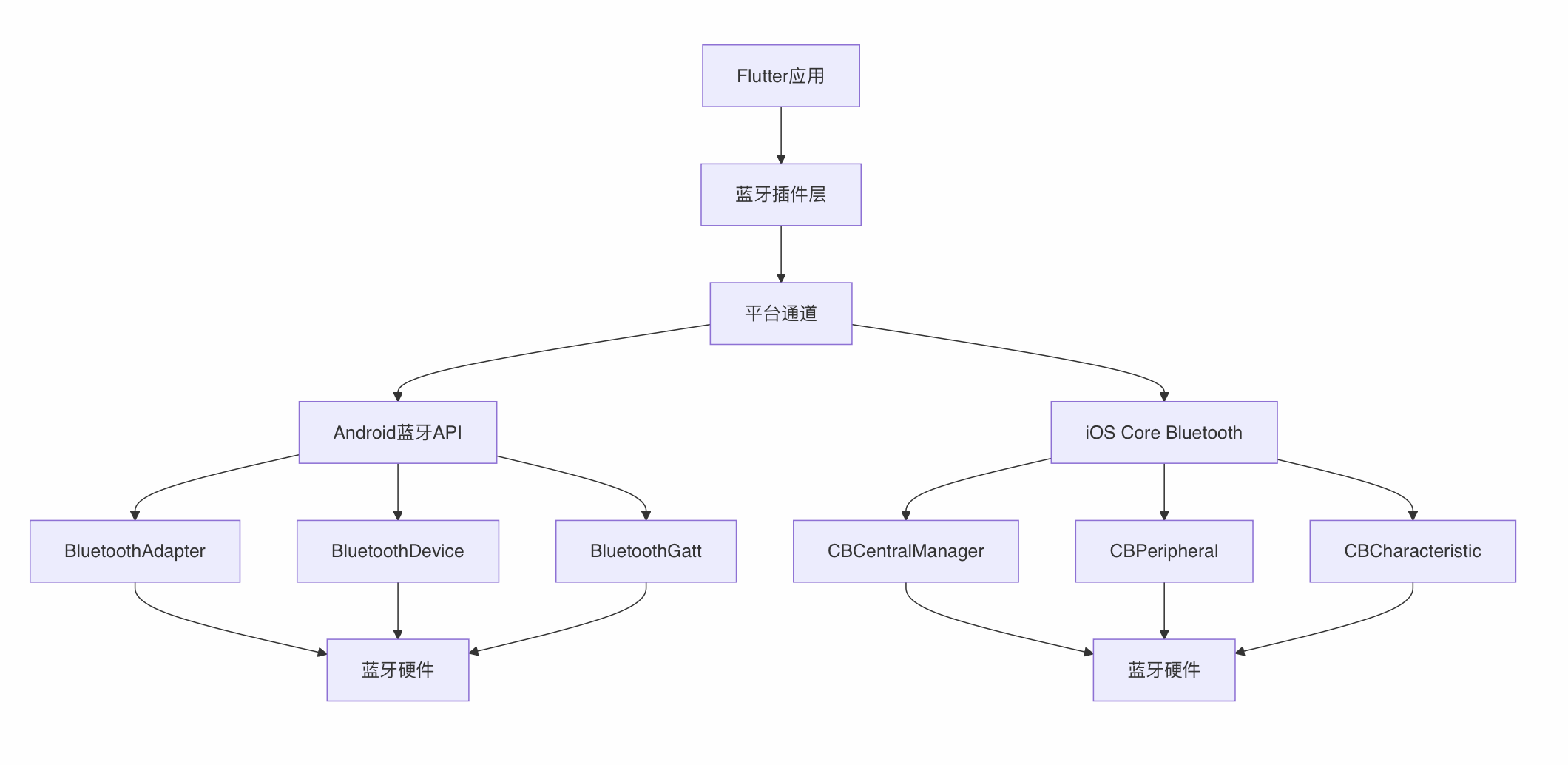
1.2 蓝牙通信架构
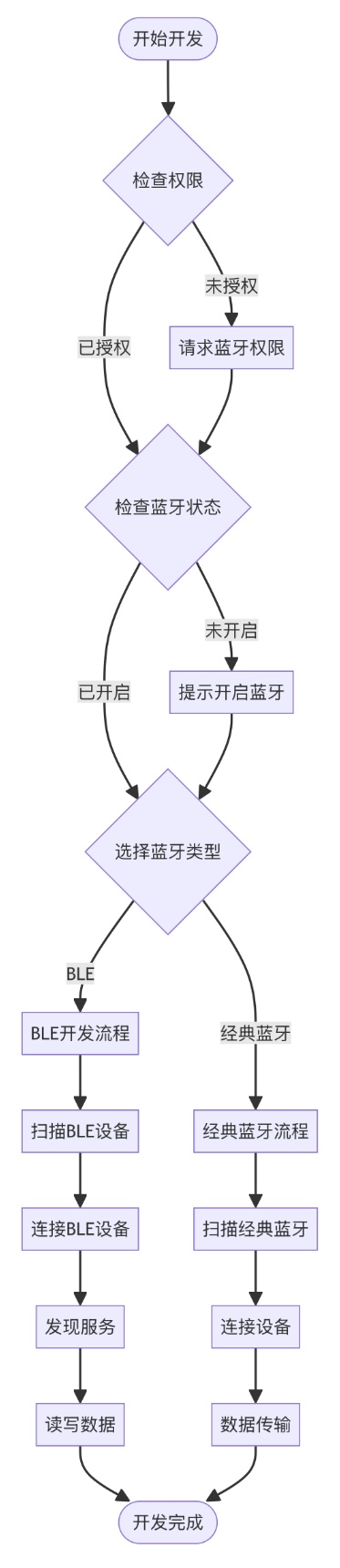
1.3 Flutter蓝牙开发流程图
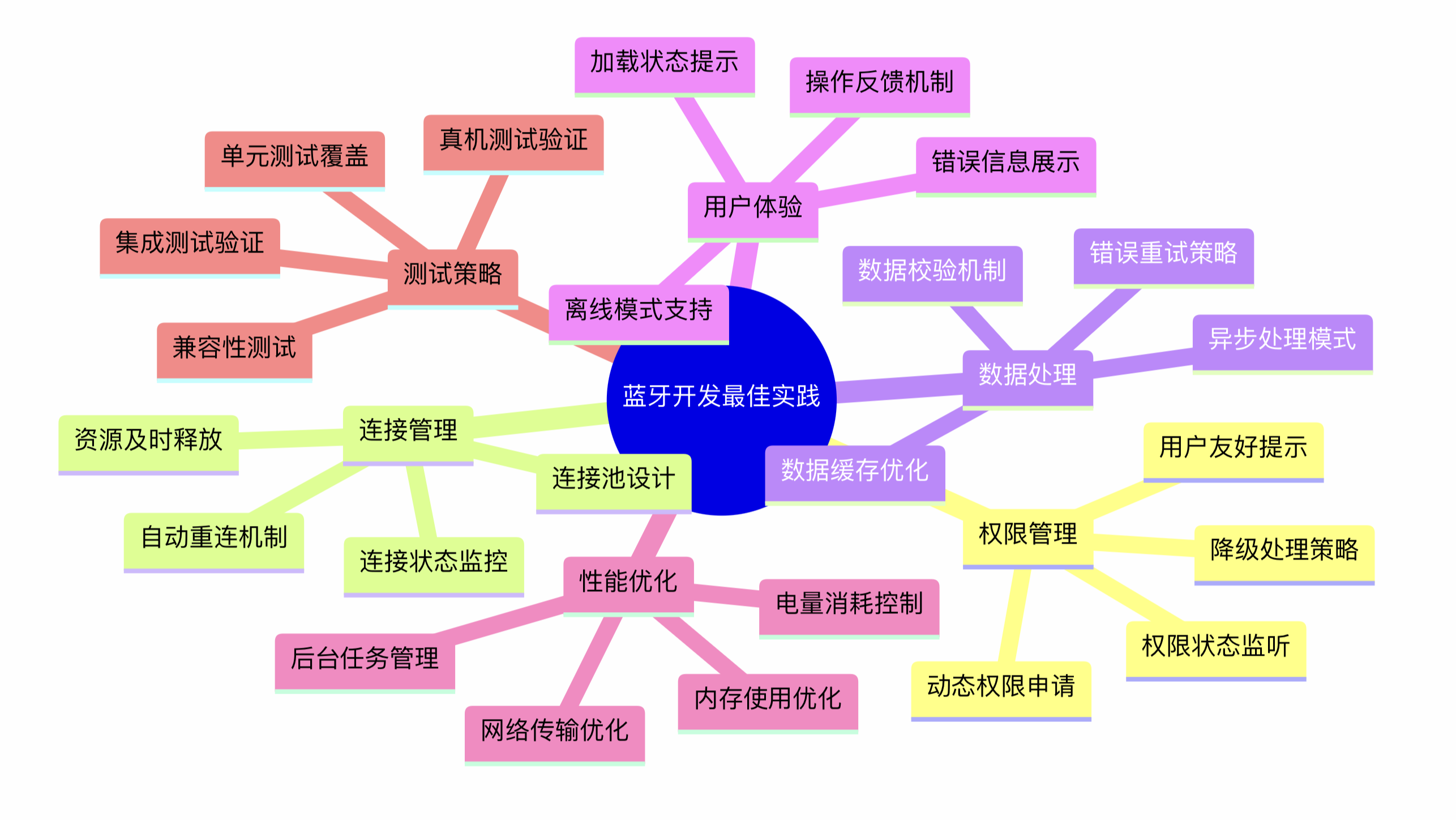
1.4 蓝牙开发最佳实践思维导图
2. Flutter蓝牙插件介绍
2.1 主要插件对比
| 插件名称 | 功能特点 | 适用场景 | 维护状态 |
|---|---|---|---|
| flutter_bluetooth_serial | 经典蓝牙串口通信 | 简单数据传输 | 活跃 |
| flutter_blue_plus | BLE专用,功能全面 | IoT设备连接 | 非常活跃 |
| bluetooth_classic | 经典蓝牙全功能 | 音频、文件传输 | 一般 |
| permission_handler | 权限管理 | 权限申请 | 活跃 |
2.2 推荐插件组合
# pubspec.yaml
dependencies:
  flutter:
    sdk: flutter
  # BLE通信(推荐)
  flutter_blue_plus: ^1.14.6
  # 经典蓝牙串口通信
  flutter_bluetooth_serial: ^0.4.0
  # 权限管理
  permission_handler: ^11.0.1
  # 设备信息
  device_info_plus: ^9.1.0
  # 位置服务(BLE需要)
  geolocator: ^9.0.2
3. 环境配置与权限设置
3.1 Android配置
权限配置(android/app/src/main/AndroidManifest.xml)
编译配置(android/app/build.gradle)
android {
    compileSdkVersion 34
    defaultConfig {
        minSdkVersion 21  // 蓝牙BLE最低要求
        targetSdkVersion 34
    }
    compileOptions {
        sourceCompatibility JavaVersion.VERSION_1_8
        targetCompatibility JavaVersion.VERSION_1_8
    }
}
3.2 iOS配置
权限配置(ios/Runner/Info.plist)
    NSBluetoothAlwaysUsageDescription
    此应用需要使用蓝牙功能来连接外部设备
    NSBluetoothPeripheralUsageDescription
    此应用需要使用蓝牙功能来连接外部设备

    NSLocationWhenInUseUsageDescription
    此应用需要位置权限来扫描蓝牙设备

    UIBackgroundModes

        bluetooth-central
        bluetooth-peripheral
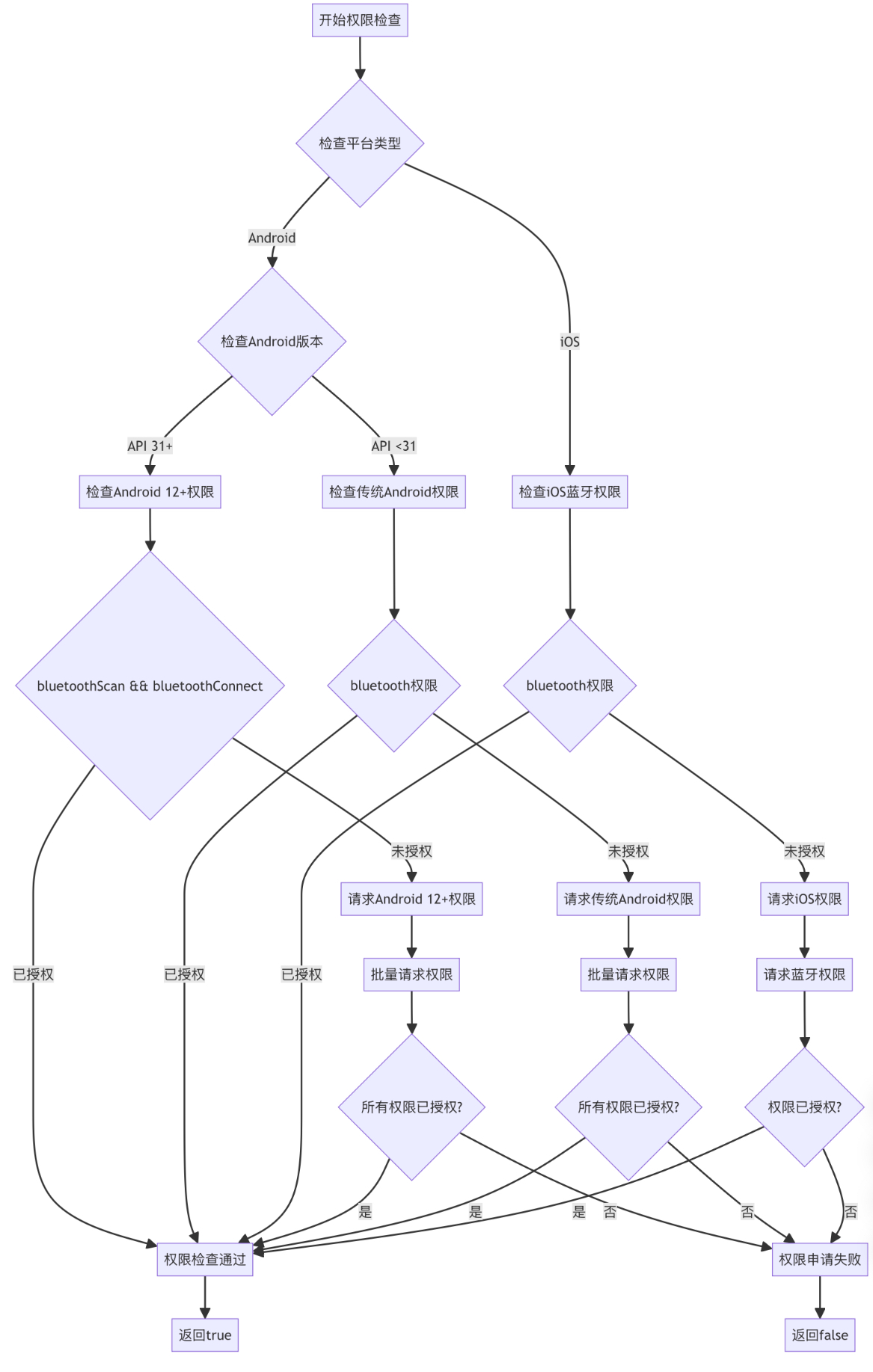
3.3 权限管理
import 'package:permission_handler.dart';
import 'package:device_info_plus/device_info_plus.dart';
/// 蓝牙权限管理器
class BluetoothPermissionManager {
  /// 请求蓝牙相关权限,根据不同平台和Android版本申请对应的权限
  static Future requestBluetoothPermissions() async {
    // 获取设备信息插件实例,用于判断设备类型和版本
    final deviceInfo = DeviceInfoPlugin();
    if (Platform.isAndroid) {
      final androidInfo = await deviceInfo.androidInfo;
      // Android 12(API 31)及以上版本需要申请新的蓝牙权限
      if (androidInfo.version.sdkInt >= 31) {
        return await _requestAndroid12Permissions();
      } else {
        // Android 12以下版本使用传统的蓝牙权限
        return await _requestLegacyAndroidPermissions();
      }
    } else if (Platform.isIOS) {
      return await _requestIOSPermissions();
    }
    // 不支持的平台返回false
    return false;
  }
  ///Android 12引入了新的蓝牙权限模型,需要申请更细粒度的权限
  static Future _requestAndroid12Permissions() async {
    // 定义Android 12+需要的权限列表
    final permissions = [
      Permission.bluetoothScan,      // 蓝牙扫描权限
      Permission.bluetoothConnect,   // 蓝牙连接权限
      Permission.bluetoothAdvertise, // 蓝牙广播权限
      Permission.locationWhenInUse,  // 位置权限(BLE扫描需要)
    ];
    // 批量请求所有权限
    final statuses = await permissions.request();
    // 检查是否所有权限都被授予
    // every()方法检查集合中的每个元素是否都满足条件
    return statuses.values.every(
      (status) => status == PermissionStatus.granted
    );
  }
  /// 请求Android 12以下版本的传统蓝牙权限,旧版本Android使用更简单的权限模型
  static Future _requestLegacyAndroidPermissions() async {
    // 定义传统Android版本需要的权限列表
    final permissions = [
      Permission.bluetooth,         // 基础蓝牙权限
      Permission.locationWhenInUse, // 位置权限(BLE扫描需要)
    ];
    final statuses = await permissions.request();
    return statuses.values.every(
      (status) => status == PermissionStatus.granted
    );
  }
  /// 请求iOS平台的蓝牙权限
  /// iOS的蓝牙权限相对简单,只需要基础蓝牙权限
  static Future _requestIOSPermissions() async {
    // 请求蓝牙权限
    final status = await Permission.bluetooth.request();
    // 返回权限是否被授予
    return status == PermissionStatus.granted;
  }
  /// 检查当前蓝牙权限状态
  /// 平台差异:
  /// - Android 12+(API 31): 检查 bluetoothScan 和 bluetoothConnect 权限
  /// - Android 12以下: 检查传统的 bluetooth 权限
  /// - iOS: 检查基础 bluetooth 权限
  static Future checkBluetoothPermissions() async {
    if (Platform.isAndroid) {
      // 获取设备信息插件实例,用于判断Android版本
      final deviceInfo = DeviceInfoPlugin();
      final androidInfo = await deviceInfo.androidInfo;
      if (androidInfo.version.sdkInt >= 31) {
        return await Permission.bluetoothScan.isGranted &&
               await Permission.bluetoothConnect.isGranted;
      } else {
        return await Permission.bluetooth.isGranted;
      }
    }
    else if (Platform.isIOS) {
      return await Permission.bluetooth.isGranted;
    }
    return false;
  }
}
4. 蓝牙基础操作
4.1 蓝牙状态管理
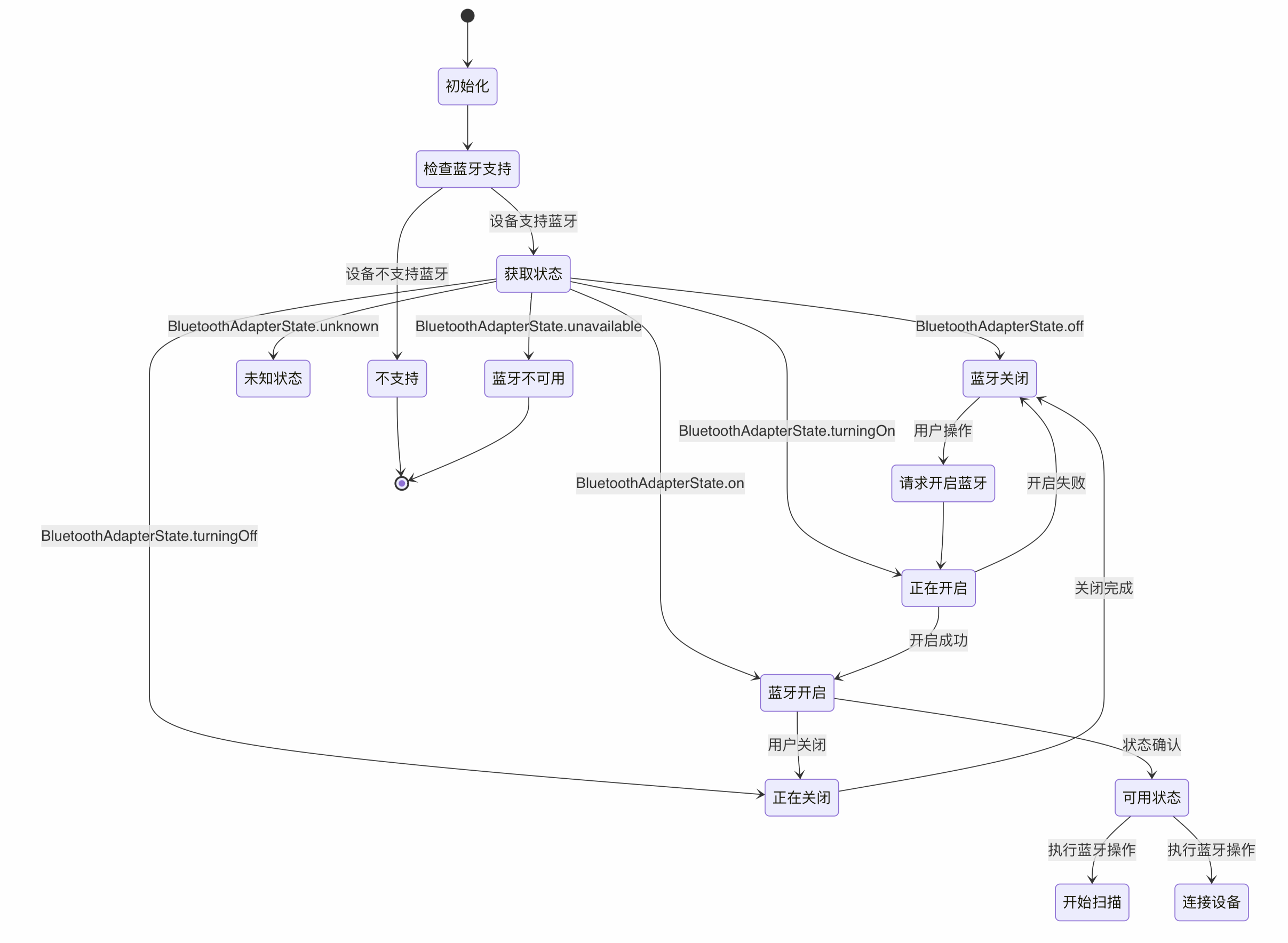
import 'package:flutter_blue_plus/flutter_blue_plus.dart';
/// 蓝牙状态管理器
/// 使用flutter_blue_plus插件管理BLE蓝牙适配器状态
class BluetoothStateManager {
  /// 获取蓝牙适配器状态变化的流
  /// 可以实时监听蓝牙开启、关闭、不可用等状态变化
  static Stream get adapterStateStream =>
      FlutterBluePlus.adapterState;
  /// 获取当前蓝牙适配器状态
  /// 返回当前时刻的蓝牙状态(开启、关闭、不可用等)
  static Future get adapterState =>
      FlutterBluePlus.adapterState.first;
  /// 检查设备是否支持蓝牙
  /// 返回true表示设备支持蓝牙功能,false表示不支持
  static Future get isSupported => FlutterBluePlus.isSupported;
  /// 获取蓝牙适配器名称
  /// 返回本设备的蓝牙适配器名称,通常是设备名称
  static Future get adapterName => FlutterBluePlus.adapterName;
  /// 检查蓝牙是否可用
  /// 综合判断设备是否支持蓝牙且蓝牙已开启
  /// 返回true表示蓝牙可以正常使用
  static Future isBluetoothAvailable() async {
    // 首先检查设备是否支持蓝牙
    if (!await isSupported) {
      return false;
    }
    // 获取当前蓝牙状态
    final state = await adapterState;
    // 判断蓝牙是否已开启
    return state == BluetoothAdapterState.on;
  }
  /// 请求开启蓝牙
  /// 在Android平台上可以程序化开启蓝牙,iOS需要用户手动开启
  /// 返回true表示开启成功或已开启,false表示开启失败
  static Future requestEnableBluetooth() async {
    try {
      // 只有Android平台支持程序化开启蓝牙
      if (Platform.isAndroid) {
        await FlutterBluePlus.turnOn();
      }
      return true;
    } catch (e) {
      // 捕获开启蓝牙时的异常(如用户拒绝、权限不足等)
      print('无法开启蓝牙: $e');
      return false;
    }
  }
}
4.2 蓝牙状态监听Widget
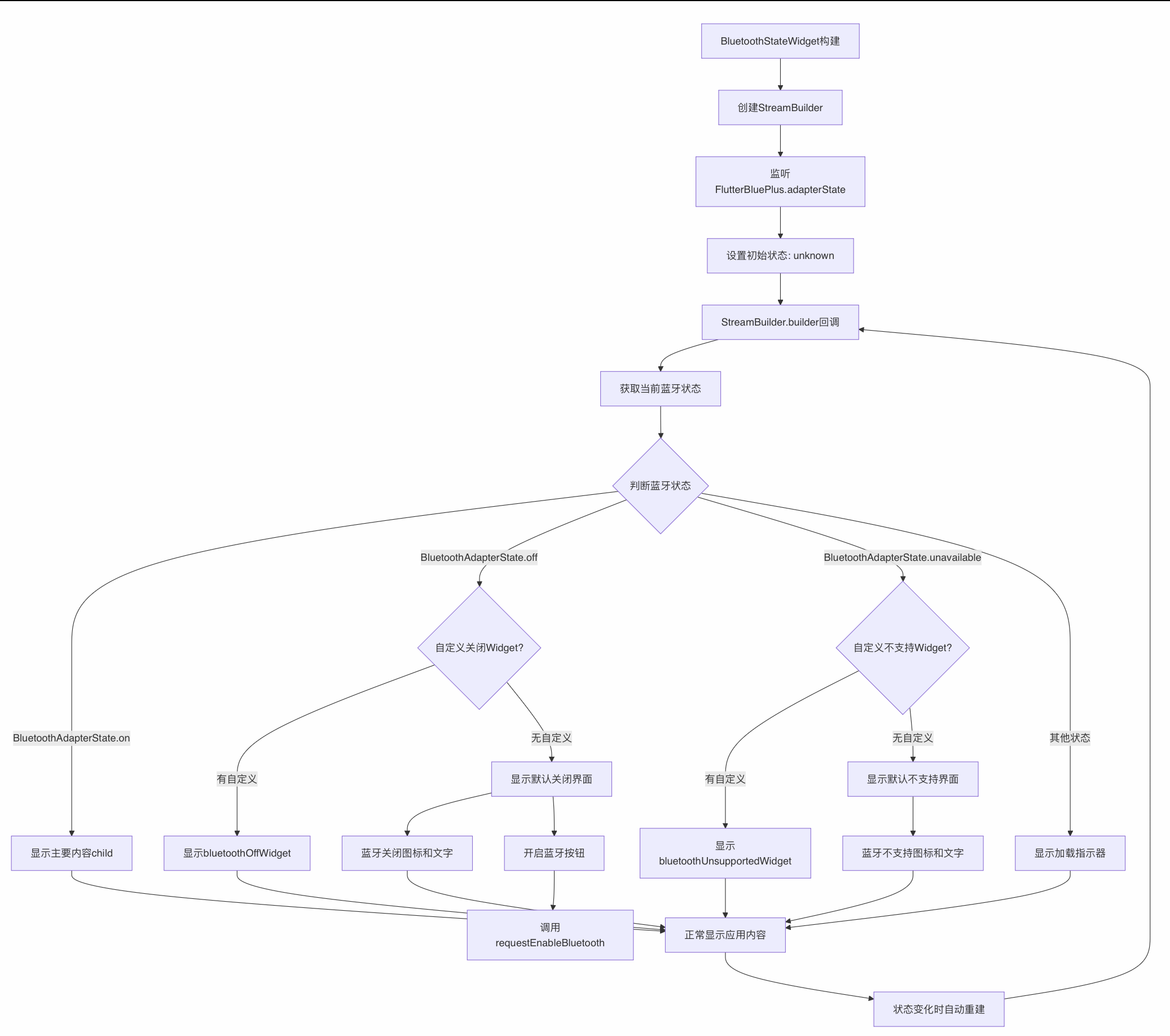
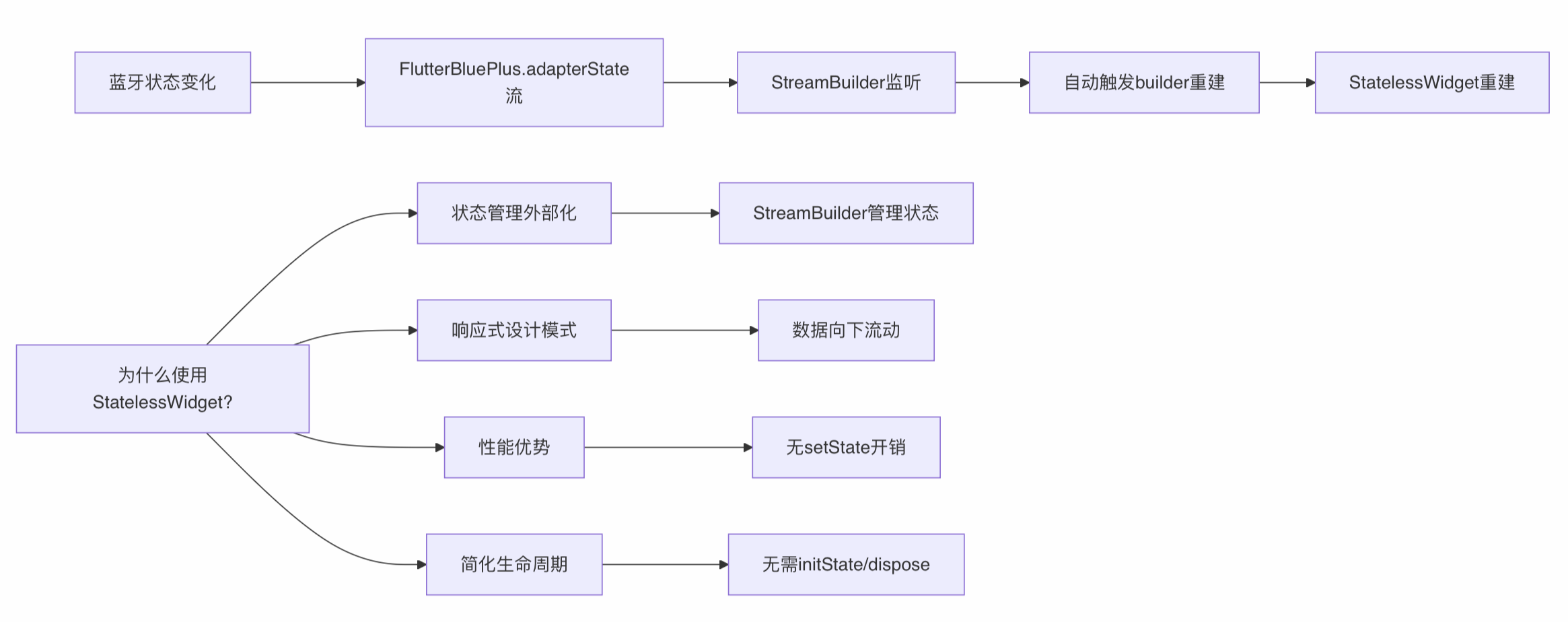
StatelessWidget vs StatefulWidget 设计说明
/// 蓝牙状态监听Widget
/// 根据蓝牙状态自动切换显示不同的界面内容
/// 当蓝牙开启时显示主要内容,关闭时显示提示界面
class BluetoothStateWidget extends StatelessWidget {
  /// 蓝牙开启时显示的主要内容Widget
  final Widget child;
  /// 蓝牙关闭时显示的自定义Widget,如果为null则使用默认界面
  final Widget? bluetoothOffWidget;
  /// 蓝牙不支持时显示的自定义Widget,如果为null则使用默认界面
  final Widget? bluetoothUnsupportedWidget;
  const BluetoothStateWidget({
    Key? key,
    required this.child,
    this.bluetoothOffWidget,
    this.bluetoothUnsupportedWidget,
  }) : super(key: key);
  @override
  Widget build(BuildContext context) {
    // 使用StreamBuilder监听蓝牙状态变化
    return StreamBuilder(
      stream: FlutterBluePlus.adapterState, // 蓝牙状态流
      initialData: BluetoothAdapterState.unknown, // 初始状态为未知
      builder: (context, snapshot) {
        final state = snapshot.data; // 获取当前蓝牙状态
        // 根据不同的蓝牙状态显示不同的界面
        switch (state) {
          case BluetoothAdapterState.on:
            // 蓝牙已开启,显示主要内容
            return child;
          case BluetoothAdapterState.off:
            // 蓝牙已关闭,显示关闭提示界面
            return bluetoothOffWidget ?? _buildBluetoothOffWidget();
          case BluetoothAdapterState.unavailable:
            // 蓝牙不可用,显示不支持提示界面
            return bluetoothUnsupportedWidget ?? _buildUnsupportedWidget();
          default:
            // 未知状态或正在切换状态,显示加载指示器
            return const Center(
              child: CircularProgressIndicator(),
            );
        }
      },
    );
  }
  Widget _buildBluetoothOffWidget() {
    return Center(
      child: Column(
        mainAxisAlignment: MainAxisAlignment.center,
        children: [
          const Icon(
            Icons.bluetooth_disabled,
            size: 64,
            color: Colors.grey,
          ),
          const SizedBox(height: 16),
          const Text(
            '蓝牙未开启',
            style: TextStyle(fontSize: 18),
          ),
          const SizedBox(height: 16),
          ElevatedButton(
            onPressed: () async {
              await BluetoothStateManager.requestEnableBluetooth();
            },
            child: const Text('开启蓝牙'),
          ),
        ],
      ),
    );
  }
  Widget _buildUnsupportedWidget() {
    return const Center(
      child: Column(
        mainAxisAlignment: MainAxisAlignment.center,
        children: [
          Icon(
            Icons.bluetooth_disabled,
            size: 64,
            color: Colors.red,
          ),
          SizedBox(height: 16),
          Text(
            '设备不支持蓝牙',
            style: TextStyle(fontSize: 18),
          ),
        ],
      ),
    );
  }
} 
 浙公网安备 33010602011771号