React 面向组件编程-【React篇2】 - 实践
React 面向组件编程

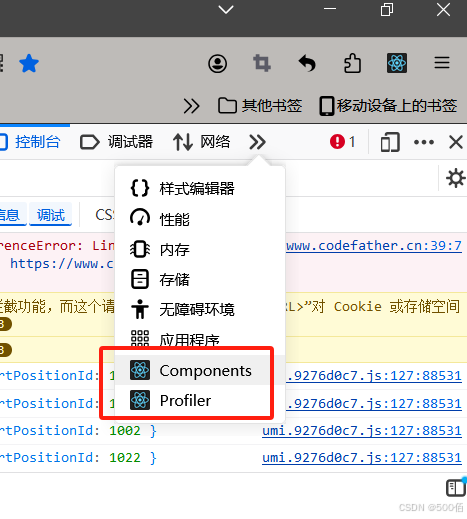
- Components:可查看页面使用了哪些组件
- Profiler :可以看见组件加载的时间 用于调节组件的加载效率
<script type="text/babel">
  //1. 创建函数式组件
  function MyComponent(){
  console.log(this) // 此处的this是undefined,因为babel编译后开启了严格模式
  return <h2>我是用函数定义的组件(适用于【简单组件】的定义)</h2>
    }
    // 2.渲染组件到页面
    ReactDOM.render(<MyComponent/>,document.getElementById('test'))
      /*
      执行了ReactDOM.render(<MyComponent/>...之后发生了什么?
      1. React解析组件标签,找到了MyComponent组件
      2. 发现组件是使用函数式定义的 随后调用该函数,将返回的虚拟DOM转为真实DOM,随后呈现在页面中
      */
    </script>
类的基本使用
总结:
1.类中的构造器不是必须写的,要对实例进行一些初始化的操作,如添加指定属性时矛与。
2.如果A类继承了B类,且A类中写了构造器,那么A类构造器中的super是必须要调用的。
3.类中所定义的方法,都是放在了类的原型对象上,供实例使用
示例:
<script type="text/javascript">
  //1. 创建一个Person类
  class Person {
  // 构造方法
  constructor(name, age) {
  // 构造器中的this是谁 --类的实例对象
  this.name = name
  this.age = age
  }
  // 一般方法
  speak() {
  // speak方法放在了哪里? --类的原型对象上,供实例使用
  // 通过Person实例调用speak时,speak中的this就是Person实例
  console.log(`我叫${name},我的年龄是${age}`)
  }
  }
  class Student extends Person {
  constructor(name, age, grade) {
  super(name, age)
  this.grade = grade
  }
  speak() {
  // speak方法放在了哪里? --类的原型对象上,供实例使用
  // 通过Student实例调用speak时,speak中的this就是Student实例
  console.log(`我叫${name},我的年龄是${age},我的年纪是${grade}`)
  }
  study() {
  console.log(`我很努力的学习`)
  }
  }
  const t1 = new Student('小张', 14, '高一')
  console.log(t1)
  t1.study()
</script>
类式组件
<script type="text/babel">
  //1. 创建类式组件
  class MyComponent extends React.Component{
  render(){
  // render是放在哪里?--MyComponent的原型对象上,供实例使用
  // render中的this?--MyComponent的实例对象<=> MyComponent组件实例对象
  console.log('render中的this:',this);
  return  <h2>我是用类定义的组件(适用于【复杂组件】的定义)</h2>
    }
    }
    // 2.渲染组件到页面
    React.render(<MyComponent/>,document.getElementById('test'))
      /*
      执行了ReactDOM.render(<MyComponent/>...之后发生了什么?
      1. React解析组件标签,找到了MyComponent组件
      2. 发现组件是使用函数式定义的 随后new出来该类的实例,并通过该实例调用原型对象的render方法
      3.将render返回的虚拟DOM转为真实DOM,呈现在页面中
      */
      </script>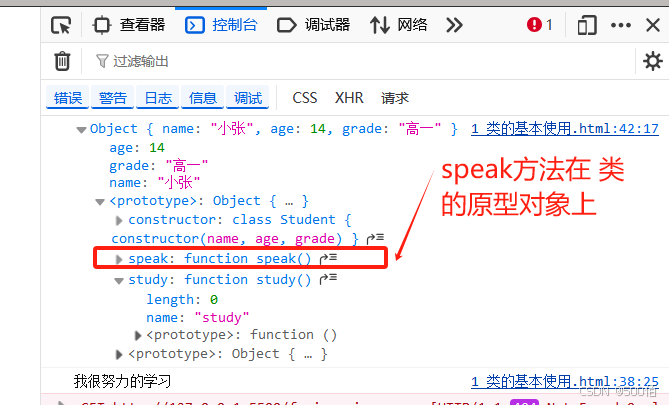
组件实例的三大核心属性1:state
范围:只适用类式组件 ,函数式组件可以hooks实现
state用法和事件绑定 bind方法解决changeWether中this指向问题 示例:
<script type="text/babel">
  //1. 创建组件
  class Weather extends React.Component {
  constructor(props) {
  super(props)
  // 初始状态
  this.state = { isHot: true }
  // 解决changeWether中this指向问题
  this.changeWether = this.changeWether.bind(this)
  }
  render() {
  const {isHot} = this.state
  //事件绑定 下面这个onClick注意C是大写
  return <h1> onClick={this.changeWether = this.changeWether.bind(this)
    }今天天气很{isHot ? '炎热' : '凉爽'}</h1>
      }
      changeWether() {
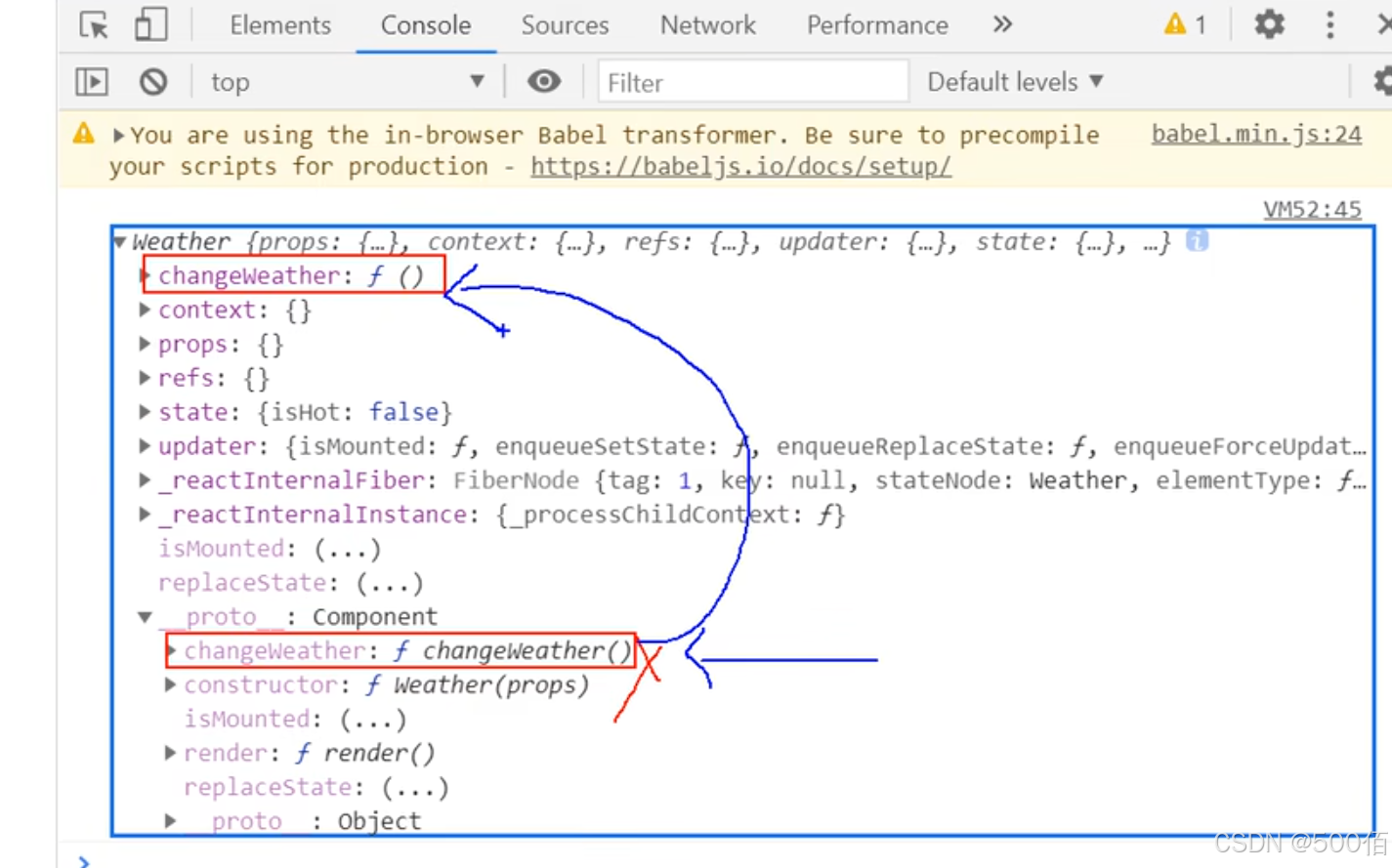
      // changeWether放在哪里?--weather的原型对象上,供实例使用
      // 由于changeWether是作用在onClick的回调,所以不是通过实例调用的,是直接调用
      // 类中的方法默认开启了局部的严格模式,所以changeWether中的this是undefined
      console.log(this)
      }
      }
      // 2.渲染组件到页面
      ReactDOM.render(<Weather />, document.getElementById('test'))
        </script>
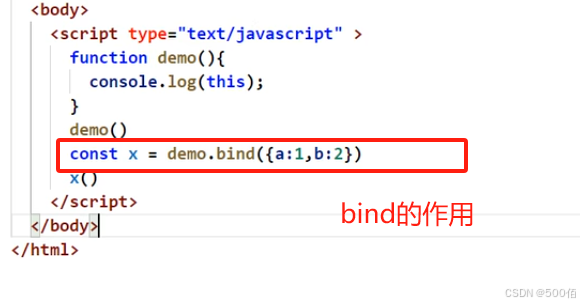
bind方法解决changeWether中this指向问题 :
state状态值的修改:setState
<script type="text/babel">
  //1. 创建组件
  class Weather extends React.Component {
  // 构造器调用多少次? --1次
  constructor(props) {
  super(props)
  // 初始状态state
  this.state = { isHot: true, wind: '微风' }
  // 解决changeWether中this指向问题
  this.changeWether = this.changeWether.bind(this)
  }
  // render调用多少次? --1+n次 :初始化+状态跟新次数
  render() {
  const { isHot } = this.state
  //事件绑定 下面这个onClick注意C是大写
  return <h1> onClick={this.changeWether = this.changeWether.bind(this)
    }今天天气很{isHot ? '炎热' : '凉爽'}</h1>
      }
      // changeWether调用多少次? --n次 状态跟新的次数
      changeWether() {
      // changeWether放在哪里?--weather的原型对象上,供实例使用
      // 由于changeWether是作用在onClick的回调,所以不是通过实例调用的,是直接调用
      // 类中的方法默认开启了局部的严格模式,所以changeWether中的this是undefined
      console.log(this)
      // 获取原来isHot值
      const isHot = this.state.isHot
      // 严重注意:状态必须通过setState进行更新,且更新是一种合并,不是替换
      this.setState({ isHot: !isHot })
      // this.state.isHot = !isHot // 这是错误写法
      }
      }
      // 2.渲染组件到页面
      ReactDOM.render(<Weather />, document.getElementById('test'))
        </script>
state的简写方式 示例:
<script type="text/babel">
  //1. 创建组件
  class Weather extends React.Component {
  // 初始化状态 这里将组件的对象上添加一个属性state
  state = { isHot: true, wind: '微风' }
  render() {
  const { isHot } = this.state
  return <h1> onClick={this.changeWether = this.changeWether.bind(this)
    }今天天气很{isHot ? '炎热' : '凉爽'}</h1>
      }
      // 自定义方法 --要用赋值语句的形式+箭头函数
      // 将原型对象上的changeWether放在组件对象上
      // 箭头函数没有自己的this 这里面是外层函数的this,就是指组件实例对象
      changeWether = () => {
      const isHot = this.state.isHot
      this.setState({ isHot: !isHot })
      }
      }
      // 2.渲染组件到页面
      ReactDOM.render(<Weather />, document.getElementById('test'))
        </script>
组件实例的三大核心属性1:state 总结:
组件中render方法中的this为组件实例对象
组件自定义的方法中this为undefined,如何解决?
强制绑定this:通过函数对象的bind()
箭头函数
状态数据,不能直接修改更新 要使用setState
最后 谢谢阅读此篇 《React 面向组件编程》-【React篇2】
个人主页:500佰 欢迎留言

 浙公网安备 33010602011771号