

全局配置
三个页面
app.json pages字段
"pages":[
    "pages/index/index", # 首页
    "pages/home/home",  # 我的
    "pages/party/party" # 活动
  ]
window字段
这好看不好看 得css的人来配。
"window":{
    "backgroundTextStyle":"light",
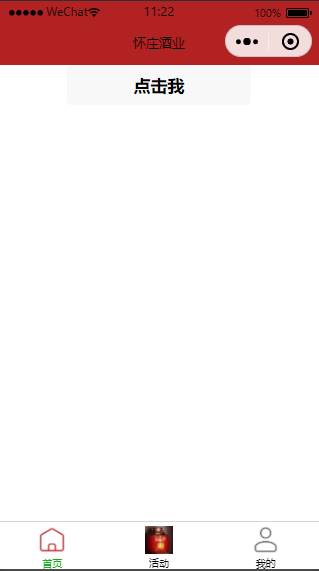
    "navigationBarBackgroundColor": "#B22222", # 最上面的颜色
    "navigationBarTitleText": "怀庄酒业", # 上面的标题
    "navigationBarTextStyle":"black" # 文字颜色
  }
tabBar字段
就是下方的菜单
注意:这里引用的pathPath一定要在Pages字段里。
"tabBar": {
      "list": [
        {
          "pagePath": "pages/index/index",
          "text": "首页",
          "iconPath": "static/tabbar/ic_menu_choice_nor.png",
          "selectedIconPath": "static/tabbar/ic_menu_choice_pressed.png"
        },
        {
            "pagePath": "pages/party/party",
            "text": "活动",
            "iconPath": "static/tabbar/ic_menu_party_nor.png",
            "selectedIconPath": "static/tabbar/ic_menu_party_pressed.png"
        },
        {
            "pagePath": "pages/home/home",
            "text": "我的",
            "iconPath": "static/tabbar/ic_menu_me_nor.png",
            "selectedIconPath": "static/tabbar/ic_menu_me_pressed.png"
        }
    ]
  }
效果如下
组件
- text: 文本信息
- view: 容器,类似div
- image: 图片
跳转
对标签绑定点击事件
part.wxml
<text>活动页面</text>
<button  bindtap="clickMeToSignUp"> 我要报名 </button>
part.js
clickMeToSignUp:function(){
        console.log("点击跳转到报名页")
        wx.navigateTo({
            url: '/pages/signup/signup'
        })
}
数据绑定
都是双向绑定
part.wxml
<text bindtap="changeLogin"> {{ isLogin }}</text>
part.js
data: {
        isLogin: false
},
changeLogin: function(){
      this.setData({isLogin: !isLogin})
}
获取用户信息
index.wxml
<view  class="container">
  <view class="userinfo">
    <block wx:if="{{!hasUserInfo}}">
      <button wx:if="{{canIUseGetUserProfile}}"  bindtap="getUserProfile" > 授权登录 </button>
      <button wx:else open-type="getUserInfo" bindgetuserinfo="getUserInfo"> 获取头像昵称 </button>
    </block>
  </view>
</view>
index.js
data: {
      userInfo: {},
      hasUserInfo: false,
      canIUseGetUserProfile: false,
    },
onLoad(options) {
      if (wx.getUserProfile) {
        console.log("onload")
        this.setData({
          canIUseGetUserProfile: true
        })
      }
    },
getUserProfile() {
      console.log("getUserprofile")
      // 推荐使用 wx.getUserProfile 获取用户信息,开发者每次通过该接口获取用户个人信息均需用户确认
      // 开发者妥善保管用户快速填写的头像昵称,避免重复弹窗
      wx.getUserProfile({
        desc: '用于完善会员资料', // 声明获取用户个人信息后的用途,后续会展示在弹窗中,请谨慎填写
        success: (res) => {
          this.setData({
            userInfo: res.userInfo,
            hasUserInfo: true
          })
          console.log(res.userInfo)
          console.log(this.data.userInfo) //获取data里的数据  this.data.xxx
        }
      })
    },
效果如下
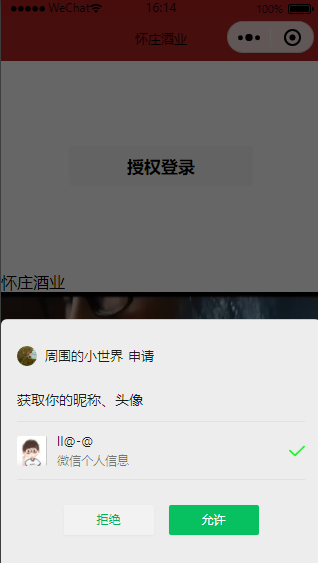

但是 界面显示很难看。
获取用户位置信息
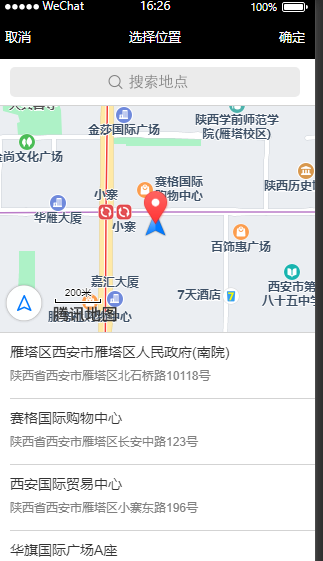
<view bindtap="getLocalPath">{{localPath}}</view>
注意这里需要将this 赋值给that.
getLocalPath: function(){
      var that = this;
      wx.chooseLocation({
         success: function(res){
           that.setData({localPath: res.address}),
           console.log(that.data.localPath)
         }
      })
    },
提示要在app.json 配置permission字段,参考 小程序全局配置https://developers.weixin.qq.com/miniprogram/dev/reference/configuration/app.html
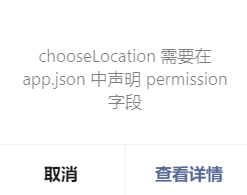
app.json
"permission": {
        "scope.userLocation": {
          "desc": "你的位置信息将用于小程序位置接口的效果展示"
        }
    }
效果如下

for指令
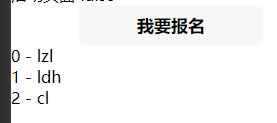
<view wx:for="{{dataList}}"> {{index}} - {{item}} </view>
效果如下
上传图片
uploadImage: function(){
      var that = this;
      wx.chooseImage({
        count: 5,
        sizeType: ['original', 'compressed'],
        success:function(res){
          that.setData({
            imageList: res.tempFilePaths
          })
        }
      })
    },
效果如下

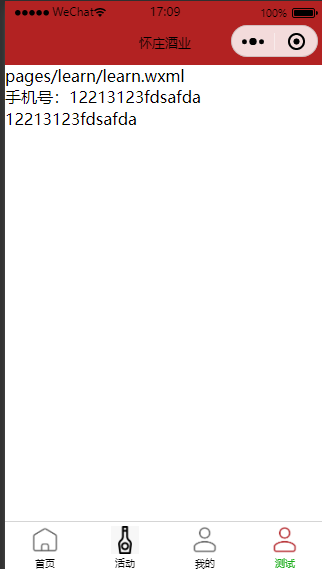
数据双向绑定
<view>手机号:{{telphone}}</view>
<input value="{{telphone}}" bindinput="bindPhone" placeholder="请输入手机号"></input>
data: {
      telphone: "12213123"
    },
bindPhone: function(e){
      console.log(1);
      this.setData({
        telphone: e.detail.value
      })
    },
效果如下


 浙公网安备 33010602011771号