对接可立图证件照API,快速搭建证件照应用(可赠送点数)
如果快速搭建证件照应用?
第一步可以先注册账号,注册后可以咨询客服,客服会赠送点数用于开发测试。

第二步,查看官网api文档
如下是证件照接口调用方法,如果需要查看细节,请进入可立图官网查看
证件照接口
接口详情
地址:https://www.clipimg.com/api/idphoto/make
请求方式:POST
数据类型:JSON
响应类型:JSON
计费:此接口不产生费用
接口描述:此接口为证件照制作接口,调用不产生费用,结果保留1小时,1小时后自动删除制作结果图片,请及时保存。重复下载同一张照片不会重复扣费。
参数[Header]
| 参数名 | 说明 | 是否必选 | 类型 |
| X-API-Key | 秘钥,点此获取 | 必选 | string |
| Content-Type | 请求数据类型 | 必选 | application/json |
参数[Body]:
| 参数名 | 说明 | 是否必选 | 类型 |
| file | 图片的base64格式,不包含base64的头部数据 | 必选 | string |
| spec_id | 规格id | 可选,width、height不传值时必传 | int |
| width | 宽度px | 可选,spec_id不传值时必传 | int |
| height | 高度px | 可选,spec_id不传值时必传 | int |
| fair_level | 美颜级别 | 可选,0-1之间的小数,为0时不美颜 | float |
| color | 背景色 | 可选,默认值蓝红白三种颜色 | list |
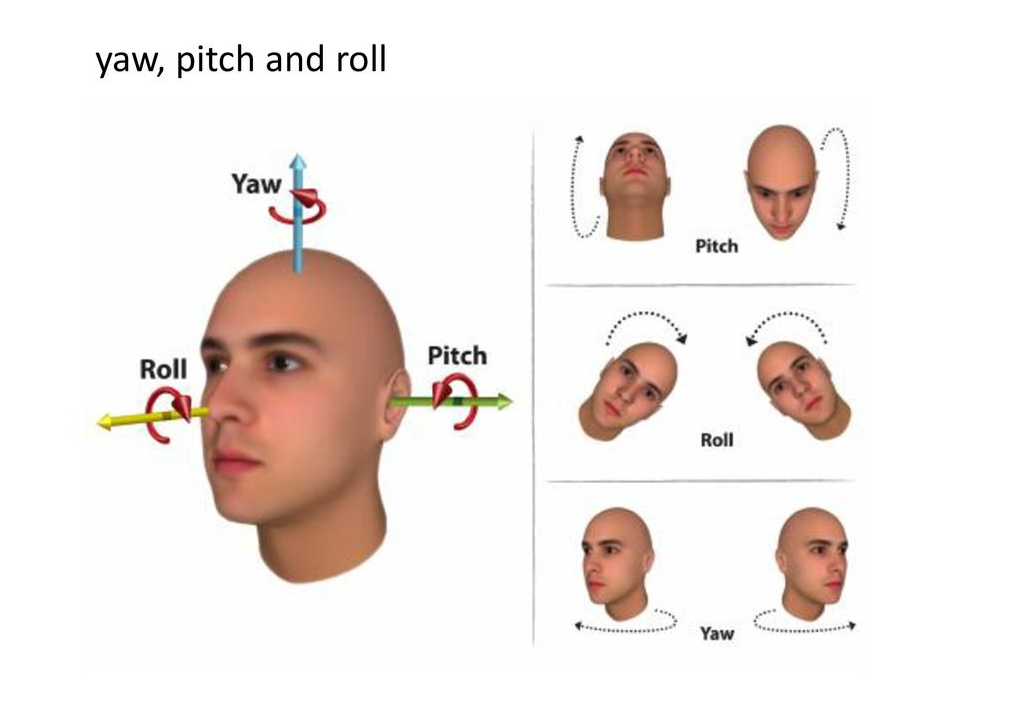
| facepose | 人脸是否正对摄像头误差范围,检测人脸pitch、yaw、roll三项误差值,示例 | 可选,越小越严格,越大容错率越高,默认:20 | float |
| eyeskew | 双眼倾斜误差范围 | 可选,越小越严格,越大容错率越高,默认:20 | float |
| face_ratio_min | 头部最小比例 | 可选,默认0.55 | float |
| face_ratio | 头部最大比例 | 可选,默认0.8 | float |
| dpi | 返回的证件照分辨率,如果不设置该值,服务端会给出默认配置,一般返回300dpi的图片 | 可选 | int |
| head_top_gap_ratio | 头顶发迹离上边缘距离 | 可选,默认0.08 | float |
| eyes_to_botttom_ratio_min | 眼睛离下边缘最小距离 | 可选,默认0.46 | float |
| enhance_image_quality | 是否对图像做清晰化处理 | 可选,默认为1,1表示是,0表示否 | int |
| head_region | 头部的计算区域,第一种计算区域为整个头部(含头发、耳朵),示例;第二种计算区域为脸颊,示例; | 可选,默认0,0表示头部,1表示脸颊 | int |
| align_face | 在eyeskew参数误差范围内是否进行人脸自动矫正 | 可选,默认0,0表示不矫正,1表示矫正 | int |
| glasses_glare | 是否进行眼镜炫光检测 | 可选,默认0,0表示不检测,1表示检测 | int |
| file_format | 文件生成类型,支持jpg,png。默认png | 可选,默认0,0表示png,1表示jpg | int |
| head_height_ratio_max | 头部高度占比最大值 | 可选,默认1,示例值:0.7 | float |
| head_height_ratio_min | 头部高度占比最小值 | 可选,默认0.01,示例值:0.5 | float |
| eye_distance_ratio_max | 眼间距宽度占比最大值 | 可选,默认1,示例值:0.4 | float |
| eye_distance_ratio_min | 眼间距宽度占比最小值 | 可选,默认0.01,示例值:0.3 | float |
color结构
| 参数名 | 说明 | 类型 |
| name | 背景色名称,请使用纯字母组成此参数 | string |
| start_color | 背景色值 | strng |
| enc_color | 渐变色色值,可选,不传值时为纯色背景 | string |
返回:
| 参数 | 说明 | 示例 | 类型 |
| code | 状态码 | 0 | int |
| msg | 错误详情 | 成功 | string |
| data | 结果 |
code取值
| 0 | 请求成功 |
| 402 | 点数已用完 |
| 407 | 未检测到人脸 |
| 408 | 包含多人 |
| 412 | 双眼倾斜,超过误差范围 |
| 413 | 人脸倾斜,超过误差范围 |
data结构体
| 参数名 | 说明 | 示例值 | 类型 |
| image_id | 上传图片的标示 | d00a42c…0dc18946 | string |
| filenames | 证件照列表 | [{‘preview_url’: ‘https://…’, ‘preview_img_name’: ‘d00a4…_white_preview’, ‘download_url’: ‘https://…’, ‘img_name’: ‘d00a4…_white’, ‘color_name’: ‘white’,’bg_color’: ‘#FFFFFF’}, …] | list |
filenames结构
| 参数名 | 说明 | 示例值 | 类型 |
| preview_url | 预览图片地址 | https://… | string |
| preview_img_name | 预览图名称,用于再次下载 | d00a4…_white | string |
| download_url | 原图下载地址 | https://… | string |
| img_name | 证件照名称,用于再次下载、换装 | d00a4…_white | string |
| color_name | 背景色名称 | white | string |
| bg_color | 背景色色值 | #FFFFFF | string |
| print_img_name | 打印排版照原图名称 | d00a4…_print_white | string |
| preview_print_img_name | 打印排版照预览图名称 | d00a4…_print_white | string |
| print_url | 排版照原图下载地址 | https://… | string |
| preview_print_url | 排版照预览图下载地址 | https://… | string |
调用示例
-
PHP
-
PYTHON
-
JAVA
    // curl示例
    $base64_img = base64_encode(file_get_contents("idphoto.jpg"));//修改为您的图片地址,转换成base64格式
    $post_data = array('file' => $base64_img,'width'=>413,'height'=>579,'color'=>array(array("name"=>"blue","start_color"=>"#FFFFFF")));
    $data_string = json_encode($post_data,JSON_UNESCAPED_UNICODE);
    $curl_con = curl_init();
    curl_setopt($curl_con, CURLOPT_URL,'https://www.clipimg.com/api/idphoto/make');
    curl_setopt($curl_con, CURLOPT_HEADER, true);
    curl_setopt($curl_con, CURLOPT_POST, true);
    curl_setopt($curl_con, CURLOPT_RETURNTRANSFER, TRUE);
    curl_setopt($curl_con, CURLOPT_CONNECTTIMEOUT, 5);
    curl_setopt($curl_con, CURLOPT_HTTPHEADER, array(
            'Content-Type: application/json',
            'X-API-KEY: apikey',
            'Content-Length: ' . strlen($data_string))
    );
    curl_setopt($curl_con, CURLOPT_POSTFIELDS, $data_string);
    $res = curl_exec($curl_con);
    $status = curl_getinfo($curl_con);
    curl_close($curl_con);
    if (isset($status['http_code']) && $status['http_code'] == 200) {
        print($res);
        return $res;
    } else {
        return FALSE;
    }


    // GuzzleHttp示例

    /**
     * 制作证件照
     * $img 上传的人像图片本地地址
     * 参数说明参考文档https://clipimg.com/wp/api-doc/
     */
    public function IdphotoMake($img,$color,$width,$height,$fair_level,$dpi){
        $client = new Client();
        $base64_img = base64_encode(file_get_contents($img));//转换成base64格式
        $response = $client->request('POST', $this->api_url.$this->idphoto, [
            'headers' => [
                'X-API-Key' => $this->apiKey,
                'Content-Type'     => 'application/json'
            ],
          'body'=>json_encode([
          "file"=>$base64_img,
          "width"=>$width,
          'height'=>$height,
          'dpi'=>$dpi,
          "color"=>$color,
          'fair_level'=>$fair_level]
          )
        ]);
        $json = json_decode($response->getBody()->getContents());

        return $json;
    }
证件照预览
地址:https://www.clipimg.com/api/idphoto/preview/预览图片名称
请求方式:GET
数据类型:application/x-www-form-urlencoded
响应类型:Image
计费:此接口不产生费用
参数:
| 参数名 | 说明 | 是否必选 | 类型 |
| text | 给证件照增加自定义文字,url拼接字符串形式拼接, eg:https://www.clipimg.com/api/idphoto/preview/d00a4…_white?text=这是自定义文字 |
可选 | string |
返回:httpcode为200时返回图片流
httpcode为404时表示图片不存在
证件照下载
地址:https://www.clipimg.com/api/idphoto/download/证件照图片名称
请求方式:POST
数据类型:JSON
响应类型:Image
计费:此接口调用成功扣除API账户30点余额
参数[Header]
| 参数名 | 说明 | 是否必选 | 类型 |
| X-API-Key | 秘钥 | 必选 | string |
| Content-Type | 请求数据类型 | 必选 | application/json |
参数[Body]:
| 参数名 | 说明 | 是否必选 | 类型 |
| text | 给证件照增加自定义文字 | 可选 | string |
返回:httpcode为200时返回图片流
httpcode为404时表示图片不存在
httpcode为402时表示点数已用完
    # /**
    # * 预览证件照
    # */
    def IdphotoPreview(self,preview_img_name,text=None):
        response = requests.get(self.api_url + self.idphoto_preview + '/' +
                                preview_img_name+("?text="+text if text is not None and len(text)>0 else ''),
            headers = {
                'X-API-Key' : self.apiKey,
                'Content-Type'     : 'application/json'
            }
        )
        return response.content

    # /**
    # * 证件照下载
    # */
    def IdphotoDownload(self,img_name,text=None):
        ext = 'png' if '_jpg' not in img_name else 'jpg'
        path = self.GenSavePath('result',ext)
        try:
            body = {"text":text} if text is not None and len(text)>0 else {}
            response = requests.post(self.api_url + self.idphoto_download + '/' + img_name,
                headers = {
                    'X-API-Key' : self.apiKey,
                    'Content-Type'     : 'application/json'
                },data=json.dumps(body)
            )
            if response.status_code == 200:
                with open(path, 'wb') as out:
                    out.write(response.content)
            return path
        except Exception as e:
            status_code = response.status_code
        return status_code
证件照排版预览
地址:https://www.clipimg.com/api/idphoto/print_preview/打印排版照预览图名称
请求方式:GET
数据类型:application/x-www-form-urlencoded
响应类型:Image
计费:此接口不产生费用
参数:
参数均使用url拼接字符串形式拼接,
eg:https://www.clipimg.com/api/idphoto/print_preview/d00a4..._white?text=这是自定义文字| 参数名 | 说明 | 是否必选 | 类型 |
| text | 给证件照增加自定义文字,url拼接字符串形式拼接, eg:https://www.clipimg.com/api/idphoto/print_preview/d00a4…_white?text=这是自定义文字 |
可选 | string |
| layouttype | 排版方式, 0表示紧凑、1表示宽松,默认0 | 可选 | int |
| orientation | 方向,0表示横板(图片宽比高长)、1表示纵版,默认0 | 可选 | int |
返回:httpcode为200时返回图片流
httpcode为404时表示图片不存在
证件照排版下载
地址:https://www.clipimg.com/api/idphoto/print_download/打印排版照原图名称
请求方式:POST
数据类型:JSON
响应类型:Image
计费:此接口调用成功扣除API账户50点余额,换装排版照扣100点余额
参数[Header]
| 参数名 | 说明 | 是否必选 | 类型 |
| X-API-Key | 秘钥 | 必选 | string |
| Content-Type | 请求数据类型 | 必选 | application/json |
参数[Body]:
参数均使用url拼接字符串形式拼接,
eg:https://www.clipimg.com/api/idphoto/print_preview/d00a4..._white?text=这是自定义文字| 参数名 | 说明 | 是否必选 | 类型 |
| text | 给证件照增加自定义文字 | 可选 | string |
| layouttype | 排版方式, 0表示紧凑、1表示宽松,默认0 | 可选 | int |
| orientation | 方向,0表示横板(图片宽比高长)、1表示纵版,默认0 | 可选 | int |
返回:httpcode为200时返回图片流
httpcode为404时表示图片不存在
httpcode为402时表示点数已用完
    # /**
    # * 排版照预览
    # */
    def PrintIdphotoPreview(self,preview_img_name,text='',layouttype = 0,orientation= 0):
        params = []
        if text is not None and len(text)>0:
            params.append('text='+text)
        if layouttype == 1:
            params.append('layouttype='+str(layouttype))
        if orientation == 1:
            params.append('orientation='+str(orientation))
        param = "&".join(params)
        if param != '':
            param = '?'+param
        response = requests.get(self.api_url + self.print_idphoto_preview + '/' + preview_img_name+param,
            headers = {
                'X-API-Key' : self.apiKey,
                'Content-Type'     : 'application/json'
            }
        )
        return response.content

    # /**
    # * 排版照下载
    # */
    def PrintIdphotoDownload(self,img_name,text='',layouttype = 0,orientation= 0):
        ext = 'png' if '_jpg' not in img_name else 'jpg'
        path = self.GenSavePath('result',ext)
        try:
            body = {}
            if text is not None and len(text)>0:
                body['text']=text
            if layouttype == 1:
                body['layouttype']=layouttype
            if orientation == 1:
                body['orientation']=orientation
            response = requests.post(self.api_url + self.print_idphoto_download + '/' + img_name,
                headers = {
                    'X-API-Key' : self.apiKey,
                    'Content-Type'     : 'application/json'
                },data=json.dumps(body)
            )
            if response.status_code == 200:
                with open(path, 'wb') as out:
                    out.write(response.content)
            return path
        except Exception as e:
            status_code = response.status_code

        return status_code
您可以使用代码对下载后的证件照实现排版,以节省成本!
使用代码实现证件照排版
-
Python
-
JavaScript
-
Java
-
PHP
-
C#
from PIL import Image, ImageDraw

# 6 寸相纸尺寸(英寸)
SIX_INCH_WIDTH = 6.0
SIX_INCH_HEIGHT = 4.0
# 默认分辨率(dpi)
DEFAULT_DPI = 300
# 照片间空隙(像素)
GAP = 10
# 裁剪线颜色
CUTLINE_COLOR = (0, 0, 0)
# 裁剪线宽度
CUTLINE_WIDTH = 1

# 转换为像素
SIX_INCH_PIXEL_WIDTH = int(SIX_INCH_WIDTH * DEFAULT_DPI)
SIX_INCH_PIXEL_HEIGHT = int(SIX_INCH_HEIGHT * DEFAULT_DPI)


def layout_photos(photo_path, output_path):
    # 打开照片
    photo = Image.open(photo_path)
    photo_width, photo_height = photo.size
    try:
        photo_dpi = photo.info['dpi'][0]
        if photo_dpi == 0:
            photo_dpi = DEFAULT_DPI
    except KeyError:
        photo_dpi = DEFAULT_DPI

    # 计算照片实际打印尺寸(英寸)
    photo_print_width = photo_width / photo_dpi
    photo_print_height = photo_height / photo_dpi

    # 转换为像素(使用默认 dpi)
    photo_pixel_width = int(photo_print_width * DEFAULT_DPI)
    photo_pixel_height = int(photo_print_height * DEFAULT_DPI)

    # 调整照片大小
    resized_photo = photo.resize((photo_pixel_width, photo_pixel_height))

    # 创建相纸
    paper = Image.new('RGB', (SIX_INCH_PIXEL_WIDTH, SIX_INCH_PIXEL_HEIGHT), 'white')
    draw = ImageDraw.Draw(paper)

    # 计算每行和每列可放置的照片数量
    cols = (SIX_INCH_PIXEL_WIDTH + GAP) // (photo_pixel_width + GAP)
    rows = (SIX_INCH_PIXEL_HEIGHT + GAP) // (photo_pixel_height + GAP)

    # 计算排版的总宽度和高度
    total_width = cols * photo_pixel_width + (cols - 1) * GAP
    total_height = rows * photo_pixel_height + (rows - 1) * GAP

    # 计算居中偏移量
    start_x = (SIX_INCH_PIXEL_WIDTH - total_width) // 2
    start_y = (SIX_INCH_PIXEL_HEIGHT - total_height) // 2

    # 粘贴照片
    for i in range(rows):
        for j in range(cols):
            x = start_x + j * (photo_pixel_width + GAP)
            y = start_y + i * (photo_pixel_height + GAP)
            paper.paste(resized_photo, (x, y))

    # 绘制垂直裁剪线(间隙两边)
    for j in range(cols + 1):
        if j == 0:
            left_x1 = start_x
            draw.line((left_x1, 0, left_x1, start_y), fill=CUTLINE_COLOR, width=CUTLINE_WIDTH)
            draw.line((left_x1, start_y + total_height, left_x1, SIX_INCH_PIXEL_HEIGHT), fill=CUTLINE_COLOR, width=CUTLINE_WIDTH)
        elif j == cols:
            left_x2 = start_x + total_width
            draw.line((left_x2, 0, left_x2, start_y), fill=CUTLINE_COLOR, width=CUTLINE_WIDTH)
            draw.line((left_x2, start_y + total_height, left_x2, SIX_INCH_PIXEL_HEIGHT), fill=CUTLINE_COLOR, width=CUTLINE_WIDTH)
        else:
            left_x1 = start_x + (j - 1) * (photo_pixel_width + GAP) + photo_pixel_width
            left_x2 = left_x1 + GAP
            draw.line((left_x1, 0, left_x1, start_y), fill=CUTLINE_COLOR, width=CUTLINE_WIDTH)
            draw.line((left_x1, start_y + total_height, left_x1, SIX_INCH_PIXEL_HEIGHT), fill=CUTLINE_COLOR, width=CUTLINE_WIDTH)
            draw.line((left_x2, 0, left_x2, start_y), fill=CUTLINE_COLOR, width=CUTLINE_WIDTH)
            draw.line((left_x2, start_y + total_height, left_x2, SIX_INCH_PIXEL_HEIGHT), fill=CUTLINE_COLOR, width=CUTLINE_WIDTH)

    # 绘制水平裁剪线(间隙两边)
    for i in range(rows + 1):
        if i == 0:
            top_y1 = start_y
            draw.line((0, top_y1, start_x, top_y1), fill=CUTLINE_COLOR, width=CUTLINE_WIDTH)
            draw.line((start_x + total_width, top_y1, SIX_INCH_PIXEL_WIDTH, top_y1), fill=CUTLINE_COLOR, width=CUTLINE_WIDTH)
        elif i == rows:
            top_y2 = start_y + total_height
            draw.line((0, top_y2, start_x, top_y2), fill=CUTLINE_COLOR, width=CUTLINE_WIDTH)
            draw.line((start_x + total_width, top_y2, SIX_INCH_PIXEL_WIDTH, top_y2), fill=CUTLINE_COLOR, width=CUTLINE_WIDTH)
        else:
            top_y1 = start_y + (i - 1) * (photo_pixel_height + GAP) + photo_pixel_height
            top_y2 = top_y1 + GAP
            draw.line((0, top_y1, start_x, top_y1), fill=CUTLINE_COLOR, width=CUTLINE_WIDTH)
            draw.line((start_x + total_width, top_y1, SIX_INCH_PIXEL_WIDTH, top_y1), fill=CUTLINE_COLOR, width=CUTLINE_WIDTH)
            draw.line((0, top_y2, start_x, top_y2), fill=CUTLINE_COLOR, width=CUTLINE_WIDTH)
            draw.line((start_x + total_width, top_y2, SIX_INCH_PIXEL_WIDTH, top_y2), fill=CUTLINE_COLOR, width=CUTLINE_WIDTH)

    paper.save(output_path)


# 示例调用
layout_photos('your_photo.jpg', 'layout_photo.jpg')
你需要将 'your_photo.jpg' 替换为实际的照片文件路径,'layout_photo.jpg' 替换为你想要保存的排版后照片的文件路径。证件照规格列表
如需全部规格列表数据,请咨询客服获取。
| id | name |
| 1 | 一寸 |
| 2 | 小一寸 |
| 3 | 大一寸 |
| 4 | 二寸 |
| 5 | 小二寸 |
| 6 | 三寸 |
| 7 | 五寸 |
| 8 | 国考(二寸)(35*45mm) |
| 9 | 英语四六级考试(144×192,0~10kb)(12*16mm) |
| 10 | 全国计算机等级考试(12*16mm) |

 浙公网安备 33010602011771号