

nginx重定向连接, 报Permission denied) while connecting to upstream
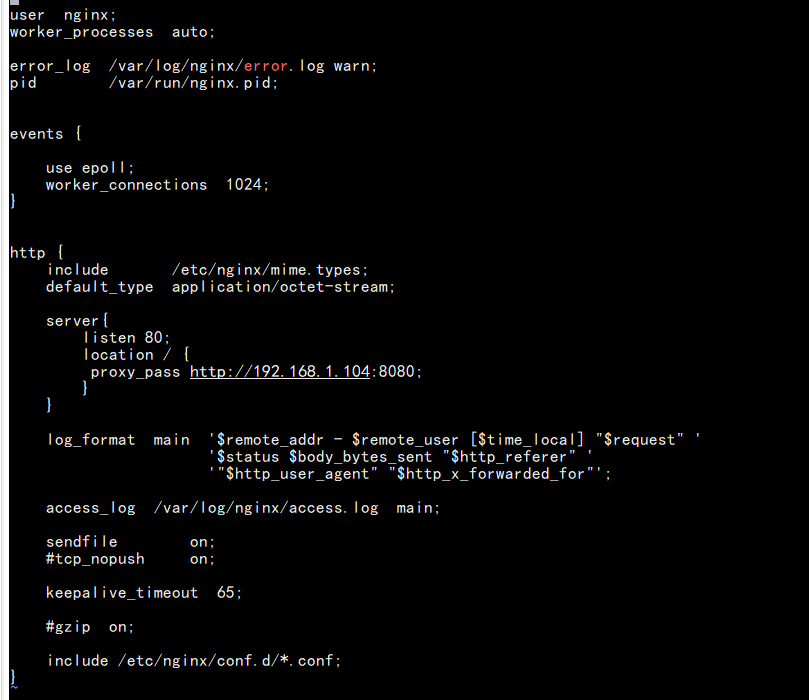
1. 设置nginx重定向
#sever需要放在http内部
    server{
        listen 80;
        location / {
         proxy_pass http://192.168.1.104:8080;
        }
    }
连接nginx地址:
报502.
nginx -V

#找到nginx的错误日志路径

cat  /var/log/nginx/error.log

日志报错:
2019/09/13 10:35:31 [crit] 81104#81104: *5 connect() to 192.168.1.104:8080 failed (13: Permission denied) while connecting to upstream, client: 192.168.1.103, server: , request: "GET /favicon.ico HTTP/1.1", upstream: "http://192.168.1.104:8080/favicon.ico", host: "192.168.1.105", referrer: "http://192.168.1.105/"
2019/09/13 10:35:31 [crit] 81104#81104: *5 connect() to 192.168.1.104:8080 failed (13: Permission denied) while connecting to upstream, client: 192.168.1.103, server: , request: "GET /favicon.ico HTTP/1.1", upstream: "http://192.168.1.104:8080/favicon.ico", host: "192.168.1.105", referrer: "http://192.168.1.105/"
防火墙,服务,端口等问题一番排查,无问题
此时需要考虑SELinux,linux操作系统的强制访问安全限制
SELinux 具体参考链接:https://blog.51cto.com/13570193/2093299
关闭SElinux即可
1. 临时关闭
[root@localhost bin]# setenforce 0

[root@localhost bin]# /usr/sbin/sestatus -v
SELinux status:                 enabled
SELinuxfs mount:                /sys/fs/selinux
SELinux root directory:         /etc/selinux
Loaded policy name:             targeted
Current mode:                   permissive
Mode from config file:          enforcing
Policy MLS status:              enabled
Policy deny_unknown status:     allowed
Max kernel policy version:      31

Process contexts:
Current context:                unconfined_u:unconfined_r:unconfined_t:s0-s0:c0.c1023
Init context:                   system_u:system_r:init_t:s0
/usr/sbin/sshd                  system_u:system_r:sshd_t:s0-s0:c0.c1023

File contexts:
Controlling terminal:           unconfined_u:object_r:user_devpts_t:s0
/etc/passwd                     system_u:object_r:passwd_file_t:s0
/etc/shadow                     system_u:object_r:shadow_t:s0
/bin/bash                       system_u:object_r:shell_exec_t:s0
/bin/login                      system_u:object_r:login_exec_t:s0
/bin/sh                         system_u:object_r:bin_t:s0 -> system_u:object_r:shell_exec_t:s0
/sbin/agetty                    system_u:object_r:getty_exec_t:s0
/sbin/init                      system_u:object_r:bin_t:s0 -> system_u:object_r:init_exec_t:s0
/usr/sbin/sshd                  system_u:object_r:sshd_exec_t:s0


查看到SELinux status:  enabled, 已经关闭(服务重启后,会重新启动安全访问级别)

2. 永久关闭SElinux

vim /etc/selinux/config
SELINUX=disabled
此时通过nginx链接访问,即可重定向成功

 浙公网安备 33010602011771号