
SpringBoot、Mybatis基础
-
-
Springboot专注于快速、方便的开发单服务个体,SpringCloud不仅仅是一个框架,应该是一个技术栈
-
Springboot默认就是基于maven构建的
-
包含spring ioc aop mvc技术,springboot特点:约定大于配置,可以让项目快速的运行起来,简化配置
-
-
项目结构
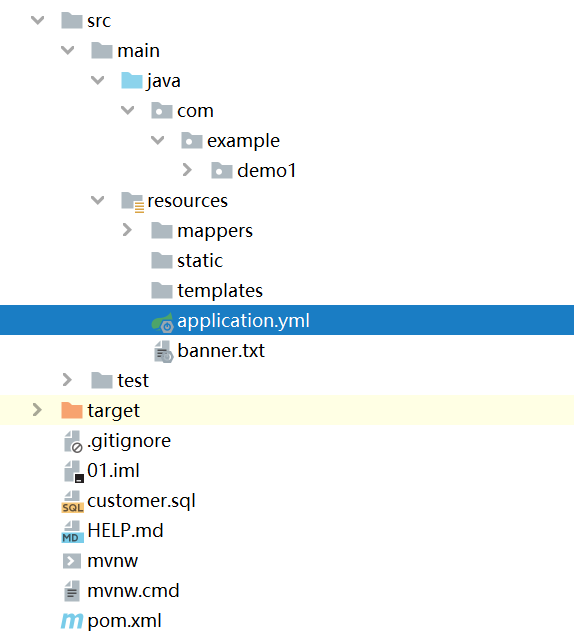
-
springboot不需要单独配置tomcat,因为内置tomcat,默认端口是8080(可以修改)
-
-
server:
 port: 8080
 servlet:
  context-path: /day01
@SpringBootApplication

public class Demo1Application {

    public static void main(String[] args) {

        SpringApplication.run(Demo1Application.class, args);
    }

}
SpringBoot常用注解
-
@SpringBootApplication:入口使用的组合注解
-
@SpringBootConfiguration
-
@EnableAutoConfiguration
-
@ComponentScan
-
-
@SpringBootConfiguration:
继承了@configuration注解,就是用来声明当前类是一个springboot应用配置类
-
@EnableAutoConfiguration
启动springboot内置的自动配置功能
-
@ComponentScan
扫描实体类,范围是当前应用的入口类所在的包和他的子包
SpringIOC常用注解
-
@Component:普通组件注册(将当前类交给spring管理)
-
@Controller:控制层注解(本质就是@component)
-
@service:业务逻辑层注解(本质就是@component)
-
@Repository:持久层(dao层)注解(本质就是@component)
-
@Autowired:自动装配注解(根据类型装配)
-
@Qualifier:一个接口有多个实现类,他可以指明@autowired具体注入哪个实现类
-
@Resource:按名称装配(是j2ee的注解,使用它更容易解耦)
SpringMVC常用注解
-
@RequestMapping:映射请求对应的注解
-
@ResponseBody:加载controller层的方法上,可以让controller返回结果不是视图页面,而是json数据
-
@RequestBody:加在controller方法用来接收前端传递的参数上,接收前端传递的json字符串对象
-
@PathVariable:接收请求路径中占位符的值(一般在restful接口风格中使用)
e.g.http://ip/端口/项目名/login/{传递的参数}
-
@RequestParam:
-
-
也可以接收请求?后面的参数拼接传值(GET请求)
-
e.g.https://www.baidu.com/s?wd=你好
<!--mybatis整合springboot的依赖-->
        <dependency>
            <groupId>org.mybatis.spring.boot</groupId>
            <artifactId>mybatis-spring-boot-starter</artifactId>
            <version>2.1.0</version>
        </dependency>
        <!--mysql的依赖-->
        <dependency>
            <groupId>mysql</groupId>
            <artifactId>mysql-connector-java</artifactId>
            <version>5.1.47</version>
        </dependency>
        <!--druid整合springboot的依赖-->
        <dependency>
            <groupId>com.alibaba</groupId>
            <artifactId>druid-spring-boot-starter</artifactId>
            <version>1.1.10</version>
        </dependency>
server:
  port: 8080
spring:
  datasource:
    druid:
      #如果是8.X版本数据库,驱动应该是:com.mysql.cj.jdbc.Driver
      driver-class-name: com.mysql.jdbc.Driver
      #如果是8.X版本数据库,url必须要设置时区(  serverTimezone=UTC )
      url: jdbc:mysql://localhost:3306/stu?useUnicode=true&characterEncoding=utf-8&useSSL=false
    username: root #自己的密码
   password: root
mybatis: #mapper文件所在的位置
  mapper-locations: classpath:mappers/*Mapper.xml

  #对应的实体类所在的包名(在Mapper文件中使用实体类时只需要类名即可,不需要指明哪个包)

  type-aliases-package: com.example.demo1.pojo
3.
@MapperScan(basePackages = "com.example.demo1.dao")
//扫描dao接口.
使用 Mapper 进行开发时,需要遵循以下规则:
mapper 映射文件中 namespace 必须与对应的 mapper 接口的完全限定名一致。
mapper 映射文件中 statement 的 id 必须与 mapper 接口中的方法的方法名一致
mapper 映射文件中 statement 的 parameterType 指定的类型必须与 mapper 接口中方法的参数类型一致。
mapper 映射文件中 statement 的 resultType 指定的类型必须与 mapper 接口中方法的返回值类型一致。
<?xml version="1.0" encoding="UTF-8" ?>
<!DOCTYPE mapper
        PUBLIC "-//mybatis.org//DTD Mapper 3.0//EN"
        "http://mybatis.org/dtd/mybatis-3-mapper.dtd">
<mapper namespace="com.example.demo1.dao.CustomerDao">

    <resultMap id="cutomerMap" type="Customer">
        <id property="customerId" column="id"/>
        <result property="customerAddress" column="address"/>
        <result property="customerName" column="name"/>
        <result property="customerTicket" column="ticket"/>
//对应数据库字段名
    </resultMap>

    <insert id="add">
        insert into customer(name,address,ticket)
        values(#{customerName},#{customerAddress},#{customerTicket})
    </insert>
    <delete id="deleteBatch">
        delete from customer where id in
        <foreach collection="ids" item="id" open="(" close=")" separator=",">
            #{id}
        </foreach>
    </delete>
前后端分离开发接口介绍
-
优点:
-
前后端可以单独部署,可以一定程度上降低对后端服务器的压力
-
前后端开发人员可以发挥各自所长,增强项目的用户体验
-
提高了项目的开发效率
-
-
缺点:
-
前后端开发人员开发成本会比较高,沟通成本也会比较高
-
-
接口规范文档
无论是前端访问后端的接口,还是后端接口返回给前端数据,我们都需要遵守共同的规范
接口规范一般都是项目功能分析时,前后端开发人员一起协调沟通出来的
- 一般会包含
-
接口的URL
-
请求参数
-
响应数据
-
package com.example.demo1.vo;

/**
 * 向前端返回需要的结果  包含:状态码、提示信息、返回值等
 */
public class ResultVo {

    private int code;
    private String msg;
    private Object data;

    public int getCode() {
        return code;
    }

    public void setCode(int code) {

        this.code = code;
    }

    public String getMsg() {

        return msg;
    }

    public void setMsg(String msg) {

        this.msg = msg;
    }

    public Object getData() {

        return data;
    }

    public void setData(Object data) {

        this.data = data;
    }

    private ResultVo() {
    }

    /**
     * 成功
     */
    public static ResultVo ok(Object data) {
        ResultVo resultVo = new ResultVo();
        resultVo.setCode(200);
        resultVo.setMsg("ok");
        resultVo.setData(data);
        return resultVo;
    }

    public static ResultVo ok() {
        return ResultVo.ok(null);
    }

    /**
     * 失败
     */
    public static ResultVo error() {
        ResultVo resultVo = new ResultVo();
        resultVo.setCode(500);
        resultVo.setMsg("error");
        return resultVo;
    }
}
-
- 比较
- 传统风格的URL设计:
http://localhost:8080/getBook?id=1
http://localhost:8080/deleteBook?id=1
http://localhost:8080/addBook //post请求,数据是以表单形式提交的
http://localhost:8080/updateBook //post请求,数据是以表单形式提交的
- RESTful风格的url
http://localhost:8080/book/1 #GET 查询
http://localhost:8080/book/1 #DELETE 删除
http://localhost:8080/book #POST 添加
http://localhost:8080/book #PUT 更新
Swagger
-
介绍:Swagger是一个用于生成服务器接口的规范性文档及接口测试的工具
-
生成接口文档:接口地址、入参、返回值
-
对接口进行测试
-
-
Swagger组件:
-
springfox-swagger2:用于扫描接口信息
-
springfox-swagger-ui:生成可视化文档
-
<!--swagger的相关依赖-->
<dependency>
    <groupId>io.springfox</groupId>
    <artifactId>springfox-swagger-ui</artifactId>
    <version>2.9.2</version>
</dependency>
<dependency>
    <groupId>io.springfox</groupId>
    <artifactId>springfox-swagger2</artifactId>
    <version>2.9.2</version>
</dependency>
@Configuration
@EnableSwagger2
@EnableWebMvc
//开启swagger配置
public class SwaggerConfig implements WebMvcConfigurer {

    @Override
    public void addResourceHandlers(ResourceHandlerRegistry registry) {

        registry.addResourceHandler("/**").addResourceLocations(
                "classpath:/static/");
        registry.addResourceHandler("swagger-ui.html").addResourceLocations(
                "classpath:/META-INF/resources/");
        registry.addResourceHandler("/webjars/**").addResourceLocations(
                "classpath:/META-INF/resources/webjars/");
        WebMvcConfigurer.super.addResourceHandlers(registry);
    }
    //需要一个docker对象
    @Bean
    public Docket getDocket() {
        Docket docket = new Docket(DocumentationType.SWAGGER_2)
                .apiInfo(getApiInfo())//指定接口说明书
                .select()//指定监控哪些接口
                .apis(
                        RequestHandlerSelectors.basePackage("com.example.demo1.controller")
                ).paths(PathSelectors.any()) //指定文档的扫描范围
                .build();
        return docket;

    }

    public ApiInfo getApiInfo() {
        ApiInfo apiInfo = new ApiInfoBuilder()
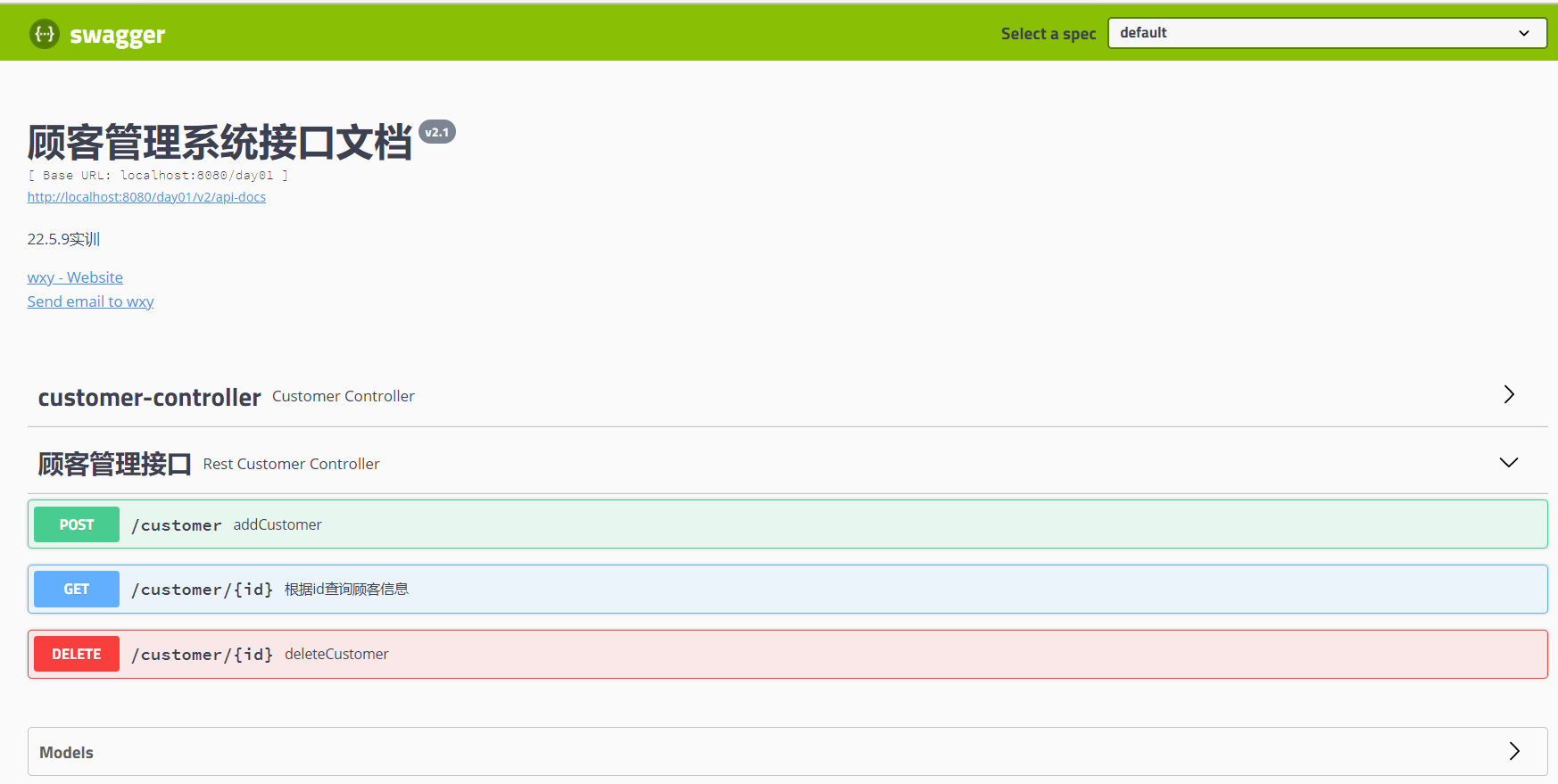
                .title("顾客管理系统接口文档")
                .description("22.5.9实训")
                .version("v2.1")
                .contact(
                        new Contact("wxy", "https://www.cnblogs.com/clematis", "15122624600@163.com")
                ).build();
        return apiInfo;

    }
}
注:
@EnableWebMvc
addResourceHandlers()未加时出现错误!!!
No mapping for GET /swagger-ui.html
-
Controller添加注解
@Api(tags = "顾客管理接口")
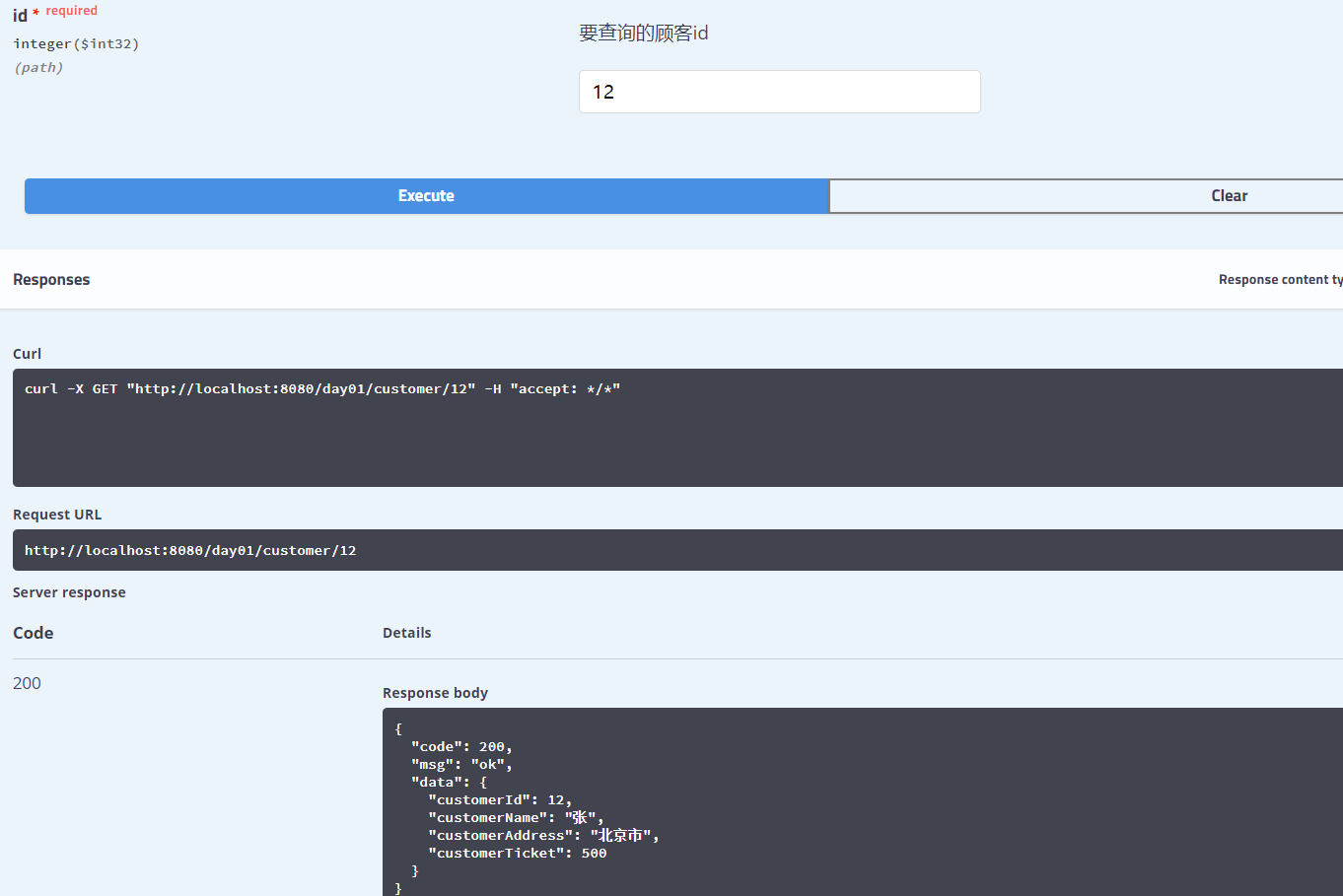
@ApiOperation(value = "根据id查询顾客信息", notes = "注意事项")
    @ApiImplicitParam(example = "0", paramType = "path", name = "id"
            , value = "要查询的顾客id", required = true, dataType = "int")

    //paramType取值:header    query(url?id=1)     path()
@ApiModel(value = "顾客对象", description = "顾客对象的属性")
public class Customer {

 @ApiModelProperty(value = "顾客id", dataType = "int", required = true, example = "0")

 浙公网安备 33010602011771号