
01-Manage_IOS
01-Manage_IOS
实验目的
- 掌握Cisco IOS命令行的基本操作
- 掌握设备的常用基本命令
- 设备Console信息抓取和识别
拓扑与需求
拓扑:
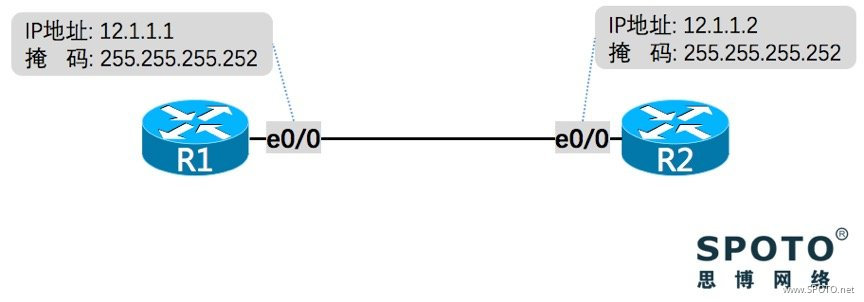
需求:
- 配置设备主机名,设置时区及系统时间
- 配置“新手三条”:关闭域名解析、Console永不超时、Console权限
- 创建MOTD
- 设置和取消密码:Console密码、enable密码、VTY线路密码
- 配置接口IP地址,查看接口状态
- 直连连通性测试
- 配置Telnet实现远程管理设备
- 查看配置并保存
- 删除配置至初始化状态
配置与实现
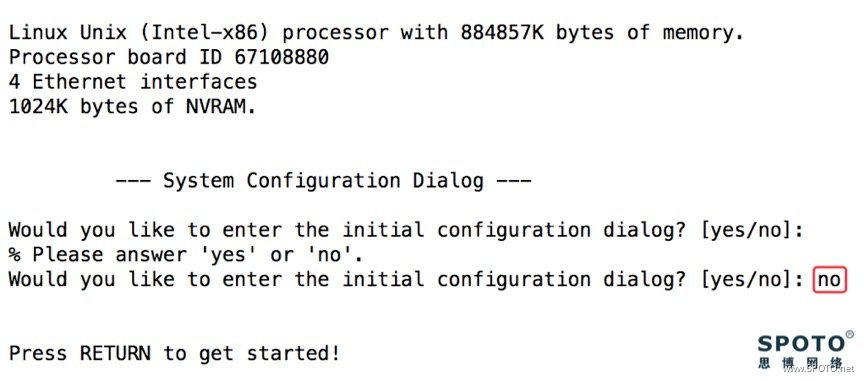
设备在初次启动时,默认会进入交互式配置模式,输入‘no’ 后回车,进入正常Console 状态
1. 配置设备主机名,设置时区及系统时间
R1
1 Router>enable
2 Router#configure terminal
3 Router(config)#hostname R1
4 R1(config)#clock timezone GMT +8
5 !!修改当前系统的时区为: GMT +8 (北京)
6 R1(config)#exit
7 R1#clock set hh:mm:ss day mouth year
8 !!修改当前设置的时间,如:clock set 12:15:30 5 Apr 2018
R2
1 Router>enable
2 Router#configure terminal
3 Router(config)#hostname R2
4 R2(config)#clock timezone GMT +8
5 R2(config)#exit
6 R2#clock set 12:15:30 5 Apr 2018
Tips:
路由器三模式:
“Router>” 表示用户模式
“Router#” 表示特权模式
“Router(config)#” 表示全局配置模式
2. 配置“新手三条”:关闭域名解析、Console永不超时、Console权限
R1和R2
1 Router(config)#no ip domain lookup
2 !!关闭域名解析
3 Router(config)#line console 0
4 Router(config-line)#no exec-time
或
1 Router(config-line)#exec-time 0 0
2 !!配置 console 永不超时(常用于实验环境)
3 Router(config-line)#privilege level 15
4 !!配置当console 时直接进入特权模式(常用于实验环境)
3. 创建MOTD
R1和R2
1 Router(config)#banner motd # This is My First Lab! #
2 !!配置提示横幅,即为登录路由器时显示的信息
4. 设置和取消密码:Console密码、enable密码、VTY线路密码
R1和R2
Console密码
1 Router(config)#line console 0
2 Router(config-line)#password word
3 !!配置 console 口密码,’word’ 为自己指定的密码,例如:password spoto
4 Router(config-line)#login
5 !! 使密码在 console 线路生效
6 Router(config-line)#no password word
7 !! 删除密码
enable密码
1 Router(config)#enable password word
2 !! 设置 enable 明文密码,可通过 show run 查看密码
3 Router(config)#no enable password
4 !! 取消 enable 明文密码
5 Router(config)#enable secret word
6 !! 设置 enable 密文密码,show run 只能查看到字母、数字等的组合,安全级别高于明文密码,与明文同时设置时,密文密码优先生效
7 Router(config)#no enable secret
8 !! 取消 enable 密文密码
VTY线路密码
 1 Router(config)#line vty 0 4
 2 !! 进入 VTY 0-4 线路
 3 Router(config-line)#password word
 4 !! 设置 VTY 线路密码,即用户通过 telnet 登入路由器时输入的密码
 5 Router(config-line)#login
 6 !! 使密码在线路上生效
 7 Router(config-line)#no password
 8 Router(config-line)#no login
 9 !! 取消 VTY 线路密码
10 Router(config-line)#exit
5. 配置接口IP地址,查看接口状态
R1
1 R1(config)#interface Ethernet 0/0
2 R1(config-if)#ip address 12.1.1.1 255.255.255.252
3 R1(config-if)#no shutdown
R2
1 R2(config)#interface Ethernet 0/0
2 R2(config-if)#ip address 12.1.1.2 255.255.255.252
3 R2(config-if)#no shutdown
查看接口状态
使用命令 show ip interface brief 查看


6. 直连连通性测试


7. 配置Telnet实现远程管理设备
R1
1 R1(config)#line vty 0 4
2 R1(config-line)#password spoto
3 R1(config-line)#login
4 R1(config-line)#transport input telnet
5 !!允许使用 telnet 管理
R2
1 R2(config)#line vty 0 4
2 R2(config-line)#password spoto
3 R2(config-line)#login
4 R2(config-line)#transport input telnet
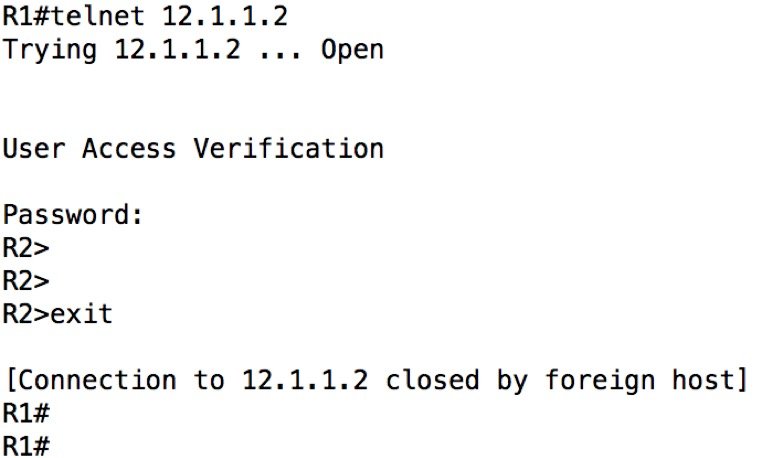
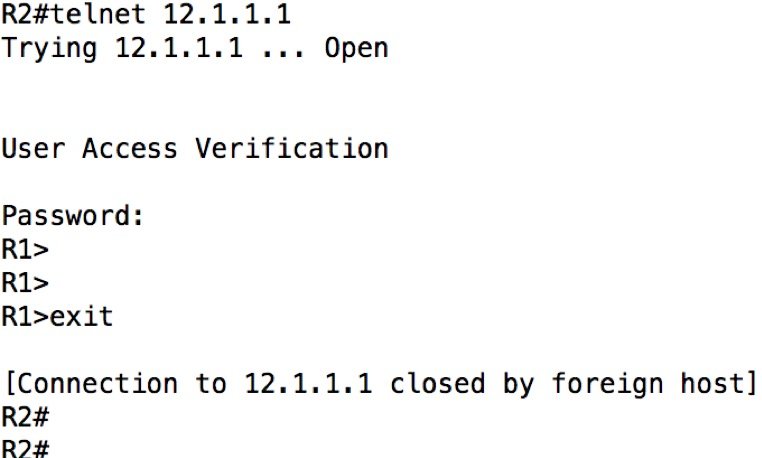
Tips:
在输入密码时不会有任何字符提示,正常输入后回车即可,注意大小写
8. 查看配置并保存
查看设备配置
1 Router#show running-config
2 !! 显示设备当前配置(配置信息保存于 RAM 中)
3 Router#show start-config
4 !! 显示设备开机配置(配置信息保存于 NVRAM 中)
Tips:
如出现以上信息,表示当前设备没有已保存的开机启动配置,下次启动将是空配置启动

保存当前配置到开机配置文件中
1 Router#write
或
1 Router#copy running-config start-config
9. 删除配置至初始化状态
1 Router#erase start-config

或
1 Router#write erase


 浙公网安备 33010602011771号