

自动化测试尝试 动态Linq表达式生成 ftp上传
自动化测试尝试
1、
Selenium IDE
Selenium IDE is a Chrome and Firefox plugin which records and plays back user interactions with the browser. Use this to either create simple scripts or assist in exploratory testing.
Selenium IDE是一个Chrome 和火狐的插件,用于记录和播放用户操作。可以用于常规性功能测试。
介绍地址:https://www.seleniumhq.org/download/
Google浏览器自动化测试插件下载地址:https://chrome.google.com/webstore/detail/selenium-ide/mooikfkahbdckldjjndioackbalphokd/related
2、安装后,可看到插件显示在浏览器的图标,单击打开

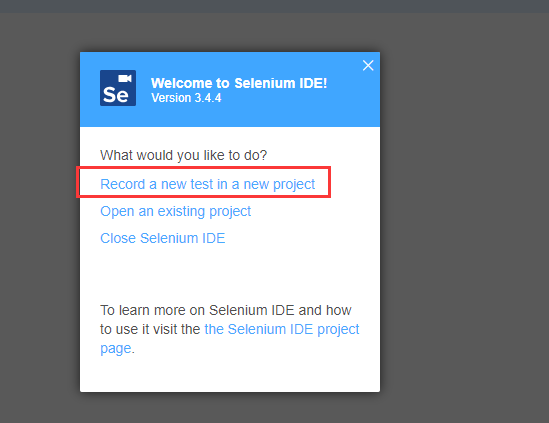
3、选择记录一个新的测试:Record a new test in a new project 链接
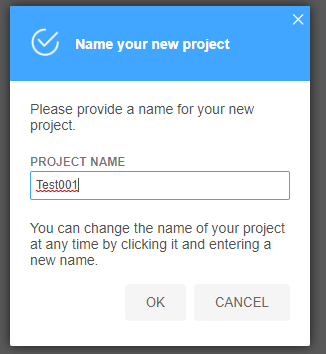
4、输入项目名称
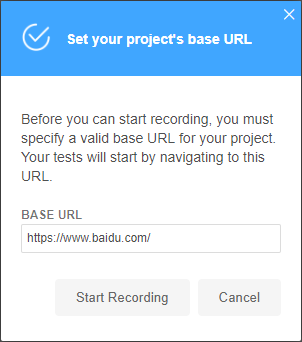
5、输入项目进入的根网站路径,比如百度首页,
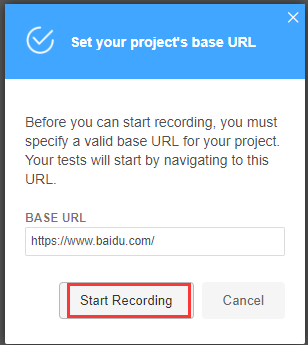
点击Start Recording开始记录
6、在打开的百度输入框里面输入自动化测试

7、点击插件可以看到已经记录下了刚才我的操作:
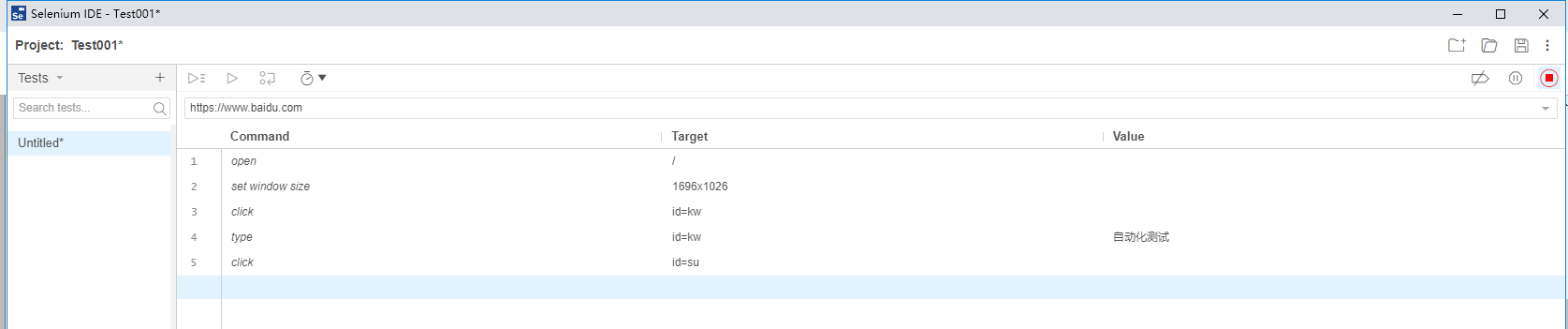
8、点击Stop Recording 按钮停止记录,输入测试名称,点击ok,后一个简单的测试实现了

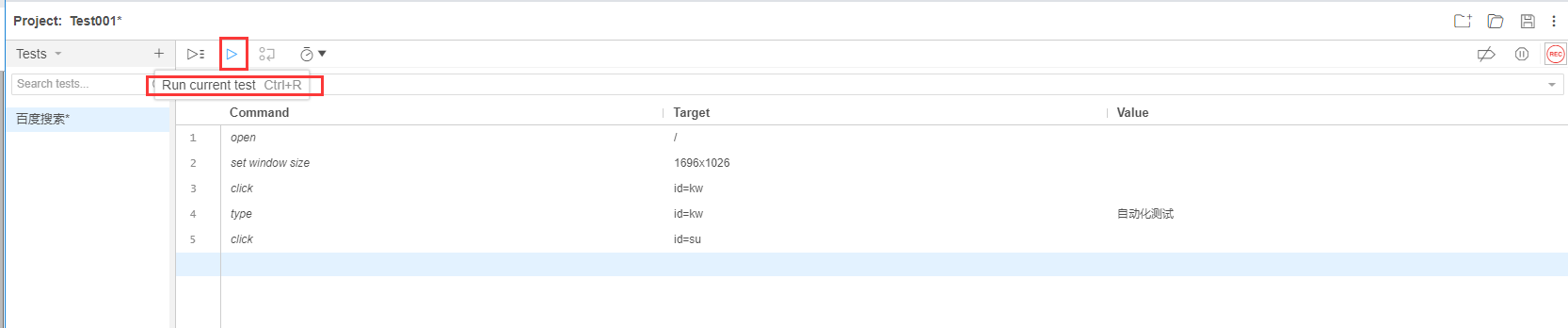
9、测试回放:点击Run current test 按钮运行当前测试。
动态Linq表达式生成
动态构建 WHERE(C=>C.Id=Value):

public static IQueryable<T> WhereEqual<T>(this IQueryable<T> q, string fieldName, string fieldValue)
        {
            Type t = typeof(T);
            ParameterExpression param = Expression.Parameter(t, "c");
            Expression left = Expression.Property(param, t.GetProperty(fieldName));
            Expression right = Expression.Constant(fieldValue);
            Expression filter = Expression.Equal(left, right);
            Expression pred = Expression.Lambda(filter, param);
            Expression expr = Expression.Call(typeof(Queryable), "Where", new Type[] { t }, Expression.Constant(q), pred);
            return q.Provider.CreateQuery<T>(expr);

        }
动态构建List的Contains表达式:
        public static Expression<Func<TEntity, bool>> ContainsPredicate<TEntity, T>(T[] arr, string fieldname) where TEntity : class
        {
            ParameterExpression entity = Expression.Parameter(typeof(TEntity), "entity");
            MemberExpression member = Expression.Property(entity, fieldname);

            var containsMethods = typeof(Enumerable).GetMethods(BindingFlags.Static | BindingFlags.Public)
            .Where(m => m.Name == "Contains");
            MethodInfo method = null;
            foreach (var m in containsMethods)
            {
                if (m.GetParameters().Count() == 2)
                {
                    method = m;
                    break;
                }
            }
            method = method.MakeGenericMethod(member.Type);
            var exprContains = Expression.Call(method, new Expression[] { Expression.Constant(arr), member });
            return Expression.Lambda<Func<TEntity, bool>>(exprContains, entity);
        }
感想dudu 大佬 :https://q.cnblogs.com/q/111853/
ftp上传
public class FtpUtil
    {
        string ftpServerIP;
        string ftpRemotePath;
        string ftpUserID;
        string ftpPassword;
        string ftpURI;

        /// <summary>
        /// 连接FTP
        /// </summary>
        /// <param name="FtpServerIP">FTP连接地址</param>
        /// <param name="FtpRemotePath">指定FTP连接成功后的当前目录, 如果不指定即默认为根目录</param>
        /// <param name="FtpUserID">用户名</param>
        /// <param name="FtpPassword">密码</param>
        public FtpUtil(string FtpServerIP, string FtpRemotePath, string FtpUserID, string FtpPassword)
        {
            ftpServerIP = FtpServerIP;
            ftpRemotePath = FtpRemotePath;
            ftpUserID = FtpUserID;
            ftpPassword = FtpPassword;
            ftpURI = "ftp://" + ftpServerIP + "/" + ftpRemotePath + "/";
        }

        /// <summary>
        /// 上传
        /// </summary>
        /// <param name="filename"></param>
        public void Upload(string filename)
        {
            FileInfo fileInf = new FileInfo(filename);
            string uri = ftpURI + fileInf.Name;
            FtpWebRequest reqFTP;

            reqFTP = (FtpWebRequest)FtpWebRequest.Create(new Uri(uri));
            reqFTP.Credentials = new NetworkCredential(ftpUserID, ftpPassword);
            reqFTP.KeepAlive = false;
            reqFTP.Method = WebRequestMethods.Ftp.UploadFile;
            reqFTP.UseBinary = true;
            reqFTP.UsePassive = false;
            reqFTP.ContentLength = fileInf.Length;
            int buffLength = 2048;
            byte[] buff = new byte[buffLength];
            int contentLen;
            FileStream fs = fileInf.OpenRead();
            try
            {
                Stream strm = reqFTP.GetRequestStream();
                contentLen = fs.Read(buff, 0, buffLength);
                while (contentLen != 0)
                {
                    strm.Write(buff, 0, contentLen);
                    contentLen = fs.Read(buff, 0, buffLength);
                }
                strm.Close();
                fs.Close();
            }
            catch (Exception ex)
            {
                throw new Exception("Ftphelper Upload Error --> " + ex.Message);
            }
        }

    }

 浙公网安备 33010602011771号