【InstallShield打包】 InstallScript工程如何制作覆盖安装包 (转载)
转载自: https://www.cnblogs.com/daocaorenbx/p/3305162.html
InstallScript工程类型:
脚本代码 -> advanced -> OnShowUI方法,修改其代码执行逻辑:
如果是第一次安装,执行OnFirstUIBefore(); (不必修改)
如果是更新,执行OnUpdateUIBefore(); (不必修改)
如果是已经安装,默认执行OnMaintBefore(); (修改为 继续执行 OnFirstUIBefore();)
此时调试,覆盖安装会覆盖不了文件,再调用一个修复方法 FeatureReinstall(); 即可以覆盖文件。
在卸载的快捷方式中添加一个参数 -removeonly,检测判断此参数为卸载功能,则开始菜单中的快捷卸载可以正常执行
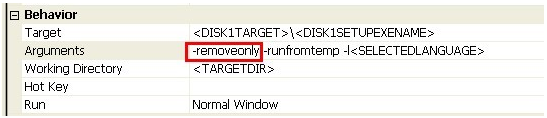
Note:如果不加这个参数,执行卸载也是覆盖安装。
function OnShowUI()
BOOL    bMaintenanceMode, bUpdateMode;
string    szIgnore, szTitle;
begin
        // Enable dialog caching
        Enable( DIALOGCACHE );

        // Determine what events to show.
        bUpdateMode    = FALSE;
        bMaintenanceMode = FALSE;

        // Remove this to disabled update mode.
        if( UPDATEMODE ) then
            bUpdateMode = TRUE;
        endif;

        // Remove this to disable maintenance mode.
        if ( MAINTENANCE ) then
            bMaintenanceMode = TRUE;
        endif;

        // Show appropriate UI
        if( REMOVEONLY )   then
            //    MessageBox ("卸载", SEVERE);
                OnMaintUIBefore();
        else
            if( bUpdateMode ) then
             //    MessageBox ("更新", SEVERE);
                OnUpdateUIBefore();
             else
                 if ( bMaintenanceMode ) then

                    if( MessageBox( "您已安装最新版本,是否覆盖安装?" , MB_YESNO ) != IDYES ) then
                        abort;
                    endif;
                    OnFirstUIBefore();
                    FeatureReinstall();
                else
                //    MessageBox ("第一次安装", SEVERE);
                    OnFirstUIBefore();
                endif;
             endif;
        endif;

        // Move Data
        OnMoveData();

        //OnFirstUIAfter();
        if( REMOVEONLY )   then
                OnMaintUIAfter();
        else
                OnFirstUIAfter();
        endif;

        // Disable dialog caching
        Disable(DIALOGCACHE);

end;

 浙公网安备 33010602011771号