JAVA并发
Java并发编程
线程运行的原理
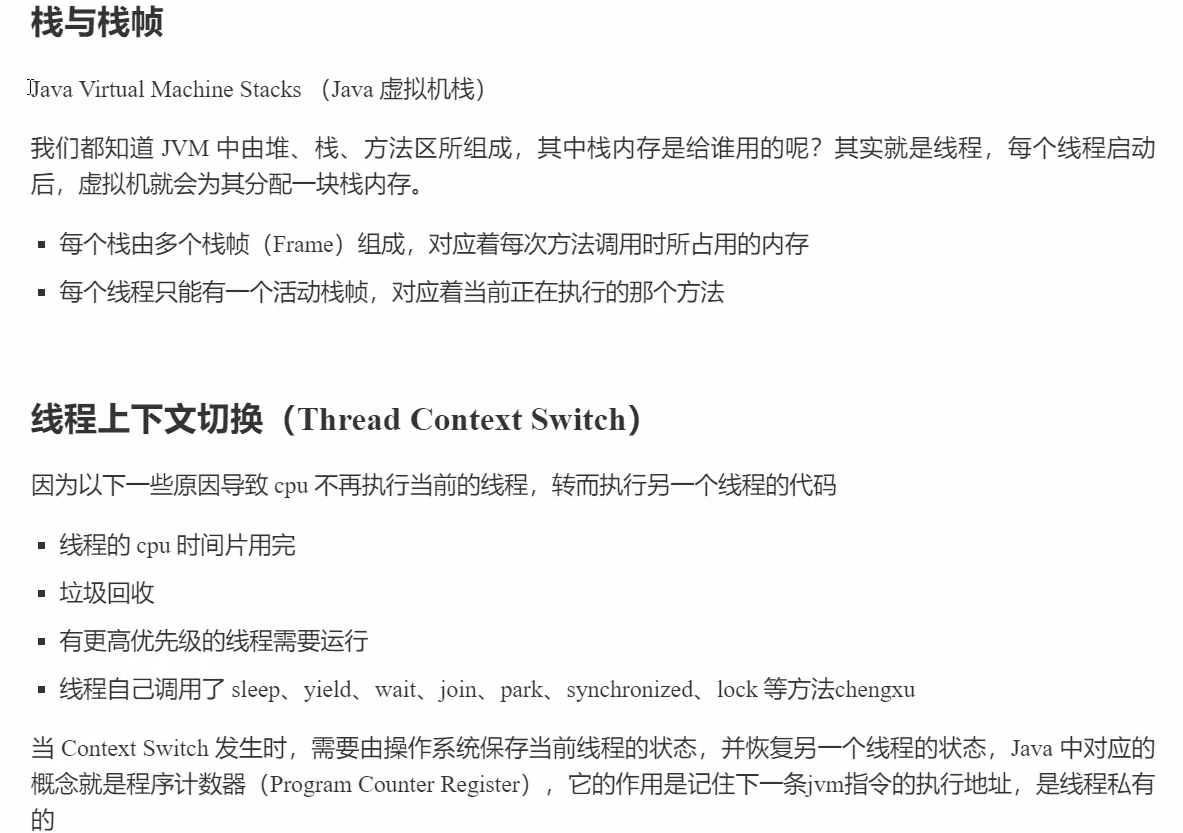
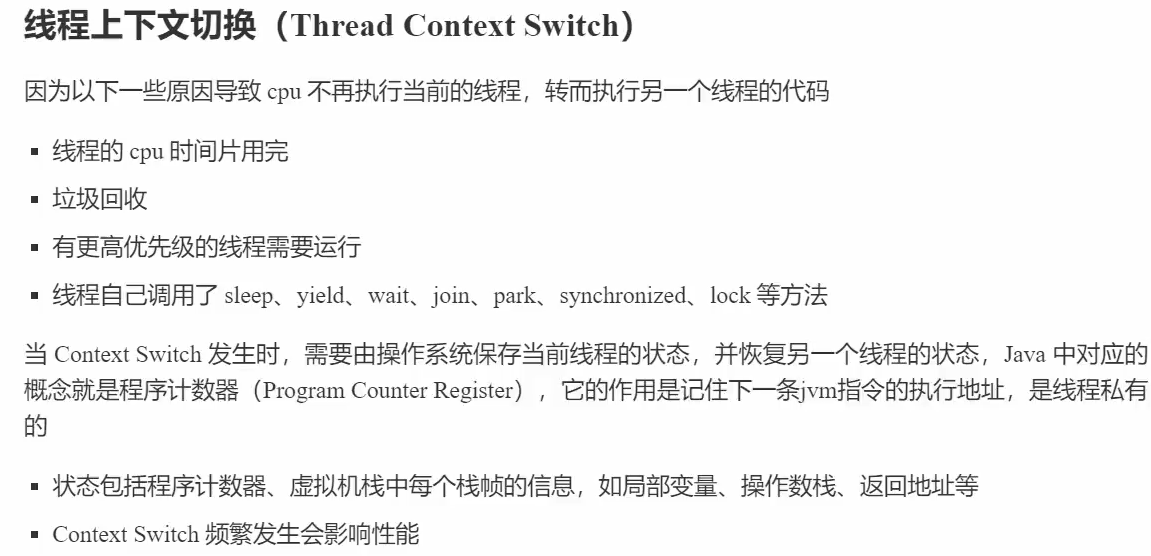
idea示例:
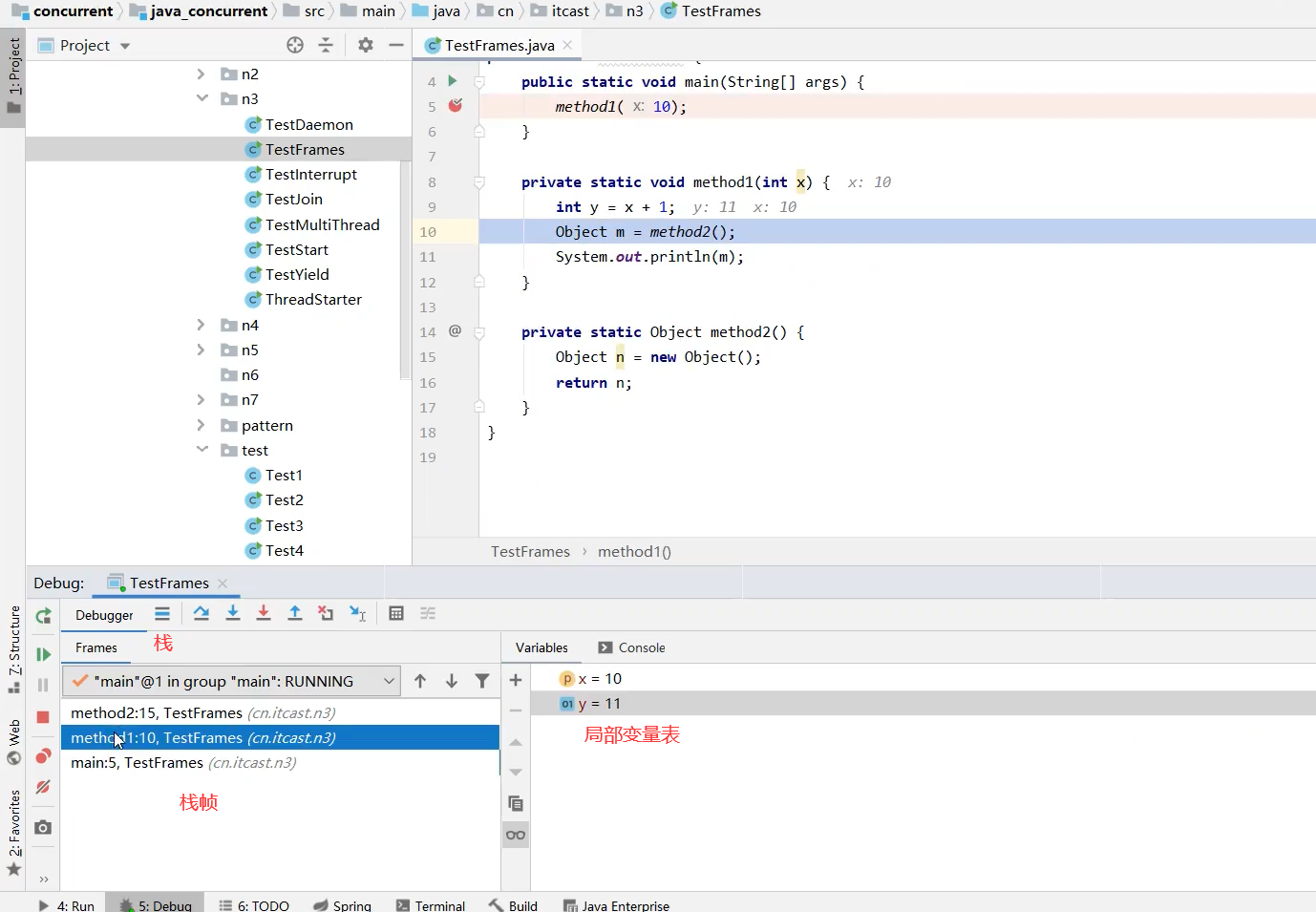
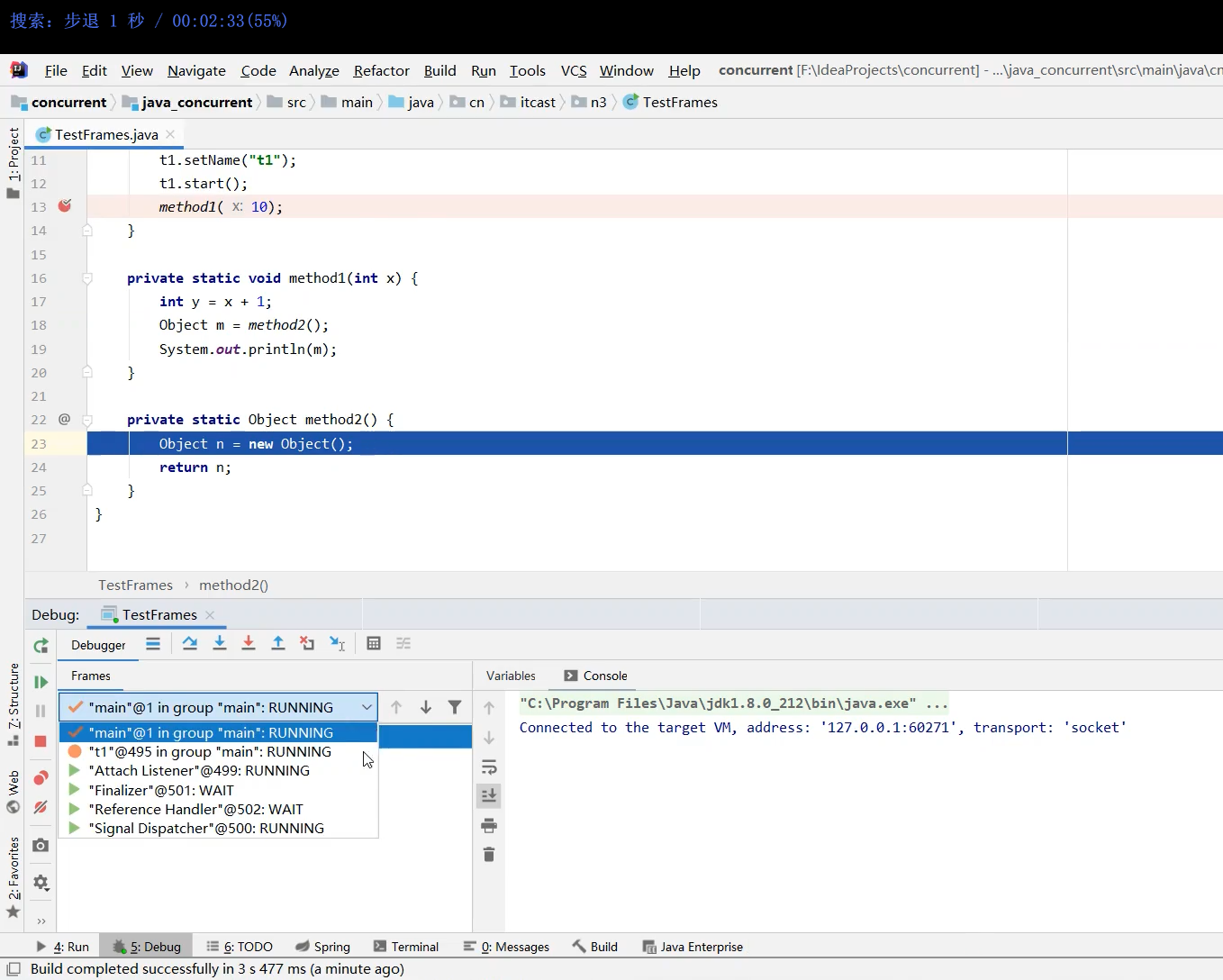
在idea里查看多线程的运行
断点处要选Thread
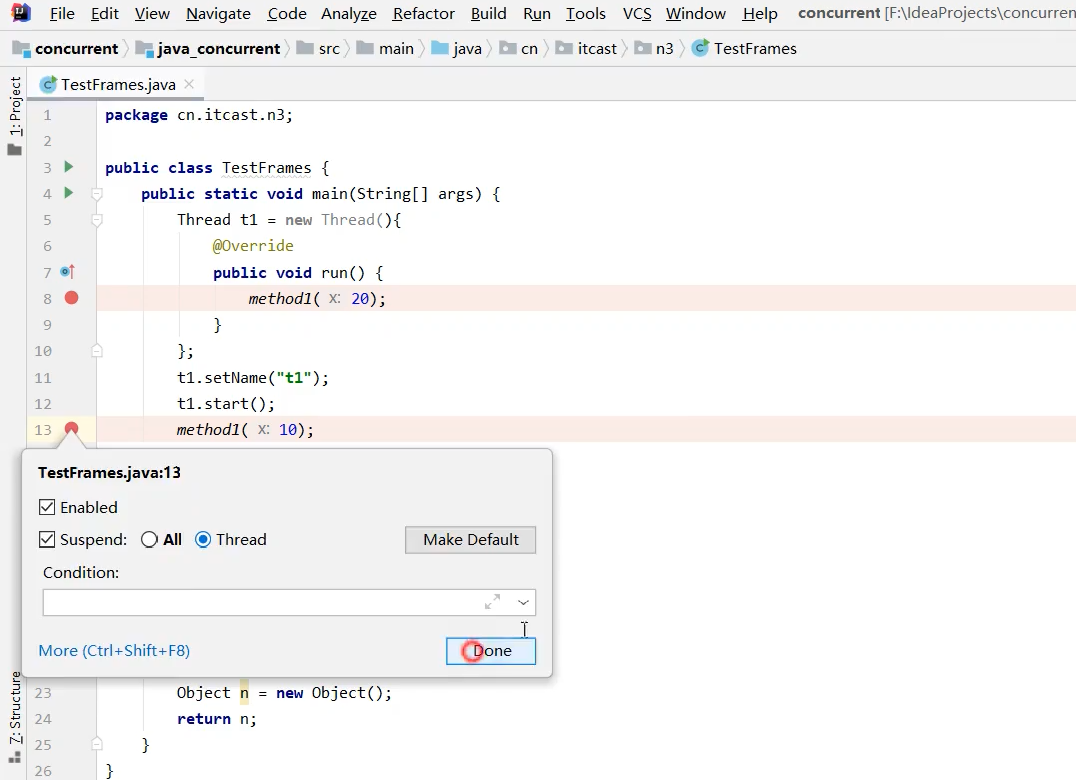
然后,可选择其中的线程查看
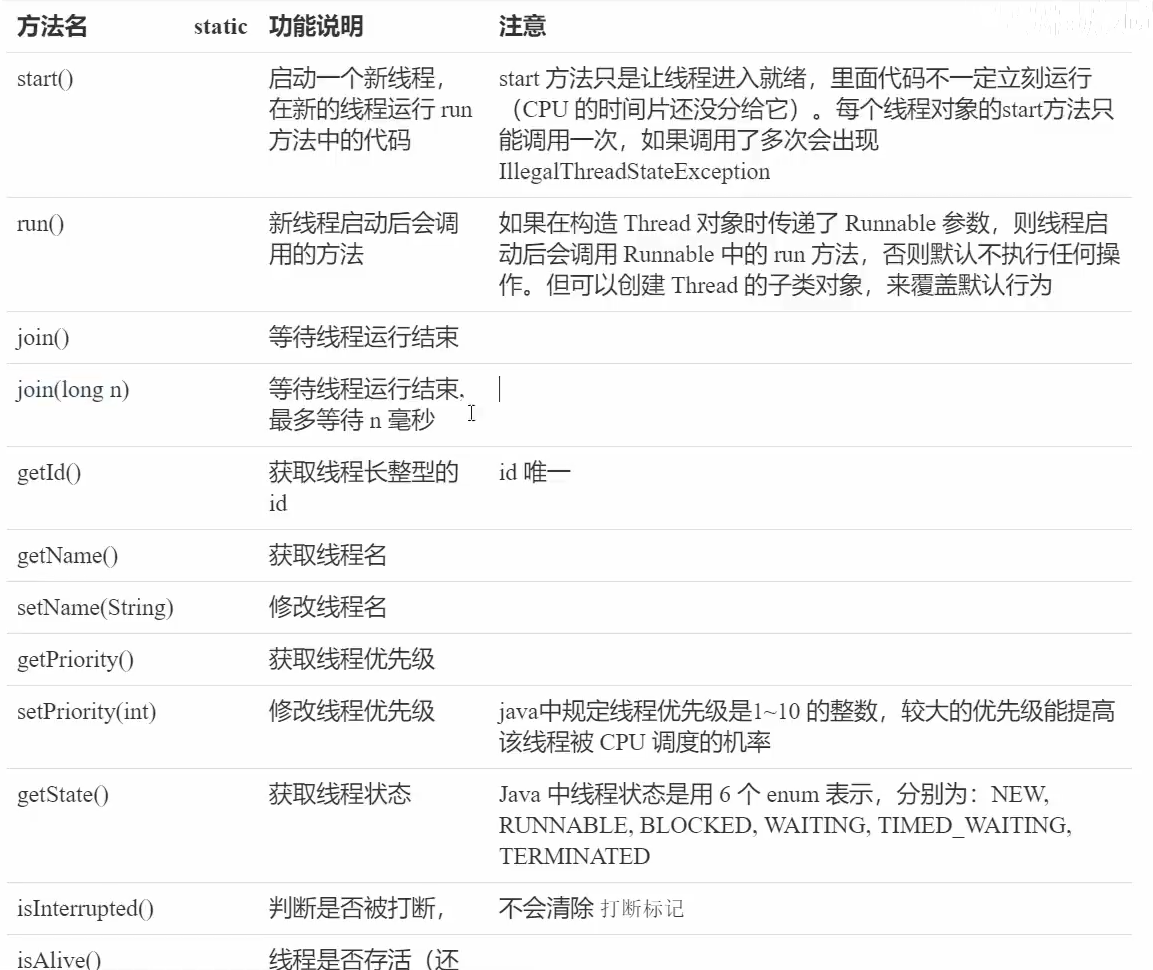
线程常见的方法
sleep方法
即放弃CPU时间片的使用

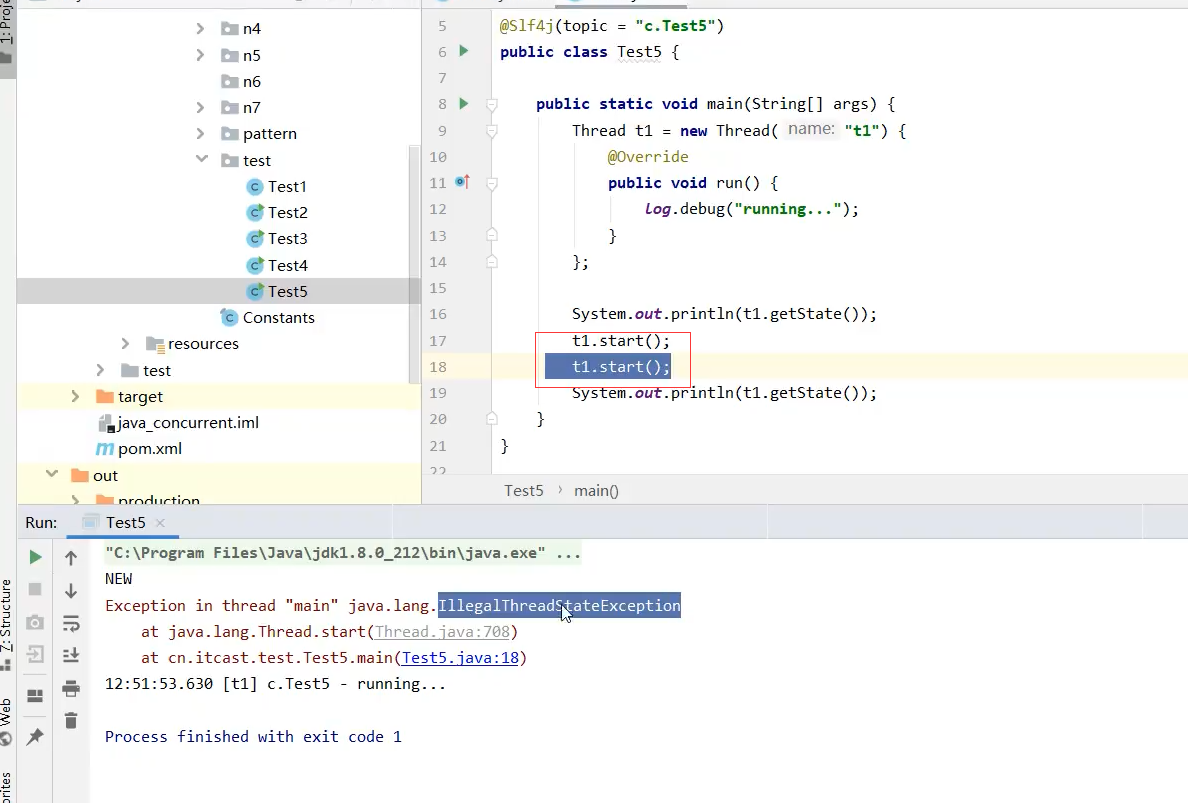
start方法只能调一次,否则会出错。


3.睡眠结束后的线程未必会立刻执行,如果此时有其他线程在运行,那么就不能立刻运行,需要等到CPU调度,分到时间片


主线程会等所有线程执行完,才结束
@Slf4j(topic = "c.test")
public class Test006 {

    public static void main(String[] args) throws InterruptedException {
        new Thread(() -> {
            log.debug("t1 start");

            new Thread(() -> {
                log.debug("t2 start");
                try {
                    Thread.sleep(6000);
                } catch (InterruptedException e) {
                    throw new RuntimeException(e);
                }
                log.debug("t2 end");
            }).start();

            try {
                Thread.sleep(4000);
            } catch (InterruptedException e) {
                throw new RuntimeException(e);
            }
            log.debug("t1 end");
        }).start();
        Thread.sleep(1000);
        log.debug("main end");
    }

}
虽然主线程输出了main end ,但是还未结束

结束后的输出
17:24:43.307 [Thread-0] c.test - t1 start
17:24:43.310 [Thread-1] c.test - t2 start
17:24:44.318 [main] c.test - main end
17:24:47.320 [Thread-0] c.test - t1 end
17:24:49.322 [Thread-1] c.test - t2 end
yield方法
yield方法,相当于让给其他线程运行,但是如果此时没有其他线程要运行,那么还会是该线程在执行。Runnable状态(就绪)和Timed Waiting(阻塞)状态区别,就绪,能分到时间片,阻塞,分不到时间片,要等到阻塞结束了,才会分到。

线程优先级,设置优先级,有作用,有时但是不明显

Sleep的应用案例

join方法
join方法,等到线程结束,哪个线程对象使用了就等哪个结束,如下图所示,在main主线程调用t1的join方法。
没有调用时,t1等待一秒后才赋值r,调用后等待t1结束再打印r
重载方法join(long n)是最多等待n毫秒


join方法的应用之同步
需要等待结果返回,才能继续运行就是同步。上面的join就是同步。
不需要等待结果返回,就能继续运行就是异步。
下图中,t1、t2同时启动,同步调用,cost(花费的时间)为2秒左右。因为是同时运行,相当于两个同时开跑。

interrupt方法
interrupt方法,打断线程。分为打断阻塞状态(sleep、wait、join)的线程,和正在运行的线程。打断后,线程的打断标记为true,但是阻塞状态的线程会将其置为false,正在运行的线程则不会,故其打断标记是true
打断阻塞状态。下图中,为true,不符合预期,因为主线程跑得快,t1线程还未睡眠就被打断了。下下图,让主线程睡一会,就为false了

让主线程睡一会

打断正在运行的,不会终止线程,因此需要根据打断标记来终止。

需要根据打断标记来终止

设计模式之两阶段终止

如何优雅的终止线程
案例
开发一个监控程序,每隔一段时间(比如2s)监控cpu使用率、内存使用率等,有个停止功能。为此可以采用两阶段中止模式。

示例代码:
点击查看代码
@Slf4j(topic = "c.TwoInterrupt")
public class TwoInterrupt {
    public static void main(String[] args) throws InterruptedException {
        TwoInterruptMonitor twoInterruptMonitor =new TwoInterruptMonitor();
        twoInterruptMonitor.start();
        Thread.sleep(5000);
        twoInterruptMonitor.stop();
    }
}

@Slf4j(topic = "c.TwoInterruptMonitor")
class TwoInterruptMonitor {
    private Thread monitor;
    public void start(){
        monitor= new Thread(() -> {
            Thread thread = Thread.currentThread();
            while (true){
                if (thread.isInterrupted()){
                    break;
                }
                try {
                    log.debug("执行监控");//情况1:此处被打断
                    Thread.sleep(500);//情况2,此期间被打断,抛出异常
                } catch (InterruptedException e) {
                    e.printStackTrace();
                    log.debug("停止监控");
                    thread.interrupt();//发生情况2,标记为false,需要再将标记置为true
                }
            }
        });
        monitor.start();
    }
    public void stop(){
        monitor.interrupt();
    }
}
注意此方法,方法名相似,不要混用或者用错了。

park方法
线程的状态
先从操作系统开始描述

初始状态,new Thread后调用start方法。
可运行,准备被CPU调度,但是还未获得时间片。
阻塞状态,不会获得CPU的时间片。

从JAVA API的层面来描述

NEW,仅new Thread,未调用start。
RUNNABLE,分为运行状态和阻塞状态,调用操作系统的IO操作进入阻塞状态时,也是RUNNABLE。
BLOCKED,抢锁,但锁被抢了,等待锁释放中。
TIMED_WAITING,有时限等待
WAITING,一直等待。

线程的应用之统筹
共享模型之管程

线程安全

情况1,出现负数
情况2,出现正数
情况3,刚好0
临界区


竞态条件

解决方案

Monitor概念


Monitor,译为监视器或管程。

图示举例
线程2执行代码,synchronized锁obj对象后,obj对象与一个Monitor对象关联,Owner为obj,并且修改对象的Mark Word

修改对象的Mark Word,改后两位为10,升级为重量锁,前30位为Monitor对象的地址

线程1执行代码,想锁obj对象,发现obj对象关联的Monitor对象的Owner为线程2,接着线程1关联了EntryList(等待队列),并且线程1此时为BLOCKED状态。

线程3同理

线程2执行完临界区代码,释放锁,从线程1、线程3中选一个执行,怎么选,这个得看java的具体实现,所以这是非公平的。

Monitor对象由操作系统提供的,可有多个,不同的对象关联不同Monitor

从字节码角度理解synchronized
示例代码

对应的字节码,重点是发生异常后会释放锁。

synchronized进阶
锁的优化,monitor对象是由操作系统提供的,使用的成本高,影响性能,后续java使用了轻量级锁、偏向锁来优化。
轻量级锁
轻量级锁是针对同一线程而言的。不会进入阻塞

Thread-0在method1方法栈帧上创建一个锁记录对象(对程序员是不可见的,是JVM层面的),Object reference用来存对象的地址,这样会与对象关联,“lock record 地址 00”,是下下图的轻量级锁的mark word,前30位是锁记录的地址


执行cas操作(原子操作),成功(mark word后两位01才会成功)后,object对象和锁记录对象互换mark word,锁记录对象关联object对象。

如果失败,分两种情况,膨胀另说,下面分析锁重入,method1是调用了method2的,就会锁重入,即同一个线程(Thread-0)对一个对象(oobject)加锁,会新建一个锁记录对象(代表method2栈帧的),该新的锁记录对象mark word为空,关联object对象,通俗来讲就是自己给自己加锁,根据锁记录对象可以得知加了几次锁。

解锁

cas,大致是如下图


锁膨胀
锁膨胀为重量级锁,会阻塞。

接下来的解锁即重量级解锁

自旋优化
线程竞争重量级锁时,可以使用自旋来优化,就是,访问同步块,获取monitor时不会立刻阻塞,而是for循环若干次数,去看下锁的释放了,owner是否为空,而去获得锁。避免陷入阻塞。

自旋失败的情况

偏向锁


偏向状态
biased_lock为1表示启用


wait-notify
原理
举例线程1成为owner后,想要等待暂时不执行了,可以调用wait,进入等待,释放锁,成为owner的线程可以调用notify或notifyAll唤醒等待着的线程。

相关的API
注意要获得锁后才能调用这些API,这个说法和上面的举例是相互印证的。

举例调用失败,没获得锁

api示例
点击查看代码
@Slf4j(topic = "c.WaitNotifyApiTest")
public class WaitNotifyApiTest {

    final static Object obj =new Object();

    public static void main(String[] args) {
        new Thread(() -> {
            synchronized (obj){
                log.debug("执行.....");
                try {
                    obj.wait();
                } catch (InterruptedException e) {
                    throw new RuntimeException(e);
                }
                log.debug("醒了....执行其他....");
            }
        },"t1").start();
        new Thread(() -> {
            synchronized (obj){
                log.debug("执行.....");
                try {
                    Thread.sleep(3000);
                } catch (InterruptedException e) {
                    throw new RuntimeException(e);
                }
                obj.notify();
                log.debug("执行.....");
            }
        },"t2").start();
    }

}

另外还有,有时限的等待

wait-notify的使用

补充,这俩的状态都是TIMED_WAITING
示例待优化的代码:
下面的代码中,小明线程获得了锁后没有获得笔,陷入阻塞(2秒),这就阻碍了其他线程的执行,1秒后送到笔,然后再过1秒才进入运行状态,其他线程开始执行。
点击查看代码
package org.example.xiancheng.study05;

import lombok.extern.slf4j.Slf4j;

@Slf4j(topic = "c.WaitNotifyGood")
public class WaitNotifyGood {

    static final Object object = new Object();
    static boolean hasPen = false;
    static boolean hasTakeout = false;

    public static void main(String[] args) throws InterruptedException {
        new Thread(() -> {
            synchronized (object){
                log.debug("是否有笔:{}",hasPen);
                if (!hasPen){
                    log.debug("没笔歇会");
                    try {
                        Thread.sleep(2000);
                    } catch (InterruptedException e) {
                        throw new RuntimeException(e);
                    }
                }
                log.debug("是否有笔 2:{}",hasPen);
                if (hasPen){
                    log.debug("有笔了,可以做事");
                }
            }
        },"小明").start();

        for (int i = 0; i<5 ; i++){
            new Thread(() -> {
                synchronized (object){
                    log.debug("其他人开始做事");
                }
            },"other-"+i).start();
        }

        Thread.sleep(1000);

        new Thread(() -> {
            hasPen=true;
            log.debug("笔送给小明");
        },"送笔的").start();
    }
}
15:41:14.413 [小明] c.WaitNotifyGood - 是否有笔:false
15:41:14.413 [小明] c.WaitNotifyGood - 没笔歇会
15:41:15.430 [送笔的] c.WaitNotifyGood - 笔送给小明
15:41:16.419 [小明] c.WaitNotifyGood - 是否有笔 2:true
15:41:16.419 [小明] c.WaitNotifyGood - 有笔了,可以做事
15:41:16.419 [other-4] c.WaitNotifyGood - 其他人开始做事
15:41:16.419 [other-3] c.WaitNotifyGood - 其他人开始做事
15:41:16.419 [other-2] c.WaitNotifyGood - 其他人开始做事
15:41:16.419 [other-1] c.WaitNotifyGood - 其他人开始做事
15:41:16.419 [other-0] c.WaitNotifyGood - 其他人开始做事
注意,不能如下图所示,使用同步,小明会获得不到笔。

改进代码
可以看到避免阻塞了其他线程
点击查看代码
package org.example.xiancheng.study05;

import lombok.extern.slf4j.Slf4j;

@Slf4j(topic = "c.WaitNotifyGood")
public class WaitNotifyGood {

    static final Object object = new Object();
    static boolean hasPen = false;
    static boolean hasTakeout = false;

    public static void main(String[] args) throws InterruptedException {
        new Thread(() -> {
            synchronized (object){
                log.debug("是否有笔:{}",hasPen);
                if (!hasPen){
                    log.debug("没笔歇会");
                    //不要使用sleep
                    try {
                        object.wait();
                    } catch (InterruptedException e) {
                        throw new RuntimeException(e);
                    }
                }
                log.debug("是否有笔 2:{}",hasPen);
                if (hasPen){
                    log.debug("有笔了,可以做事");
                }
            }
        },"小明").start();

        for (int i = 0; i<5 ; i++){
            new Thread(() -> {
                synchronized (object){
                    log.debug("其他人开始做事");
                }
            },"other-"+i).start();
        }

        Thread.sleep(1000);

        new Thread(() -> {
            synchronized (object){
                hasPen=true;
                //唤醒
                object.notify();
                log.debug("笔送给小明");
            }
        },"送笔的").start();
    }
}
结果如下:
15:53:25.786 [小明] c.WaitNotifyGood - 是否有笔:false
15:53:25.792 [小明] c.WaitNotifyGood - 没笔歇会
15:53:25.792 [other-4] c.WaitNotifyGood - 其他人开始做事
15:53:25.792 [other-3] c.WaitNotifyGood - 其他人开始做事
15:53:25.792 [other-2] c.WaitNotifyGood - 其他人开始做事
15:53:25.792 [other-1] c.WaitNotifyGood - 其他人开始做事
15:53:25.792 [other-0] c.WaitNotifyGood - 其他人开始做事
15:53:26.794 [送笔的] c.WaitNotifyGood - 笔送给小明
15:53:26.794 [小明] c.WaitNotifyGood - 是否有笔 2:true
15:53:26.794 [小明] c.WaitNotifyGood - 有笔了,可以做事
如果还有别的线程(小红)也来竞争,那么就不能使用notify了,要使用notifyAll,以下为示例代码,解释为什么不能用notify
点击查看代码
package org.example.xiancheng.study05;

import lombok.extern.slf4j.Slf4j;

@Slf4j(topic = "c.WaitNotifyGood")
public class WaitNotifyGood {

    static final Object object = new Object();
    static boolean hasPen = false;
    static boolean hasTakeout = false;

    public static void main(String[] args) throws InterruptedException {
        new Thread(() -> {
            synchronized (object){
                log.debug("是否有笔:{}",hasPen);
                if (!hasPen){
                    log.debug("没笔歇会");
                    //不要使用sleep
                    try {
                        object.wait();
                    } catch (InterruptedException e) {
                        throw new RuntimeException(e);
                    }
                }
                log.debug("是否有笔 2:{}",hasPen);
                if (hasPen){
                    log.debug("有笔了,可以做事");
                }
            }
        },"小明").start();

        new Thread(() -> {
            synchronized (object){
                log.debug("外卖到了吗:{}",hasTakeout);
                if (!hasTakeout){
                    try {
                        log.debug("外卖没到,歇会");
                        object.wait();
                    } catch (InterruptedException e) {
                        throw new RuntimeException(e);
                    }
                }
                log.debug("外卖到了吗 2:{}",hasTakeout);
                if (hasTakeout){
                    log.debug("外卖到了,可以做事");
                }
            }
        },"小红").start();

        Thread.sleep(1000);

        new Thread(() -> {
            synchronized (object){
                hasTakeout=true;
                //唤醒
                object.notify();
                log.debug("送出外卖");
            }
        },"外卖员").start();
    }
}
输出如下:随机唤醒一个,唤醒了小明,小明再次判断没笔,线程结束,小红还在等待,故此时程序会一直运行着。
16:51:03.002 [小明] c.WaitNotifyGood - 是否有笔:false
16:51:03.020 [小明] c.WaitNotifyGood - 没笔歇会
16:51:03.020 [小红] c.WaitNotifyGood - 外卖到了吗:false
16:51:03.020 [小红] c.WaitNotifyGood - 外卖没到,歇会
16:51:04.006 [外卖员] c.WaitNotifyGood - 送出外卖
16:51:04.006 [小明] c.WaitNotifyGood - 是否有笔 2:false
改为使用notifyAll

输出如下:

上述代码中,小明也被唤醒了,然后线程结束,这样不行。改进代码如下,使用while来监视

同步模式之保护性暂停

示例代码一
点击查看代码
package org.example.xiancheng.study06;

import lombok.extern.slf4j.Slf4j;

@Slf4j(topic = "c.TestGuard")
public class GuardedSuspensionTest {

    public static void main(String[] args) {
        GuardedObject guardedObject = new GuardedObject();
        new Thread(() -> {
            log.debug("等待结果");
            guardedObject.get();
            log.debug("结果大小");
        },"t1").start();

        new Thread(() -> {
            log.debug("执行下载");
            guardedObject.complete(Downloader.download(3000));
            //此设计模式的优点1,如果采用的是join,那么要等t2分析数据完后,t1才能执行(要等待),采用这种模式,下载完成后t1就可执行,不必等待分析数据完成。
             //log.debug("分析数据");
        },"t2").start();
    }
}


class GuardedObject {

    private Object response;

    public Object get(){
        synchronized (this){
            while (response==null){
                try {
                    this.wait();
                } catch (InterruptedException e) {
                    throw new RuntimeException(e);
                }
            }
        }
        return response;
    }

    public void complete(Object object){
        synchronized (this){
            this.response=object;
            this.notifyAll();
        }
    }

}
Downloader代码:

输出如下:
09:52:02.348 [t2] c.TestGuard - 执行下载
09:52:02.348 [t1] c.TestGuard - 等待结果
09:52:05.354 [t1] c.TestGuard - 结果大小
此模式对比join,join是等待线程的结束,而wait - notify是等待结果即可。
优点一:此设计模式的优点1,如果采用的是join,那么要等t2分析数据完后,t1才能执行(要等待),采用这种模式,下载完成后t1就可执行,不必等待分析数据完成。
优点二:等待结果的变量可以是局部的,join等待结果的变量只能是全局的。
改进,增加等待时间(超时效果)
错误的示例

改进代码,仍然不好

最终示例代码
保护类
点击查看代码
@Slf4j
class GuardedTimeObject {

    private Object response;

    public Object get(long timeout){
        synchronized (this){
            //开始时间
            long begin = System.currentTimeMillis();
            //经历的时间
            long passTime =0;
            while (response==null){
                //判断唤醒后经历的时间有没有超过时限
                //此处一定要大于等于,按最初的想法,只是==,误认为等足2秒后,当前时间减去开始时间会刚好2秒,实际上这是long,秒后面还有毫秒,必须有大于
                if (passTime>=timeout){
                    break;
                }
                try {
                    this.wait(timeout-passTime);//参数不能是timeout,避免虚假唤醒。这里还可以优化代码,将timeout-passTime提取为long wait= timeout-passTime,然后上面的判断也可以修改
                } catch (InterruptedException e) {
                    throw new RuntimeException(e);
                }
                //唤醒后经历的时间
                passTime=System.currentTimeMillis()-begin;
            }
        }
        return response;
    }

    public void complete(Object object){
        synchronized (this){
            this.response=object;
            this.notifyAll();
        }
    }

}
测试代码
没有超时
点击查看代码
@Slf4j(topic = "c.TestGuard")
public class GuardedSuspensionTimeTest {

    public static void main(String[] args) {
        GuardedTimeObject guardedTimeObject = new GuardedTimeObject();
        new Thread(() -> {
            log.debug("开始下载");
            Object o = guardedTimeObject.get(2000);
            log.debug("结果:{}",o);
        },"t1").start();

        new Thread(() -> {
            log.debug("接收数据");
            guardedTimeObject.complete(Downloader.download(1000));
        },"t2").start();
    }
}
输出如下:
14:03:28.427 [t2] c.TestGuard - 接收数据
14:03:28.427 [t1] c.TestGuard - 开始下载
14:03:29.434 [t1] c.TestGuard - 结果:[a, b, c]
超时

虚假唤醒,需要等够2秒

join原理
默认无参

会一直等待

有时限的等待

改进,解耦
中间类Futures,要维护一个GuardedObject对象的队列,每个对象要有id以示区分。

示例代码
Park和Unpark介绍和使用
此时的状态为WAIT

t1睡了1秒,然后进入等待,1秒后恢复

线程t1先被unpark,然后在park,不会等待

LockSupport 出现就是为了增强 wait & notify 的功能:
- wait,notify 和 notifyAll 必须配合 Object Monitor 一起使用,而 park、unpark 不需要
- park & unpark 以线程为单位来阻塞和唤醒线程,而 notify 只能随机唤醒一个等待线程,notifyAll 是唤醒所有等待线程
- park & unpark 可以先 unpark,而 wait & notify 不能先 notify。
- wait 会释放锁资源进入等待队列,park 不会释放锁资源,只负责阻塞当前线程,会释放 CPU
原理:
park对象由底层的c代码实现的。_cond是条件变量。

示例一:
先park

接着unpark:

示例二:
先unpark再park

再来理解线程的状态转换
多把锁
准备多把锁

下图公共一把锁,并发度低

改为多把锁


活跃性
死锁

死锁示例:

哲学家就餐问题


发生死锁的情况了

活锁
活锁:指的是任务或者执行者没有被阻塞,由于某些条件没有满足,导致一直重复尝试—失败—尝试—失败的过程
两个线程互相改变对方的结束条件,最后谁也无法结束:
class TestLiveLock {
    static volatile int count = 10;
    static final Object lock = new Object();
    public static void main(String[] args) {
        new Thread(() -> {
            // 期望减到 0 退出循环
            while (count > 0) {
                Thread.sleep(200);
                count--;
                System.out.println("线程一count:" + count);
            }
        }, "t1").start();
        new Thread(() -> {
            // 期望超过 20 退出循环
            while (count < 20) {
                Thread.sleep(200);
                count++;
                System.out.println("线程二count:"+ count);
            }
        }, "t2").start();
    }
}
解决方案之一:可以使等待的时间不一样,上面都是等200毫秒
饥饿

ReentrantLock 可重入锁


也可放在里面

可重入

示例代码
@Slf4j(topic = "c.re")
public class ReentrantLockReTest {

    private static ReentrantLock lock =new ReentrantLock();

    public static void main(String[] args) {

        lock.lock();
        try {
            m1();
            log.debug("main......");
        }finally {

        }
    }

    public static void m1(){
        lock.lock();
        try {
            m2();
            log.debug("m1.....");
        }finally {

        }
    }

    public static void m2(){
        lock.lock();
        try {
            log.debug("m2....");
        }finally {

        }
    }

}
输出示例
17:21:36.538 [main] c.re - m2....
17:21:36.540 [main] c.re - m1.....
17:21:36.540 [main] c.re - main......
可打断
用lockInterruptibly()方法,可被打断,没被打断时如同正常的锁

演示尝试获取锁

演示可打断,应该是执行了lock.lockInterruptibly(),卡住,在尝试获取锁
@Slf4j(topic = "c.interrupt")
public class ReentrantInterruptTest {

    private static ReentrantLock lock =new ReentrantLock();

    public static void main(String[] args) throws InterruptedException {
        Thread t1 =new Thread(() -> {
            try {
                log.debug("尝试获取锁");
                //lock.lock()该方法就不会被打断
                lock.lockInterruptibly();
            } catch (InterruptedException e) {
                e.printStackTrace();
                log.debug("被打断了,没获得到锁");
                //被打断后应该要返回,否则会继续往下运行
                return;
            }

            try {
                log.debug("获得到锁");
            }finally {
                lock.unlock();
            }

        },"t1");
        Thread.sleep(1000);
        lock.lock();
        t1.start();
        log.debug("打断t1");
        t1.interrupt();
    }
}
输出如下:
17:48:28.742 [t1] c.interrupt - 尝试获取锁
17:48:28.742 [main] c.interrupt - 打断t1
17:48:28.744 [t1] c.interrupt - 被打断了,没获得到锁
java.lang.InterruptedException
	at java.util.concurrent.locks.AbstractQueuedSynchronizer.doAcquireInterruptibly(AbstractQueuedSynchronizer.java:898)
	at java.util.concurrent.locks.AbstractQueuedSynchronizer.acquireInterruptibly(AbstractQueuedSynchronizer.java:1222)
	at java.util.concurrent.locks.ReentrantLock.lockInterruptibly(ReentrantLock.java:335)
	at org.example.xiancheng.study08.ReentrantInterruptTest.lambda$main$0(ReentrantInterruptTest.java:16)
	at java.lang.Thread.run(Thread.java:750)
锁超时,尝试获取锁,有时间限制。
简单演示,没有超时

超时一:
@Slf4j(topic = "c.try")
public class ReentrantTryTest {

    private static ReentrantLock lock = new ReentrantLock();

    public static void main(String[] args) {
        Thread t1 = new Thread(()->{
            try {
                if (!lock.tryLock(1, TimeUnit.SECONDS)){
                    log.debug("获取不到锁");
                    return;
                }
            } catch (InterruptedException e) {
                //该超时方法会被打断,打断后退出。
                e.printStackTrace();
                log.debug("被打断获取不到锁");
                return;
            }
            try {
                log.debug("获得到锁");
            }finally {
                lock.unlock();
            }

        },"t1");
        lock.lock();
        log.debug("获得到锁");
        t1.start();
    }
}
输出如下:1秒后就不再尝试获取锁
20:50:23.716 [main] DEBUG c.try - 获得到锁
20:50:24.719 [t1] DEBUG c.try - 获取不到锁
超时二:设置超时4秒,主线程2秒后释放锁,线程t1就会获得。
@Slf4j(topic = "c.try")
public class ReentrantTryTest {

    private static ReentrantLock lock = new ReentrantLock();

    public static void main(String[] args) throws InterruptedException {
        Thread t1 = new Thread(()->{
            try {
                if (!lock.tryLock(4, TimeUnit.SECONDS)){
                    log.debug("获取不到锁");
                    return;
                }
            } catch (InterruptedException e) {
                e.printStackTrace();
                log.debug("被打断获取不到锁");
                return;
            }
            try {
                log.debug("获得到锁");
            }finally {
                lock.unlock();
            }

        },"t1");
        lock.lock();
        log.debug("获得到锁");
        t1.start();
        //两秒后释放锁
        Thread.sleep(2000);
        lock.unlock();
    }
}
输出如下:
20:55:15.840 [main] DEBUG c.try - 获得到锁
20:55:17.847 [t1] DEBUG c.try - 获得到锁
利用锁超时解决哲学家问题
公平锁
- synchronized是不公平锁,ReentrantLock默认不公平,可设置为公平锁
- 一般没必要设置,会降低并发度,也可以通过trylock的方式来实现
![image]()

条件变量


 浙公网安备 33010602011771号