JAVA第四次大作业及期中考试总结
-
前言(作业分析)
点线形系列4和点线形系列5和之前点线形系列的类有很密切的联系,需要写好前面点线形系列的各个类的代码,能够减小4、5两次的编程量。
点线形系列让我们认识Java的封装、继承、多态这三大特征以及对其的应用,还有加强了对正则表达式的认识和使用,锻炼Java面向对象的编程思想。
期中考试的点线类的重写加深了对多态的认识,以及对Java接口和容器相关概念的认识。
-
设计与分析
-
7-2 点线形系列4-凸四边形的计算
用户输入一组选项和数据,进行与四边形有关的计算。
以下四边形顶点的坐标要求按顺序依次输入,连续输入的两个顶点是相邻顶点,第一个和最后一个输入的顶点相邻。
选项包括:
1:输入四个点坐标,判断是否是四边形、平行四边形,判断结果输出true/false,结果之间以一个英文空格符分隔。
2:输入四个点坐标,判断是否是菱形、矩形、正方形,判断结果输出true/false,结果之间以一个英文空格符分隔。 若四个点坐标无法构成四边形,输出"not a quadrilateral"
3:输入四个点坐标,判断是凹四边形(false)还是凸四边形(true),输出四边形周长、面积,结果之间以一个英文空格符分隔。 若四个点坐标无法构成四边形,输出"not a quadrilateral"
4:输入六个点坐标,前两个点构成一条直线,后四个点构成一个四边形或三角形,输出直线与四边形(也可能是三角形)相交的交点数量。如果交点有两个,再按面积从小到大输出四边形(或三角形)被直线分割成两部分的面积(不换行)。若直线与四边形或三角形的一条边线重合,输出"The line is coincide with one of the lines"。若后四个点不符合四边形或三角形的输入,输出"not a quadrilateral or triangle"。
后四个点构成三角形的情况:假设三角形一条边上两个端点分别是x、y,边线中间有一点z,另一顶点s:
1)符合要求的输入:顶点重复或者z与xy都相邻,如x x y s、x z y s、x y x s、s x y y。此时去除冗余点,保留一个x、一个y。
2) 不符合要求的输入:z 不与xy都相邻,如z x y s、x z s y、x s z y
5:输入五个点坐标,输出第一个是否在后四个点所构成的四边形(限定为凸四边形,不考虑凹四边形)或三角形(判定方法见选项4)的内部(若是四边形输出in the quadrilateral/outof the quadrilateral,若是三角形输出in the triangle/outof the triangle)。如果点在多边形的某条边上,输出"on the triangle或者on the quadrilateral"。若后四个点不符合四边形或三角形,输出"not a quadrilateral or triangle"。输入格式:
基本格式:选项+":"+坐标x+","+坐标y+" "+坐标x+","+坐标y。点的x、y坐标之间以英文","分隔,点与点之间以一个英文空格分隔。
输出格式:
基本输出格式见每种选项的描述。
异常情况输出:
如果不符合基本格式,输出"Wrong Format"。
如果符合基本格式,但输入点的数量不符合要求,输出"wrong number of points"。
注意:输出的数据若小数点后超过3位,只保留小数点后3位,多余部分采用四舍五入规则进到最低位。小数点后若不足3位,按原始位数显示,不必补齐。例如:1/3的结果按格式输出为 0.333,1.0按格式输出为1.0选项1、2、3中,若四边形四个点中有重合点,输出"points coincide"。
选项4中,若前两个输入线的点重合,输出"points coincide"。 -
输入样例1:
选项1,点重合。例如:
1:-1,-1 -1,-1 1,2 1,-2输出样例:
在这里给出相应的输出。例如:
points coincide输入样例2:
不符合基本格式。例如:
1:-1,-1 1,2 -1,1 ++1,0输出样例:
在这里给出相应的输出。例如:
Wrong Format输入样例3:
选项1,输入点数量不对。例如:
1:-1,-1 -1,2输出样例:
在这里给出相应的输出。例如:
wrong number of points输入样例4:
选项1,正确输入判断。例如:
1:-1,-1 -1,1 1,2 1,-2输出样例:
在这里给出相应的输出。例如:
true false输入样例5:
选项2,输入点不构成四边形。例如:
2:10,10 1,1 0,0 1,20输出样例:
在这里给出相应的输出。例如:
not a quadrilateral输入样例6:
选项2,正方形。例如:
2:0,0 0,80 80,80 80,0输出样例:
在这里给出相应的输出。例如:
true true true输入样例7:
选项2。例如:
2:0,0 -10,80 0,160 -10,80输出样例:
在这里给出相应的输出。例如:
not a quadrilateral输入样例8:
选项3,凸四边形。例如:
3:-1,-1 -1,1 1,2 1,-2输出样例:
在这里给出相应的输出。例如:
true 10.472 6.0输入样例9:
选项3,。例如:
3:0,0 -10,100 0,99 10,100输出样例:
在这里给出相应的输出。例如:
false 221.097 990.0其余样例,详见附件:
- 代码SourceMonitor :
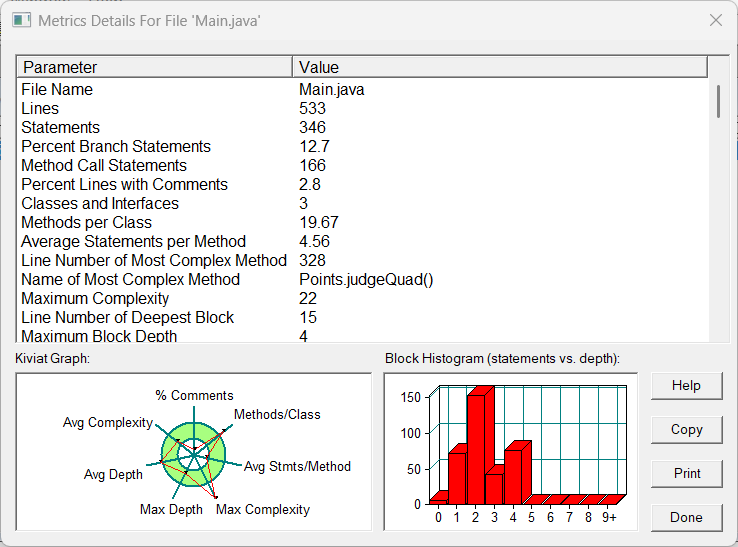
-
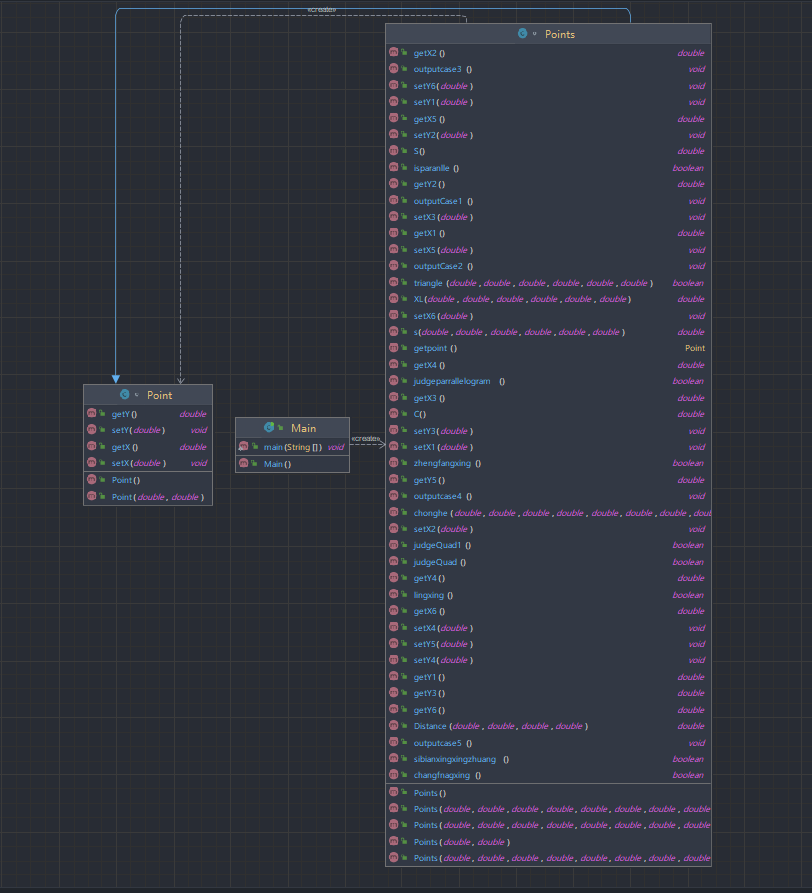
类图:
-
-
题目分析:本题中利用到三角形类,所以需要分析本题的需求,再对三角形类进行重构,在分析四边形形状时要充分考虑到全部有可能的情况,以免漏写导致测试点无法通过。
-
踩坑心得:由于没有构建四边形,在写本题时,代码思路不够清晰 ,导致一些测试点无法通过,而且代码阅读性较差。
- 改进建议:在今后编写代码之前需要认真仔细的分析题目需求,构思好编写思路。
-
7-1 点线形系列5-凸五边形的计算-1
用户输入一组选项和数据,进行与五边形有关的计算。
以下五边形顶点的坐标要求按顺序依次输入,连续输入的两个顶点是相邻顶点,第一个和最后一个输入的顶点相邻。
选项包括:
1:输入五个点坐标,判断是否是五边形,判断结果输出true/false。
2:输入五个点坐标,判断是凹五边形(false)还是凸五边形(true),如果是凸五边形,则再输出五边形周长、面积,结果之间以一个英文空格符分隔。 若五个点坐标无法构成五边形,输出"not a pentagon"
3:输入七个点坐标,前两个点构成一条直线,后五个点构成一个凸五边形、凸四边形或凸三角形,输出直线与五边形、四边形或三角形相交的交点数量。如果交点有两个,再按面积从小到大输出被直线分割成两部分的面积(不换行)。若直线与多边形形的一条边线重合,输出"The line is coincide with one of the lines"。若后五个点不符合五边形输入,若前两点重合,输出"points coincide"。以上3选项中,若输入的点无法构成多边形,则输出"not a polygon"。输入的五个点坐标可能存在冗余,假设多边形一条边上两个端点分别是x、y,边线中间有一点z,另一顶点s:
1)符合要求的输入:顶点重复或者z与xy都相邻,如:x x y s、x z y s、x y x s、s x y y。此时去除冗余点,保留一个x、一个y。
2) 不符合要求的输入:z不与xy都相邻,如:z x y s、x z s y、x s z y输入格式:
基本格式:选项+":"+坐标x+","+坐标y+" "+坐标x+","+坐标y。点的x、y坐标之间以英文","分隔,点与点之间以一个英文空格分隔。
输出格式:
基本输出格式见每种选项的描述。
异常情况输出:
如果不符合基本格式,输出"Wrong Format"。
如果符合基本格式,但输入点的数量不符合要求,输出"wrong number of points"。
注意:输出的数据若小数点后超过3位,只保留小数点后3位,多余部分采用四舍五入规则进到最低位。小数点后若不足3位,按原始位数显示,不必补齐。例如:1/3的结果按格式输出为 0.333,1.0按格式输出为1.0 -
输入样例1:
选项1,点重合。例如:
1:-1,-1 1,2 -1,1 1,0输出样例:
在这里给出相应的输出。例如:
wrong number of points详细信息及样例请查看附件,本题包含附件中的选项1-3的功能:
- 类图:
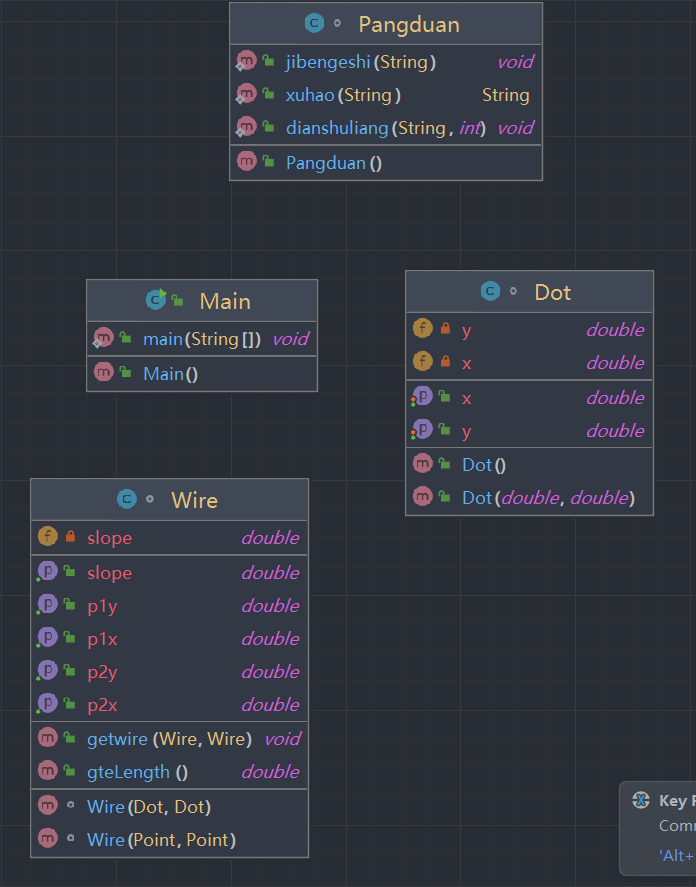
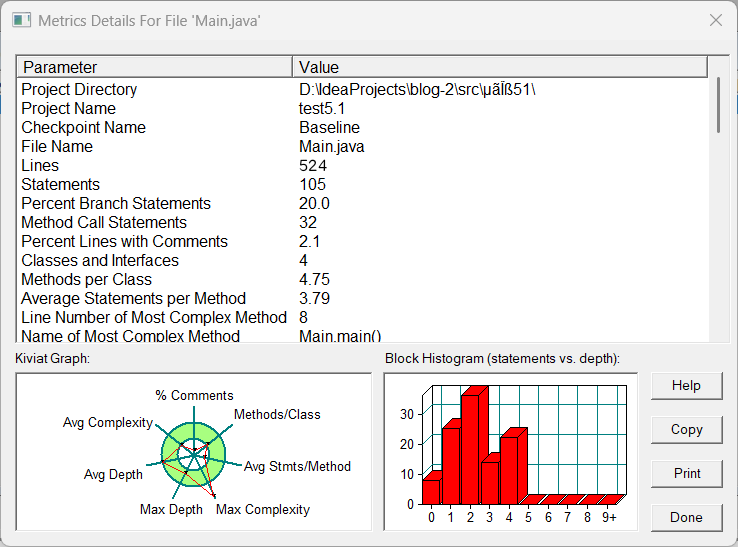
- 代码SourceMonitor :
-
7-2 点线形系列5-凸五边形的计算-2
用户输入一组选项和数据,进行与五边形有关的计算。
以下五边形顶点的坐标要求按顺序依次输入,连续输入的两个顶点是相邻顶点,第一个和最后一个输入的顶点相邻。
选项包括:
4:输入十个点坐标,前、后五个点分别构成一个凸多边形(三角形、四边形、五边形),判断它们两个之间是否存在包含关系(一个多边形有一条或多条边与另一个多边形重合,其他部分都包含在另一个多边形内部,也算包含)。
两者存在六种关系:1、分离(完全无重合点) 2、连接(只有一个点或一条边重合) 3、完全重合 4、被包含(前一个多边形在后一个多边形的内部)5、交错 6、包含(后一个多边形在前一个多边形的内部)。
各种关系的输出格式如下:
1、no overlapping area between the previous triangle/quadrilateral/ pentagon and the following triangle/quadrilateral/ pentagon
2、the previous triangle/quadrilateral/ pentagon is connected to the following triangle/quadrilateral/ pentagon
3、the previous triangle/quadrilateral/ pentagon coincides with the following triangle/quadrilateral/ pentagon
4、the previous triangle/quadrilateral/ pentagon is inside the following triangle/quadrilateral/ pentagon
5、the previous triangle/quadrilateral/ pentagon is interlaced with the following triangle/quadrilateral/ pentagon
6、the previous triangle/quadrilateral/ pentagon contains the following triangle/quadrilateral/ pentagon5:输入十个点坐标,前、后五个点分别构成一个凸多边形(三角形、四边形、五边形),输出两个多边形公共区域的面积。注:只考虑每个多边形被另一个多边形分割成最多两个部分的情况,不考虑一个多边形将另一个分割成超过两个区域的情况。
6:输入六个点坐标,输出第一个是否在后五个点所构成的多边形(限定为凸多边形,不考虑凹多边形),的内部(若是五边形输出in the pentagon/outof the pentagon,若是四边形输出in the quadrilateral/outof the quadrilateral,若是三角形输出in the triangle/outof the triangle)。输入入错存在冗余点要排除,冗余点的判定方法见选项5。如果点在多边形的某条边上,输出"on the triangle/on the quadrilateral/on the pentagon"。
以上4、5、6选项输入的五个点坐标可能存在冗余,假设多边形一条边上两个端点分别是x、y,边线中间有一点z,另一顶点s:
1)符合要求的输入:顶点重复或者z与xy都相邻,如:x x y s、x z y s、x y x s、s x y y。此时去除冗余点,保留一个x、一个y。
2) 不符合要求的输入:z不与xy都相邻,如:z x y s、x z s y、x s z y输入格式:
基本格式:选项+":"+坐标x+","+坐标y+" "+坐标x+","+坐标y。点的x、y坐标之间以英文","分隔,点与点之间以一个英文空格分隔。
输出格式:
输出的数据若小数点后超过3位,只保留小数点后3位,多余部分采用四舍五入规则进到最低位。小数点后若不足3位,按原始位数显示,不必补齐。例如:1/3的结果按格式输出为 0.333,1.0按格式输出为1.0
-
输入样例:
在这里给出一组输入。例如:
4:0,0 6,0 7,1 8,3 6,6 0,0 6,0 7,1 8,3 6,6输出样例:
在这里给出相应的输出。例如:
the previous pentagon coincides with the following pentagon更多样例请查看附件:
点线形系列5-五边形题目详情.pdf - 题目分析:五边形是在四边形的基础上来编写的,所以写好四边形就显得很重要,因为这样会很好的减小代码的编程量以及更加清晰的编程思路。
- 踩坑心得:由于四边形构造的不合理,导致五边形的编程难度增加,点线形系列需要一开始就要有好的类构造。
- 改进建议:重写前面类的代码。
-
期中考试
7-1 点与线(类设计)-
设计一个类表示平面直角坐标系上的点Point,私有属性分别为横坐标x与纵坐标y,数据类型均为实型数,除构造方法以及属性的getter与setter方法外,定义一个用于显示信息的方法display(),用来输出该坐标点的坐标信息,格式如下:
(x,y),数值保留两位小数。为简化题目,其中,坐标点的取值范围设定为(0,200]。若输入有误,系统则直接输出Wrong Format -
设计一个类表示平面直角坐标系上的线Line,私有属性除了标识线段两端的点point1、point2外,还有一个字符串类型的color,用于表示该线段的颜色,同样,除构造方法以及属性的getter与setter方法外,定义一个用于计算该线段长度的方法getDistance(),还有一个用于显示信息的方法display(),用来输出线段的相关信息,输出格式如下:
  ```
      The line's color is:颜色值
      The line's begin point's Coordinate is:
      (x1,y1)
      The line's end point's Coordinate is:
      (x2,y2)
      The line's length is:长度值
  ```
其中,所有数值均保留两位小数,建议可用
String.format("%.2f", data)方法。设计类图如下图所示。
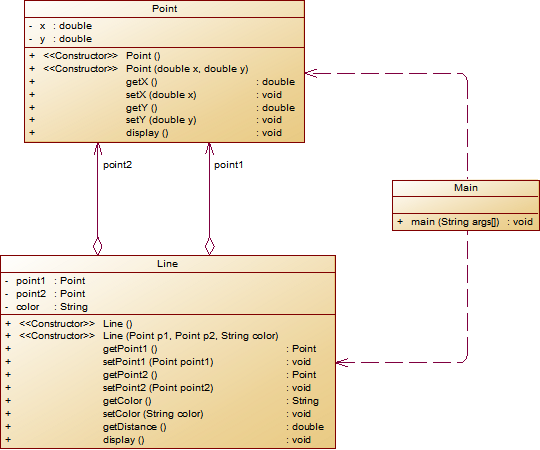
** 题目要求:在主方法中定义一条线段对象,从键盘输入该线段的起点坐标与终点坐标以及颜色,然后调用该线段的display()方法进行输出。**
- 以下情况为无效作业
- 无法运行
- 设计不符合所给类图要求
- 未通过任何测试点测试
- 判定为抄袭
输入格式:
分别输入线段的起点横坐标、纵坐标、终点的横坐标、纵坐标以及颜色,中间可用一个或多个空格、tab或者回车分隔。
输出格式:
The line's color is:颜色值
The line's begin point's Coordinate is:
(x1,y1)
The line's end point's Coordinate is:
(x2,y2)
The line's length is:长度值
输入样例1:
在这里给出一组输入。例如:
5
9.4
12.3
84
Red
输出样例1:
在这里给出相应的输出。例如:
The line's color is:Red
The line's begin point's Coordinate is:
(5.00,9.40)
The line's end point's Coordinate is:
(12.30,84.00)
The line's length is:74.96
输入样例2:
在这里给出一组输入。例如:
80.2356
352.12
24.5
100
Black
输出样例2:
在这里给出相应的输出。例如:
Wrong Format -
- 代码:
import java.util.Scanner; public class Main { public static void main(String[] args) { Scanner input = new Scanner(System.in); double x1,x2,y1,y2; String s; x1 = input.nextDouble(); y1 = input.nextDouble(); x2 = input.nextDouble(); y2 = input.nextDouble(); if(x1>0&&x1<=200&&y1>0&&y1<=200&&x2>0&&x2<=200&&y2>0&&y2<=200) //控制输入坐标的范围 { s = input.next(); Line line = new Line(); Point point1 = new Point(); Point point2 = new Point(); point1.setX(x1); point1.setY(y1); point2.setX(x2); point2.setY(y2); line.setPoint1(point1); line.setPoint2(point2); line.setColor(s); double length = line.getDistance(point1,point2); line.display(point1,point2,s,length); } else { System.out.println("Wrong Format"); } } } class Point { private double x; private double y; public Point() { } public Point(double x, double y) { this.x = x; this.y = y; } public double getX() { return x; } public void setX(double x) { this.x = x; } public double getY() { return y; } public void setY(double y) { this.y = y; } public void display(double x,double y){ if ((x <= 200 && x > 0) && (y <= 200 && y > 0)) { System.out.println("("+x+","+y+")"); } else{ System.out.println("Wrong Format"); } } } class Line { private Point point1; private Point point2; private String color; public Line() { } public Line(Point point1, Point point2, String color) { this.point1 = point1; this.point2 = point2; this.color = color; } public Point getPoint1() { return point1; } public void setPoint1(Point point1) { this.point1 = point1; } public Point getPoint2() { return point2; } public void setPoint2(Point point2) { this.point2 = point2; } public String getColor() { return color; } public void setColor(String color) { this.color = color; } public double getDistance(Point point1,Point point2){ double length = Math.sqrt((point1.getX()-point2.getX())*(point1.getX()-point2.getX())+(point1.getY()-point2.getY())*(point1.getY()-point2.getY())); String format = String.format("%.2f", length); return Double.parseDouble(format); } public void display(Point point1,Point point2,String color,double length){ double x1,x2,y1,y2; x1 = point1.getX(); x2 = point2.getX(); y1 = point1.getY(); y2 = point2.getY(); System.out.println("The line's color is:"+color); //System.out.println(); System.out.println("The line's begin point's Coordinate is:"); System.out.println("("+String.format("%.2f", x1)+","+String.format("%.2f", y1)+")"); System.out.println("The line's end point's Coordinate is:"); System.out.println("("+x2+","+y2+")"); System.out.println("The line's length is:"+length); //System.out.println(color) } } - 类图:
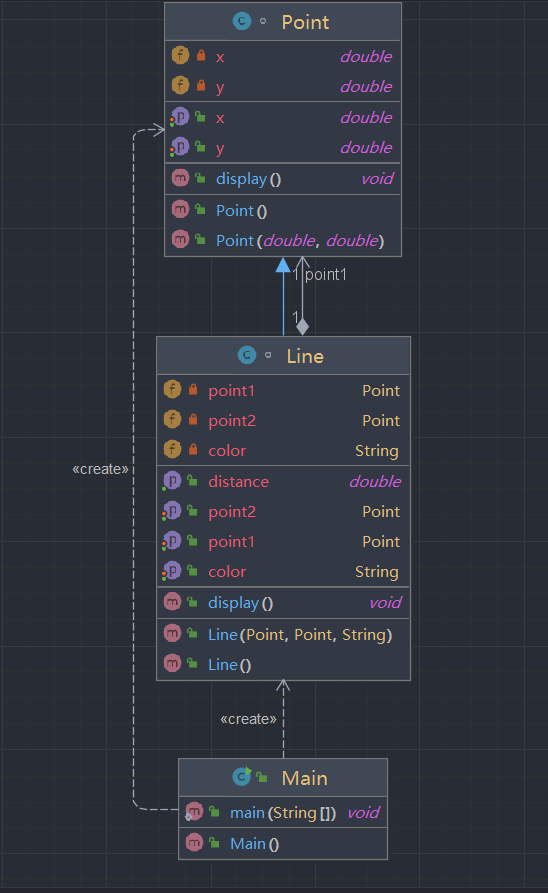
- 代码SourceMonitor :
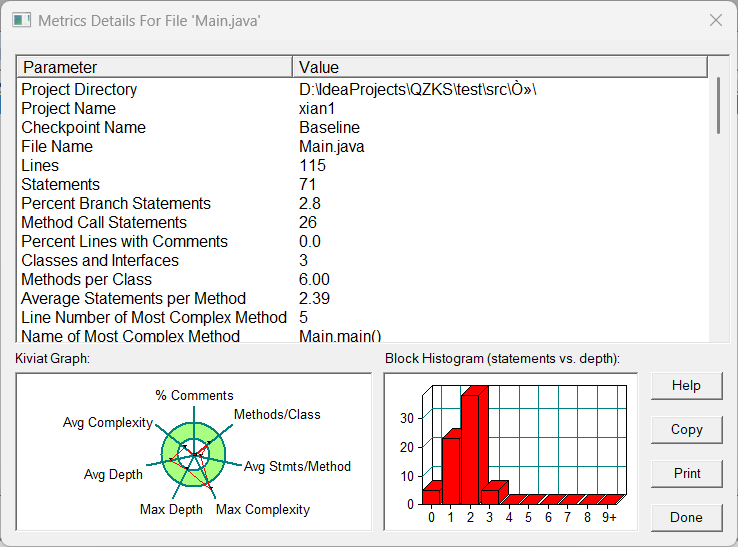
-
7-2 点线面问题重构(继承与多态)
在“点与线(类设计)”题目基础上,对题目的类设计进行重构,以实现继承与多态的技术性需求。
- 对题目中的点Point类和线Line类进行进一步抽象,定义一个两个类的共同父类Element(抽象类),将display()方法在该方法中进行声明(抽象方法),将Point类和Line类作为该类的子类。
- 再定义一个Element类的子类面Plane,该类只有一个私有属性颜色color,除了构造方法和属性的getter、setter方法外,display()方法用于输出面的颜色,输出格式如下:
The Plane's color is:颜色 - 在主方法内,定义两个Point(线段的起点和终点)对象、一个Line对象和一个Plane对象,依次从键盘输入两个Point对象的起点、终点坐标和颜色值(Line对象和Plane对象颜色相同),然后定义一个Element类的引用,分别使用该引用调用以上四个对象的display()方法,从而实现多态特性。示例代码如下:
      element = p1;//起点Point
      element.display();

      element = p2;//终点Point
      element.display();

      element = line;//线段
      element.display();

      element = plane;//面
      element.display();
类结构如下图所示。
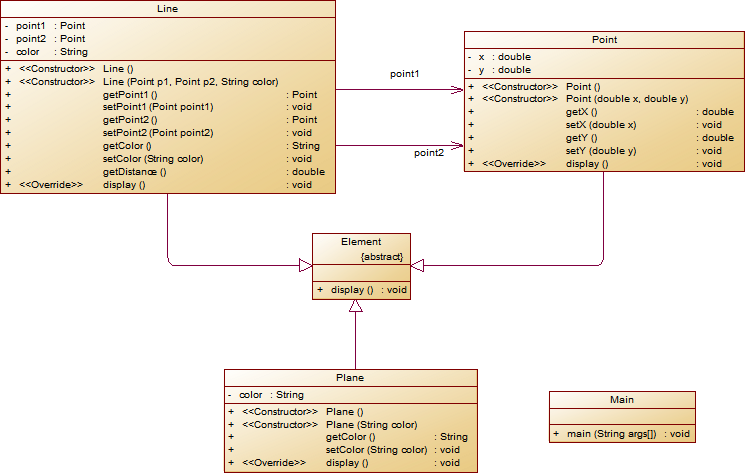
其中,所有数值均保留两位小数,建议可用
String.format("%.2f", data)方法。- 以下情况为无效作业
- 无法运行
- 设计不符合所给类图要求
- 未通过任何测试点测试
- 判定为抄袭
输入格式:
分别输入线段的起点横坐标、纵坐标、终点的横坐标、纵坐标以及颜色,中间可用一个或多个空格、tab或者回车分隔。
输出格式:
(x1,y1)
(x2,y2)
The line's color is:颜色值
The line's begin point's Coordinate is:
(x1,y1)
The line's end point's Coordinate is:
(x2,y2)
The line's length is:长度值
The Plane's color is:颜色值
输入样例1:
在这里给出一组输入。例如:
5
9.4
12.3
84
Red
输出样例1:
在这里给出相应的输出。例如:
(5.00,9.40)
(12.30,84.00)
The line's color is:Red
The line's begin point's Coordinate is:
(5.00,9.40)
The line's end point's Coordinate is:
(12.30,84.00)
The line's length is:74.96
The Plane's color is:Red
输入样例2:
在这里给出一组输入。例如:
5
9.4
12.3
845
Black
输出样例2:
在这里给出相应的输出。例如:
Wrong Format
- 代码:
import java.util.Scanner; public class Main { public static void main(String[] args) { // TODO Auto-generated method stub Scanner input = new Scanner(System.in); double x1 = input.nextDouble(); double y1 = input.nextDouble(); double x2 = input.nextDouble(); double y2 = input.nextDouble(); String color = input.next(); if(x1 < 0 || x1 >200 || y1 < 0 || y1 > 200 || x2 < 0 || x2 >200 || y2 < 0 || y2 > 200) { System.out.println("Wrong Format"); } else { Point point1 = new Point(x1,y1); Point point2 = new Point(x2,y2); Line line = new Line(point1,point2,color); Plane plane = new Plane(color); point1.display(); point2.display(); line.display(); plane.display(); } } } class Point extends Element{ private double x; private double y; public Point() { super(); } public Point(double x, double y) { super(); this.x = x; this.y = y; } public double getX() { return x; } public void setX(double x) { this.x = x; } public double getY() { return y; } public void setY(double y) { this.y = y; } @Override public void display() { System.out.printf("(%.2f,%.2f)\n", x,y); } } class Line extends Point{ private Point point1; private Point point2; private String color; public Line() { super(); } public Line(Point point1, Point point2, String color) { super(); this.point1 = point1; this.point2 = point2; this.color = color; } public Point getPoint1() { return point1; } public void setPoint1(Point point1) { this.point1 = point1; } public Point getPoint2() { return point2; } public void setPoint2(Point point2) { this.point2 = point2; } public String getColor() { return color; } public void setColor(String color) { this.color = color; } public double getDistance() { double distance = 0; distance = Math.sqrt((point1.getX() - point2.getX()) * (point1.getX() - point2.getX()) + (point1.getY() - point2.getY()) * (point1.getY() - point2.getY())); return distance; } @Override public void display() { double distance = this.getDistance(); System.out.println("The line's color is:"+color); System.out.println("The line's begin point's Coordinate is:"); point1.display(); System.out.println("The line's end point's Coordinate is:"); point2.display(); System.out.printf("The line's length is:%.2f\n", distance); } } - 类图:
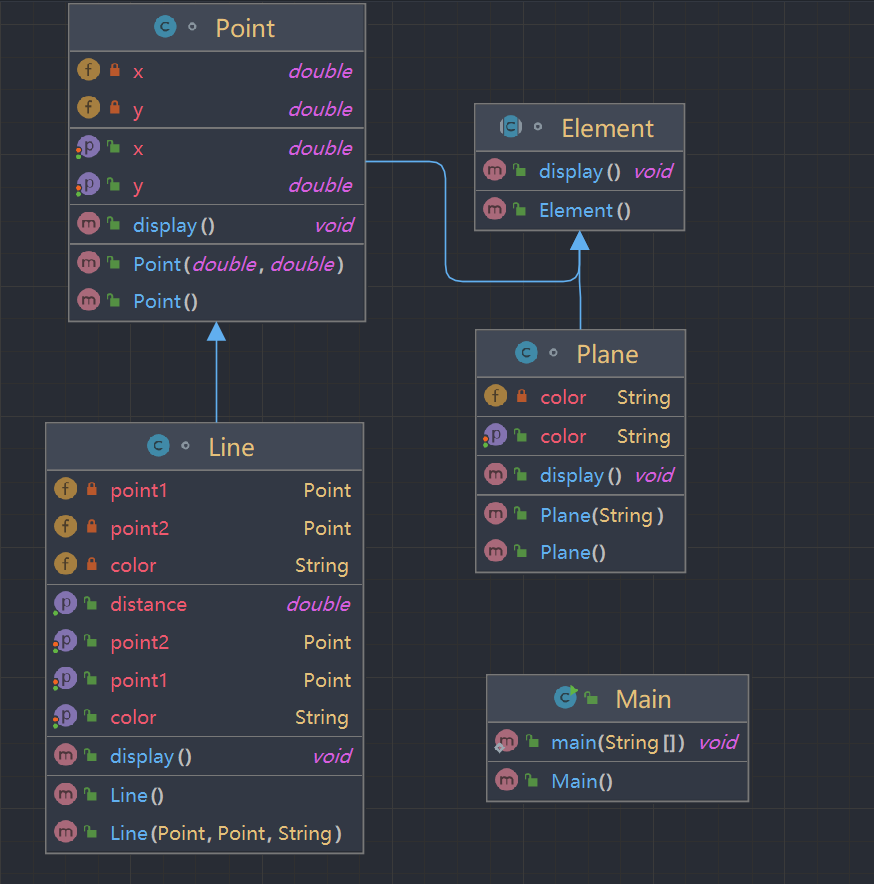
- 代码SourceMonitor :
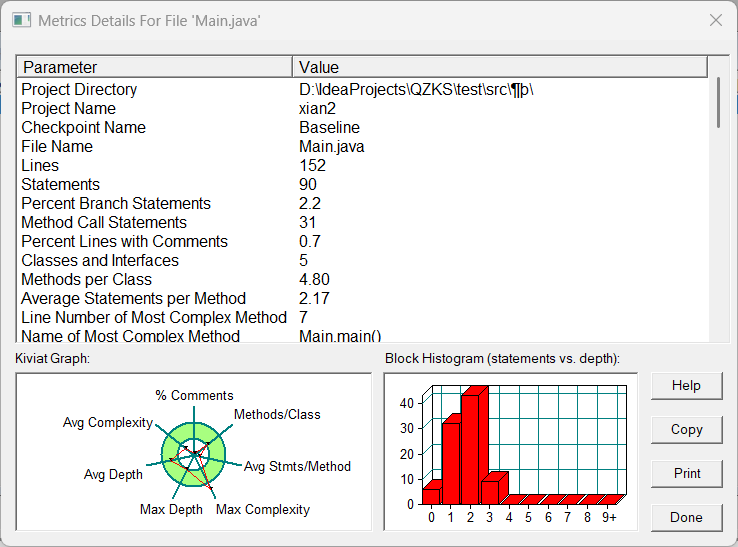
-
-
7-3 点线面问题再重构(容器类)
在“点与线(继承与多态)”题目基础上,对题目的类设计进行重构,增加容器类保存点、线、面对象,并对该容器进行相应增、删、遍历操作。
- 在原有类设计的基础上,增加一个GeometryObject容器类,其属性为
ArrayList<Element>类型的对象(若不了解泛型,可以不使用<Element>) - 增加该类的
add()方法及remove(int index)方法,其功能分别为向容器中增加对象及删除第index - 1(ArrayList中index>=0)个对象 - 在主方法中,用户循环输入要进行的操作(choice∈[0,4]),其含义如下:
- 1:向容器中增加Point对象
- 2:向容器中增加Line对象
- 3:向容器中增加Plane对象
- 4:删除容器中第index - 1个数据,若index数据非法,则无视此操作
- 0:输入结束
choice = input.nextInt(); while(choice != 0) { switch(choice) { case 1://insert Point object into list ... break; case 2://insert Line object into list ... break; case 3://insert Plane object into list ... break; case 4://delete index - 1 object from list int index = input.nextInt(); ... } choice = input.nextInt(); }输入结束后,按容器中的对象顺序分别调用每个对象的display()方法进行输出。
类图如下所示:
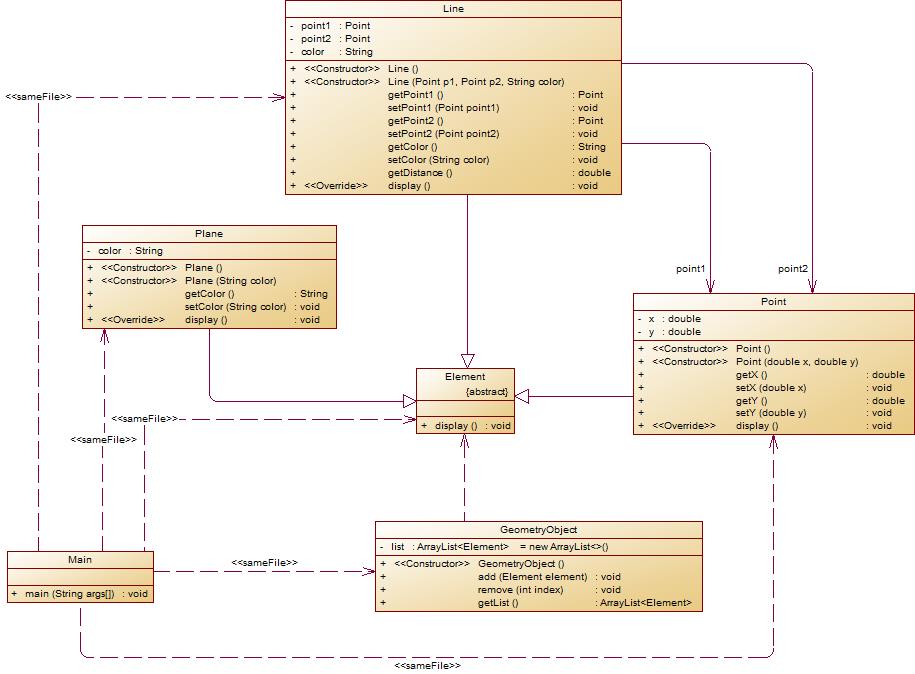
- 以下情况为无效作业
- 无法运行
- 设计不符合所给类图要求
- 未通过任何测试点测试
- 判定为抄袭
输入格式:
switch(choice) {
            case 1://insert Point object into list
              输入“点”对象的x,y值
                break;
            case 2://insert Line object into list
                输入“线”对象两个端点的x,y值
                break;
            case 3://insert Plane object into list
                输入“面”对象的颜色值
                break;
            case 4://delete index - 1 object from list
                输入要删除的对象位置(从1开始)
                ...
            }
输出格式:
- Point、Line、Plane的输出参考题目2
- 删除对象时,若输入的index超出合法范围,程序自动忽略该操作
输入样例:
在这里给出一组输入。例如:
1
3.4
5.6
2
4.4
8.0
0.98
23.888
Red
3
Black
1
9.8
7.5
3
Green
4
3
0
输出样例:
在这里给出相应的输出。例如:
(3.40,5.60) The line's color is:Red The line's begin point's Coordinate is: (4.40,8.00) The line's end point's Coordinate is: (0.98,23.89) The line's length is:16.25 (9.80,7.50) The Plane's color is:Green - 在原有类设计的基础上,增加一个GeometryObject容器类,其属性为
-
- 代码:
mport java.util.Scanner; import java.util.ArrayList; public class Main { public static void main(String[] args) { Scanner in = new Scanner(System.in); int choice = in.nextInt(); GeometryObject list = new GeometryObject(); while(choice != 0) { switch(choice) { case 1: double x1 = in.nextDouble(); double y1 = in.nextDouble(); if(x1<0||x1>200||y1<0||y1>200) { System.out.println("Wrong Format"); } else { Point point1 = new Point(x1,y1); list.add(point1); } break; case 2: double x2 = in.nextDouble(); double y2 = in.nextDouble(); double x3 = in.nextDouble(); double y3 = in.nextDouble(); String color = in.next(); if(x2<0||x2>200||y2<0||y2>200||x3<0||x3>200||y3<0||y3>200) { System.out.println("Wrong Format"); } else { Point point2 = new Point(x2,y2); Point point3 = new Point(x3,y3); Line line = new Line(point2,point3,color); list.add(line); } break; case 3: String color1 = in.next(); Plane plane = new Plane(color1); list.add(plane); break; case 4: int index = 0; index = in.nextInt(); list.remove(index); break; } } for(Element element:list.getList()){ element.display(); } } } -
类图:
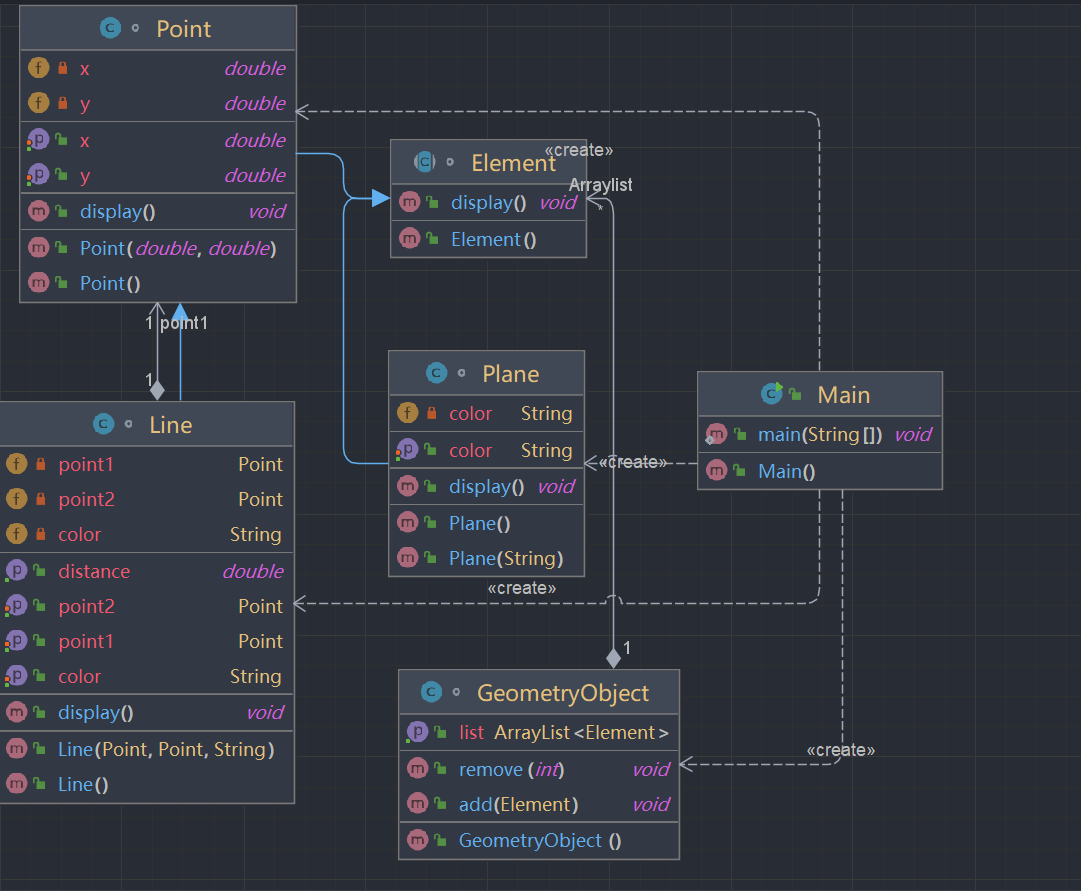
- 代码SourceMonitor :
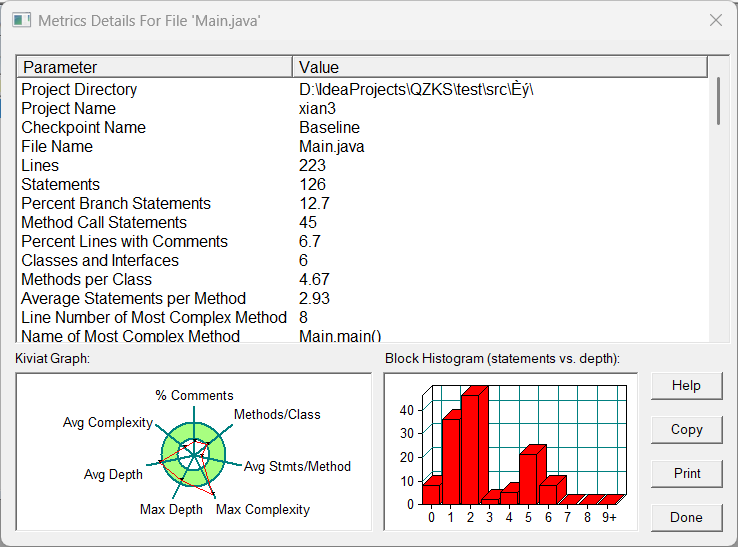
- 题目分析:本次期中考试,主要考察前面几次大作业中的各个知识点,相当于是对前几周所学的知识进行一次复习巩固。
-
踩坑心得:容器、泛型没有接触过,抽象类上课只大概听了一下,没有细看,所以导致写的时候临时百度(当时没写出来)。
- 改进建议:及时复习当天所学的知识。
-
总结
- 点线形系列的大作业让我学到了很多东西。一是对正则表达式的认识和运用,然后就是对面向对象编程的理解。
- 期中考试加深了对前面所学知识的理解以及运用,也在这次考试中看出前面那些知识没有掌握,对前段时间的学习的一个总结。
-
展望: 在今后的学习中还是需要更加努力的学习,巩固自己所学的知识,加强自己的面向对象的编程思想

 浙公网安备 33010602011771号