


Mybatis逆向工程generator
Mybatis的逆向工程(genertor)由表帮我们来生成dao,bean,xml映射文件。
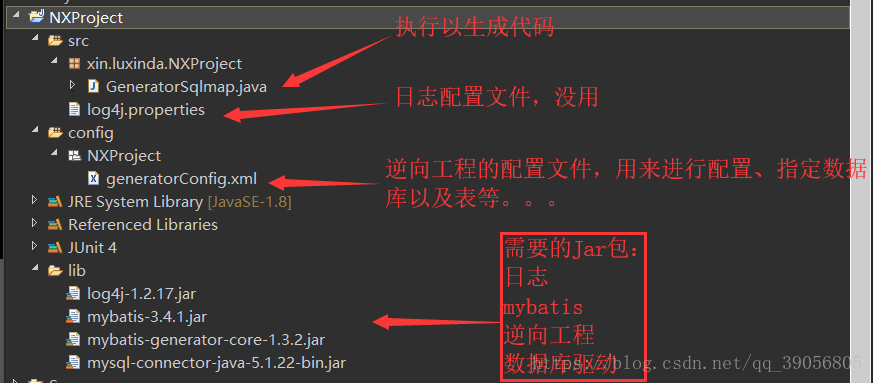
需要导入的jar包:导入mybatis:mybatis-3.2.2.jar(以下导入的包仅参考自行导入)
连接jdbc数据库的jar包mysql-connector-java-5.1.47.jar(可能会发生导jar包的冲突)
一般都企业都需要导入日志jar包:log4j-1.2.17.jar
导入generator:mybatis-generator-core-1.3.5.jar
登陆http://www.mybatis.org/generator/configreference/xmlconfig.html 官网
<?xml version="1.0" encoding="UTF-8"?>
<!DOCTYPE generatorConfiguration
  PUBLIC "-//mybatis.org//DTD MyBatis Generator Configuration 1.0//EN"
  "http://mybatis.org/dtd/mybatis-generator-config_1_0.dtd">
<generatorConfiguration>
    <context id="test" targetRuntime="MyBatis3">
        <plugin type="org.mybatis.generator.plugins.EqualsHashCodePlugin"></plugin>
        <plugin type="org.mybatis.generator.plugins.SerializablePlugin"></plugin>
         <plugin type="org.mybatis.generator.plugins.ToStringPlugin"></plugin>
        <commentGenerator>
            <!-- 这个元素用来去除指定生成的注释中是否包含生成的日期 false:表示保护 -->
            <!-- 如果生成日期,会造成即使修改一个字段,整个实体类所有属性都会发生变化,不利于版本控制,所以设置为true -->
            <property name="suppressDate" value="true" />
            <!-- 是否去除自动生成的注释 true:是 : false:否 -->
            <property name="suppressAllComments" value="true" />
        </commentGenerator>
        <!--数据库链接URL,用户名、密码 -->
        <jdbcConnection driverClass="com.mysql.jdbc.Driver"
            connectionURL="jdbc:mysql://127.0.0.1:3306/ssm" userId="root" password="123456">
            </jdbcConnection>
        <javaTypeResolver>
            <!-- This property is used to specify whether MyBatis Generator should
                force the use of java.math.BigDecimal for DECIMAL and NUMERIC fields, -->
            <property name="forceBigDecimals" value="false" />
        </javaTypeResolver>
        <!-- 生成模型的包名和位置 -->
        <javaModelGenerator targetPackage="com.zxy.dealer.entity"
            targetProject="src/main/java">
            <property name="enableSubPackages" value="true" />
            <property name="trimStrings" value="true" />
        </javaModelGenerator>
        <!-- 生成映射文件的包名和位置 -->
        <sqlMapGenerator targetPackage="mapper"
            targetProject="src/main/resources">
            <property name="enableSubPackages" value="true" />
        </sqlMapGenerator>
        <!-- 生成DAO的包名和位置 -->
        <javaClientGenerator type="XMLMAPPER"
            targetPackage="com.zxy.dealer.dao"  targetProject="src/main/java">
            <property name="enableSubPackages" value="true" />
        </javaClientGenerator>

        <!-- 要生成哪些表 -->
        <table tableName="goods" domainObjectName="Goods"
            enableCountByExample="false" enableUpdateByExample="false"
            enableDeleteByExample="false" enableSelectByExample="false"
            selectByExampleQueryId="false"></table>
    </context>
</generatorConfiguration>
以上代码复制到generatorConfig.xml中
generatorConfig.xml放在src/resources下(没有明确具体的要求)
最后需要执行逆向工程生成代码
public class GeneratorSqlmap {

    public void generator() throws Exception{

        List<String> warnings = new ArrayList<String>();
        boolean overwrite = true;
        //指定 逆向工程配置文件
        File configFile = new File("generatorConfig.xml");
        ConfigurationParser cp = new ConfigurationParser(warnings);
        Configuration config = cp.parseConfiguration(configFile);
        DefaultShellCallback callback = new DefaultShellCallback(overwrite);
        MyBatisGenerator myBatisGenerator = new MyBatisGenerator(config,
                callback, warnings);
        myBatisGenerator.generate(null);

    }
    public static void main(String[] args) throws Exception {
        try {
            GeneratorSqlmap generatorSqlmap = new GeneratorSqlmap();
            generatorSqlmap.generator();
        } catch (Exception e) {
            e.printStackTrace();
        }

    }

}
具体代码配置上官网或者https://www.cnblogs.com/xiaoyao-001/p/9865186.html(某位博主的详细介绍,参考)
最后别忘了在conf.xml基础配置中加入该配置

 浙公网安备 33010602011771号