观察者模式Observer
- 观察者接口:Observer接口、Listener接口、Hook、Callback
- 具体观察者:实现Observer接口
- 事件类 :不仅仅包含时间,事件,还包含事件源。这样观察者拿到事件知道是谁发的才可以做有区别的处理
- 事件源对象:被观察者Object,
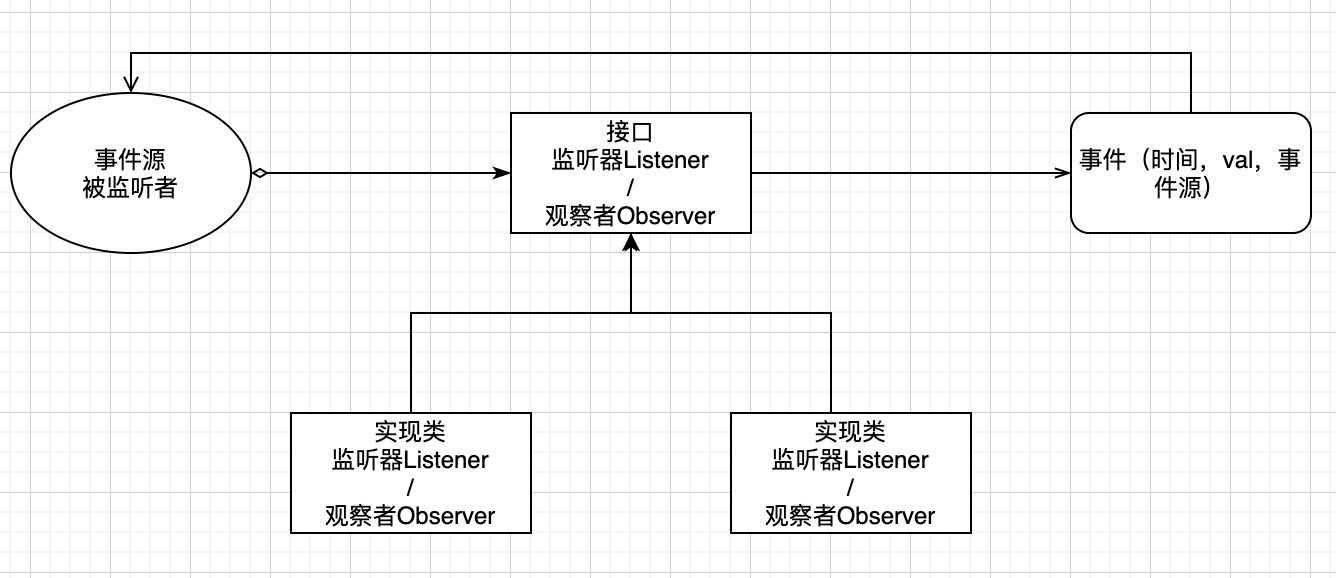
事件源对象,新建事件对象。事件源自己会维护很多监听器。可以调用监听器接口的方法,
**事件对象 **穿过 Observer的链条
package com.deltaqin.designPattern.d09_observer;

import java.util.ArrayList;
import java.util.List;

/**
 * @author deltaqin
 * @date 2021/3/27 12:15 下午
 */

// Button 有一个监听自己的监听器列表,一个按下按钮的方法,
// 按下的时候会生成一个事件ActionEvent,
// 通知自己维护的监听器列表里的所有的监听器
public class Demo {
    public static void main(String[] args) {
        Button b = new Button();
        b.addActionListener(new MyActionListener());
        b.addActionListener(new MyActionListener2());
        b.buttonPressed();
    }
}

class Button {

    private List<ActionListener> actionListeners = new ArrayList<ActionListener>();

    public void buttonPressed() {
        ActionEvent e = new ActionEvent(System.currentTimeMillis(),this);
        for(int i=0; i<actionListeners.size(); i++) {
            ActionListener l = actionListeners.get(i);
            l.notify(e);
        }
    }

    public void addActionListener(ActionListener l) {
        actionListeners.add(l);
    }
}

// 监听器接口
interface ActionListener {
    public void notify(ActionEvent e);
}

// 具体的监听器
class MyActionListener implements ActionListener {

    public void notify(ActionEvent e) {
        System.out.println("button pressed!");
    }

}

// 具体的监听器
class MyActionListener2 implements ActionListener {

    public void notify(ActionEvent e) {
        System.out.println("button pressed 2!");
    }

}

// 事件
class ActionEvent {

    long when;
    // 事件源
    Object source;

    public ActionEvent(long when, Object source) {
        super();
        this.when = when;
        this.source = source;
    }


    public long getWhen() {
        return when;
    }

    public Object getSource() {
        return source;
    }

}


 浙公网安备 33010602011771号