
关于CSS中clientHeight、scrollHeight、offsetHeight的个人见解
1. 概念
clientHeight :这个属性是只读属性,对于没有定义CSS或者内联布局盒子的元素为0,否则,它是元素内部的高度(单位像素),包含内边距,但不包括水平滚动条、边框和外边距。
clientHeight 可以通过 CSS height + CSS padding - 水平滚动条高度 (如果存在)来计算.
scrollHeight :这个只读属性是一个元素内容高度的度量,包括由于溢出导致的视图中不可见内容。
scrollHeight的值等于该元素在不使用滚动条的情况下为了适应视口中所用内容所需的最小高度。
没有垂直滚动条的情况下,scrollHeight值与元素视图填充所有内容所需要的最小值clientHeight相同。包括元素的padding,但不包括元素的border和margin。scrollHeight也包括 ::before 和 ::after这样的伪元素。
offsetHeight :一个只读属性,返回当前元素左上角相对于 HTMLElement.offsetParent 节点的左边界偏移的像素值。
对块级元素来说,offsetTop、offsetLeft、offsetWidth 及 offsetHeight 描述了元素相对于 offsetParent 的边界框。
然而,对于可被截断到下一行的行内元素(如 span),offsetTop 和 offsetLeft 描述的是第一个边界框的位置(使用 Element.getClientRects() 来获取其宽度和高度),而offsetWidth 和 offsetHeight 描述的是边界框的尺寸(使用Element.getBoundingClientRect 来获取其位置)。因此,使用 offsetLeft、offsetTop、offsetWidth、offsetHeight 来对应 left、top、width 和 height 的一个盒子将不会是文本容器 span 的盒子边界。
2. 实例
2.1 界面图

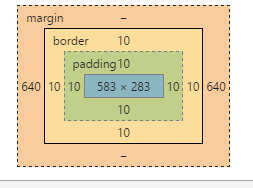
2.2 box的盒子模型图
谷歌浏览器的模型图:
2.3 CSS代码
        html *{
            margin: 0;
            padding: 0;
        }
        body{
            background: pink;
        }
        #box{
            width: 600px;
            height: 300px;
            padding: 10px;
            border: 10px black solid;
            margin: auto;
            overflow: scroll;
        }
        .item{
            height: 200px;
        }
        .item:nth-child(1){
            background: red;
        }
        .item:nth-child(2){
            background: blue;
        }
        .item:nth-child(3){
            background: black;
        }
2.4 HTML代码
<div id="box">
    <div class="item"></div>
    <div class="item"></div>
    <div class="item"></div>
</div>
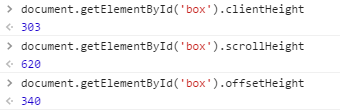
2.5 控制台输出
谷歌浏览器的输出结果:
3.分析与说明
3.1 clientHeight
clientHeight 简单的理解就是可见区域的宽度,不包括border(区域内有水平滚动条还应该减去水平滚动条的高度)
那么clientHeight = 283+2*10 = 303
3.2 scrollHeight
scrollHeight为可滚动的区域加上元素的padding
那么scrollHeight = 200*3+10*2 = 620
3.3 offsetHeight
offsetHeight描述的是自身的高度,包括padding、border
那么offsetHeight = 300+10*2+10*2 = 340
4.参考文章
https://developer.mozilla.org/zh-CN/docs/Web/API/Element/scrollHeight
https://developer.mozilla.org/zh-CN/docs/Web/API/Element/scrollHeight
https://developer.mozilla.org/zh-CN/docs/Web/API/HTMLElement/offsetParent

 浙公网安备 33010602011771号