
Antdesign React之API展示页面
本项目基于antdesignpro,点击调试后跳转弹窗,左边展示public/doc路径下的md文档并且通过markdownview渲染成md,右侧是json编辑器
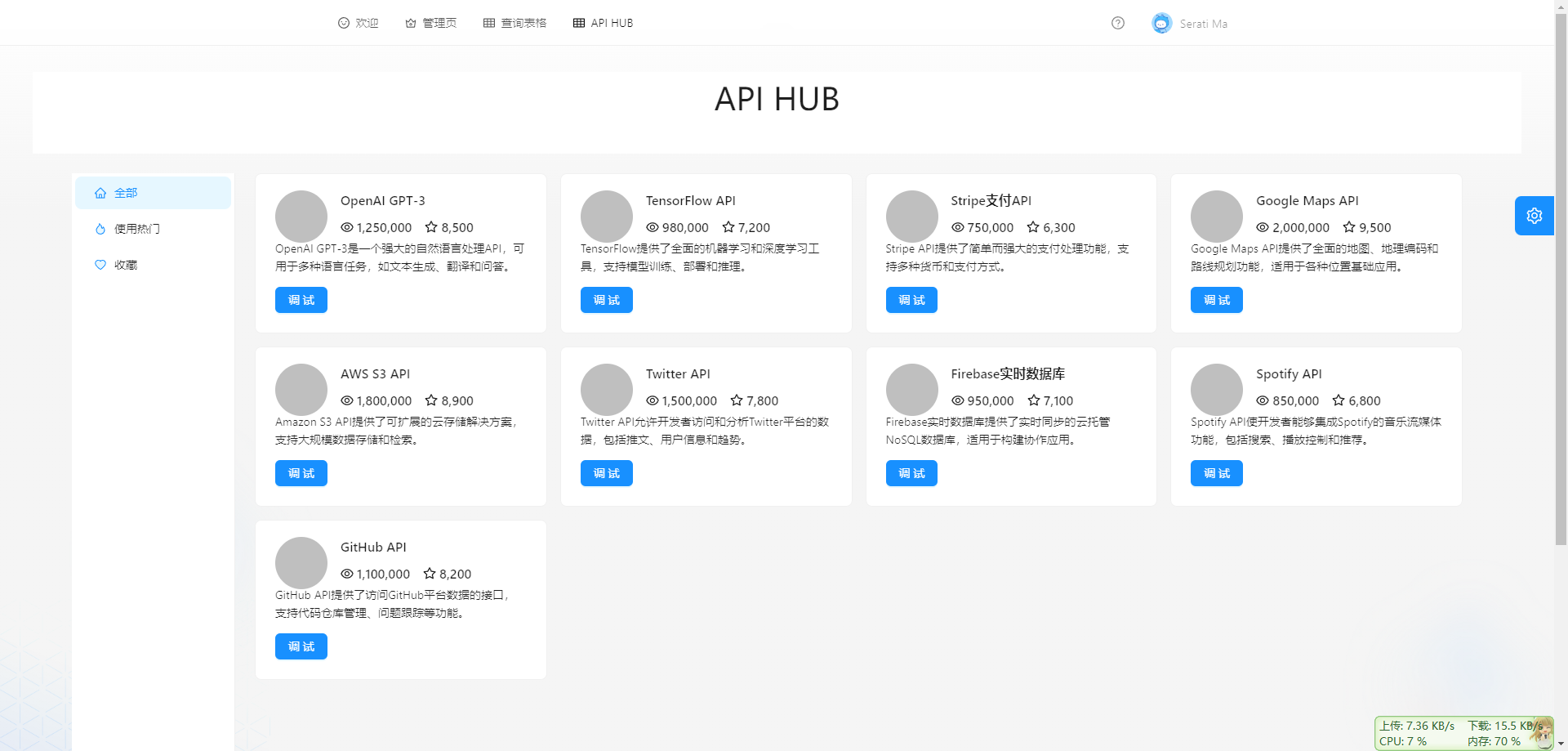
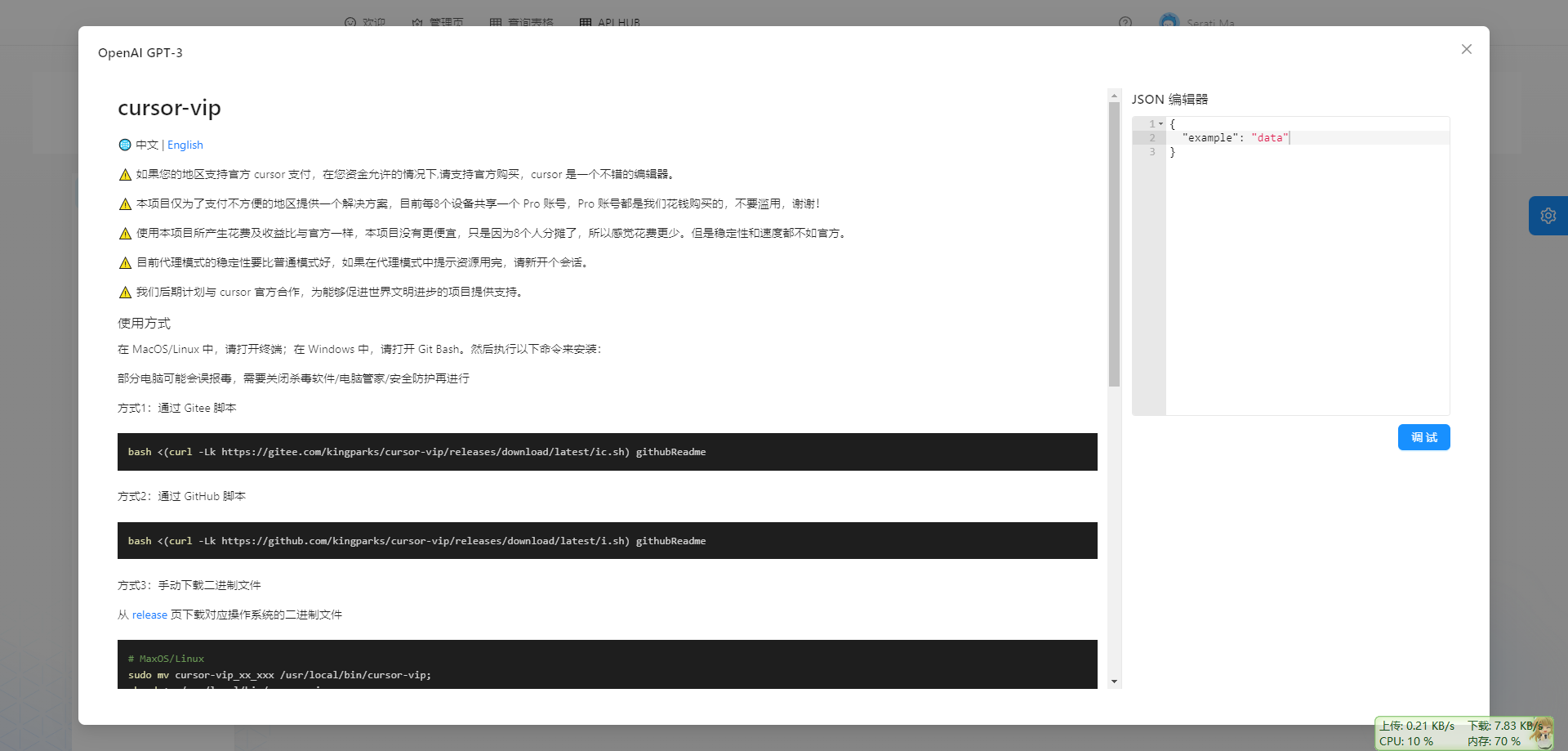
index.tsx
import React, { useState, useMemo } from 'react';
import { Layout, Menu, theme, Row, Col } from 'antd';
import { HomeOutlined, FireTwoTone, HeartTwoTone } from '@ant-design/icons';
import CustomCard from "./CustomCard";
import { cardData, categoryLabels, categoryKeys, Card } from './cardData';

const { Header, Content, Sider } = Layout;

const sidebarItems = [HomeOutlined, FireTwoTone, HeartTwoTone].map(
  (icon, index) => ({
    key: categoryKeys[index],
    icon: React.createElement(icon),
    label: categoryLabels[index],
  }),
);

interface CardGridProps {
  cards: Card[];
}

// 卡片网格
const CardGrid: React.FC<CardGridProps> = ({ cards }) => (
  <Row gutter={[16, 16]}>
    {cards.map((card, index) => (
      <Col key={index} xs={24} sm={12} md={8} lg={6}>
        <CustomCard {...card} />
      </Col>
    ))}
  </Row>
);

const Test2: React.FC = () => {
  const {
    token: { colorBgContainer, borderRadiusLG, fontSizeHeading1, paddingLG },
  } = theme.useToken();

  const [selectedCategory, setSelectedCategory] = useState(categoryKeys[0]);

  // 筛选出当前选中类别的卡片
  const filteredCards = useMemo(() => {
    // 如果选中类别是 'all',则返回所有类别的卡片
    if (selectedCategory === 'all') {
      return cardData.flatMap(category => category.cards);
    }
    // 否则,只返回该类别的卡片
    return cardData
      .filter(category => category.categoryName === selectedCategory)
      .flatMap(category => category.cards);
  }, [selectedCategory]);

  return (
    <Layout>
      <Header
        style={{
          textAlign: 'center',
          height: 100,
          paddingInline: paddingLG,
          lineHeight: '64px',
          fontSize: fontSizeHeading1,
          fontFamily: 'PingFang SC',
          backgroundColor: 'white',
        }}
      >
        API HUB
      </Header>
      <Content style={{ padding: '0 48px' }}>
        <Layout
          style={{ padding: '24px 0', background: colorBgContainer, borderRadius: borderRadiusLG }}
        >
          <Sider style={{ background: colorBgContainer }} width={200}>
            <Menu
              mode="inline"
              selectedKeys={[selectedCategory]}
              style={{ height: '100%' }}
              items={sidebarItems}
              onClick={(e) => setSelectedCategory(e.key)}
            />
          </Sider>
          <Content style={{ padding: '0 24px', minHeight: 280 }}>
            <CardGrid cards={filteredCards} />
          </Content>
        </Layout>
      </Content>
    </Layout>
  );
};


export default Test2;
customcard.tsx,定义每一个api卡片
import React, { useState } from 'react';
import { Card, Typography, Button, Modal, Avatar, Row, Col } from 'antd';
import { EyeOutlined, StarOutlined } from '@ant-design/icons';
import AceEditor from 'react-ace';
import 'ace-builds/src-noconflict/mode-json';
import 'ace-builds/src-noconflict/theme-github';
import MarkdownView from '../MarkdownView/MarkdownView';

const { Meta } = Card;

interface CardProps {
  title: string;
  views: number;
  stars: number;
  description: string;
  avatar: string;
  mdFilePath: string;
}

const CustomCard: React.FC<CardProps> = React.memo(({
  title,
  views,
  stars,
  description,
  avatar,
  mdFilePath
}) => {
  const [isModalVisible, setIsModalVisible] = useState(false);
  const [fileContent, setFileContent] = useState('');
  const [jsonContent, setJsonContent] = useState(`{
  "example": "data"
}`);

  // 点击调试按钮处理函数
  const handleButtonClick = async () => {
    try {
      const publicPath = process.env.PUBLIC_URL || '';
      const response = await fetch(`${publicPath}/doc/${mdFilePath}`);

      if (!response.ok) {
        throw new Error(`HTTP error! status: ${response.status}`);
      }

      const content = await response.text();
      setFileContent(content);
      setIsModalVisible(true);
    } catch (error) {
      console.error('Error reading file:', error);
    }
  };

  // JSON编辑器变更处理函数
  const handleJsonChange = (value: string) => {
    setJsonContent(value);
  };

  return (
    <>
      <Card hoverable>
        <Meta
          avatar={
            <Avatar
              src={avatar}
              size={64}
            />
          }
          title={
            <div>
              <Typography.Title level={5}>
                {title}
              </Typography.Title>
              <div>
                <EyeOutlined style={{ marginRight: 4 }} />
                {views?.toLocaleString() ?? 0}
                <StarOutlined style={{ marginLeft: 16, marginRight: 4 }} />
                {stars?.toLocaleString() ?? 0}
              </div>
            </div>
          }
        />
        <Typography.Paragraph ellipsis={{ rows: 2, expandable: false }}>
          {description}
        </Typography.Paragraph>
        <div>
          <Button type="primary" onClick={handleButtonClick}>
            调试
          </Button>
        </div>
      </Card>

      <Modal
        title={title}
        open={isModalVisible}
        onCancel={() => setIsModalVisible(false)}
        footer={null}
        width={1600}
        centered
        bodyStyle={{
          height: '800px',
          padding: '24px'
        }}
      >
        <Row gutter={24} style={{ height: '100%' }}>
          {/* Markdown内容 - 左侧 */}
          <Col span={18} style={{
            height: '100%',
            overflowY: 'auto',
            borderRight: '1px solid #e8e8e8'
          }}>
            <MarkdownView content={fileContent} />
          </Col>

          {/* JSON编辑器 - 右侧 */}
          <Col span={6} style={{
            height: '100%',
            display: 'flex',
            flexDirection: 'column'
          }}>
            <h3 style={{ margin: '0 0 16px 0' }}>JSON 编辑器</h3>
            <AceEditor
              mode="json"
              theme="github"
              value={jsonContent}
              onChange={handleJsonChange}
              name="json-editor"
              editorProps={{ $blockScrolling: true }}
              setOptions={{
                showLineNumbers: true,
                tabSize: 2,
                useWorker: false,
                fontSize: 14,
                printMargin: false
              }}
              width="100%"
              height="calc(100% - 400px)"
              style={{
                border: '1px solid #e8e8e8',
                borderRadius: '4px',
                marginBottom: '16px'
              }}
            />
            <Button type="primary">
              调试
            </Button>
          </Col>
        </Row>
      </Modal>
    </>
  );
});

export default CustomCard;
carddata.tsx,定义了一些接口的数据,后续将接入后端
export interface Card {
  title: string;
  views: number;
  stars: number;
  description: string;
  avatar: string;
  mdFilePath: string; // 新增的属性
}

export interface Category {
  categoryName: string;
  cards: Card[];
}

export const cardData: Category[] = [
  {
    categoryName: 'hot',
    cards: [
      {
        title: 'OpenAI GPT-3',
        views: 1250000,
        stars: 8500,
        description: 'OpenAI GPT-3是一个强大的自然语言处理API,可用于多种语言任务,如文本生成、翻译和问答。',
        avatar: 'https://example.com/openai-avatar.png',
        mdFilePath: 'test.md', // 示例路径
      },
      {
        title: 'TensorFlow API',
        views: 980000,
        stars: 7200,
        description: 'TensorFlow提供了全面的机器学习和深度学习工具,支持模型训练、部署和推理。',
        avatar: 'https://example.com/tensorflow-avatar.png',
        mdFilePath: 'test2.md', // 示例路径
      },
    ],
  },
  {
    categoryName: 'fav',
    cards: [
      {
        title: 'Stripe支付API',
        views: 750000,
        stars: 6300,
        description: 'Stripe API提供了简单而强大的支付处理功能,支持多种货币和支付方式。',
        avatar: 'https://example.com/stripe-avatar.png',
        mdFilePath: 'public/doc/stripe-api.md', // 示例路径
      },
    ],
  },
  {
    categoryName: 'all',
    cards: [
      {
        title: 'Google Maps API',
        views: 2000000,
        stars: 9500,
        description: 'Google Maps API提供了全面的地图、地理编码和路线规划功能,适用于各种位置基础应用。',
        avatar: 'https://example.com/googlemaps-avatar.png',
        mdFilePath: 'public/doc/google-maps-api.md', // 示例路径
      },
      {
        title: 'AWS S3 API',
        views: 1800000,
        stars: 8900,
        description: 'Amazon S3 API提供了可扩展的云存储解决方案,支持大规模数据存储和检索。',
        avatar: 'https://example.com/awss3-avatar.png',
        mdFilePath: 'public/doc/aws-s3-api.md', // 示例路径
      },
      {
        title: 'Twitter API',
        views: 1500000,
        stars: 7800,
        description: 'Twitter API允许开发者访问和分析Twitter平台的数据,包括推文、用户信息和趋势。',
        avatar: 'https://example.com/twitter-avatar.png',
        mdFilePath: 'public/doc/twitter-api.md', // 示例路径
      },
    ],
  },
  {
    categoryName: 'hot',
    cards: [
      {
        title: 'Firebase实时数据库',
        views: 950000,
        stars: 7100,
        description: 'Firebase实时数据库提供了实时同步的云托管NoSQL数据库,适用于构建协作应用。',
        avatar: 'https://example.com/firebase-avatar.png',
        mdFilePath: 'public/doc/firebase-realtime-db.md', // 示例路径
      },
    ],
  },
  {
    categoryName: 'fav',
    cards: [
      {
        title: 'Spotify API',
        views: 850000,
        stars: 6800,
        description: 'Spotify API使开发者能够集成Spotify的音乐流媒体功能,包括搜索、播放控制和推荐。',
        avatar: 'https://example.com/spotify-avatar.png',
        mdFilePath: 'public/doc/spotify-api.md', // 示例路径
      },
      {
        title: 'GitHub API',
        views: 1100000,
        stars: 8200,
        description: 'GitHub API提供了访问GitHub平台数据的接口,支持代码仓库管理、问题跟踪等功能。',
        avatar: 'https://example.com/github-avatar.png',
        mdFilePath: 'public/doc/github-api.md', // 示例路径
      },
    ],
  },
];

export const categoryLabels = ['全部', '使用热门', '收藏'];
export const categoryKeys = ['all', 'hot', 'fav'];

 浙公网安备 33010602011771号