
Codex配置通知hook
注意⚠️:请按照实际路径进行配置!
1.安装 BurntToast
Install-Module -Name BurntToast -Force
2.编写脚本
位置:C:\Users\UBU.codex
Import-Module BurntToast
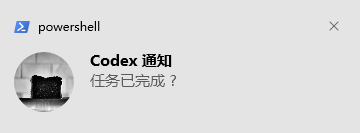
New-BurntToastNotification -Text "Codex 通知", "任务已完成 ?"
3.toml配置
位置:C:\Users\UBU.codex
notify = [
  "powershell.exe", "-ExecutionPolicy", "Bypass", "-File", "C:\\Users\\UBU\\.codex\\notify.ps1",
  "-RawEventJson", "{\"type\":\"agent-turn-complete\",\"thread\":\"12345\"}"
]
4.测试
打开codex发送你好,测试hook是否生效

 浙公网安备 33010602011771号