Recipe 1.3. Connecting to a Microsoft Excel
1.3.1. Problem
You want to connect to a Microsoft Excel workbook.
1.3.2. Solution
Use the OLE DB .NET data provider.
The solution creates and opens a connection to a Microsoft Excel workbook using the OLE DB .NET data provider. Information about the connection is displayed.
The Excel 2007 workbook in this solution is shown in Figure 1-13.
Figure 1-3. Excel workbook Category.xlsx
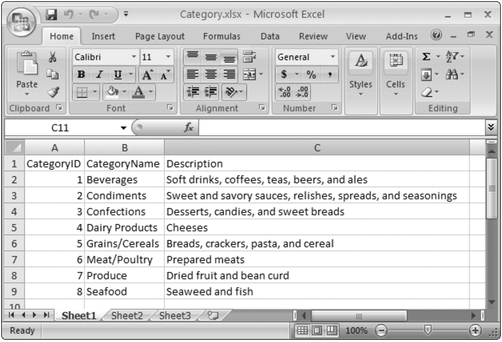
The Excel 2003 workbook used in this solution is identical.
The C# code in Program.cs in the project ConnectExcel is shown in Example 1-3.
Example 1-3. File: Program.cs for ConnectExcel solution
|
Code View: using System;
using System.Data;
using System.Data.OleDb;
namespace ConnectExcel
{
class Program
{
static void Main(string[] args)
{
// Define connection strings for both default
// Excel .xlsx format and Excel 97-2003 .xls format
string[] oledbConnectString = new string[]
{
"Provider=Microsoft.ACE.OLEDB.12.0;" +
@"Data Source=..\..\..\Category.xlsx;" +
"Extended Properties=\"Excel 12.0;HDR=YES\";",
"Provider=Microsoft.ACE.OLEDB.12.0;" +
@"Data Source=..\..\..\Category.xls;" +
"Extended Properties=\"Excel 8.0;HDR=YES\";"
};
foreach (string connectString in oledbConnectString)
{
// Define and open the connection
OleDbConnection connection = new OleDbConnection(connectString);
connection.Open( );
// Output some connection properties to the console
Console.WriteLine("---CONNECTION---");
Console.WriteLine("Connection.String = {0}\n",connectString);
Console.WriteLine("Connection.State = {0}",connection.State);
Console.WriteLine("Connection.Provider = {0}",connection.Provider);
Console.WriteLine("Connection.ServerVersion = {0}",connection.ServerVersion);
connection.Close( );
Console.WriteLine( );
}
Console.WriteLine("Press any key to continue.");
Console.ReadKey( );
}
}
} |
1.3.3. Discussion
You can connect to a Microsoft Excel using the OLE DB .NET data provider. The OLE DB connection uses the Microsoft.ACE.OLEDB.12.0, which is the new Access database engine OLE DB driver that can also read previous versions of Microsoft Excel workbooks. The Jet OLE DB driver cannot access Microsoft Excel 2007 or 2010.

 浙公网安备 33010602011771号