
httpclient的使用
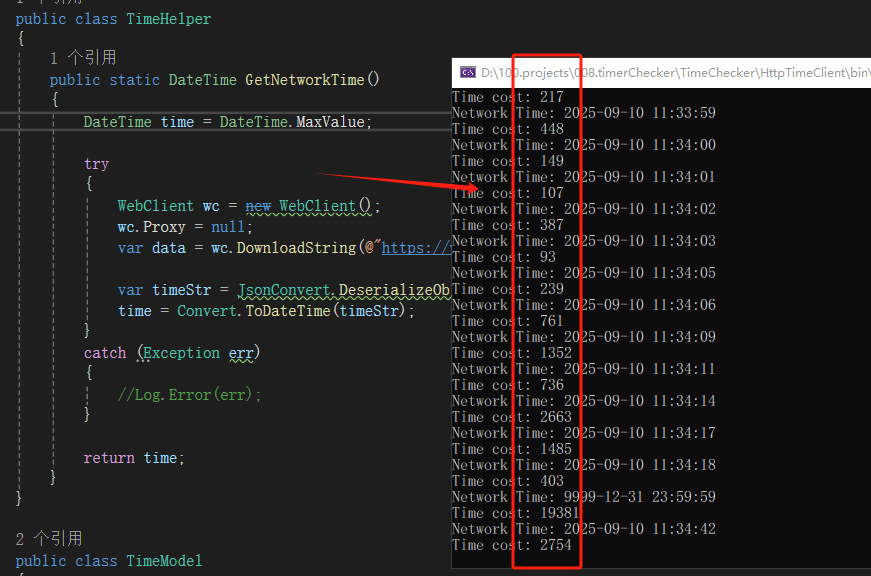
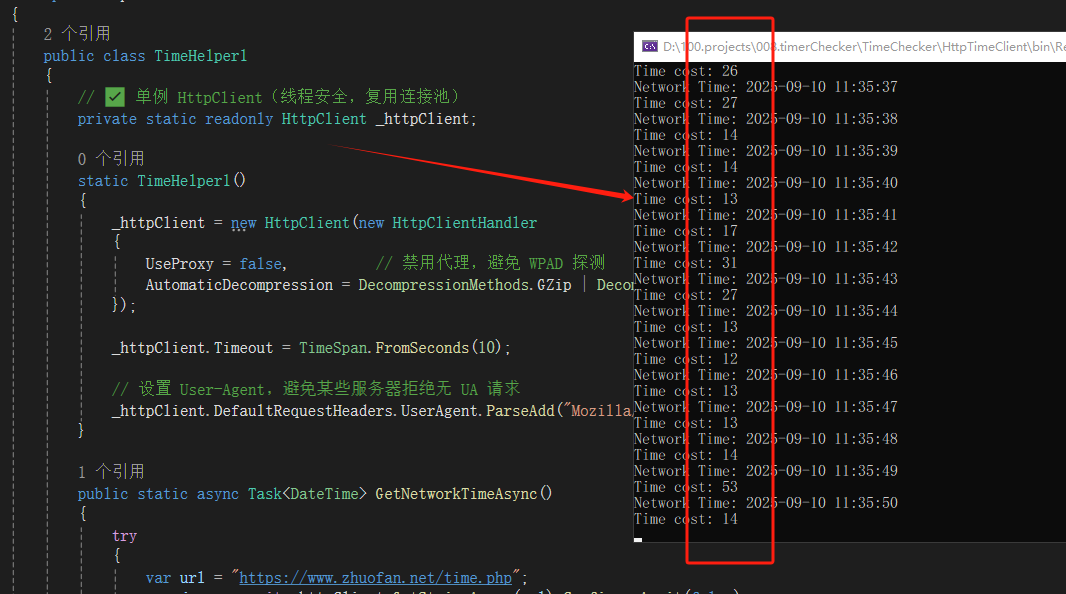
建议使用httpclient,不再使用webclient。
前者性能更高,更安全,推荐。
测试代码:
using Newtonsoft.Json;
using System;
using System.Collections.Generic;
using System.Net;
using System.Text;

namespace HttpTimeClient
{
    public class TimeHelper1
    {
        // ✅ 单例 HttpClient(线程安全,复用连接池)
        private static readonly HttpClient _httpClient;

        static TimeHelper1()
        {
            _httpClient = new HttpClient(new HttpClientHandler
            {
                UseProxy = false,          // 禁用代理,避免 WPAD 探测
                AutomaticDecompression = DecompressionMethods.GZip | DecompressionMethods.Deflate
            });

            _httpClient.Timeout = TimeSpan.FromSeconds(10);

            // 设置 User-Agent,避免某些服务器拒绝无 UA 请求
            _httpClient.DefaultRequestHeaders.UserAgent.ParseAdd("Mozilla/5.0 (compatible; MyApp/1.0)");
        }

        public static async Task<DateTime> GetNetworkTimeAsync()
        {
            try
            {
                var url = "https://www.zhuofan.net/time.php";
                var json = await _httpClient.GetStringAsync(url).ConfigureAwait(false);

                var model = JsonConvert.DeserializeObject<TimeModel>(json);
                if (DateTime.TryParse(model?.SysTime, out var time))
                {
                    return time;
                }
            }
            catch (Exception ex)
            {
                // Log.Error(ex);
            }

            return DateTime.MaxValue;
        }

        // 如果必须同步调用(不推荐),包装异步方法
        public static DateTime GetNetworkTime()
        {
            return GetNetworkTimeAsync().GetAwaiter().GetResult();
        }
    }

    public class TimeHelper
    {
        public static DateTime GetNetworkTime()
        {
            DateTime time = DateTime.MaxValue;

            try
            {
                WebClient wc = new WebClient();
                wc.Proxy = null;
                var data = wc.DownloadString(@"https://www.zhuofan.net/time.php");

                var timeStr = JsonConvert.DeserializeObject<TimeModel>(data).SysTime;
                time = Convert.ToDateTime(timeStr);
            }
            catch (Exception err)
            {
                //Log.Error(err);
            }

            return time;
        }
    }

    public class TimeModel
    {
        public string? SysTime { get; set; }

        public string? SysTimeIso { get; set; } // ISO8601格式,带时区
        public string? TimeZoneId { get; set; }

        public string? TimeZoneDisplayName { get; set; }

        public string? UtcOffset { get; set; }

        public string? ZoneDirection { get; set; }

        public int ZoneHours { get; set; }
    }
}

 浙公网安备 33010602011771号