
MTU issue in Ubuntu 22.04
2026-01-30 18:18 蜡笔小旧 阅读(2) 评论(0) 收藏 举报最新一直在Ubuntu 22.04 desktop中上网很慢,经常超时如下图:

但是刷新下后面又能正常用,也不是每个网站都这样。这两天在用nuget上传package到私有registry发现也有问题了, 如图:

受不了了, 用tshark capture了下:
sudo tshark -f "(host x.x.x.x or host x.x.x.x) and tcp port 443" -w /tmp/nuget.pcap
然后用WireShark打开(注: 因为deb的版本没有装上, 用的flatpak, 只能在sanbox中运行不支持capture)
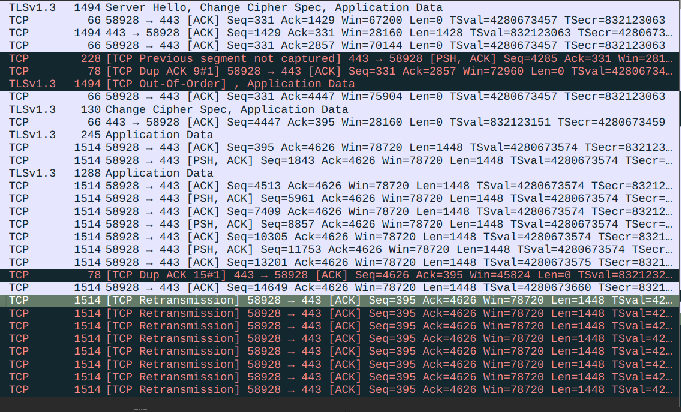
可以发现有大量的重传. 把数据丢给AI. 他告诉我可能是Len的问题。
ping -M do -s 1400 {IP} # 没问题
ping -M do -s 1472 {IP} # 有问题
# ping: local error: message too long, mtu=1480
这就找到问题所在了, 然后查了一下NetworkManager的默认值是1500, 把他改成1450把
sudo nmcli connection modify "Wired connection 1" ethernet.mtu 1450
sudo nmcli connection down "Wired connection 1"
sudo nmcli connection up "Wired connection 1"
# 用nmcli确认是否还有1500
然后可以正常push了。 后面找了网管他说可以改下DF, 我研究了下不好改, 算了。 后面他说那改一下路由器上的MSS到1410,相当于MSS 1410 + TCP header 20 +IP header 20 = 1450 MTU。问题更严重了, 连ACK后一堆问题。 我就又改回来了。
还顺道查了下Windows,因为Windows一直没有问题:

发现Windows也是1500, 这就不合理了.
Ubuntu 1500 超时
Windows 1500 正常
后面查了AI, AI丢了一句话:
Windows: “I’ll try 1500, but if it hits a low tunnel, I shrink automatically.”
Ubuntu: “I’ll try 1500, and if I don’t get the message, I just keep banging against the wall.”
看来还是Windows人性化.

 浙公网安备 33010602011771号