
FFmpeg录制音频
最近在学习怎么用FFmpeg录制音频,在按照网上教程整理过程中碰到一些问题,以下集中记录下录制音频时碰到的一些问题。
- 在调用FFmpeg的avformat_open_input函数时,由于设置options这个参数,然后程序立即报这个错误:
[dshow @ 0000026cebd068c0] Could not set audio only options
[dshow @ 0000026cebd068c0] Searching for audio device within video devices for virtual-audio-capturer
[dshow @ 0000026cebd068c0] Could not find audio only device with name [virtual-audio-capturer] among source devices of type video.
由提示可以知道肯定是options这个参数设置有问题,而我只参照其他文档只设置了一项:
ret = av_dict_set(&dict, "sample_rate", "44100", 0);
在网上搜了下查看本设备的详细参数的命令:
>ffmpeg -f dshow -list_options 1 -i audio="virtual-audio-capturer"
ffmpeg version 6.0-full_build-www.gyan.dev Copyright (c) 2000-2023 the FFmpeg developers
  built with gcc 12.2.0 (Rev10, Built by MSYS2 project)
......
  libpostproc    57.  1.100 / 57.  1.100
[dshow @ 000001761dca7e40] DirectShow audio only device options (from audio devices)
[dshow @ 000001761dca7e40]  Pin "Capture Virtual Audio Pin" (alternative pin name "1")
[dshow @ 000001761dca7e40]   ch= 2, bits=16, rate= 48000
audio=virtual-audio-capturer: Immediate exit requested
发现仅支持采样率仅支持48000,原来不能和这个值不一样。
既然如此,那干脆就采用默认值算了,有需求的话再重采样。
- avformat_write_header fail. Error ret: -22 , info: Invalid argument
完整提示如下:
avformat_write_header fail.  Error ret: -22 , info:  Invalid argument
[dshow @ 0000022ddb8368c0] Selecting pin Capture Virtual Audio Pin on audio only
[dshow @ 0000022ddb8368c0] passing through packet of type audio size     1920 timestamp 294129990000 orig timestamp 294129990000 graph timestamp 294130090000 diff 100000 virtual-audio-capturer
[dshow @ 0000022ddb8368c0] All info found
[file @ 0000022ddb827f00] Setting default whitelist 'file,crypto,data'
Output #0, mp3, to '2_16_48000.mp3':
  Stream #0:0, 0, 0/0: Unknown: none
[mp3 @ 0000022ddb83a2c0] Only audio streams and pictures are allowed in MP3.
[AVIOContext @ 0000022ddb87b300] Statistics: 0 bytes written, 0 seeks, 0 writeouts
Received stop event after 2 passes
错误提示在avformat_write_header处,错误是参数错误,但是由于第一次搞这块,实在没看懂哪个参数有问题。
然后只能把这些提示一行行去搜,终于用Only audio streams and pictures are allowed in MP3.搜到一份源代码。
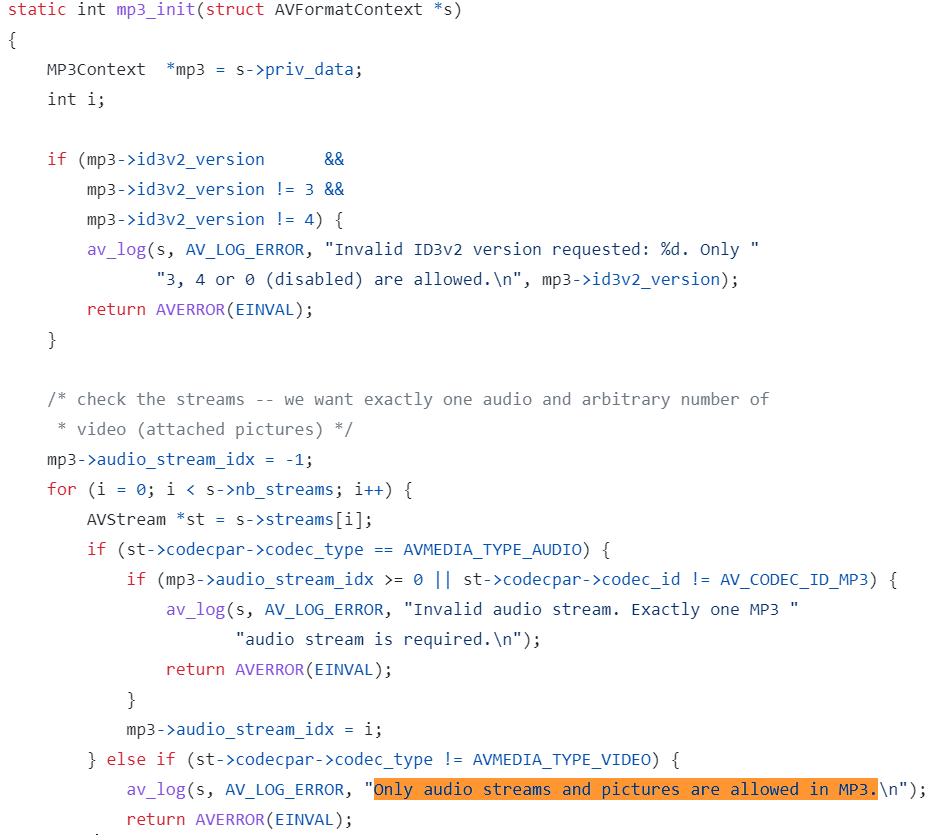
突然醒悟过来,的确我从网上抄来的代码没有设置codecpar这个参数,那么只需要把这个参数给设置上就可以了。

 浙公网安备 33010602011771号