
记一次java简易计算器的实现(windows&android)
 windows上用的是swing&awt框架,android用的是android studio。总的来说设置好监听之后就是熟悉的数据处理环节了。
事情的起因是想在一个项目里摸鱼结果摸成了技术组,由于什么也不会被要求在一周内写出一个计算器app(虽然最后一共花了两天半)。写程序的时候参考了很多大佬的博客,特此也把自己的代码贴来,用作参考与交流。
记一次java简易计算器的实现(windows&android) - Chi4ki - 博客园 (cnblogs.com)
1、windows计算器
主要用的是swing和awt框架,参考网站Java Swing教程:30分钟玩转Swing界面设计 (biancheng.net)。先看了网格布局和按钮以及文本框的设置写出布局,然后是重点事件监听,根据事件监听搭好框架,最后就是数据处理了,用StringBuilder作为数据的反馈。代码如下:
import java.awt.event.ActionEvent;
import java.awt.event.ActionListener;
import java.awt.*;
import javax.swing.*;

public class Calculator3 {
    public static void main(String[] args) {
        CalculatorDemo cal = new CalculatorDemo();
    }
}

class CalculatorDemo {
    StringBuilder sb = new StringBuilder();
    JTextField fi = new JTextField(60);
    int j = 0, equal = 0, point = 0, sy = 0;
    double sum = 0;
    double num1 = 0, num2, num3;
    String[] num = { "1", "2", "3", "4", "5", "6", "7", "8", "9", "0" };
    String[] s = { " ", " ", "DEL", "AC", "7", "8", "9", "/", "4", "5", "6", "*", "1", "2", "3", "-", "0", ".", "=",
            "+" };
    String[] symbol = { "+", "-", "*", "/" };

    public CalculatorDemo() {
        JFrame frame = new JFrame("计算器");
        JPanel p1 = new JPanel();
        fi.setFont(new Font("楷体", Font.BOLD, 16));
        p1.add(fi);
        frame.add(p1, BorderLayout.NORTH);

        JPanel panel = new JPanel();
        panel.setLayout(new GridLayout(5, 4, 10, 5));

        JButton[] button = new JButton[20];
        for (int i = 0; i < 20; i++) {
            button[i] = new JButton(s[i]);
            panel.add(button[i]);
        }
        class button1ActionListener implements ActionListener {
            @Override
            public void actionPerformed(ActionEvent e) {
                String a = e.getActionCommand();

                for (int i = 0; i < 10; i++) {
                    if (a.equals(num[i])) {
                        if (equal == 1) {
                            sb = new StringBuilder();
                            equal = 0;
                        }
                        sb.append(num[i]);
                        fi.setText(sb.toString());
                        if (j != 0) {
                            sy = j;
                            j = 0;
                        }
                        break;
                    }
                }

                if (a.equals(".")) {
                    if (j == 0 && point != 1) {
                        point = 1;
                        sb.append(".");
                        fi.setText(sb.toString());
                    }
                }

                for (int i = 0; i < 4; i++) {
                    if (j == 0 && a.equals(symbol[i]) && sy != 0) {
                        num3 = Double.parseDouble(sb.toString());
                        if (sy == 1)
                            sum = num1 + num3;
                        if (sy == 2)
                            sum = num1 - num3;
                        if (sy == 3)
                            sum = num1 * num3;
                        if (sy == 4)
                            sum = num1 / num3;
                        sb = new StringBuilder();
                        sb.append(sum);
                        break;
                    }
                }
                if (a.equals("+")) {
                    if (j == 0) {
                        j = 1;
                        point = 0;
                        num1 = Double.parseDouble(sb.toString());
                        sb = new StringBuilder();
                        fi.setText("+");
                    } else {
                        j = 1;
                        fi.setText("+");
                    }
                }
                if (a.equals("-")) {
                    if (j == 0) {
                        j = 2;
                        point = 0;
                        num1 = Double.parseDouble(sb.toString());
                        sb = new StringBuilder();
                        fi.setText("-");
                    } else {
                        j = 2;
                        fi.setText("-");
                    }
                }
                if (a.equals("*")) {
                    if (j == 0) {
                        j = 3;
                        point = 0;
                        num1 = Double.parseDouble(sb.toString());
                        sb = new StringBuilder();
                        fi.setText("*");
                    } else {
                        j = 3;
                        fi.setText("*");
                    }
                }
                if (a.equals("/")) {
                    if (j == 0) {
                        j = 4;
                        point = 0;
                        num1 = Double.parseDouble(sb.toString());
                        sb = new StringBuilder();
                        fi.setText("/");
                    } else {
                        j = 4;
                        fi.setText("/");
                    }
                }
                if (a.equals("=")) {
                    num2 = Double.parseDouble(sb.toString());
                    sb = new StringBuilder();
                    if (sy == 0) {
                        sum = num1 + num2;
                        sb.append(sum);
                        fi.setText(sb.toString());
                    } else if (sy == 1) {
                        sum = num1 + num2;
                        sb.append(sum);
                        fi.setText(sb.toString());
                    } else if (sy == 2) {
                        sum = num1 - num2;
                        sb.append(sum);
                        fi.setText(sb.toString());
                    } else if (sy == 3) {
                        sum = num1 * num2;
                        sb.append(sum);
                        fi.setText(sb.toString());
                    } else if (sy == 4) {
                        if (num2 == 0) {
                            sb.append("error");
                            fi.setText(sb.toString());
                            sb = new StringBuilder();
                        } else {
                            sum = num1 / num2;
                            sb.append(sum);
                            fi.setText(sb.toString());
                        }
                    }
                    j = 0;
                    sy = 0;
                    num1 = 0;
                    num2 = 0;
                    equal = 1;
                }
                if (a.equals("AC")) {
                    sb = new StringBuilder();
                    j = 0;
                    sy = 0;
                    sum = 0;
                    num1 = 0;
                    num2 = 0;
                    fi.setText(String.valueOf(sum));
                }
                if (a.equals("DEL")) {
                    if (sb.length() > 0 && !"null".equals(sb.toString())
                            && !"".equals(sb.toString())) {
                        if (j != 0) {
                            j = 0;
                            sb.append(num1);
                            fi.setText(sb.toString());
                        }

                        if (j == 0) {
                            sb.deleteCharAt(sb.length() - 1);
                            fi.setText(sb.toString());
                        }
                    } else {
                        sb.append("error");
                        fi.setText(sb.toString());
                        sb = new StringBuilder();
                    }
                }
            }
        }
        for (int i = 0; i < 20; i++)
            button[i].addActionListener(new button1ActionListener());
        frame.add(panel);
        frame.setBounds(600, 300, 600, 450);
        frame.setVisible(true);
        frame.setDefaultCloseOperation(JFrame.EXIT_ON_CLOSE);
    }
}
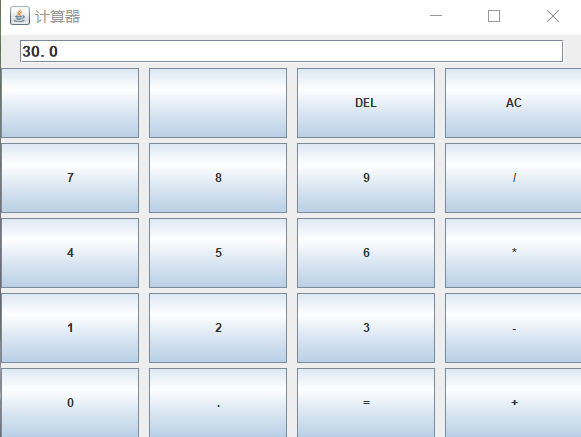
运行后的效果
2、Anroid 计算器app
编程软件:Android studio,教程有1.0 Android基础入门教程 | 菜鸟教程 (runoob.com)。相比于windows上的布局是直接在xml里设置的,会舒服很多。布局的计算器代码我是照着菜鸟教程上的修改的,代码如下:
<?xml version="1.0" encoding="utf-8"?>
<androidx.constraintlayout.widget.ConstraintLayout xmlns:android="http://schemas.android.com/apk/res/android"
    xmlns:app="http://schemas.android.com/apk/res-auto"
    xmlns:tools="http://schemas.android.com/tools"
    android:layout_width="match_parent"
    android:layout_height="match_parent"
    tools:context=".MainActivity">

    <GridLayout
        android:id="@+id/GridLayout1"
        android:layout_width="wrap_content"
        android:layout_height="wrap_content"
        android:columnCount="4"
        android:orientation="horizontal"
        android:rowCount="6"
        app:layout_constraintStart_toStartOf="parent"
        app:layout_constraintTop_toTopOf="parent">

        <TextView
            android:layout_height="78dp"
            android:layout_columnSpan="4"
            android:layout_gravity="fill"
            android:layout_marginLeft="5dp"
            android:layout_marginRight="5dp"
            android:background="#FFCCCC"
            android:text="0"
            android:id="@+id/txv"
            android:textSize="50sp" />


        <Button
            android:layout_columnSpan="2"
            android:layout_gravity="fill"
            android:id="@+id/DEL"
            android:text="DEL" />

        <Button
            android:layout_columnSpan="2"
            android:layout_gravity="fill"
            android:id="@+id/AC"
            android:text="AC" />

        <Button
            android:text="+"
            android:id="@+id/plus"
            />

        <Button android:text="1"
            android:id="@+id/one"/>

        <Button android:text="2"
            android:id="@+id/two"/>

        <Button android:text="3"
            android:id="@+id/three"/>

        <Button android:text="-"
            android:id="@+id/minus"/>

        <Button android:text="4"
            android:id="@+id/four"/>

        <Button android:text="5"
            android:id="@+id/five"/>

        <Button android:text="6"
            android:id="@+id/six"/>

        <Button android:text="*"
            android:id="@+id/multiply"/>

        <Button android:text="7"
            android:id="@+id/seven"/>

        <Button android:text="8"
            android:id="@+id/eight"/>

        <Button android:text="9"
            android:id="@+id/nine" />

        <Button
            android:layout_width="wrap_content"
            android:text="/"
            android:id="@+id/divide"/>

        <Button
            android:layout_width="wrap_content"
            android:text="."
            android:id="@+id/point"/>

        <Button android:text="0"
            android:id="@+id/zero"/>

        <Button android:text="="
            android:id="@+id/equals"/>

    </GridLayout>

</androidx.constraintlayout.widget.ConstraintLayout>
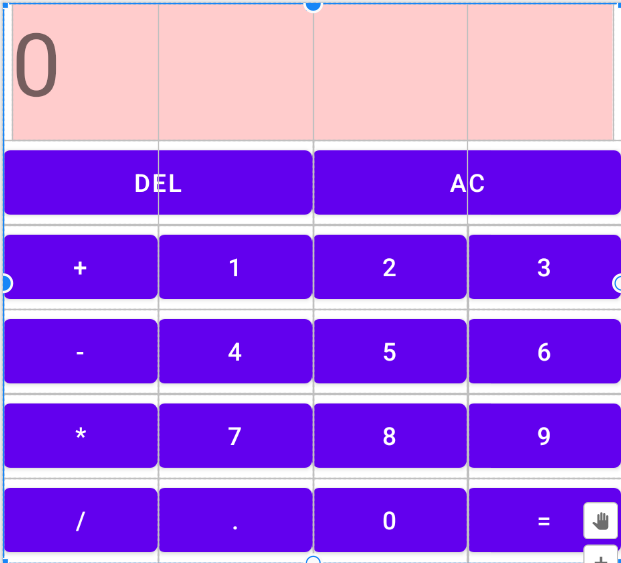
计算器布局效果
然后就是java的代码了,与之前类似,搭好监听数据处理就行。这里需要注意findViewById必须在onCreate之后使用,不然直接keeps stopping怎么找也找不到原因……java部分的代码如下:
package com.example.myapplication02;

import android.os.Bundle;
import android.view.View;
import android.view.View.OnClickListener;
import android.widget.Button;
import android.app.Activity;
import android.widget.TextView;
import android.widget.EditText;

public class MainActivity extends Activity {
    StringBuilder sb = new StringBuilder();
    int j = 0,  sy = 0,equal=0,point=1;
    //j作为符号判断,sy作为计算时的符号判断,equal作为等于号判断
    double sum = 0;
    double num1 = 0, num2, num3;
    String[] num = { "1", "2", "3", "4", "5", "6", "7", "8", "9", "0" };
    Button[] button=new Button[18];
    Integer[] id= new Integer[]{ R.id.one, R.id.two, R.id.three, R.id.four, R.id.five,
            R.id.six, R.id.seven, R.id.eight, R.id.nine, R.id.zero,
            R.id.point, R.id.plus, R.id.minus, R.id.multiply,
            R.id.divide, R.id.equals, R.id.DEL, R.id.AC};
    @Override
    protected void onCreate(Bundle savedInstanceState) {
        super.onCreate(savedInstanceState);
        setContentView(R.layout.activity_main);
        for(int i=0;i<18;i++){
            //对每个按钮设置监听
            button[i]=  findViewById(id[i]);
            button[i].setOnClickListener(new BtnClickListener());
        }
    }
    class BtnClickListener implements View.OnClickListener
    {
        @Override
        public void onClick(View v) {
            TextView text= findViewById(R.id.txv);
            Integer name=v.getId();
            for (int i = 0; i < 10; i++) {
                if (name.equals(id[i])) {
                    if (equal == 1) {
                        //增加equal参数判断上一个按钮是不是等号,满足时重置StringBuilder
                        sb = new StringBuilder();
                        point=1;
                        equal = 0;
                    }
                    sb.append(num[i]);
                    text.setText(sb.toString());
                    if (j != 0) {
                        sy = j;
                        j = 0;
                    }
                    break;
                }
            }
            //当字符为空且符号为加减乘除DEL中任意一个时
            if (!(sb.length() > 0 && !"null".equals(sb.toString())
                    && !"".equals(sb.toString()))){
                for (int i = 11; i < 17; i++){
                    if (name.equals(id[i])) {
                        name=(Integer)R.id.AC;
                        break;}
                }
            }
            //当只有小数点且输入运算符时
            if (".".equals(sb.toString()))
                for (int i = 11; i < 15; i++){
                    if (name.equals(id[i])) {
                        name=(Integer)R.id.AC;
                        break;}
                }
            if (name.equals(id[10])) {
                if (!sb.toString().contains(".")) {
                    //小数点的判断
                    sb.append(".");
                    text.setText(sb.toString());
                }
            }
            //对结果显示整数还是小数的判断
            if(sb.toString().contains(".")) point=0;
            for (int i = 11; i < 15; i++) {
                if (j == 0 && name.equals(id[i]) && sy != 0) {
                    //判断:当第三次及以上按下符号键,且每两符号之间输入过数字,计算前两个运算的结果储存为num1
                    num3 = Double.parseDouble(sb.toString());
                    if (sy == 1)
                        sum = num1 + num3;
                    if (sy == 2)
                        sum = num1 - num3;
                    if (sy == 3)
                        sum = num1 * num3;
                    if (sy == 4) {
                        if (num3 == 0) {
                            //处理多次计算时除数为0的情况:直接AC重置
                            name=(Integer)R.id.AC;
                        } else {
                            sum = num1 / num3;
                        };
                    }
                    sb = new StringBuilder();
                    if(point==1&&sy!=4) sb.append((int)sum);
                    else sb.append(sum);
                    break;
                }
            }
            if (name.equals(id[11])) {
                //加
                equal = 0;
                if (j == 0) {
                    j = 1;
                    num1 = Double.parseDouble(sb.toString());
                    sb = new StringBuilder();
                    text.setText("+");
                } else {
                    j = 1;
                    text.setText("+");
                }
            }
            if (name.equals(id[12])) {
                //减
                equal = 0;
                if (j == 0) {
                    j = 2;
                    num1 = Double.parseDouble(sb.toString());
                    sb = new StringBuilder();
                    text.setText("-");
                } else {
                    j = 2;
                    text.setText("-");
                }
            }
            if (name.equals(id[13])) {
                //乘
                equal = 0;
                if (j == 0) {
                    j = 3;
                    num1 = Double.parseDouble(sb.toString());
                    sb = new StringBuilder();
                    text.setText("*");
                } else {
                    j = 3;
                    text.setText("*");
                }
            }
            if (name.equals(id[14])) {
                //除
                equal = 0;
                if (j == 0) {
                    j = 4;
                    num1 = Double.parseDouble(sb.toString());
                    sb = new StringBuilder();
                    text.setText("/");
                } else {
                    j = 4;
                    text.setText("/");
                }
            }
            if (name.equals(id[15])) {
                num2 = Double.parseDouble(sb.toString());
                sb = new StringBuilder();
                //等于时根据sy判断运算符号
                if (sy == 0) {
                    sum = num1 + num2;
                    sb.append(sum);
                    text.setText(sb.toString());
                } else if (sy == 1) {
                    sum = num1 + num2;
                    sb.append(sum);
                    text.setText(sb.toString());
                } else if (sy == 2) {
                    sum = num1 - num2;
                    sb.append(sum);
                    text.setText(sb.toString());
                } else if (sy == 3) {
                    sum = num1 * num2;
                    sb.append(sum);
                    text.setText(sb.toString());
                } else if (sy == 4) {
                    if (num2 == 0) {
                        //当除数为零时的处理
                        sb.append("error");
                        text.setText(sb.toString());
                        sb = new StringBuilder();
                    } else {
                        sum = num1 / num2;
                        sb.append(sum);
                        text.setText(sb.toString()); }
                }
                //eaual变为1,其余参数重置
                if(point==1&&sy!=4) {
                    sb = new StringBuilder();
                    sb.append((int)sum);
                    text.setText(sb.toString());
                }
                j = 0;
                sy = 0;
                num1 = 0;
                num2 = 0;
                sum = 0;
                equal=1;
            }
            if (name.equals(id[17])) {
                //AC时重置所有参数
                sb = new StringBuilder();
                j = 0;
                sy = 0;
                sum = 0;
                num1 = 0;
                num2 = 0;
                equal = 0;
                point=1;
                text.setText("0");
            }
            if (name.equals(id[16])) {
                if (j != 0) {
                    j = 0;
                    sb.append(num1);
                    text.setText(sb.toString());
                }if (j == 0) {
                    sb.deleteCharAt(sb.length() - 1);
                    text.setText(sb.toString()); }
            }
        }
    }
}
最后参考(25条消息) Android Studio 打包APK(详细版)_初学者-Study的博客-CSDN博客_安卓打包apk将程序打包成apk,一个简易的计算器就完成了~
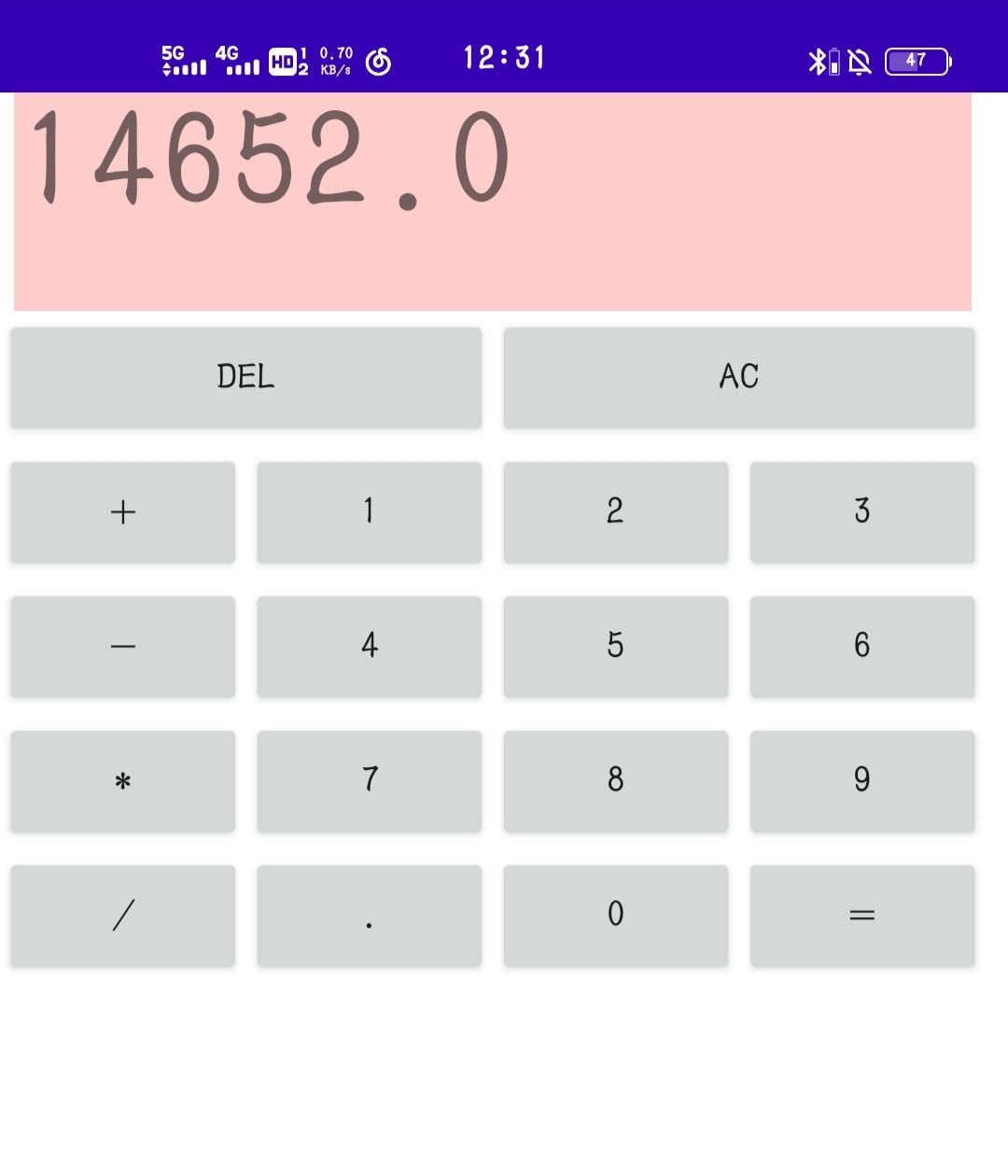
app运行效果
目前来说计算器还有不少问题,在一些按键之后会出现闪退之类……等之后有时间再修改一下。

 浙公网安备 33010602011771号