


展示PNG动画精灵
首先,我为动画精灵创建一个类
1: public class AnimatedSprite
2: {
3: Point _frameSize;
4: int _currentFrame;
5: private readonly int _frame = 4;
6: private readonly Texture2D _sprite;
7: public AnimatedSprite(Texture2D texture, int frame)
8: {
9: _frameSize = new Point(texture.Width/frame, texture.Height);
10: _frame = frame;
11: _sprite = texture;
12: }
13:
14: public void Update()
15: {
16: _currentFrame = (_currentFrame + 1) % _frame;
17: }
18:
19: public void Draw(SpriteBatch spriteBatch)
20: {
21: spriteBatch.Draw(
22: _sprite,
23: Vector2.Zero,
24: new Rectangle(_currentFrame*_frameSize.X, 0,
25: _frameSize.X, _frameSize.Y
26: ),
27: Color.White, 0,
28: Vector2.Zero, 1,
29: SpriteEffects.None, 0
30: );
31:
32: }
33: }
在页面中进行调用
1: private AnimatedSprite Player { get; set; }
2:
3: protected override void LoadContent()
4: {
5: _spriteBatch = new SpriteBatch(GraphicsDevice);
6: Player = new AnimatedSprite(
7: Content.Load<Texture2D>("Roles\\Ningke\\stand")
8: , 4);
9: TargetElapsedTime = new TimeSpan(0, 0, 0, 0, 125);
10:
11: }
12:
13: protected override void Update(GameTime gameTime)
14: {
15: if (GamePad.GetState(PlayerIndex.One).Buttons.Back == ButtonState.Pressed)
16: this.Exit();
17: KeyboardTemplate(_graphics.ToggleFullScreen, Keys.Enter, Keys.RightAlt);
18: KeyboardTemplate(this.Exit, Keys.F4, Keys.LeftControl);
19: Player.Update();
20: base.Update(gameTime);
21: }
22: protected override void Draw(GameTime gameTime)
23: {
24: GraphicsDevice.Clear(Color.CornflowerBlue);
25: _spriteBatch.Begin();
26: Player.Draw(_spriteBatch);
27: _spriteBatch.End();
28: base.Draw(gameTime);
29: }
即可实现动画精灵效果
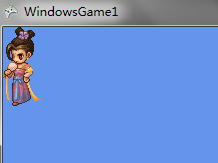
挺好玩的.
-
逍遥地羊啊。。。。

 浙公网安备 33010602011771号