

go学习笔记——Kratos框架
官方文档
|
1
|
https://go-kratos.dev/en/docs/getting-started/start/ |
1.安装Go
参考:mac安装go1.20
2.安装Kratos框架
kratos依赖protobuf grpc等框架,需要先进行安装
|
1
2
3
4
|
brew install grpcbrew install protobufbrew install protoc-gen-gobrew install protoc-gen-go-grpc |
验证
|
1
2
3
|
protoc --versionprotoc-gen-go --versionprotoc-gen-go-grpc --version |
安装kratos框架
|
1
|
go install github.com/go-kratos/kratos/cmd/kratos/v2@latest |
3.创建项目
|
1
2
3
4
|
# 创建项目kratos new helloworld# 也可以指定仓库kratos new helloworld -r https://gitee.com/go-kratos/kratos-layout.git |
编译项目
|
1
2
3
4
5
6
7
8
9
10
11
12
13
14
15
16
17
18
19
20
21
22
23
|
cd helloworld# 安装依赖make init# 生成wire依赖注入go generate ./...# 或者使用makemake generate# 生成bin执行文件go build -o ./bin/ ./...# 或者使用makemake build# 运行./bin/helloworld -conf ./configs或者kratos run# 测试curl 'http://127.0.0.1:8000/helloworld/kratos'{"message":"Hello kratos"}% |
项目结构
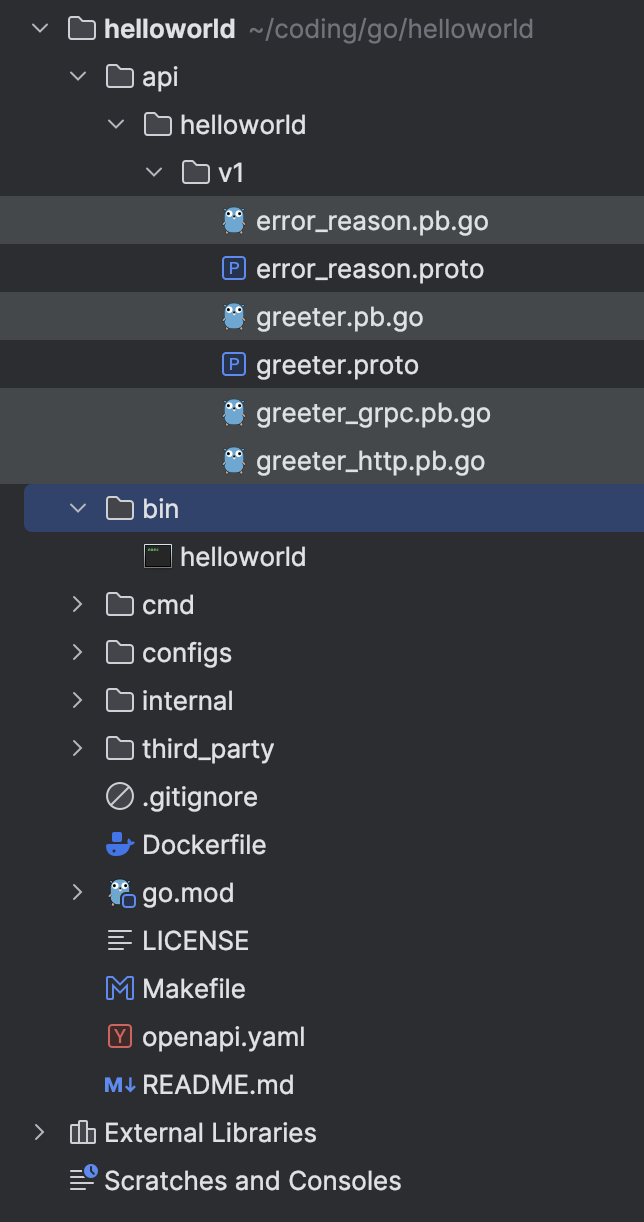
Kratos项目如果想要使用debug模式来运行
需要将run kind从File修改成Directory,并指定Directory为main.go和wire_gen.go所在的目录,否则会报
|
1
2
|
# command-line-arguments./main.go:77:23: undefined: wireApp |
同时还需要额外指定conf文件的路径,否则会报
|
1
|
panic: stat ../../configs: no such file or directory |
配置如下
|
1
|
-conf ./configs/config.yaml |
其中config.yaml的路径是相对于Working directory的,如果有多个config文件,也可以写文件夹,比如
|
1
|
-conf ./configs |

 浙公网安备 33010602011771号