
创建jar包
打包方法
To create an executable jar, we need to add the spring-boot-maven-plugin to our pom.xml. To do so, insert the following lines just below the dependencies section:
<build>
    <finalName>FirstSpringBootDemo</finalName>
    <pluginManagement><!-- lock down plugins versions to avoid using Maven defaults (may be moved to parent pom) -->
      <plugins>
        <plugin>
          <groupId>org.springframework.boot</groupId>
          <artifactId>spring-boot-maven-plugin</artifactId>
          <version>2.2.5.RELEASE</version>
        </plugin>
      </plugins>
    </pluginManagement>
</build>
并将war换成jar:
<groupId>sjtu.chenzf</groupId>
<artifactId>hellospringboot</artifactId>
<version>1.0-SNAPSHOT</version>
<packaging>jar</packaging>
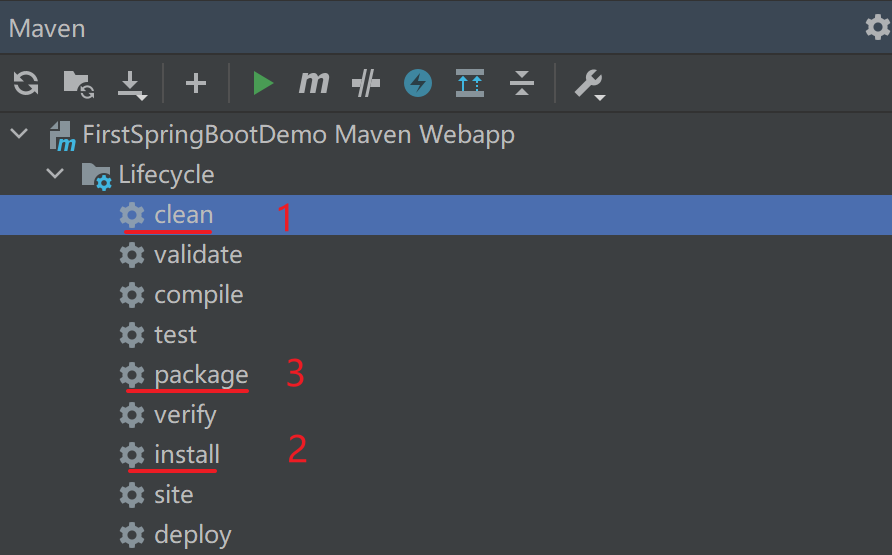
然后使用Maven Projects里Lifecycle中package进行打包:

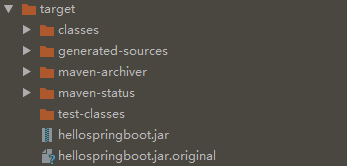
在target中可以找到打包完成后的文件:
基于jar包运行应用
在Windows环境下使用terminal:
D:\MarkdownFiles\SpringBoot\SpringBootDemo\Demo1\target>java -jar hellospringboot.jar
可能出现的问题:参考链接
D:\Learning\SpringBoot\SpringBootProject\FirstSpringBootDemo\target>java -jar FirstSpringBootDemo.jar
FirstSpringBootDemo.jar中没有主清单属性
在pom中修改build(添加executions部分):
<build>
<finalName>FirstSpringBootDemo</finalName>
  <plugins>
    <plugin>
      <groupId>org.springframework.boot</groupId>
      <artifactId>spring-boot-maven-plugin</artifactId>
      <version>2.3.4.RELEASE</version>
      <executions>
        <execution>
          <goals>
            <goal>repackage</goal>
          </goals>
        </execution>
      </executions>
    </plugin>
  </plugins>
</build>
target文件夹变化:


 浙公网安备 33010602011771号