
JavaScript:运动模型之侧边栏滑入滑出
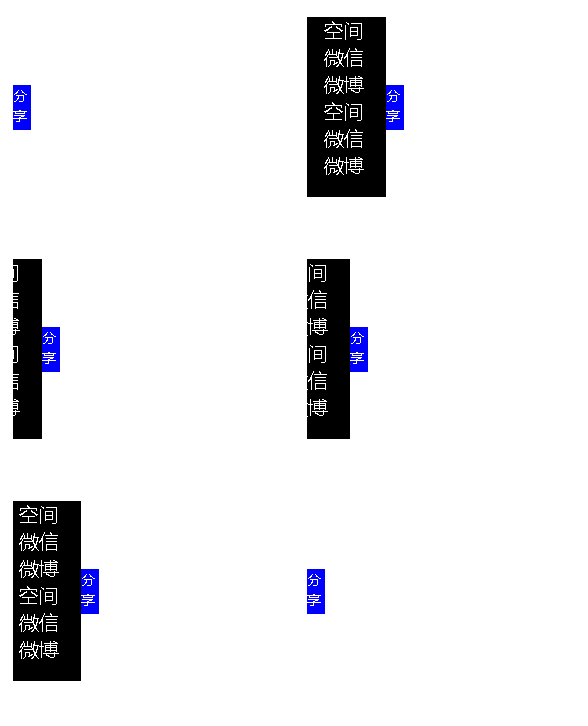
侧边栏
结构、样式
<style type="text/css">
	*{margin: 0px;padding: 0px;}
	li{font-size: 22px;}
	#div1{ width: 100px; height: 200px; background-color: black;	position: absolute; left: -100px; top: 200px; color: white;	}
	span{ width: 20px;height: 50px;position: absolute;left: 100px;top: 75px;background-color: blue;}
</style>

<div id="div1">
	<li>空间</li>
	<li>微信</li>
	<li>微博</li>
	<li>空间</li>
	<li>微信</li>
	<li>微博</li>
	<span id="span1">分<br>享</span>
</div>
滑动事件
	window.onload = function(){
		var oDiv = document.getElementById('div1');

		oDiv.onmouseover = function(){
			startMove(0);
		}
		oDiv.onmouseout = function(){
			startMove(-100);
		}
	};
滑动事件函数
var timer = null;
//target表示目标坐标位置,鼠标移入时,left逐渐增加到0
//鼠标移出时,left逐渐减小到-100
//target与div宽度有关
function startMove(target){
	var oDiv = document.getElementById('div1');
	var speed = 4;
	if(target>=0){
		speed = 4;
	}
	else{
		speed = -4;
	}
	clearInterval(timer);
	timer = setInterval(function(){
		if (oDiv.offsetLeft == target) {
			clearInterval(timer);
		} else {
			oDiv.style.left = oDiv.offsetLeft+speed+'px';
		}
	},30);
}
完整示例代码
<!DOCTYPE html>
<html>
<head>
	<title>侧边栏</title>
<style type="text/css">
	*{margin: 0px;padding: 0px;}
	li{font-size: 22px;}
	#div1{
		width: 100px;
		height: 200px;
		background-color: black;
		position: absolute;
		left: -100px;
		top: 200px;
		color: white;
	}
	span{
		width: 20px;height: 50px;position: absolute;left: 100px;top: 75px;background-color: blue;
	}
</style>
<script type="text/javascript">
	window.onload = function(){
		var oDiv = document.getElementById('div1');

		oDiv.onmouseover = function(){
			startMove(0);
		}
		oDiv.onmouseout = function(){
			startMove(-100);
		}
	};
	var timer = null;
	//target表示目标坐标位置,鼠标移入时,left逐渐增加到0
	//鼠标移出时,left逐渐减小到-100
	//target与div宽度有关
	function startMove(target){
		var oDiv = document.getElementById('div1');
		var speed = 4;
		if(target>=0){
			speed = 4;
		}
		else{
			speed = -4;
		}
		clearInterval(timer);
		timer = setInterval(function(){
			if (oDiv.offsetLeft == target) {
				clearInterval(timer);
			} else {
				oDiv.style.left = oDiv.offsetLeft+speed+'px';
			}
		},30);
	}
</script>
</head>
<body>
<div id="div1">
	<li>空间</li>
	<li>微信</li>
	<li>微博</li>
	<li>空间</li>
	<li>微信</li>
	<li>微博</li>
	<span id="span1">分<br>享</span>
</div>

</body>
</html>
效果
侧边栏

 浙公网安备 33010602011771号