
error: command 'C:\Program Files (x86)\Microsoft Visual Studio\2022\BuildTools\VC\Tools\MSVC\14.44.35207\bin\HostX86\x64\cl.exe' failed with exit code 2 解决方案
安装jenkins时出现了上面的错误 ,按照 ds给的步骤进行修复
这个错误表明在使用 Microsoft Visual C++ 编译器 (cl.exe) 编译 Python 扩展模块时失败了(退出码 2)。以下是详细的解决方案:
1. 核心原因
这是典型的 Python C/C++ 扩展编译失败 问题,常见于:
- 安装需要编译的 Python 包(如
pycrypto,lxml,jenkins等) - 系统缺少必要的 VS Build Tools 组件或环境配置错误
- 代码中存在语法错误或兼容性问题
2. 解决方案
① 安装完整的 VS Build Tools 组件
- 卸载现有 Build Tools
- 从 VS 官方下载页面 重新安装,勾选:
- "C++ 桌面开发"
- "Windows 10/11 SDK"
- "C++ CMake 工具"
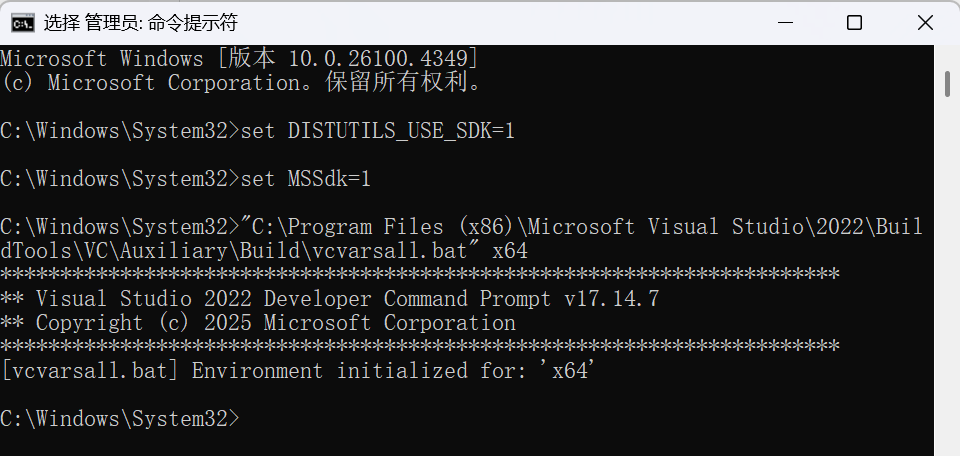
② 设置正确环境变量
在 管理员权限的终端 中运行:
:: 设置 VS 工具链路径
set DISTUTILS_USE_SDK=1
set MSSdk=1

:: 重新激活环境
"C:\Program Files (x86)\Microsoft Visual Studio\2022\BuildTools\VC\Auxiliary\Build\vcvarsall.bat" x64
③ 强制使用二进制轮子(wheel)
跳过源码编译:
pip install --only-binary=:all: 包名
例如 jenkins
pip install --only-binary=:all: jenkins
④ 安装预编译版本
pip install 包名 --global-option="--no-compile"
3. 分步诊断
步骤 1:检查编译器是否有效
cl.exe
若报错则说明环境未配置正确。
步骤 2:验证 Python 环境
python -m pip debug --verbose
检查是否显示 VC++ 14.x 兼容标签。
步骤 3:查看完整错误日志
pip install 包名 -vvv > install.log 2>&1
搜索 error C2065, error C2143 等具体编译错误。
4. 常见子错误及修复
| 错误类型 | 解决方案 |
|---|---|
error C2065: 'xxx': undeclared identifier |
升级 setuptools: pip install --upgrade setuptools |
error LNK1104: cannot open file 'python310.lib' |
安装对应 Python 版本的开发头文件 |
fatal error C1083: Cannot open include file: 'stdio.h' |
重装 Windows SDK(通过 VS Installer) |
5. 替代方案
如果问题持续:
1.使用 Conda 环境(自动处理依赖)
conda install 包名
2.改用 Docker:
docker run -it python:3.10 pip install 包名
3.寻找纯 Python 实现的替代包
6. 验证修复
测试编译器工作状态:
# test_compiler.py
from setuptools import setup
from setuptools.dist import Distribution

class BinaryDistribution(Distribution):
    def has_ext_modules(self):
        return True

setup(distclass=BinaryDistribution)
运行:
python setup.py bdist_wheel
通过以上方法,90% 的 VS 编译问题可以解决。如果仍报错,建议:
- 提供完整的错误日志
- 说明您具体安装的包名和版本
- 确认 Python 版本与 VS Build Tools 的匹配性(例如 Python 3.10 需要 VS 2019/2022)
ERROR: Could not find a version that satisfies the requirement jenkins (from versions: none)
1. 错误原因分析
- ❌ 包名错误:PyPI 上没有名为
jenkins的直接可用包。 - ✅ 正确包名:实际维护的包是 python-jenkins(由 Jenkins 官方社区维护)。
2. 立即解决方案
安装正确的包:
1. 错误原因分析
❌ 包名错误:PyPI 上没有名为 jenkins 的直接可用包。
✅ 正确包名:实际维护的包是 python-jenkins(由 Jenkins 官方社区维护)。
2. 立即解决方案
安装正确的包:
声明 欢迎转载,但请保留文章原始出处:) 博客园:https://www.cnblogs.com/chenxiaomeng/
如出现转载未声明 将追究法律责任~谢谢合作

 浙公网安备 33010602011771号