CSS设置选中网页文字时的背景和颜色
在网页中,选中某段文字,默认的显示效果为:

可以看到,选中后文字颜色为白色,背景为蓝色。
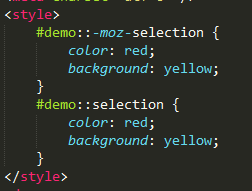
现我们想设置,选中后文字为红色,背景为黄色。需要用到CSS伪类 ::selection。
IE9+、Opera、Google、Chrome、Safari都支持 ::selection 选择器。
Firefox 通过其私有属性 :: moz-selection 支持。
设置CSS为:
页面效果为:

扩展:
::selection 可以应用的属性有:color、background、cursor、outline。
posted on 2018-12-06 14:42 陈田田_921017 阅读(335) 评论(0) 收藏 举报


 浙公网安备 33010602011771号