


Linux,第三篇
Linux,第三篇
yum私有仓库的实现及博客输出
##本地源路径
root@Rocky8 yum.repos.d]#ls /local_iso/
AppStream  BaseOS  EFI  images  isolinux  LICENSE  media.repo  TRANS.TBL
##私有yum(时间原因只做BaseOS的私有yum)
[root@localhost yum.repos.d]# cat Rocky-BaseOS.repo
[baseos]
name=Rocky Linux $releasever - BaseOS
baseurl=http://10.0.0.128/BaseOS/
enabled=1
[root@localhost yum.repos.d]# ls
backup  Rocky-BaseOS.repo
##成功使用私有yum建立yum缓存
[root@localhost yum.repos.d]# yum makecache
Rocky Linux 8 - BaseOS                                                                                                                               27 MB/s | 2.6 MB     00:00
Metadata cache created.
[root@localhost yum.repos.d]# yum repolist
repo id                                                                            repo name
baseos                                                                             Rocky Linux 8 - BaseOS
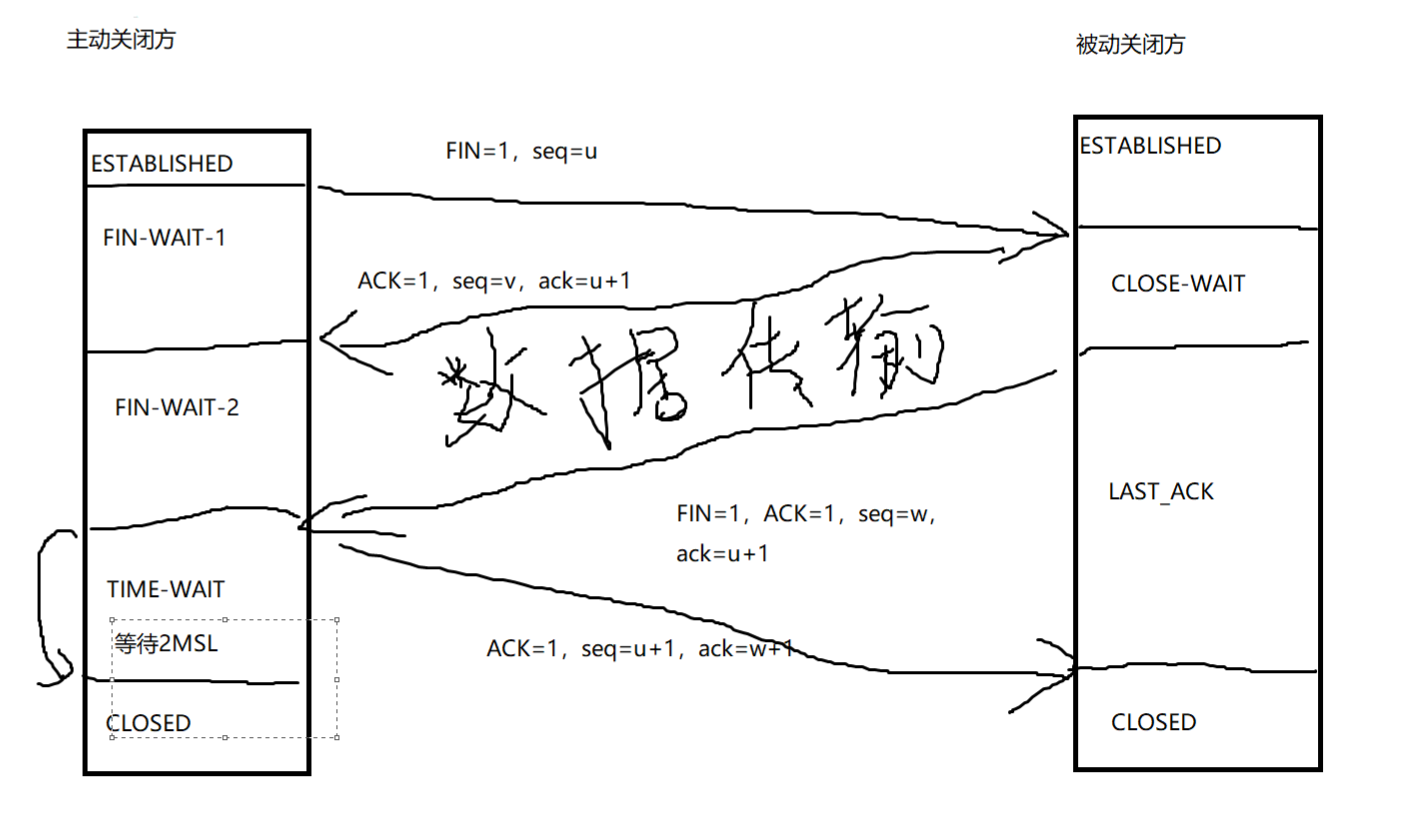
画图 TCP/IP协议和三次握手及四次挥手
TCP/IP三次握手
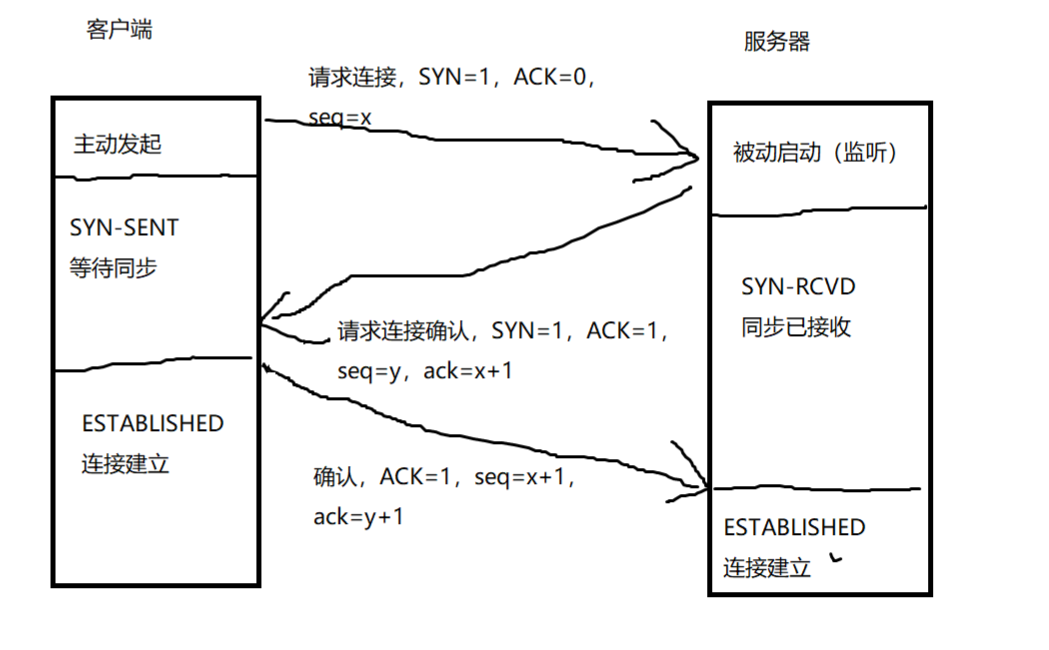
TCP/IP四次挥手
静态配置网卡IP,centos/ubuntu实现
centos配置静态网卡
[root@localhost yum.repos.d]# vi /etc/sysconfig/network-scripts/ifcfg-ens160
TYPE=Ethernet
PROXY_METHOD=none
BROWSER_ONLY=no
BOOTPROTO=static
IPADDR=10.0.0.134
GATEWAY=10.0.0.2
NETMASK=255.255.255.0
DEFROUTE=yes
IPV4_FAILURE_FATAL=no
IPV6INIT=yes
IPV6_AUTOCONF=yes
IPV6_DEFROUTE=yes
IPV6_FAILURE_FATAL=no
IPV6_ADDR_GEN_MODE=eui64
NAME=ens160
UUID=89d65755-7659-43c5-8b44-efe9458faf43
DEVICE=ens160
ONBOOT=yes
 ens160: <BROADCAST,MULTICAST,UP,LOWER_UP> mtu 1500 qdisc fq_codel state UP group default qlen 1000
    link/ether 00:0c:29:8e:8d:2c brd ff:ff:ff:ff:ff:ff
    altname enp3s0
    inet 10.0.0.134/24 brd 10.0.0.255 scope global noprefixroute ens160
       valid_lft forever preferred_lft forever
    inet6 fe80::20c:29ff:fe8e:8d2c/64 scope link noprefixroute
       valid_lft forever preferred_lft forever
ubuntu配置静态网卡
[root@ubuntu2004-01 etc]#vim /etc/netplan/00-installer-config.yaml
# This is the network config written by 'subiquity'
network:
  ethernets:
    ens33:
      dhcp4: false
      addresses: [10.0.0.129/24]
      gateway4: 10.0.0.2
  version: 2
[root@ubuntu2004-01 etc]#ip a
1: lo: <LOOPBACK,UP,LOWER_UP> mtu 65536 qdisc noqueue state UNKNOWN group default qlen 1000
    link/loopback 00:00:00:00:00:00 brd 00:00:00:00:00:00
    inet 127.0.0.1/8 scope host lo
       valid_lft forever preferred_lft forever
    inet6 ::1/128 scope host
       valid_lft forever preferred_lft forever
2: ens33: <BROADCAST,MULTICAST,UP,LOWER_UP> mtu 1500 qdisc fq_codel state UP group default qlen 1000
    link/ether 00:0c:29:14:d2:37 brd ff:ff:ff:ff:ff:ff
    inet 10.0.0.129/24 brd 10.0.0.255 scope global ens33
       valid_lft forever preferred_lft forever
    inet6 fe80::20c:29ff:fe14:d237/64 scope link
       valid_lft forever preferred_lft forever
实现免密登陆脚本, expect登陆远程主机,将生成的密钥写入到目标主机, expect测试远程登陆
脚本实现功能1:安装mysql
[root@Rocky8 ~]#bash select.sh
1) 安装mysql
2) 安装apache
3) 免密钥登陆主机
4) 退出
请选择需要的功能(1-4): 1
Last metadata expiration check: 0:15:35 ago on Tue 25 Jul 2023 03:00:47 PM CST.
Dependencies resolved.
=============================================================================================================================================================
 Package                                    Architecture           Version                                                   Repository                 Size
=============================================================================================================================================================
Installing:
 mysql                                      x86_64                 8.0.32-1.module+el8.8.0+1283+4b88a3a8.0.1                 AppStream                  15 M
Installing dependencies:
 mariadb-connector-c-config                 noarch                 3.1.11-2.el8_3                                            AppStream                  14 k
 mysql-common                               x86_64                 8.0.32-1.module+el8.8.0+1283+4b88a3a8.0.1                 AppStream                 137 k
Enabling module streams:
 mysql                                                             8.0

Transaction Summary
=============================================================================================================================================================
Install  3 Packages

Total size: 15 M
Installed size: 74 M
Downloading Packages:
Running transaction check
Transaction check succeeded.
Running transaction test
Transaction test succeeded.
Running transaction
  Preparing        :                                                                                                                                     1/1
  Installing       : mariadb-connector-c-config-3.1.11-2.el8_3.noarch                                                                                    1/3
  Installing       : mysql-common-8.0.32-1.module+el8.8.0+1283+4b88a3a8.0.1.x86_64                                                                       2/3
  Installing       : mysql-8.0.32-1.module+el8.8.0+1283+4b88a3a8.0.1.x86_64                                                                              3/3
  Running scriptlet: mysql-8.0.32-1.module+el8.8.0+1283+4b88a3a8.0.1.x86_64                                                                              3/3
  Verifying        : mariadb-connector-c-config-3.1.11-2.el8_3.noarch                                                                                    1/3
  Verifying        : mysql-8.0.32-1.module+el8.8.0+1283+4b88a3a8.0.1.x86_64                                                                              2/3
  Verifying        : mysql-common-8.0.32-1.module+el8.8.0+1283+4b88a3a8.0.1.x86_64                                                                       3/3

Installed:
  mariadb-connector-c-config-3.1.11-2.el8_3.noarch                                 mysql-8.0.32-1.module+el8.8.0+1283+4b88a3a8.0.1.x86_64
  mysql-common-8.0.32-1.module+el8.8.0+1283+4b88a3a8.0.1.x86_64
脚本实现功能2:安装apache
[root@Rocky8 ~]#bash select.sh
1) 安装mysql
2) 安装apache
3) 免密钥登陆主机
4) 退出
请选择需要的功能(1-4): 2
Last metadata expiration check: 0:17:54 ago on Tue 25 Jul 2023 03:00:47 PM CST.
Dependencies resolved.
=============================================================================================================================================================
 Package                             Architecture             Version                                                      Repository                   Size
=============================================================================================================================================================
Installing:
 httpd                               x86_64                   2.4.37-56.module+el8.8.0+1284+07ef499e.6                     AppStream                   1.4 M
Installing dependencies:
 apr                                 x86_64                   1.6.3-12.el8                                                 AppStream                   128 k
 apr-util                            x86_64                   1.6.1-6.el8_8.1                                              AppStream                   104 k
 httpd-filesystem                    noarch                   2.4.37-56.module+el8.8.0+1284+07ef499e.6                     AppStream                    42 k
 httpd-tools                         x86_64                   2.4.37-56.module+el8.8.0+1284+07ef499e.6                     AppStream                   109 k
 mod_http2                           x86_64                   1.15.7-8.module+el8.8.0+1284+07ef499e.3                      AppStream                   154 k
 rocky-logos-httpd                   noarch                   86.3-1.el8                                                   BaseOS                       24 k
Installing weak dependencies:
 apr-util-bdb                        x86_64                   1.6.1-6.el8_8.1                                              AppStream                    24 k
 apr-util-openssl                    x86_64                   1.6.1-6.el8_8.1                                              AppStream                    26 k

Transaction Summary
=============================================================================================================================================================
Install  9 Packages

Total size: 2.0 M
Installed size: 5.4 M
Downloading Packages:
Running transaction check
Transaction check succeeded.
Running transaction test
Transaction test succeeded.
Running transaction
  Preparing        :                                                                                                                                     1/1
  Installing       : apr-1.6.3-12.el8.x86_64                                                                                                             1/9
  Running scriptlet: apr-1.6.3-12.el8.x86_64                                                                                                             1/9
  Installing       : apr-util-bdb-1.6.1-6.el8_8.1.x86_64                                                                                                 2/9
  Installing       : apr-util-openssl-1.6.1-6.el8_8.1.x86_64                                                                                             3/9
  Installing       : apr-util-1.6.1-6.el8_8.1.x86_64                                                                                                     4/9
  Running scriptlet: apr-util-1.6.1-6.el8_8.1.x86_64                                                                                                     4/9
  Installing       : httpd-tools-2.4.37-56.module+el8.8.0+1284+07ef499e.6.x86_64                                                                         5/9
  Running scriptlet: httpd-filesystem-2.4.37-56.module+el8.8.0+1284+07ef499e.6.noarch                                                                    6/9
  Installing       : httpd-filesystem-2.4.37-56.module+el8.8.0+1284+07ef499e.6.noarch                                                                    6/9
  Installing       : rocky-logos-httpd-86.3-1.el8.noarch                                                                                                 7/9
  Installing       : mod_http2-1.15.7-8.module+el8.8.0+1284+07ef499e.3.x86_64                                                                            8/9
  Installing       : httpd-2.4.37-56.module+el8.8.0+1284+07ef499e.6.x86_64                                                                               9/9
  Running scriptlet: httpd-2.4.37-56.module+el8.8.0+1284+07ef499e.6.x86_64                                                                               9/9
  Verifying        : rocky-logos-httpd-86.3-1.el8.noarch                                                                                                 1/9
  Verifying        : apr-1.6.3-12.el8.x86_64                                                                                                             2/9
  Verifying        : apr-util-1.6.1-6.el8_8.1.x86_64                                                                                                     3/9
  Verifying        : apr-util-bdb-1.6.1-6.el8_8.1.x86_64                                                                                                 4/9
  Verifying        : apr-util-openssl-1.6.1-6.el8_8.1.x86_64                                                                                             5/9
  Verifying        : httpd-2.4.37-56.module+el8.8.0+1284+07ef499e.6.x86_64                                                                               6/9
  Verifying        : httpd-filesystem-2.4.37-56.module+el8.8.0+1284+07ef499e.6.noarch                                                                    7/9
  Verifying        : httpd-tools-2.4.37-56.module+el8.8.0+1284+07ef499e.6.x86_64                                                                         8/9
  Verifying        : mod_http2-1.15.7-8.module+el8.8.0+1284+07ef499e.3.x86_64                                                                            9/9

Installed:
  apr-1.6.3-12.el8.x86_64                                                    apr-util-1.6.1-6.el8_8.1.x86_64
  apr-util-bdb-1.6.1-6.el8_8.1.x86_64                                        apr-util-openssl-1.6.1-6.el8_8.1.x86_64
  httpd-2.4.37-56.module+el8.8.0+1284+07ef499e.6.x86_64                      httpd-filesystem-2.4.37-56.module+el8.8.0+1284+07ef499e.6.noarch
  httpd-tools-2.4.37-56.module+el8.8.0+1284+07ef499e.6.x86_64                mod_http2-1.15.7-8.module+el8.8.0+1284+07ef499e.3.x86_64
  rocky-logos-httpd-86.3-1.el8.noarch

Complete!
脚本实现功能3:免密登录主机
脚本内容
#!/bin/bash
#设置输出字体颜色
color() {
    RES_COL=60
    MOVE_TO_COL="echo -en \\033[${RES_COL}G"
    SETCOLOR_SUCCESS="echo -en \\033[1;32m"
    SETCOLOR_FAILURE="echo -en \\033[1;31m"
    SETCOLOR_WARNING="echo -en \\033[1;33m"
    SETCOLOR_NORMAL="echo -en \E[0m"
    echo -n "$1"&& $MOVE_TO_COL
    echo -n "["
    if [ $2 = "success" -o $2 = "0" ] ;then
        ${SETCOLOR_SUCCESS}
        echo -n $"  OK  "
    elif [ $2 = "failure" -o $2 = "1"  ] ;then
        ${SETCOLOR_FAILURE}
        echo -n $"FAILED"
    else
        ${SETCOLOR_WARNING}
        echo -n $"WARNING"
    fi
    ${SETCOLOR_NORMAL}
    echo -n "]"
    echo
}

sum=0
install_mysql(){
  yum install -y mysql
}
install_apache(){
  yum install -y httpd
}
ssh_host(){

    execute(){
        password="123456"
        while [ "$1" ] ;do
            expect <<EOF
            set timeout 20
            spawn ssh-copy-id -i /root/.ssh/id_rsa.pub root@$1\n
            expect {
                "yes/no" { send "yes\n";exp_continue }
                "password" { send "$password\n" }
            }
            expect "#" { send "exit\n" }
            expect eof
EOF
            color $1 0
            shift

        done

    }

    while true ;do
    declare -a ip_list
        while true ;do
            read -p "输入IP,q/Q退出:" ip
            [[ $ip =~ ^(q|Q)$  ]]&&break
            [[ $ip =~ ^(([1-9]?[0-9]|1[0-9]{2}|2[0-4][0-9]|25[0-5])\.){3}([1-9]?[0-9]|1[0-9]{2}|2[0-4][0-9]|25[0-5])$ ]]&&ip_list[${#ip_list[*]}]=$ip||{ echo "IP不合法,请重新输入";continue ; }

        done
    execute ${ip_list[*]}
    read -p "是否继续免密登录其他主机,输入q/Q退出,其他任意键继续!: " var
    [[ $var =~ ^q|Q$  ]]&&break
done

}


select_menu(){
PS3="请选择需要的功能(1-4): "
select MENU in 安装mysql 安装apache 免密钥登陆主机 退出;do
 case $REPLY in
 1)install_mysql
  break
 ;;
 2)install_apache
  break
 ;;
 3)ssh_host
 break
 ;;
 4)
 echo "退出"
 break
 ;;
 *)
 echo "输入错误,请重新输入正确序号"
 ;;
 esac
 done
 }
 select_menu
运行脚本前环境,远程10.0.0129、10.0.0.130需要输入密码
[root@Rocky8 ~]#ssh 10.0.0.129
root@10.0.0.129's password:
[root@Rocky8 ~]#ssh 10.0.0.130
root@10.0.0.130's password:
运行脚本,写入免密
spawn ssh-copy-id -i /root/.ssh/id_rsa.pub root@10.0.0.129
/usr/bin/ssh-copy-id: INFO: Source of key(s) to be installed: "/root/.ssh/id_rsa.pub"
/usr/bin/ssh-copy-id: INFO: attempting to log in with the new key(s), to filter out any that are already installed

/usr/bin/ssh-copy-id: WARNING: All keys were skipped because they already exist on the remote system.
		(if you think this is a mistake, you may want to use -f option)

expect: spawn id exp4 not open
    while executing
"expect "#" { send "exit\n" }"
10.0.0.129                                                 [  OK  ]
spawn ssh-copy-id -i /root/.ssh/id_rsa.pub root@10.0.0.130
/usr/bin/ssh-copy-id: INFO: Source of key(s) to be installed: "/root/.ssh/id_rsa.pub"
/usr/bin/ssh-copy-id: INFO: attempting to log in with the new key(s), to filter out any that are already installed

/usr/bin/ssh-copy-id: WARNING: All keys were skipped because they already exist on the remote system.
		(if you think this is a mistake, you may want to use -f option)

expect: spawn id exp4 not open
    while executing
"expect "#" { send "exit\n" }"
10.0.0.130                                                 [  OK  ]
运行脚本后免密
[root@Rocky8 ~]#ssh 10.0.0.129
Welcome to Ubuntu 20.04.6 LTS (GNU/Linux 5.4.0-153-generic x86_64)

 * Documentation:  https://help.ubuntu.com
 * Management:     https://landscape.canonical.com
 * Support:        https://ubuntu.com/advantage

  System information as of Tue 25 Jul 2023 12:07:31 AM UTC

  System load:  0.02               Processes:              211
  Usage of /:   12.4% of 47.93GB   Users logged in:        1
  Memory usage: 16%                IPv4 address for ens33: 10.0.0.129
  Swap usage:   0%

 * Strictly confined Kubernetes makes edge and IoT secure. Learn how MicroK8s
   just raised the bar for easy, resilient and secure K8s cluster deployment.

   https://ubuntu.com/engage/secure-kubernetes-at-the-edge

 * Introducing Expanded Security Maintenance for Applications.
   Receive updates to over 25,000 software packages with your
   Ubuntu Pro subscription. Free for personal use.

     https://ubuntu.com/pro

Expanded Security Maintenance for Applications is not enabled.

47 updates can be applied immediately.
To see these additional updates run: apt list --upgradable

Enable ESM Apps to receive additional future security updates.
See https://ubuntu.com/esm or run: sudo pro status

New release '22.04.2 LTS' available.
Run 'do-release-upgrade' to upgrade to it.


Last login: Mon Jul 24 23:43:22 2023 from 10.0.0.128
[root@ubuntu2004-01 ~]#


-------------------------------------------------------------------------------------
[root@Rocky8 ~]#ssh 10.0.0.130
Last login: Tue Jul 25 15:43:47 2023 from 10.0.0.128
[root@centos7 ~]#^C
[root@centos7 ~]#ip a
1: lo: <LOOPBACK,UP,LOWER_UP> mtu 65536 qdisc noqueue state UNKNOWN group default qlen 1000
    link/loopback 00:00:00:00:00:00 brd 00:00:00:00:00:00
    inet 127.0.0.1/8 scope host lo
       valid_lft forever preferred_lft forever
    inet6 ::1/128 scope host
       valid_lft forever preferred_lft forever
2: ens33: <BROADCAST,MULTICAST,UP,LOWER_UP> mtu 1500 qdisc pfifo_fast state UP group default qlen 1000
    link/ether 00:0c:29:cf:26:49 brd ff:ff:ff:ff:ff:ff
    inet 10.0.0.130/24 brd 10.0.0.255 scope global noprefixroute dynamic ens33
       valid_lft 1141sec preferred_lft 1141sec
    inet6 fe80::2456:6608:51e9:7417/64 scope link noprefixroute
       valid_lft forever preferred_lft forever

 浙公网安备 33010602011771号