图数据库neo4j学习笔记
1.Neo4是非关系型数据库,所以为已存在的节点增加属性可直接通过UPDATE属性来实现,如原节点:
{
"name": "迪丽热巴",
"age": 30,
"sex": "女"
}
Update语句为:
match (u:userinfo)
where id(u) = 12
set u.name = '迪丽热巴',u.age = 32,u.sex = '女',u.personid='222402196201193174';
这样就增加了personid这个属性了,而后通过update语句:
match (u:userinfo) where id(u) = 5 set u.personid='411282197509280661'
就能更新属性了。
2.将数据导入到Neo4j步骤:
将数据导出成cvs文件,例如:

(因无法上传EXCEL,所以将列表贴出来了)
放在某个可以访问的服务里,例如:
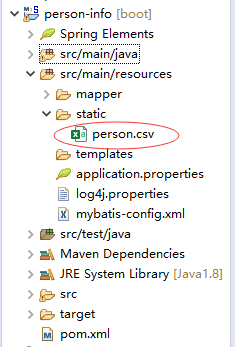
通过http://localhost:8095/person.csv 能下载到这个文件。
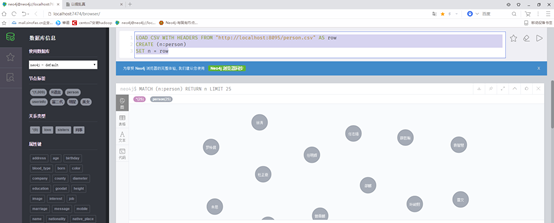
执行
LOAD CSV WITH HEADERS FROM "http://localhost:8095/person.csv" AS row
CREATE (n:person)
SET n = row
导入数据
3.CQL编写:
a.两节点建立关系:
match (a:person),(b:bankcard) where a.personid=b.personid create (a)-[l:帐户]->(b) RETURN a,b
b.删除所有节点的关系:
match (a:person)-[l:帐户]->(b:bankcard) delete l
c.按姓名查询两节点信息:
match (a:person),(b:bankcard) where a.personid=b.personid and a.personname='孟君浩' RETURN a,b
导入案件:
LOAD CSV WITH HEADERS FROM "http://localhost:8080/case.csv" AS row
CREATE (n:case)
SET n = row
导入案件、人员关系:
LOAD CSV WITH HEADERS FROM "http://localhost:8080/case_person.csv" AS row
CREATE (n:case_person)
SET n = row
案件嫌疑人关系:
match (a:case),(b:case_person) where a.caseid=b.caseid create (a)-[l:嫌疑]->(b) RETURN a,b
match (a:person),(b:case_person) where a.personid=b.personid create (a)-[l:涉案]->(b) RETURN a,b
match (a:person),(b:case_person),(c:case) where a.personid=b.personid and b.caseid=c.caseid create (c)-[l:嫌疑人]->(a) return a,c
b.删除所有节点的关系:
match (a: case)-[l: 嫌疑人]->(b: person) delete l
c.查询人员:
match (a:person),(b:case_person),(c:case) where a.personid=b.personid and b.caseid=c.caseid and a.personid='410225197206141869' RETURN a,c
d.导入转帐数据:
LOAD CSV WITH HEADERS FROM "http://localhost:8080/transfer.csv" AS row CREATE (n:transfer) SET n = row
e.建立关系:
match (fp:person),(fb:bankcard),(e:transfer),(tp:person),(tb:bankcard) where fp.personid=fb.personid and fb.cardid=e.from_cardid and e.to_cardid=tb.cardid and tb.personid=tp.personid create (fp)-[l:转帐]->(tp) RETURN fp,tp
f.按身份证号查询所有关系
match (u:person{personid:'654226195912244342'})- [l] -> (u1)
return u
union
match (u)- [l] -> (u1:person{personid:'654226195912244342'})
return u
match (p)- [l] -> (p1:person{personid:'430426199308077079'})
return p,type(l) as relation,p1
g.设置人员标签:
MATCH (a:person) set a:老板:行政违法人员:高危地区:线索移送:反洗钱可疑交易主体:战支嫌疑主体
MATCH (a:bankcard) set a:财务人员:已开户:高危地区:非法集资:反洗钱可疑交易:偷税:前科:漏税
企业数据导入:
LOAD CSV WITH HEADERS FROM "http://localhost:8080/company.csv" AS row CREATE (n:company) SET n = row
LOAD CSV WITH HEADERS FROM "http://localhost:8080/company_person.csv" AS row CREATE (n:company_person) SET n = row
生成关系:
match (c:company),(cp:company_person),(p:person) where cp.personid=p.personid and cp.comid=c.comid and cp.relationship='普通员工' create (p)-[l:普通员工]->(c) RETURN c,p
match (c:company),(cp:company_person),(p:person) where cp.personid=p.personid and cp.comid=c.comid and cp.relationship='法人' create (p)-[l:法人]->(c) RETURN c,p
1.生成关系:
match(b1:bankcard),(t:transfer),(b2:bankcard)
where b1.cardid=t.from_cardid and t.to_cardid=b2.cardid
create (b1)-[:转帐{trandate:t.trandate,charge:t.charge,remark:b1.cardname+'转帐'+b2.cardname}]->(b2)
2. 关系全文搜索
a.创建关系索引
CALL
db.index.fulltext.createRelationshipIndex("relationIndex",["转帐","员工"],["charge","trandate","remark"])
"转帐","员工"
是关系名称
"charge","trandate","remark" 是关系的属性
b.关系全文搜索
CALL db.index.fulltext.queryRelationships("relationIndex", '${key}') YIELD relationship
with startNode(relationship) as startnode,type(relationship) as r,endNode(relationship) as endnode
return startnode,labels(startnode) as startlabel,r,endnode,labels(endnode) as endlabel
skip 0
limit 20
key是关健字
c.删除索引
call db.index.fulltext.drop("relationIndex")
3.节点全文搜索
a.创建节点索引
CALL db.index.fulltext.createNodeIndex("personIndex",["person","case","company"],["personid","personname","mobile","address","work","education","caseid","casename","comid","comname","remark"])
b.关系节点搜索
CALL db.index.fulltext.queryNodes("personIndex", "思") YIELD node return node
c.删除索引
call db.index.fulltext.drop("personIndex")
4.关系数据统计:
示例:按身份证号查询人员出入帐统计
match(b1:bankcard{personid:'${personid}'})-[r:转帐]->(b2:bankcard)
return 'out' as farward,substring(r.trandate,0,7) as month,sum(r.charge) as money,count(1) as count
union
match(b1:bankcard)-[r:转帐]->(b2:bankcard{personid:'${personid}'})
return
'in' as farward,substring(r.trandate,0,7) as month,sum(r.charge) as
money,count(1) as count
5.教训:
a.关系是有自己属性的,关系名1:关系名2:关系名3{属性1:值1,属性2:'值2'......}
b.全文关系搜索依赖于关系的“属性集合”进行搜索。
c.关系属性是可以统计的
人员转帐关系:
match (p1:person),(b1:bankcard)-[r:转帐]->(b2:bankcard),(p2:person)
where (p1.personid=b1.personid) and (b2.personid=p2.personid)
create (p1)-[l:资金往来{inout:'转出'}]->(p2)
6.导入内存不足解决
There is not enough memory to perform the current task. Please try increasing 'dbms.memory.heap.max_size' in the neo4j configuration (normally in 'conf/neo4j.conf' or, if you are using Neo4j Desktop, found through the user interface) or if you are running an embedded installation increase the heap by using '-Xmx' command line flag, and then restart the database.
下面以桌面版为示例:
桌面版->(左侧)数据库->你建的数据库->Settings->
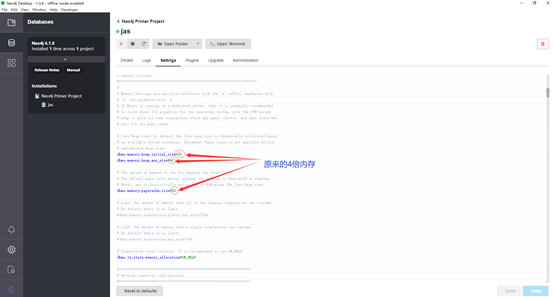
dbms.memory.heap.initial_size=2G
dbms.memory.heap.max_size=4G
dbms.memory.pagecache.size=2G
都改为原来的4位内存
然后点击:apply,重启数据库就行了
LOAD CSV WITH HEADERS FROM "http://localhost:8080/commission.csv" AS row
CREATE (n:commission)
SET n = row
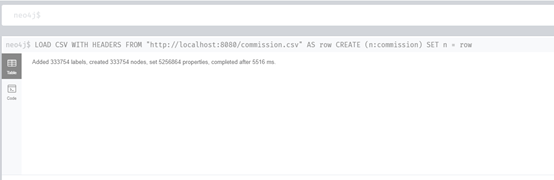
导入333754节点合计5516 ms
后面我会发布springboot+mysql操作的代码,请期待。

 浙公网安备 33010602011771号