
时间格式为yyyymmdd,通过转换为int类型进行比较大小
画面:

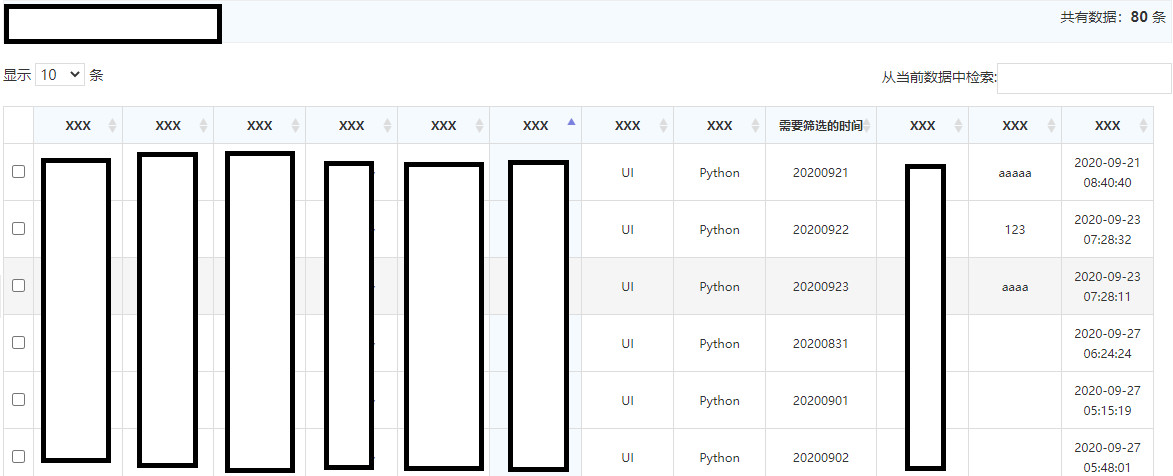
jsp代码:
 1 //日期显示控件,使用h-ui框架
 2
 3 <div class="text-c">日期范围:
 4     <input type="text" onfocus="WdatePicker({ maxDate:'#F{$dp.$D(\'logmax\')||\'%y-%M-%d\'}' })"
 5        id="logmin" name="logmin" class="input-text Wdate"  style="width: 120px;"> -
 6     <input type="text" onfocus="WdatePicker({ minDate:'#F{$dp.$D(\'logmin\')}',maxDate:'%y-%M-%d' })"
 7        id="logmax" name="logmax" class="input-text Wdate" style="width: 120px;">
 8     <input name="" id="searchRecord" class="btn btn-success" type="button" value="搜日报" >
 9     <input id="userid"  type="hidden" name=employeeId value="${sessionScope.loginUser.getUserId()}" />
10 </div>
 1 <table     class="table table-border table-bordered table-bg table-hover table-sort table-responsive">
 2     <thead>
 3         <tr class="text-c">
 4             <td></td>
         .....
 5             <th width="100">需要筛选的时间</th>
 6             <th width="80">XXX</th>
 7             <th width="80">XXX</th>
 8             <th width="80">XXX</th>
 9         </tr>
10     </thead>
11     <tbody id="tbodyId">
12         <tr class="text-c">
         ......
13             <td>${workrecord.workDay}</td>//从后台传过来的值,可以自己填写
14             <td>${workrecord.workTime}</td>
15             <td>${workrecord.remark}</td>
16             <td>${workrecord.createTime}</td>
17         </tr>
18     </tbody>
19 </table>
js代码:
使用
$.fn.dataTable.ext.search.push(
function( settings, data, dataIndex ) {
});具体是什么意思,还不清楚。
 1  $.fn.dataTable.ext.search.push(
 2         function( settings, data, dataIndex ) {
 3           var logmin =parseInt( document.getElementById("logmin").value.replace(/-/g,"")); //获取把格式改为跟你要筛选的数据的格式一样,并转换为int类型
 4           var logmax =parseInt(document.getElementById("logmax").value.replace(/-/g,""));
 5           var search = parseInt(data[9]);  获取列,我的是第九列,根据自己的情况来填写
 6           if ( ( isNaN( logmin ) && isNaN( logmax ) ) ||
 7                   ( isNaN( logmin ) && search<= logmax ) ||
 8                   ( logmin <= search   && isNaN( logmax ) ) ||
 9                   ( logmin <= search   && search <= logmax ) )
10              {
11                  return true;
12              }
13              return false;
14          }
15      );
16      $(document).ready(function() {
17          var table = $('.table').DataTable();
18
19          $('#searchRecord').click( function() { //点击按钮时,触发事件,执行下面的代码
20              table.draw(); //重新绘制表格,不理解的话,底部有说明的官网链接
21              var info = table.page.info();
22              var dataRows = info.recordsTotal; //获取有关分页的基本信息
23              console.log("tbodytr=");
24              console.log(info);
25          } );
26      } );
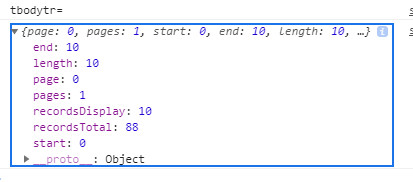
分页的基本信息如图console中显示为:
*这个是关于 draw()的官方说明网址: https://datatables.net/reference/api/draw()

 浙公网安备 33010602011771号