
.Net Framework 安装 Swagger 使用
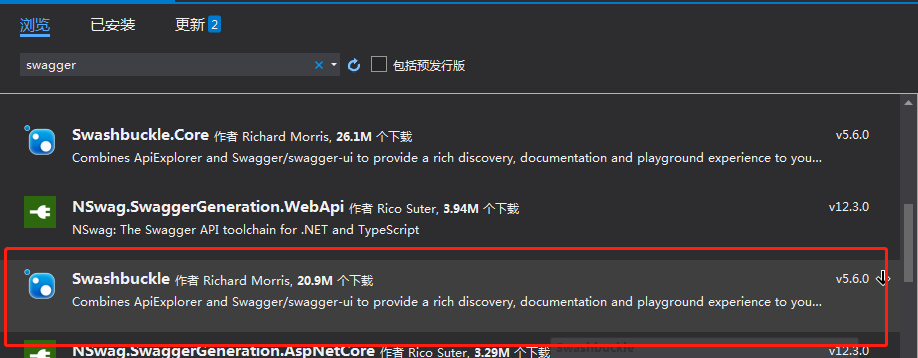
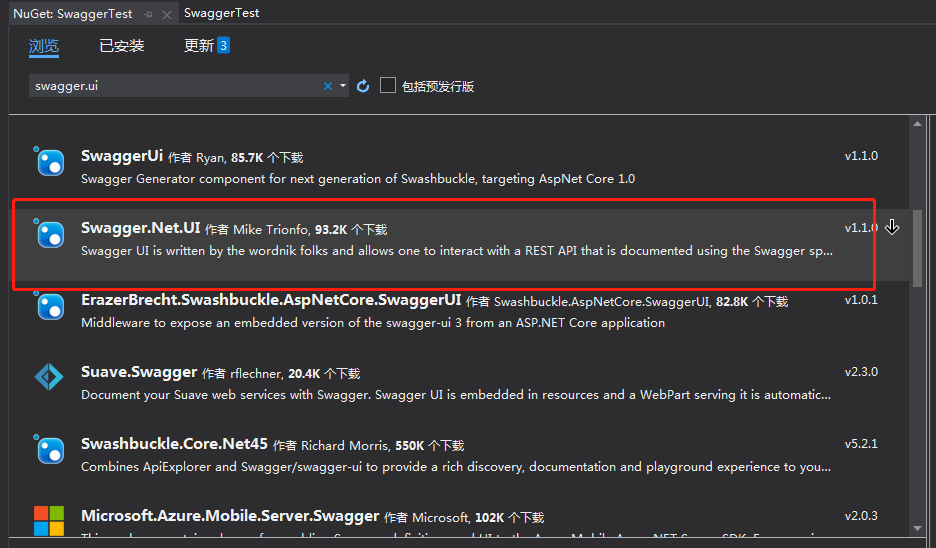
1.先用nuget引用swagger
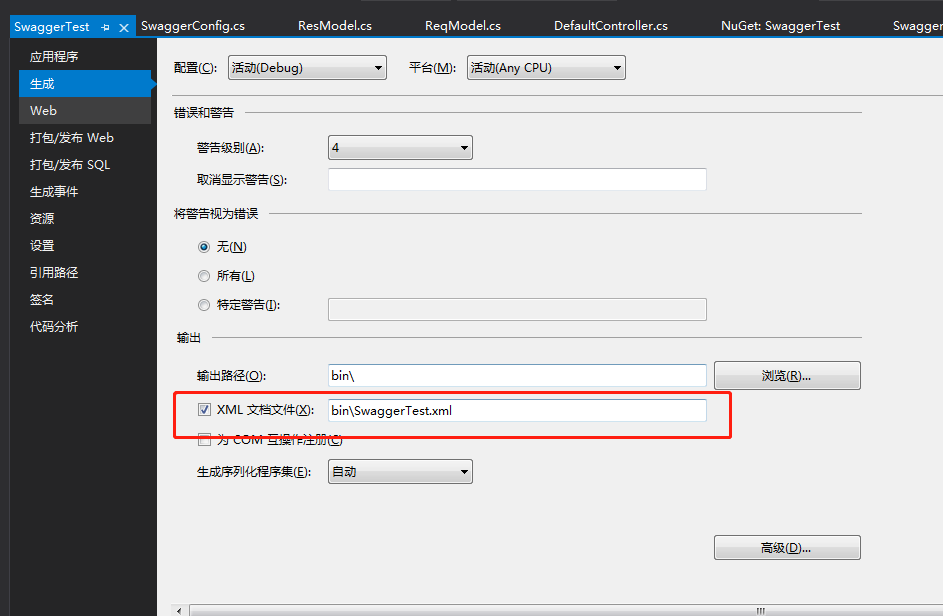
2.配置
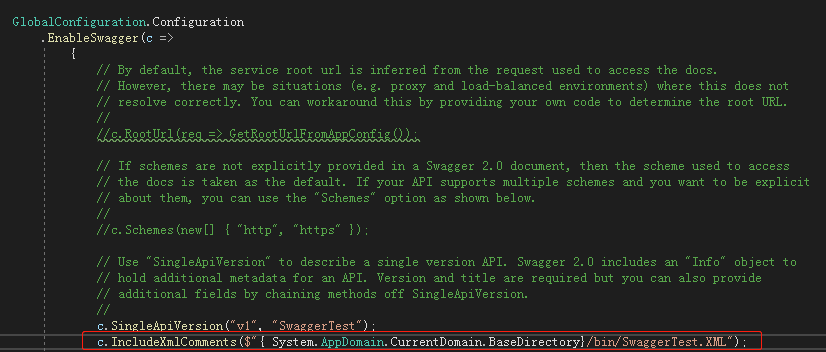
在SwaggerConfig.cs配置
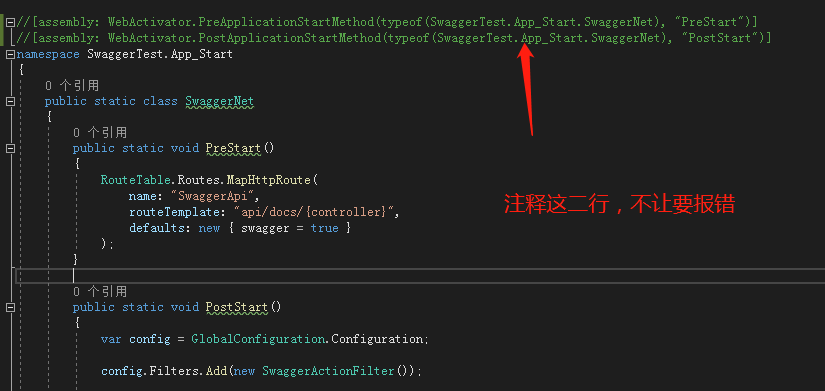
3.基本配置已经好了,直接访问http://localhost:31374/swagger/ui/index
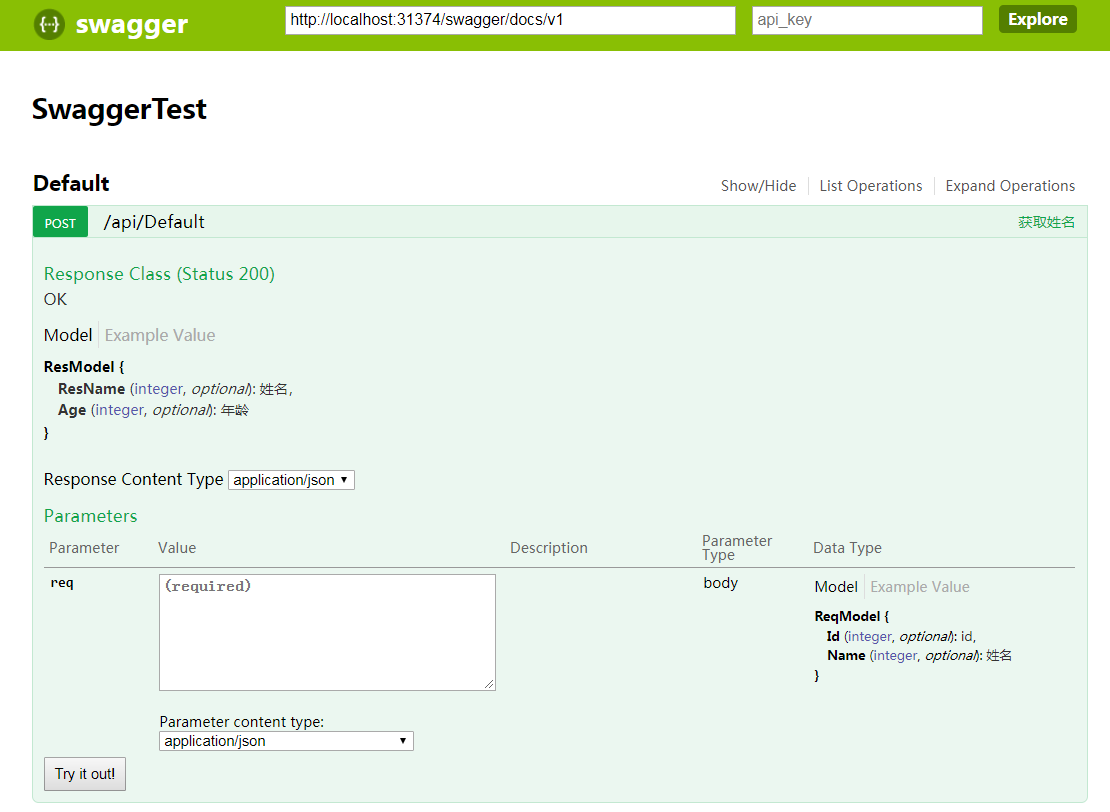
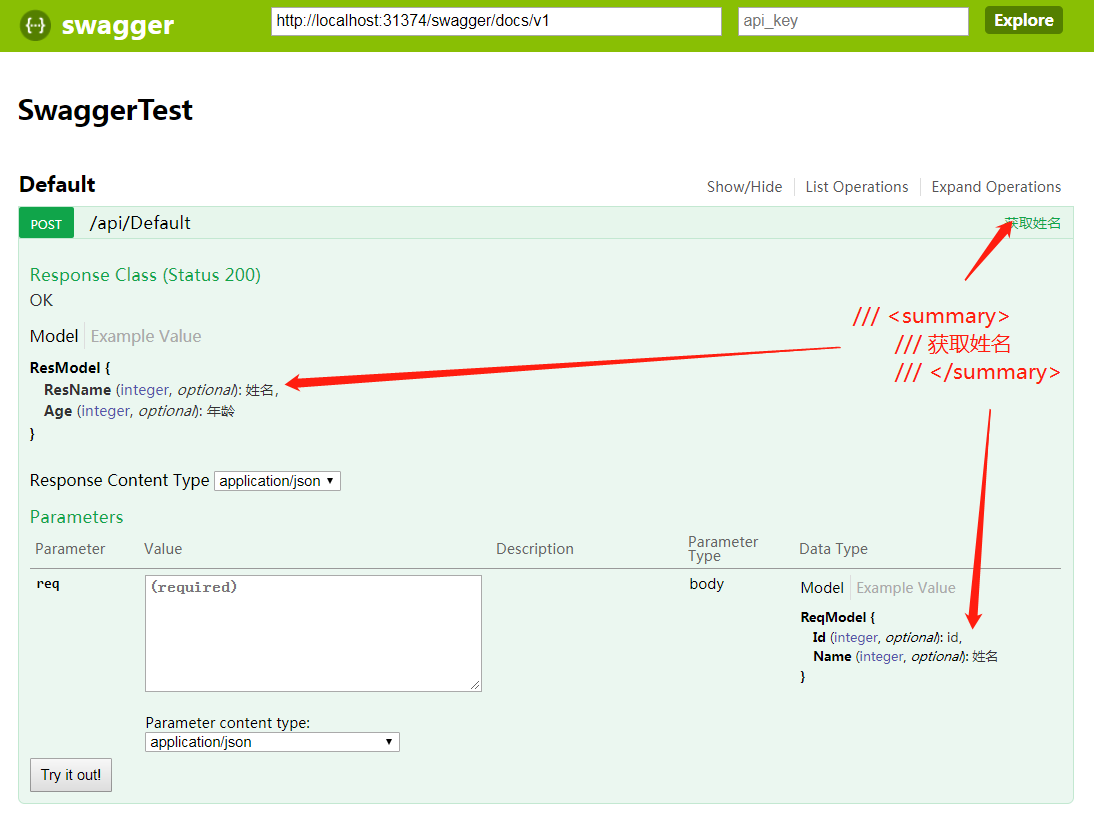
接口入参和返回值的备注,直接在类上面备注就能显示到网页上
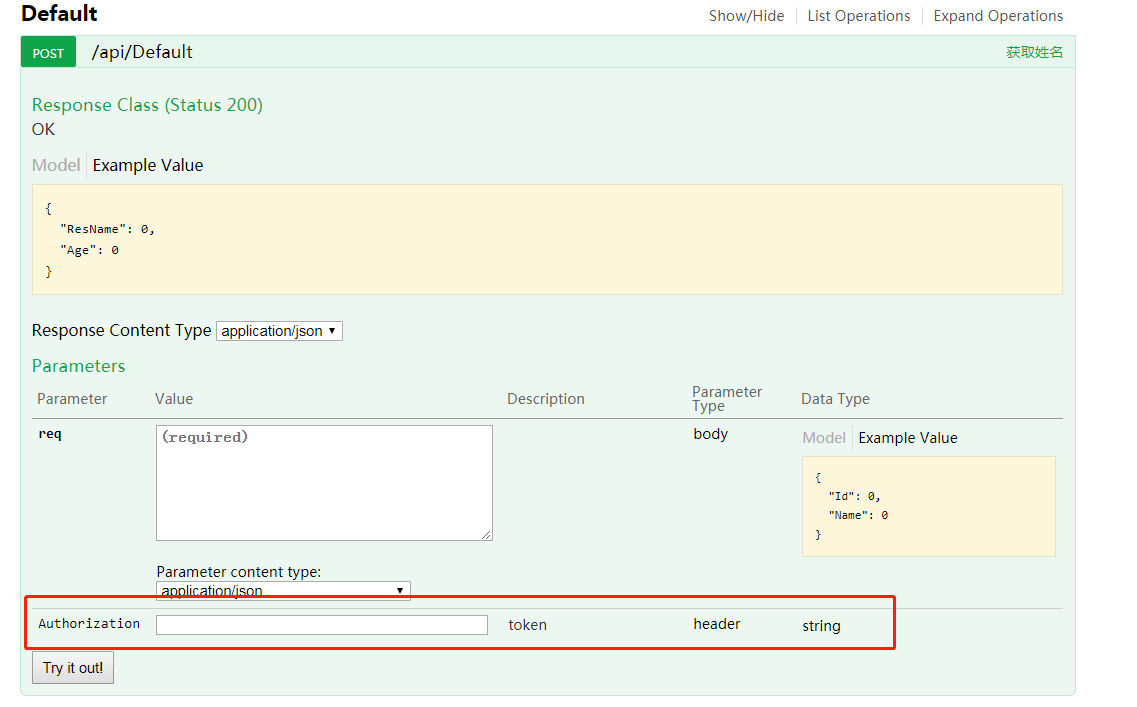
4.如果该接口需要在请求头(Request Headers)加身份验证也可以做到
新建一个HttpAuthHeaderFilter 类继承IOperationFilter
 public class HttpAuthHeaderFilter : IOperationFilter
    {
        public void Apply(Operation operation, SchemaRegistry schemaRegistry, ApiDescription apiDescription)
        {

            operation.parameters = operation.parameters ?? new List<Parameter>();
            var actionAllow = apiDescription.ActionDescriptor.GetCustomAttributes<AllowAnonymousAttribute>().Any();
            var controllAllow = apiDescription.ActionDescriptor.ControllerDescriptor.GetCustomAttributes<AllowAnonymousAttribute>().Any();
            if(!actionAllow&&!controllAllow)//当使用AllowAnonymousAttribute特性时就不显示下面的请求头
                operation.parameters.Add(new Parameter { name = "Authorization", @in = "header", description = "token", required = false, type = "string" });
        }
    }
  public class SwaggerConfig
    {
        public static void Register()
        {
            var thisAssembly = typeof(SwaggerConfig).Assembly;

            GlobalConfiguration.Configuration
                .EnableSwagger(c =>
                    {

                        c.SingleApiVersion("v1", "SwaggerTest");
                        c.IncludeXmlComments($"{ System.AppDomain.CurrentDomain.BaseDirectory}/bin/SwaggerTest.XML");
                        c.OperationFilter<HttpAuthHeaderFilter>();//加http请求头用的

                    })
                .EnableSwaggerUi(c =>
                    {

                    });
        }
    }
5.汉化
新建SwaggerChinese.js 文件,讲文件生成操作改为“嵌入资源” ,在SwaggerConfig.cs文件中配置进去
'use strict';
window.SwaggerTranslator = {
    _words: [],

    translate: function () {
        var $this = this;
        $('[data-sw-translate]').each(function () {
            $(this).html($this._tryTranslate($(this).html()));
            $(this).val($this._tryTranslate($(this).val()));
            $(this).attr('title', $this._tryTranslate($(this).attr('title')));
        });
    },

    setControllerSummary: function () {
        $.ajax({
            type: "get",
            async: true,
            url: $("#input_baseUrl").val(),
            dataType: "json",
            success: function (data) {
                var summaryDict = data.ControllerDesc;
                var id, controllerName, strSummary;
                $("#resources_container .resource").each(function (i, item) {
                    id = $(item).attr("id");
                    if (id) {
                        controllerName = id.substring(9);
                        strSummary = summaryDict[controllerName];
                        if (strSummary) {
                            $(item).children(".heading").children(".options").first().prepend('<li class="controller-summary" title="' + strSummary + '">' + strSummary + '</li>');
                        }
                    }
                });
            }
        });
    },
    _tryTranslate: function (word) {
        return this._words[$.trim(word)] !== undefined ? this._words[$.trim(word)] : word;
    },

    learn: function (wordsMap) {
        this._words = wordsMap;
    }
};


/* jshint quotmark: double */
window.SwaggerTranslator.learn({
    "Warning: Deprecated": "警告:已过时",
    "Implementation Notes": "实现备注",
    "Response Class": "响应类",
    "Status": "状态",
    "Parameters": "参数",
    "Parameter": "参数",
    "Value": "值",
    "Example Value": "示例值",
    "Description": "描述",
    "Parameter Type": "参数类型",
    "Data Type": "数据类型",
    "Response Messages": "响应消息",
    "HTTP Status Code": "HTTP状态码",
    "Reason": "原因",
    "Response Model": "响应模型",
    "Request URL": "请求URL",
    "Response Body": "响应体",
    "Response Code": "响应码",
    "Response Headers": "响应头",
    "Hide Response": "隐藏响应",
    "Headers": "头",
    "Try it out!": "试一下!",
    "Show/Hide": "显示/隐藏",
    "List Operations": "显示操作",
    "Expand Operations": "展开操作",
    "Raw": "原始",
    "can't parse JSON.  Raw result": "无法解析JSON. 原始结果",
    "Model Schema": "模型架构",
    "Model": "模型",
    "apply": "应用",
    "Username": "用户名",
    "Password": "密码",
    "Terms of service": "服务条款",
    "Created by": "创建者",
    "See more at": "查看更多:",
    "Contact the developer": "联系开发者",
    "api version": "api版本",
    "Response Content Type": "响应Content Type",
    "fetching resource": "正在获取资源",
    "fetching resource list": "正在获取资源列表",
    "Explore": "浏览",
    "Show Swagger Petstore Example Apis": "显示 Swagger Petstore 示例 Apis",
    "Can't read from server.  It may not have the appropriate access-control-origin settings.": "无法从服务器读取。可能没有正确设置access-control-origin。",
    "Please specify the protocol for": "请指定协议:",
    "Can't read swagger JSON from": "无法读取swagger JSON于",
    "Finished Loading Resource Information. Rendering Swagger UI": "已加载资源信息。正在渲染Swagger UI",
    "Unable to read api": "无法读取api",
    "from path": "从路径",
    "server returned": "服务器返回"
});
$(function () {
    window.SwaggerTranslator.translate();
    window.SwaggerTranslator.setControllerSummary();
});

public class SwaggerConfig
    {
        public static void Register()
        {
            var thisAssembly = typeof(SwaggerConfig).Assembly;

            GlobalConfiguration.Configuration
                .EnableSwagger(c =>
                    {

                        c.SingleApiVersion("v1", "SwaggerTest");
                        c.IncludeXmlComments($"{ System.AppDomain.CurrentDomain.BaseDirectory}/bin/SwaggerTest.XML");
                        c.OperationFilter<HttpAuthHeaderFilter>();//加http求情头

                    })
                .EnableSwaggerUi(c =>
                    {
                        c.InjectJavaScript(thisAssembly, "SwaggerTest.SwaggerUI.SwaggerChinese.js"); //汉化 (js对应的文件路径)
                    });
        }
    }
汉化成功


 浙公网安备 33010602011771号