正则表达式
注:通过B站观看韩顺平老师的正则表达式专题的学习,本人总结了一下笔记(仅供参考)。ps:韩老师讲得通俗易通:https://www.bilibili.com/video/BV1Eq4y1E79W?p=1
正则表达式
正则表达式:用某种模式去匹配字符串的一个公式
快速入门
    @Test
    public void test01() {
        String content = "1995年,互联网的蓬勃发展给了Oak机会。";

        // 匹配文中所有单词,输出:找到:Oak 找到:IT 找到:Sun
        // Pattern compile = Pattern.compile("[a-zA-Z]+");
        // 匹配文中所有数字,输出:找到:1995
        // Pattern compile = Pattern.compile("[0-9]+");

        // 匹配数字或者单词(正则表达式对象)
        Pattern pattern = Pattern.compile("\\d\\d\\d\\d");
        // 2.创建一个匹配器对象
        Matcher matcher = pattern.matcher(content);
        // 3. 可以循环匹配
        while (matcher.find()) {
            // 匹配内容,文本,放到 m.group(0)
            System.out.println("找到:" + matcher.group(0));
        }
    }
结果:
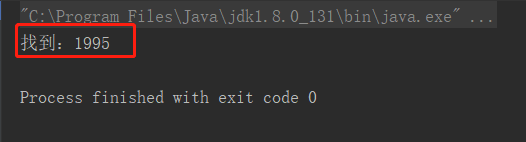
原理剖析1
匹配规则("\d\d\d\d"):查询xxxx年份
    //原理剖析
    @Test
    public void test03() {
        String content = "2000年5月,JDK1.3、JDK1.4和J2SE1.3相继发布,几周后其获得了Apple公司Mac OS X的工业标准的支持。2001年9月24日,J2EE1.3发布。" +
                "2002年2月26日,J2SE1.4发布。自此Java的计算能力有了大幅提升,与J2SE1.3相比,其多了近62%的类和接口。在这些新特性当中,还提供了广泛的XML支持、安全套接字(Socket)支持(通过SSL与TLS协议)、全新的I/OAPI、正则表达式、日志与断言。" +
                "2004年9月30日,J2SE1.5发布,成为Java语言发展史上的又一里程碑。为了表示该版本的重要性,J2SE 1.5更名为Java SE 5.0(内部版本号1.5.0)," +
                "代号为“Tiger”,Tiger包含了从1996年发布1.0版本以来的最重大的更新,其中包括泛型支持、基本类型的自动装箱、改进的循环、枚举类型、" +
                "格式化I/O及可变参数。";

        Pattern compile = Pattern.compile("\\d\\d\\d\\d");
        Matcher matcher = compile.matcher(content);
        // 查找过程:
        // 1. 根据指定的规则,定位满足规则的字符串,比如"2000"
        // 2. 找到后将 子字符串的开始索引 group[0]=0 记录到 matcher 对象的 int[] groups数组中;把该字符串结束的索引+1的值记录到groups[1]中,此时groups[1]=4
        // 3. 同时记录oldLast 的值为 子字符串的结束的 (索引+1)的位置,下次执行find时,就从记录的索引开始匹配
        // 4. 如果matcher.group(i),i超过了范围,就会报索引越界异常,因为 getSubSequence(groups[group * 2], groups[group * 2 + 1]).toString();
        // 5. 继续向下找的时候同理, 找到后将 子字符串的开始索引记录 group[0]=65 到 matcher 对象的 int[] groups数组中;同时记录oldLast 的值为 子字符串的结束的 索引+1的位置值索引为group[1]=69,下次执行find是,就从记录的索引开始匹配
        while (matcher.find()) {
            // 开始匹配group - 源码:
            // public String group(int group) {
            //         if (first < 0)
            //             throw new IllegalStateException("No match found");
            //         if (group < 0 || group > groupCount())
            //             throw new IndexOutOfBoundsException("No group " + group);
            //         if ((groups[group*2] == -1) || (groups[group*2+1] == -1))
            //             return null;
            //         return getSubSequence(groups[group * 2], groups[group * 2 + 1]).toString();
            //     }
            System.out.println("找到:" + matcher.group(0));
        }
    }
总结查询过程:
1.根据上面的字符串的顺序,首先会查询到“2000”,然后会查到“2001”,以此类推
matcher.find()的作用:
当执行matcher.find()时,会查询到2000,会把2000的开始索引和(结束索引加1)记录在group数组中,
oldlast的值主要是记录下次执行时开始的位置
group[0]=1,group[1]=4,oldLast=group[1]=4
debug结果:
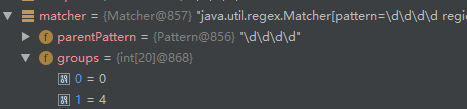
2.第二次会查询到“2001”,此时会根据上次查询的oldLast值开始查,根据源码得知先把group数组清空,再把新的结果记录在group数组中
group[0]=65,group[1]=69,oldLast=group[1]=69
debug结果

3.第三个查询到2002,也以此类推
原理剖析2(分组)
什么是分组?
比如 (\d\d)(\d\d) ,其中表达式中有 () 表示分组,第一个 ()表示第1组,第二个()表示第2组...
-
根据指定的规则,定位满足规则的子字符串(比如“2000”,分组后:(20)(00) )
-
找到后将 子字符串的开始索引 group[0]=0 记录到 matcher 对象的熟悉 int[] groups数组中;
2.1 groups[0] = 0, 把该子字符串的结束的索引+1的值记录到 groups[1] = 4
2.2 记录第1组(20)匹配到的子字符串 groups[2] = 0 groups[3] = 2,注意:groups[2]为子字符串'20'开始索引,groups[3]为子字符串结束索引+1
2.3 记录第2组(00)匹配到的子字符串 groups[4] = 2 groups[5] = 4,注意:groups[4]为子字符串'00'开始索引,groups[5]为子字符串结束索引+1
2.4 如果有更多的分组,同理
-
同时记录 oldLast 的值为 子字符串的结束的 索引+1的值即4,即下次执行find时,就从4开始匹配。
    @Test
    public void test04() {
        String content = "2000年5月,JDK1.3、JDK1.4和J2SE1.3相继发布,几周后其获得了Apple公司Mac OS X的工业标准的支持。2001年9月24日,J2EE1.3发布。" +
                "2002年2月26日,J2SE1.4发布。自此Java的计算能力有了大幅提升,与J2SE1.3相比,其多了近62%的类和接口。在这些新特性当中,还提供了广泛的XML支持、安全套接字(Socket)支持(通过SSL与TLS协议)、全新的I/OAPI、正则表达式、日志与断言。" +
                "2004年9月30日,J2SE1.5发布,成为Java语言发展史上的又一里程碑。为了表示该版本的重要性,J2SE 1.5更名为Java SE 5.0(内部版本号1.5.0)," +
                "代号为“Tiger”,Tiger包含了从1996年发布1.0版本以来的最重大的更新,其中包括泛型支持、基本类型的自动装箱、改进的循环、枚举类型、" +
                "格式化I/O及可变参数。";

        Pattern compile = Pattern.compile("(\\d\\d)(\\d\\d)");
        Matcher matcher = compile.matcher(content);
        // 查找过程:
        // 什么是分组,比如 (\d\d)(\d\d) ,则会功能则表达式中有 () 表示分组,第一个 ()表示第1组,第二个()表示第2组...
        // 1. 根据指定的规则,定位欸满足规则的子字符串(比如(20)(00))
        // 2. 找到后将 子字符串的开始索引 0 记录到 matcher 对象的熟悉 int[] groups数组中;
        // *  2.1 groups[0] = 0, 把该子字符串的结束的索引+1的值记录到 groups[1] = 4
        // *  2.2 记录1组()匹配到的子字符串 groups[2] = 0 groups[3] = 2
        // *  2.3 记录2组()匹配到的子字符串 groups[4] = 2 groups[5] = 4
        // *  2.4 如果有更多的分组,同理
        // 3. 同时记录 oldLast 的值为 子字符串的结束的 索引+1的值即4,即下次执行find时,就从4开始匹配。
        while (matcher.find()) {
            // 开始匹配group - 源码:
            // public String group(int group) {
            //         if (first < 0)
            //             throw new IllegalStateException("No match found");
            //         if (group < 0 || group > groupCount())
            //             throw new IndexOutOfBoundsException("No group " + group);
            //         if ((groups[group*2] == -1) || (groups[group*2+1] == -1))
            //             return null;
            //         return getSubSequence(groups[group * 2], groups[group * 2 + 1]).toString();
            //     }
            System.out.println("找到:" + matcher.group(0)); // 2000
            System.out.println("找到:" + matcher.group(1)); // 2
            System.out.println("找到:" + matcher.group(2)); // 000
            // System.out.println("找到:" + matcher.group(3)); 索引越界
        }
    }
元字符
要想灵活使用正则表达式,必须了解其中各种元字符的功能,元字符从功能上分为六大类:
限定符,选择匹配符 ,分组组合和反向引用符 ,定位符 ,特殊字符 ,字符匹配符
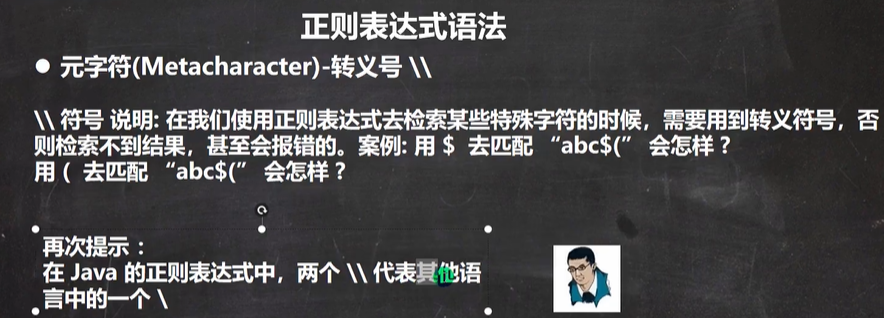
限定符
作用:用于指定其前面的字符和组合项连续出现多少次
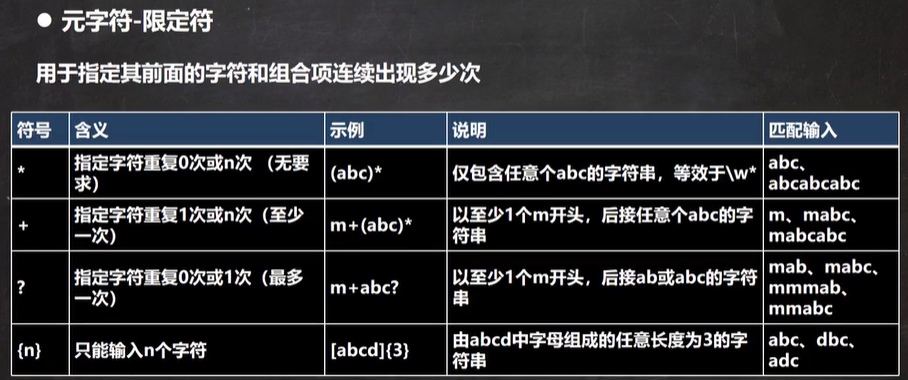

@Test
public void test01(){
    String content = "111111111aaahello";
    //String regex = "a{3}" ;//表示匹配 aaa
  //  String regex = "1{4}" ;  //匹配 1111
 //   String regex = "\\d{2}"; //表示匹配连续俩位的任意数字
    //  a{3,5}  表示匹配 至少3个a,之多5个a  aaa  aaaa aaaaa
    //注意,java匹配默认贪婪匹配,优先匹配长度较长的字符串 aaaaa-->aaaa-->aaa
    String regex = "";
    Pattern pattern = Pattern.compile(regex);
    Matcher matcher = pattern.matcher(content);
    while (matcher.find()){
        System.out.println("找到:"+matcher.group(0));
    }
}
注意:java匹配默认贪婪匹配,优先匹配长度较长的字符串 例如:aaaaa-->aaaa-->aaa
示例:至少以一个数字开头,后接任意个大小写字母
    @Test
    public void test02(){
        String content = "123abc";
//        至少以一个数字开头,后接任意个大小写字母
        String regex = "^[0-9]+[a-zA-Z]*";
        Pattern pattern = Pattern.compile(regex);
        Matcher matcher = pattern.matcher(content);
        while (matcher.find()){
            System.out.println("找到:"+matcher.group(0));
        }
    }
选择匹配符
符号 |
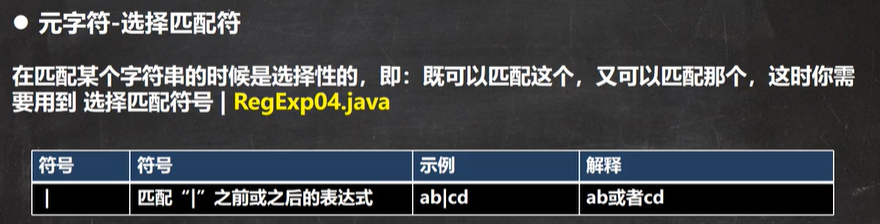
@Test
public void test01(){
    String content = "chenguanqin 陈 晨晨";
    String regex = "chen|陈|晨";//匹配字符串 "abc" (不区分区分大小写)
    Pattern pattern = Pattern.compile(regex);
    Matcher matcher = pattern.matcher(content);
    while (matcher.find()){
        System.out.println("找到:"+matcher.group(0));
    }
}
结果:
找到:chen
找到:陈
找到:晨
找到:晨
分组组合
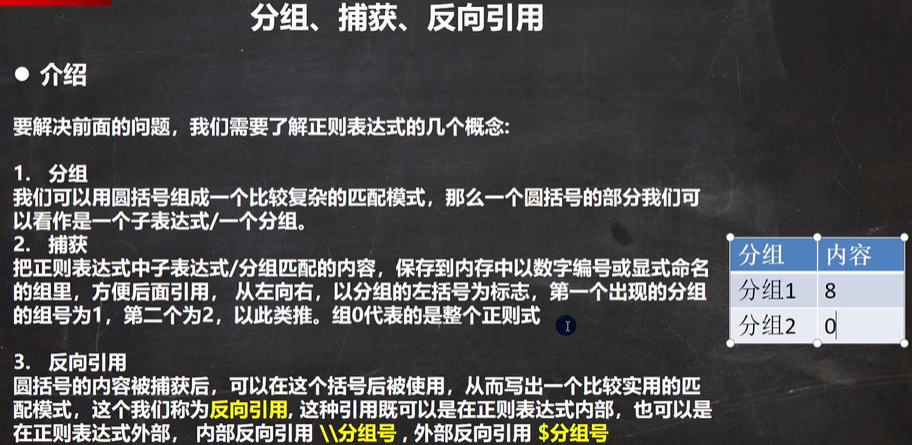
什么是捕获?把符合正则规则的子字符串记录在group数组中
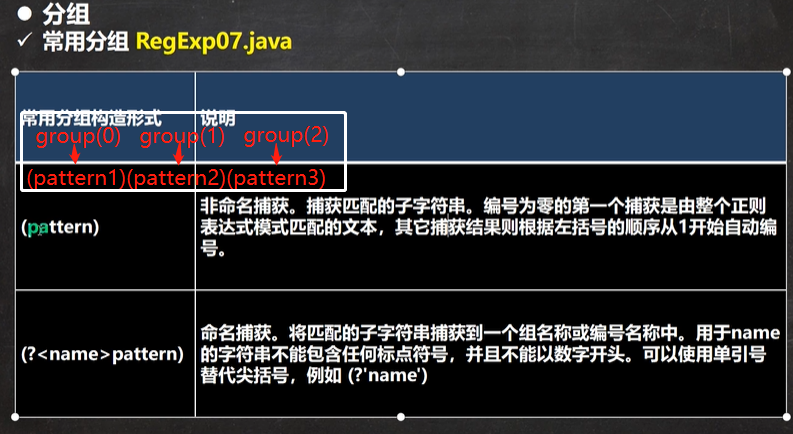
示例:非命名分组 ,匹配规则:(\d\d)(\d\d)
    @Test
    public void test05(){
        String content = "abc1996aa2000";
//非命名组匹配
        String regex = "(\\d\\d)(\\d\\d)";
        Pattern pattern = Pattern.compile(regex);
        Matcher matcher = pattern.matcher(content);
        while (matcher.find()){
            System.out.println("找到:"+matcher.group(0));
            System.out.println("找到:"+matcher.group(1));
        }
    }
结果
找到:1996
找到:19
找到:2000
找到:20
示例,命名分组,格式:(?<组名>匹配规则),例如 String regex = "(?<g1>\d\d)(?<g2>\d\d)",输出结果时,既可以写group(1),也可以写group(组名) ---》也就是group(1)=group("g1"),gruop(2)=group("g2")
    @Test
    public void test06(){
        String content = "abc1996aa2000";
//命名组匹配:(?<组名>匹配规则)
        String regex = "(?<g1>\\d\\d)(?<g2>\\d\\d)";
        Pattern pattern = Pattern.compile(regex);
        Matcher matcher = pattern.matcher(content);
        while (matcher.find()){
            System.out.println("找到:"+matcher.group(0)); //输出1996
            System.out.println("找到:"+matcher.group(1));//输出19
            System.out.println("找到g1组:"+matcher.group("g1"));//输出19
            System.out.println("找到:"+matcher.group(2));//输出96
            System.out.println("找到g2组:"+matcher.group("g2"));//输出96

        }
    }
非捕获:把符合正则规则的子字符串没有记录在groups数组中
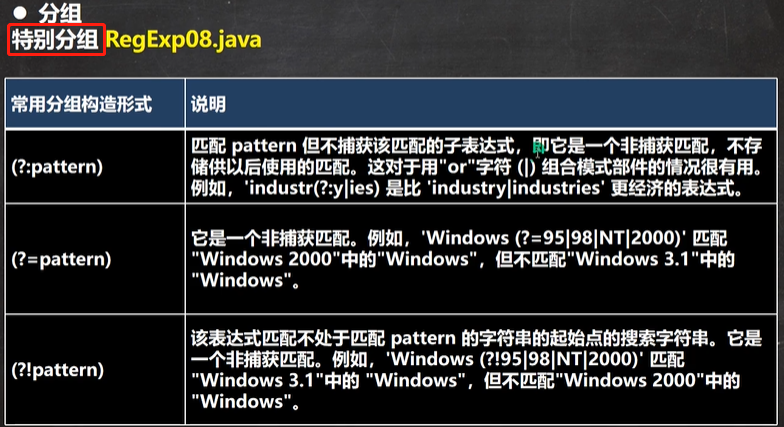
示例:(?:pattern)
    @Test
    public void test01() {
        String content = "某某是学生 某某是老师 某某是教授";

//等价于 "某某是学生|某某是老师|某某是教授",但是不能group(1)=学生,group(2)=老师,group(3)=教授
        String regex = "某某是(?:学生|老师|教授)";
        Pattern pattern = Pattern.compile(regex);
        Matcher matcher = pattern.matcher(content);
        while (matcher.find()) {
            System.out.println("找到:" + matcher.group(0));
        }
    }
非贪婪匹配:尽可能匹配短的字符串,java正则表达式默认是贪婪匹配,若想使用非贪婪匹配,需要在限定符后面加 ?
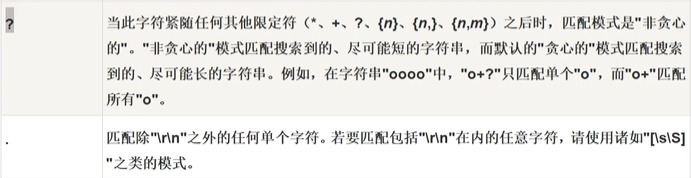
示例: String regex = "\\d+?";
    @Test
    public void test02() {
        String content = "abc111111";
        String regex = "\\d+?";  //非贪婪匹配
        Pattern pattern = Pattern.compile(regex);
        Matcher matcher = pattern.matcher(content);
        while (matcher.find()) {
            System.out.println("找到:" + matcher.group(0));
        }
    }
反向引用符
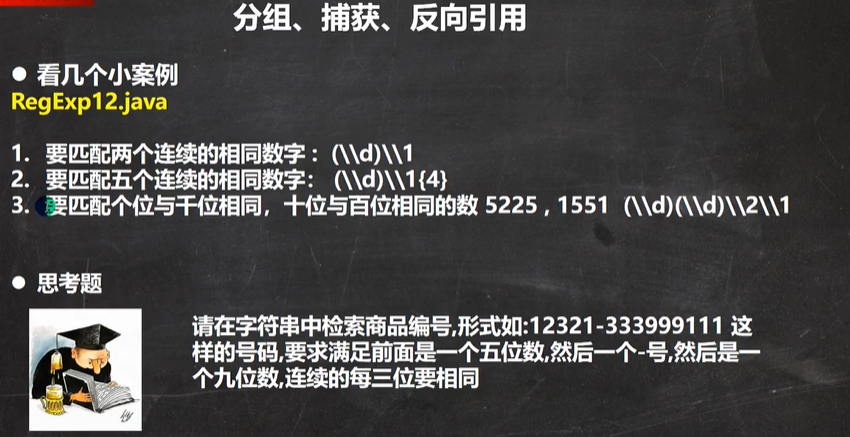
示例: 匹配俩个连续相同的数字
格式

    @Test
    public void test01() {
        String content = "123321";
//        匹配俩个连续相同的数字
        String regex = "(\\d)\\1";
        Pattern pattern = Pattern.compile(regex);
        Matcher matcher = pattern.matcher(content);
        while (matcher.find()) {
            System.out.println(matcher.group(0)); //输出结果:33
        }
    }
示例:匹配五个连续相同的数字

    @Test
    public void test02() {
        String content = "123333321111";
//        匹配五个连续相同的数字
        String regex = "(\\d)\\1{4}";
        Pattern pattern = Pattern.compile(regex);
        Matcher matcher = pattern.matcher(content);
        while (matcher.find()) {
            System.out.println(matcher.group(0)); //输出结果:33333
        }
    }
示例 :匹配 个位和千位相同 十位和百位相同的四位数
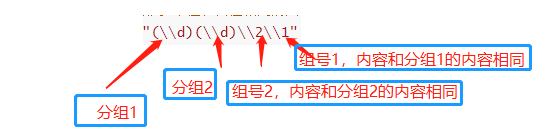
    @Test
    public void test03() {
        String content = "123333321111";
//        匹配 个位和千位相同 十位和百位相同的四位数
        String regex = "(\\d)(\\d)\\2\\1";
        Pattern pattern = Pattern.compile(regex);
        Matcher matcher = pattern.matcher(content);
        while (matcher.find()) {
            System.out.println(matcher.group(0)); //输出结果3333  1111
        }
    }
示例
    @Test
    public void test04() {
        String content = "12321-333999666";
//        形如:12321-333999666
//        要求:前面5个数字,然后一个 - 号,接着9个数字,连续的3个数字相同
        String regex = "\\d{5}-(\\d)\\1{2}(\\d)\\2{2}(\\d)\\3{2}";
        Pattern pattern = Pattern.compile(regex);
        Matcher matcher = pattern.matcher(content);
        while (matcher.find()) {
            System.out.println(matcher.group(0)); //输出结果12321-333999666
        }
    }
示例:我我......要要要要.....学java编程,去掉重复---》我要学java编程
    @Test
    public void test05() {
        String content = "我我......要要要要.....学java编程";
//       步骤1:去掉 . ,得"我我要要要要学java编程"
//       步骤2: 去掉重复字符,得 "我要学java编程"
        String regex = "\\.+";
//        注意,正则表达式的改变,匹配器也要重置
        Pattern pattern = Pattern.compile(regex);
        Matcher matcher = pattern.matcher(content);
        content = matcher.replaceAll("");
        System.out.println(content);  //我我要要要要学java编程

        regex = "(.)\\1+";
        pattern = Pattern.compile(regex); //分组的匹配内容记录在$1中
        matcher = pattern.matcher(content);
//        while (matcher.find()) {
//            System.out.println(matcher.group(0)); //输出结果12321-333999666
//        }
//        使用反向引用来替换匹配到的内容
        content = matcher.replaceAll("$1");
        System.out.println(content);  //我要学java编程
//        连写也可以
//        Pattern.compile(regex).matcher(content).replaceAll("$1");
    }
定位符
作用:规定要匹配的字符串出现的位置
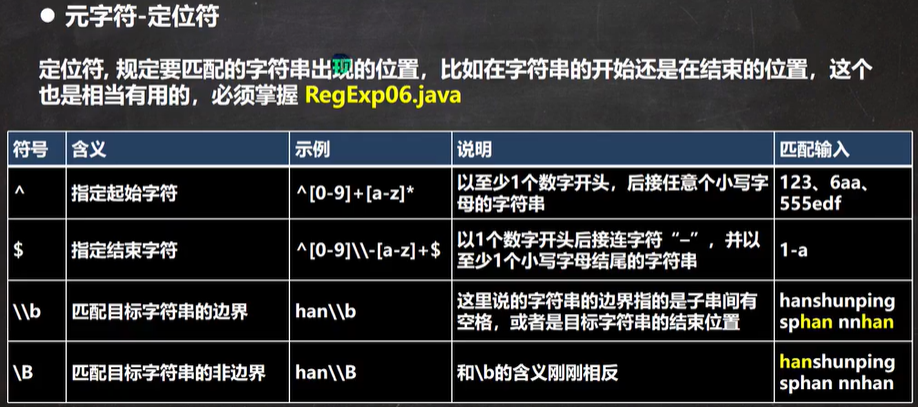
示例:至少以一个数字开头,以至少一个大小写字母结束
    @Test
    public void test03(){
        String content = "123abc";
//        至少以一个数字开头,以至少一个大小写字母结束
        String regex = "^[0-9]+[a-zA-Z]+$";
        Pattern pattern = Pattern.compile(regex);
        Matcher matcher = pattern.matcher(content);
        while (matcher.find()){
            System.out.println("找到:"+matcher.group(0));
        }
    }
示例:匹配边界的字符串hanabchan aahan(这里的边界指:匹配的子字符串在整个字符串最后或者匹配的子字符串后面有空格)
    @Test
    public void test04(){
        String content = "hanabchan aahan";
//        匹配边界的字符串
        String regex = "han\\b";
        Pattern pattern = Pattern.compile(regex);
        Matcher matcher = pattern.matcher(content);
        while (matcher.find()){
            System.out.println("找到:"+matcher.group(0));
        }
    }
特殊字符
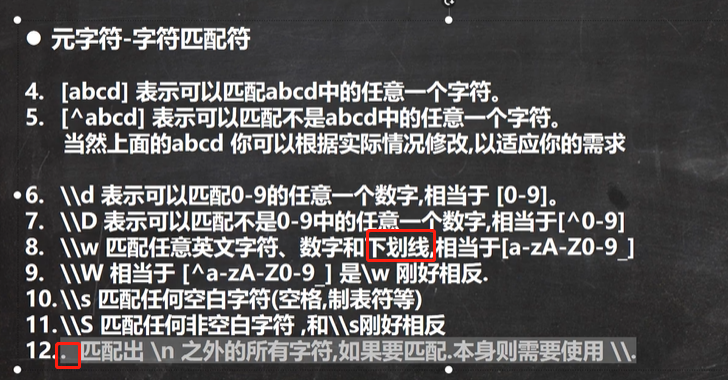
字符匹配符
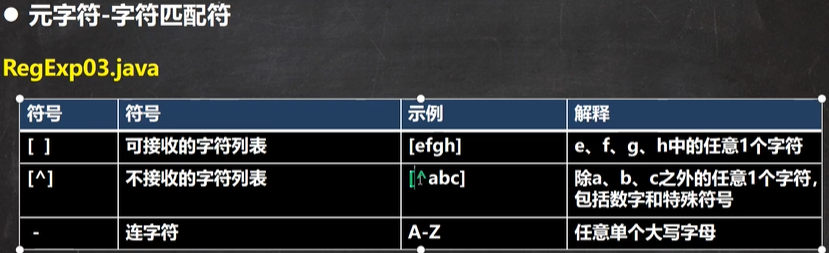
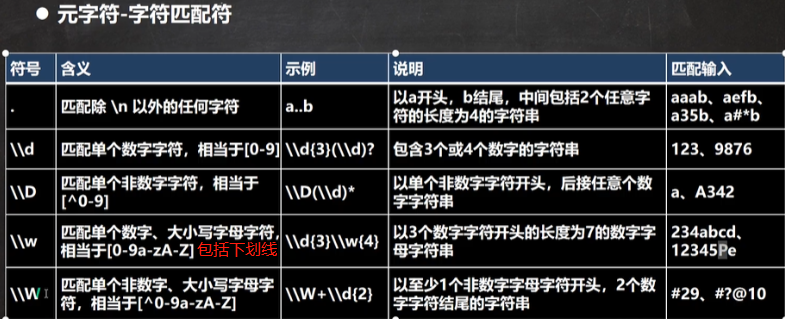
示例

 @Test
    public void test01(){
        String content = "abcABCAABBCC";
        String regex ="[a-z]";//匹配小写a-z之间的任意一个字符
        String regex1 = "abc";//匹配字符串 "abc" (默认区分大小写)
        Pattern pattern = Pattern.compile(regex1);
        Matcher matcher = pattern.matcher(content);
        while (matcher.find()){
            System.out.println("找到:"+matcher.group(0));
            //输出结果:找到:abc
        }
    }
输出结果--》 找到:abc
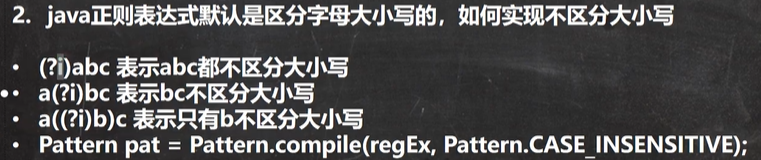
在定义匹配规则的字符串前加 (?i)
    @Test
    public void test02(){
        String content = "abcABCAABBCC";
        String regex ="[a-z]";//匹配小写a-z之间的任意一个字符
        String regex1 = "(?i)abc";//匹配字符串 "abc" (不区分区分大小写)
        Pattern pattern = Pattern.compile(regex1);
        Matcher matcher = pattern.matcher(content);
        while (matcher.find()){
            System.out.println("找到:"+matcher.group(0));
        }
    }
输出结果:
找到:abc
找到:ABC
以下关键代码也可以区分大小写
Pattern pattern = Pattern.compile(regex2,Pattern.CASE_INSENSITIVE);
    @Test
    public void test02(){
        String content = "abcABCAABBCC";
        String regex ="[a-z]";//匹配小写a-z之间的任意一个字符
        String regex1 = "(?i)abc";//匹配字符串 "abc" (不区分区分大小写)
        String regex2 = "abc";//匹配字符串 "abc" (不区分区分大小写)

//        Pattern pattern = Pattern.compile(regex1);
        Pattern pattern = Pattern.compile(regex2,Pattern.CASE_INSENSITIVE);
        Matcher matcher = pattern.matcher(content);
        while (matcher.find()){
            System.out.println("找到:"+matcher.group(0));
        }
    }
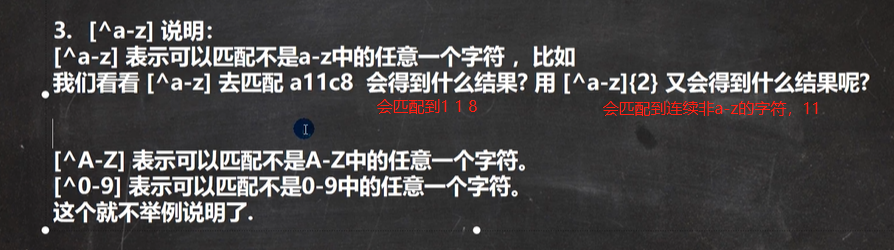
小结练习
注意:
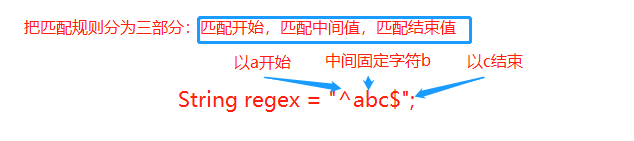
若匹配规则里面同时出现开始限定符^和结束限定符$,表示只能匹配 ^ 和 $ 之间的内容
例如 String regex = "^abc$",只能匹配"abc",新手很容易理解成开始和结尾都是"abc"的字符串就可以成立,
所以误认为字符串"abcabc"也会满足,其实是错误的。更加准确的说法是必须以a开头,必须以c结束,a和c的中间只写了b,所以只能匹配’abc’
我们可以这样理解把匹配规则分层三部分:开始值(^匹配的值),中间值(固定值,如果没有则为空),结束值($匹配的值)
String regex ="^a.c$"; //可以匹配a加任意单个字符加c,比如abc,aec,acc,a2c等
示例1:要求匹配全是汉字
    @Test
    public void test01() {
        String content = "韩顺平老师";
//        要求匹配全是汉字
        String regex = "^[\u4E00-\u9FA5]*$";
        Pattern pattern = Pattern.compile(regex);
        Matcher matcher = pattern.matcher(content);
        if (matcher.find()) {
            System.out.println("满足格式");
        } else
            System.out.println("不满足");
    }

示例2:匹配1-9开头的6位数字
    @Test
    public void test02() {
        String content = "12345689";
//        String regex = "^[u4E00-u9FA5]+$";
//        要求:1-9开头的6个数字
        String regex = "^[1-9]\\d{5}$";
        Pattern pattern = Pattern.compile(regex);
        Matcher matcher = pattern.matcher(content);
        if (matcher.find()) {
            System.out.println("满足格式");
        } else
            System.out.println("不满足");
        while (matcher.find()) {
            System.out.println("找到:" + matcher.group(0));
        }
    }
示例3:匹配1-9开头的一个(5位-10位)数
    @Test
    public void test03() {
        String content = "12345678901";
//        要求:1-9开头的一个(5位-10位)的数字
        String regex = "^[1-9]\\d{4,9}$";
        Pattern pattern = Pattern.compile(regex);
        Matcher matcher = pattern.matcher(content);
        if (matcher.find()) {
            System.out.println("满足格式");
        } else
            System.out.println("不满足");
//        while (matcher.find()){
//            System.out.println("找到:"+matcher.group(0));
//        }
    }
示例4:必须以13或14或15或18开头的11位数字
    @Test
    public void test04() {
        String content = "17345678901";
//        要求:必须以13或14或15或18开头的11位数字
        String regex = "^(13|14|15|18)\\d{9}$";
//      String regex = "^1[3|4|5|8]\\d{9}$";
        Pattern pattern = Pattern.compile(regex);
        Matcher matcher = pattern.matcher(content);
        if (matcher.find()) {
            System.out.println("满足格式");
        } else
            System.out.println("不满足");
//        while (matcher.find()){
//            System.out.println("找到:"+matcher.group(0));
//        }
    }
正则匹配URL
步骤
//        1、先确定协议头:http://或者https://
//                String regex = "^((http|https)://)";
//        2、再确定域名:www.baidu.com
//            String regex = "^((http|https)://)([\\w-]+\\.)+[\\w-]+";
//        若访问地址省略了协议头,请求地址直接是baidu.com,省略了https://www., 用正则限定符 ?,指定匹配出现0次或者1次,^((http|https)://)?(www\\.)?
//            String regex = "^((http|https)://)?(www\\.)?([\\w-]+\\.)+[\\w-]+";
//        3、确定参数:/s?wd=jrs%E7%9B%B4%E6%92%ADnba&rsv_spt=……"
//			(\/[\w-?!@#$%&=/.]*)?$,包含了一些特殊字符
    @Test
    public void test06() {
        String content = "https://www.baidu.com/s?wd=jrs%E7%9B%B4%E6%92%ADnba&rsv_spt="+
                "1&rsv_iqid=0xba0cd6cd00025883&issp=1&f=3&rsv_bp=1&rsv_idx=2&ie=utf-8&r" + "qlang=cn&tn=02003390_2_hao_pg&rsv_enter=0&rsv_dl=ts_3&oq=jrs&rsv_btype=t&rsv_" +
                "t=ce5czk2eAi6BarMyUus7J0FamFJfQWYKeBRr2PIUJHNLmtbZ%2F6cxy0N3btyb5%2FU0%2B7mTOi0hn" +
                "%2Fo&rsv_pq=c24286040008d0a7&rsv_sug3=159&rsv_sug1=156&rsv_sug7=100&rsv_sug2=" +
                "1&prefixsug=jrs&rsp=3&rsv_sug4=2389";

//        1、先确定协议头:http://或者https://
//                String regex = "^((http|https)://)";
//        2、再确定域名:www.baidu.com
//            String regex = "^((http|https)://)([\\w-]+\\.)+[\\w-]+";
//        若访问地址省略了协议头,请求地址直接是baidu.com,省略了https://www., 用正则限定符 ?,指定匹配出现0次或者1次,^((http|https)://)?(www\\.)?
//            String regex = "^((http|https)://)?(www\\.)?([\\w-]+\\.)+[\\w-]+";
//        3、确定参数:/s?wd=jrs%E7%9B%B4%E6%92%ADnba&rsv_spt=……"
        String regex = "^((http|https)://)?(www\\.)?([\\w-]+\\.)+[\\w-]+(\\/[\\w-?!@#$%&=/.]*)?$";
//        String regex = "^((http|https)://)?([\\w-]+\\.)+[\\w]+(\\/[\\w-=%.&?]*)*$";
        Pattern pattern = Pattern.compile(regex);
        Matcher matcher = pattern.matcher(content);
        if (matcher.find()) {
            System.out.println("满足格式");
        } else
            System.out.println("不满足");
    }
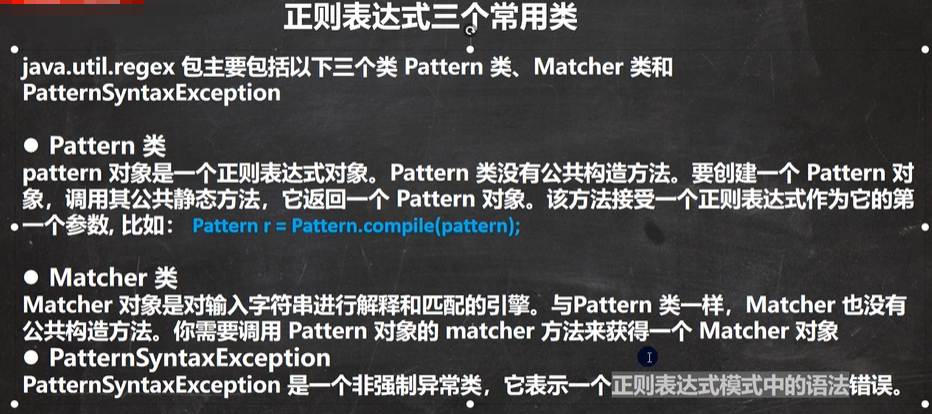
正则表达式常用的三个类
Pattern、Matcher、PatternSyntaxException
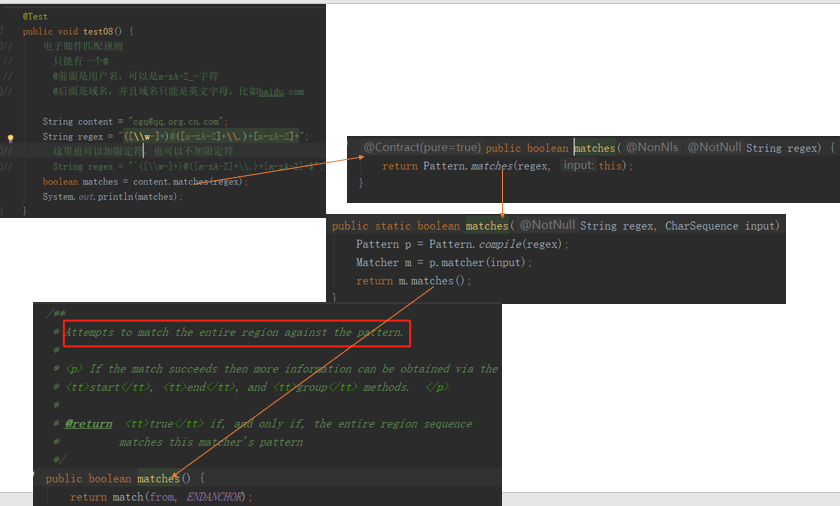
Pattern的matches(regex,content)方法,查看源码可知,
public static boolean matches(String regex, CharSequence input) {
    Pattern p = Pattern.compile(regex);
    Matcher m = p.matcher(input);
    return m.matches(); //调用了Matcher类的matches()
}
用法:
        /**
         * public static boolean matches(String regex, CharSequence input)
         * regex:匹配规则
         * input:需要匹配的字符串
         * 若整体匹配成功,返回true
         * 若整体匹配失败,返回false
         * 注意:是整体匹配,不能多也不能少,不需要加限定符^和$
         */
        System.out.println(Pattern.matches(regex,content));//匹配成功返回true,否则返回false
    @Test
    public void test07(){
        String content = "abc132.";
        String regex = "[\\w]*\\.";
        /**
         * public static boolean matches(String regex, CharSequence input)
         * regex:匹配规则
         * input:需要匹配的字符串
         * 若整体匹配成功,返回true
         * 若整体匹配失败,返回false
         * 注意:是整体匹配
         */
        System.out.println(Pattern.matches(regex,content));//返回true
    }
@Test
public void test08(){
    String content = "@abc132.";
    String regex = "[\\w]*\\.";
    /**
     * public static boolean matches(String regex, CharSequence input)
     * regex:匹配规则
     * input:需要匹配的字符串
     * 若整体匹配成功,返回true
     * 若整体匹配失败,返回false
     * 注意:是整体匹配,不能多也不能少不需要加限定符^和$
     */
    System.out.println(Pattern.matches(regex,content));//返回false,因为没有匹配字符串中的@
}
//注意区分整体匹配和下面的示例(局部匹配)
@Test
public void test09(){
    String content = "@abc132.";
    String regex = "[\\w]*\\.";
    /**
     * public static boolean matches(String regex, CharSequence input)
     * regex:匹配规则
     * input:需要匹配的字符串
     * 若整体匹配成功,返回true
     * 若整体匹配失败,返回false
     * 注意:是整体匹配,不能多也不能少不需要加限定符^和$
     */
    Pattern pattern = Pattern.compile(regex);
    Matcher matcher = pattern.matcher(content);
    if (matcher.find()){
        System.out.println("匹配成功!");
    }else
        System.out.println("匹配失败");
}
以下是Matcher类的方法
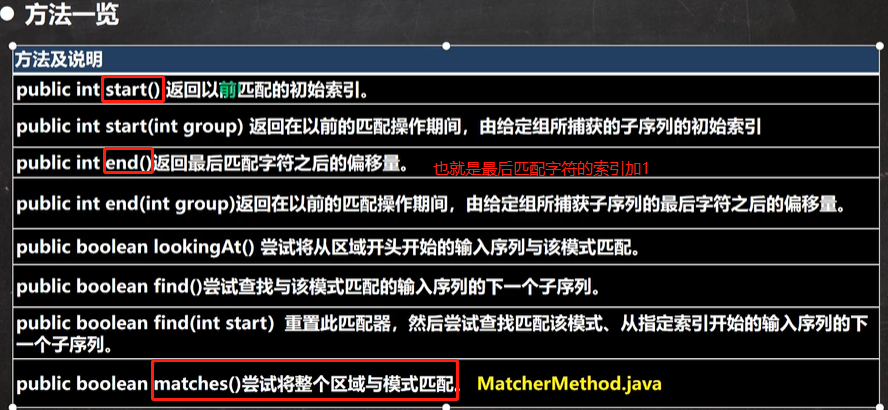
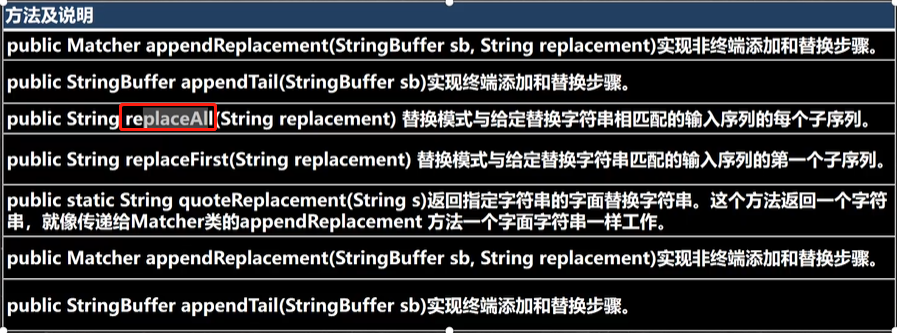
start()、end()方法的使用
    @Test
    public void test01() {
        String content = "hello abc hello AAA hello";
        String regex = "hello";
        Pattern pattern = Pattern.compile(regex);
        Matcher matcher = pattern.matcher(content);
        while (matcher.find()){
            System.out.println("开始匹配的索引:"+matcher.start());
            System.out.println("匹配结束的索引偏移量:"+matcher.end());
        }
    }
replaceAll(String replacement)方法,参数是替换的内容
    @Test
    public void test02() {
        String content = "hello abc hello AAA hello";
        String regex = "hello";
        Pattern pattern = Pattern.compile(regex);
        Matcher matcher = pattern.matcher(content);
//        注意:参数是替换的内容,返回的字符串才是替换后的字符串,原来的content字符串不变
        String replaceAll = matcher.replaceAll("替换了字符");
        System.out.println("没替换前:"+content);
        System.out.println("替换后的字符串:"+replaceAll);
    }
结果
没替换前:hello abc hello AAA hello
替换后的字符串:替换了字符 abc 替换了字符 AAA 替换了字符
String类使用正则表达式
-
替换功能,respaceAll,
respaceAll(String regex,String content) -
判断功能 matches(String regex)
// 验证一个手机号,必须是138 或 139开头的字符串 @Test public void test06() { String content = "13969696966"; String regex = "^(138|139)\\d{8}$"; boolean matches = content.matches(regex); System.out.println(matches); } -
分割功能
public String[] split(String regex),按照规则分割字符串返回字符串数组// 要求按照 # 或者 - 或者 ~ 或者 数字 来分割 @Test public void test07() { String content = "hello#hello-hello~hello123hello"; String regex = "(#|-|~|\\d+)"; String[] strings = content.split(regex); for (String string : strings){ System.out.println(string); } }结果
hello
hello
hello
hello
hello
练习1

    @Test
    public void test08() {
//      电子邮件匹配规则
//        只能有一个@
//        @前面是用户名,可以是a-zA-Z_-字符
//        @后面是域名,并且域名只能是英文字母,比如baidu.com
        String content = "cgq@qq.org.cn.com";
        String regex = "([\\w-]+)@([a-zA-Z]+\\.)+[a-zA-Z]+";
//        这里也可以加限定符,也可以不加限定符,因为底层调用的是Matcher类中的 public boolean //matches()方法,该方法尽可能匹配整个字符串区域
//        String regex = "^([\\w-]+)@([a-zA-Z]+\\.)+[a-zA-Z]+$";
        boolean matches = content.matches(regex);
        System.out.println(matches);
    }
matches(regex)的调用流程
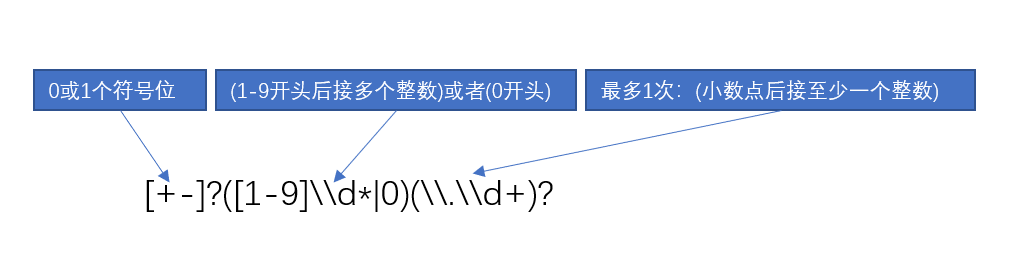
//    要求是不是整数或者小数
//    需要考虑正数和负数
    @Test
    public void test09() {
//12 -12 +12 -0.12 +0.12
        String content = "+07.121";
        String regex = "^[+-]?([1-9]\\d*|0)(\\.\\d+)?$";

        boolean matches = content.matches(regex);
        System.out.println(matches);
    }
分析

 浙公网安备 33010602011771号